Introduction
Live streaming has become an important part of how organisations communicate with audiences, conduct events and share information. Businesses use live broadcasts to host conferences, launch products and connect with remote participants. Churches stream services to members who cannot attend in person, while event organisers use live streaming to extend the reach of conferences, performances and special occasions.
However, producing a successful live stream requires more than simply connecting a camera to the internet. A professional broadcast may require cameras, microphones, lighting, tripods, video switching equipment, streaming computers, encoders, monitors and reliable internet connectivity. These components must work together to capture the event, manage the audio and video signals, and deliver the broadcast to the intended platform.
At Janeson Rentals, we provide complete livestreaming package hire and rental in Kenya for businesses, churches, event organisers, production companies, institutions and individuals. Our rental approach helps clients arrange the equipment required for their broadcasts without necessarily purchasing an entire production system.
Whether you are planning a small webinar, a corporate conference, a church service, a product launch or a multi-camera event, a complete livestreaming package can help simplify equipment planning and support a more organised production workflow.
Janeson Rentals is based in Nairobi and serves clients across Kenya, helping them arrange event and production equipment according to their requirements.
What Is a Complete Livestreaming Package?
A complete livestreaming package is a coordinated collection of equipment used to capture, process, manage and transmit a live video broadcast.
The exact contents depend on the production requirements. A basic setup may include a camera, microphone, lighting, tripod and streaming computer. A more advanced package may include several cameras, a video switcher, audio mixer, capture devices, streaming encoder, production monitors, wireless video transmission equipment and network connectivity solutions.
The purpose of hiring a complete package is to organise the main components of a live broadcast through one planned equipment arrangement.
Instead of sourcing every component separately without considering compatibility, clients can discuss the type of event and production requirements with Janeson Rentals. This helps establish the equipment needed for the intended broadcast.
It is important to understand that a complete livestreaming package is not necessarily identical for every event. A single-camera webinar has different requirements from a three-camera conference or a large church broadcast. The right package should match the number of speakers, venue size, camera positions, audio requirements, broadcast platform and available internet connection.
Why Hire a Complete Livestreaming Package in Kenya?
Hiring a complete livestreaming package offers several practical advantages for event organisers and production teams.
1. Arrange Multiple Equipment Requirements Together
A live broadcast may involve many separate pieces of equipment. Sourcing each item independently can make planning complicated, especially when the production team needs to consider compatibility and connections.
A coordinated package helps clients plan the main equipment requirements together. This can make it easier to organise cameras, microphones, lighting, switching equipment and streaming hardware around one production plan.
2. Avoid the Cost of Purchasing a Full Streaming Setup
Professional livestreaming equipment can represent a significant investment. Organisations that only stream occasionally may not need to own cameras, switchers, encoders, microphones and other production equipment permanently.
Complete livestreaming package rental gives clients access to equipment for a specific event or project without requiring them to purchase an entire system.
3. Support Different Types of Events
A complete package can be planned for different production environments, including conferences, church services, webinars, corporate presentations, concerts and product launches.
The equipment selection can be adjusted according to the size and technical complexity of the event.
4. Improve Production Organisation
A coordinated setup makes it easier to plan how video and audio signals will move through the production system.
For example, cameras may connect to a video switcher, microphones may feed into an audio mixer, and the selected audio and video output may be sent to a streaming computer or encoder.
Understanding this workflow before the event helps the production team prepare the correct cables, connections and equipment positions.
5. Provide Flexibility for Temporary Projects
Event requirements change. One project may need a simple one-camera setup, while another may require multiple cameras and a more advanced production arrangement.
Hiring allows organisations to select equipment according to the requirements of each project rather than maintaining one fixed setup for every occasion.
What Can Be Included in a Complete Livestreaming Package?
The equipment included in a complete livestreaming package depends on the event and the production plan. The following are common components that may be required.
1. Professional Streaming Cameras
Cameras capture the event and provide the video feed used in the broadcast.
A simple production may use one camera, while a conference or church service may require several cameras positioned at different locations.
Different camera types serve different purposes. Professional video cameras may be suitable for extended event coverage, while compatible mirrorless or DSLR cameras may be used for selected production workflows.
Camera selection should consider recording duration, output connections, lens requirements, power arrangements and compatibility with the video switching or capture system.
2. Streaming Tripods and Camera Support
Tripods provide stable support for cameras during live broadcasts. They help maintain consistent framing and reduce unwanted movement.
A multi-camera production may require several tripods to position cameras for wide shots, close-ups and alternative viewing angles.
The tripod should be suitable for the weight of the camera and accessories being used.
3. Streaming Microphones
Audio quality is just as important as video quality. Viewers may tolerate a less polished camera image, but unclear or distorted sound can make a broadcast difficult to follow.
Depending on the event, the package may require wireless microphones, wired microphones, lapel microphones, handheld microphones or other suitable audio equipment.
For a conference, speakers may need individual microphones. A church broadcast may require microphones for the preacher, worship leaders and instruments. An interview may require microphones positioned for each participant.
Microphone selection should be based on the number of speakers, the venue environment and the audio production plan.
4. Audio Mixer or Audio Interface
An audio mixer helps manage multiple audio sources. It allows the production team to control microphone levels and combine audio signals before they are sent to the streaming system.
An audio interface may be used to connect compatible audio equipment to a computer.
The appropriate solution depends on the number of audio inputs, the required controls and the way the streaming system handles sound.
5. Video Switcher
A video switcher allows the production team to select between different camera feeds and other compatible video sources.
For example, a conference production may use one camera for a wide stage view and another for a close-up of the speaker. The operator can switch between the feeds to create a more engaging broadcast.
Some switchers also support additional functions such as transitions, picture-in-picture layouts and other production features, depending on the model.
A video switcher is particularly useful for multi-camera events, although it may not be necessary for a simple single-camera stream.
6. Streaming Computer
A streaming computer runs compatible software used to manage and transmit a live broadcast.
It may receive video and audio from capture devices or other supported connections. The computer can then process the production and send it to the selected streaming platform.
The required computer specifications depend on the streaming software, video resolution, number of sources and production complexity.
7. Video Capture Cards and Devices
A video capture device allows compatible video signals to enter a computer through a supported connection.
This is useful when the production workflow relies on software-based switching or encoding.
The capture device must support the required input format, resolution and connection type. A capture card does not automatically make every camera compatible with every computer, so signal compatibility should be confirmed during planning.
8. Streaming Encoder
A streaming encoder converts the production’s audio and video into a format suitable for transmission to a compatible streaming destination.
Encoding may be handled by software running on a computer or by a dedicated hardware encoder.
A hardware encoder can be useful in production environments where a dedicated encoding device is preferred. The correct choice depends on the broadcast workflow, required output and streaming platform compatibility.
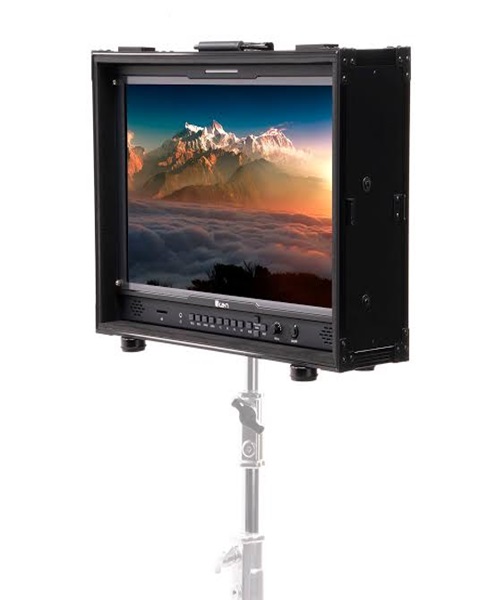
9. Streaming Monitors and Multiview Displays
Monitors help operators observe the camera feeds, programme output and other production information.
A multiview display can show several video sources on one screen, helping the production team monitor different cameras before selecting the final broadcast output.
This is particularly valuable during conferences, concerts and multi-camera church productions.
10. Streaming Lights
Lighting equipment helps illuminate speakers, presenters and performers.
The lighting requirements depend on the venue, camera positions and existing light sources. A simple presenter setup may need one or two lights, while a larger production may require several fixtures.
LED panels, ring lights, COB lights and compatible light modifiers can be considered according to the intended setup.
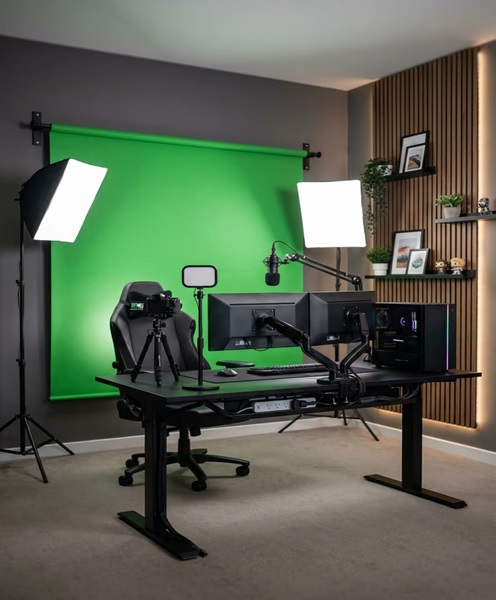
11. Streaming Background
A streaming background provides a controlled visual setting behind the presenter or subject.
It may be a plain backdrop, branded background, decorative setting or green screen, depending on the production.
For corporate broadcasts, a branded background can reinforce the identity of the organisation or event.
12. Internet Connectivity Equipment
A reliable internet connection is essential when the broadcast is transmitted online.
Depending on the venue, the production may use an existing wired internet connection, a suitable router or a cellular connectivity solution.
A dedicated streaming router, 4G/5G router or bonded internet system may be considered when the event requires additional network options.
The actual performance depends on available upload bandwidth, network coverage, congestion, service provider conditions and the streaming platform’s requirements.
Complete Livestreaming Packages for Different Events
Corporate Conferences and Seminars
Corporate conferences often require a structured broadcast that captures speakers, presentations and panel discussions.
A suitable package may include multiple cameras, tripods, wireless microphones, an audio mixer, a video switcher, monitors and a streaming computer or encoder.
The production plan should also account for presentation slides, remote speakers and any video content that needs to be included in the broadcast.
Church Services and Religious Events
Church livestreaming may involve sermons, worship sessions, announcements, prayer meetings and special programmes.
A basic package may include one or two cameras, microphones, audio mixing equipment, lighting and a streaming computer.
Larger churches may require multiple camera positions, a video switcher, multiview monitoring and a more advanced audio workflow.
The sound system should be planned carefully so that the online audience receives a clear mix rather than simply an uncontrolled recording of the room.
Weddings and Private Celebrations
Weddings and special occasions may be streamed for family and friends who cannot attend physically.
A suitable setup can capture the ceremony, speeches and important moments from selected camera positions.
The production team should consider camera placement, audio from the ceremony and speeches, venue lighting and the internet connection available at the location.
Product Launches and Corporate Announcements
Product launches often involve presentations, demonstrations and speeches. A livestreaming package can help capture the event and distribute it to online viewers.
The production may need several camera angles, microphones, presentation input connections and a streaming encoder or computer.
For branded broadcasts, the background and graphics should also reflect the identity of the company or campaign.
Concerts and Entertainment Events
Concerts and performances can require more complex production arrangements. Multiple cameras may be used to capture performers, stage activity and audience reactions.
Audio planning is particularly important because music events may require a dedicated audio feed from the venue’s mixing system.
The streaming team should coordinate with the sound engineer to obtain a suitable broadcast mix. Simply placing a camera microphone in front of the stage may not provide the required audio quality.
Webinars and Online Training
A webinar may require a relatively compact package with a camera, microphone, lighting, computer and suitable internet connection.
If the session includes presentations, remote guests or multiple video sources, additional switching and capture equipment may be required.
The package should be selected according to the software and platform being used.
Understanding the Livestreaming Workflow
A professional livestreaming setup follows a sequence of connected stages.
Step 1: Capture the Video
The cameras record the speakers, performers, stage or other subjects. Each camera provides a video signal to the next part of the production system.
Step 2: Capture and Manage Audio
Microphones collect the sound from speakers and other sources. The audio may pass through a mixer or interface where levels and other settings are managed.
Step 3: Switch and Arrange the Production
When multiple cameras or video sources are used, a switcher or compatible software workflow allows the operator to select the desired feed.
The production may also include presentation slides, pre-recorded videos, graphics or other supported sources.
Step 4: Encode the Broadcast
The final audio and video output is encoded by compatible streaming software or a hardware encoder.
The encoder prepares the content for transmission to the selected platform.
Step 5: Transmit the Stream
The encoded broadcast is sent through an internet connection to the intended streaming destination.
The production team should test the connection before the event and monitor network performance throughout the broadcast.
Step 6: Monitor the Broadcast
Monitoring helps the team identify problems such as missing video, incorrect camera selection, audio distortion or interrupted transmission.
A reliable monitoring arrangement is important because some problems may not be visible to the camera operators.
Important Factors to Consider When Hiring a Complete Livestreaming Package
Number of Cameras
The number of cameras affects the equipment required, the production workflow and the number of operators needed.
A single-camera broadcast is generally simpler than a multi-camera production. When planning several cameras, consider the angles required and the equipment needed to switch between them.
Number of Speakers and Audio Sources
The number of microphones and other audio sources determines the required audio inputs.
A panel discussion with several speakers will need a different microphone arrangement from a webinar featuring one presenter.
Also consider whether music, playback devices or presentation audio must be included.
Venue Size and Layout
The venue determines camera positions, cable routes, lighting requirements and the distance between equipment stations.
A small meeting room may support a compact setup, while a large conference hall may require additional cameras, longer signal connections and more complex monitoring.
Streaming Platform
Identify the platform where the event will be broadcast. Different platforms and production workflows may have different connection, format and account requirements.
Confirm that the chosen encoder or streaming software supports the intended destination.
Internet Upload Capacity
Streaming requires sufficient and reasonably stable upload bandwidth. The connection should be tested at the venue before the event.
Do not assume that a fast download speed guarantees reliable live streaming. Upload performance, network stability and other users sharing the connection can affect the broadcast.
Power and Cable Management
Cameras, lights, monitors, computers and other devices require suitable power arrangements.
Plan power outlets, extension cables and cable routes in advance. Keep cables organised and avoid creating trip hazards in areas used by guests or event staff.
Technical Operators
Equipment alone does not guarantee a successful broadcast. The production may require camera operators, an audio technician, a video switcher operator and a streaming technician.
The number of people required depends on the complexity of the event and the responsibilities assigned to each operator.
Why Choose Janeson Rentals for Complete Livestreaming Package Hire in Kenya?
Janeson Rentals provides equipment hire solutions for events and production projects across Kenya. We understand that live streaming involves several connected technical requirements and that each event needs an equipment arrangement suited to its size and objectives.
Our complete livestreaming package hire and rental service is intended to help clients plan the equipment needed for professional broadcasts, from simple webinars to more advanced multi-camera productions.
We support different event requirements, including corporate conferences, church services, weddings, product launches, seminars, interviews, concerts and online training sessions.
Janeson Rentals is based in Nairobi and serves clients across Kenya. We encourage clients to provide clear information about their event before making an equipment enquiry.
Useful details include:
- Event date and venue.
- Type of event or broadcast.
- Number of cameras required.
- Number of speakers and microphones.
- Whether the event includes presentations or video playback.
- Intended streaming platform.
- Expected broadcast duration.
- Available internet connection.
- Whether technical operation or setup assistance is required.
These details help establish a suitable equipment arrangement and identify any additional production requirements.
Book a Complete Livestreaming Package in Nairobi and Across Kenya
Are you planning a corporate conference, church broadcast, wedding, webinar, concert, product launch or other event that needs professional live streaming?
Janeson Rentals can help you arrange complete livestreaming package hire and rental in Kenya according to your production requirements.
From cameras and microphones to lighting, video switching, encoding and internet connectivity equipment, planning the right combination is an important step towards a well-organised broadcast.
Contact Janeson Rentals to discuss your event, equipment requirements and preferred setup.
Choose Janeson Rentals for complete livestreaming package hire in Nairobi and across Kenya, and prepare your next event for a professional live broadcast.