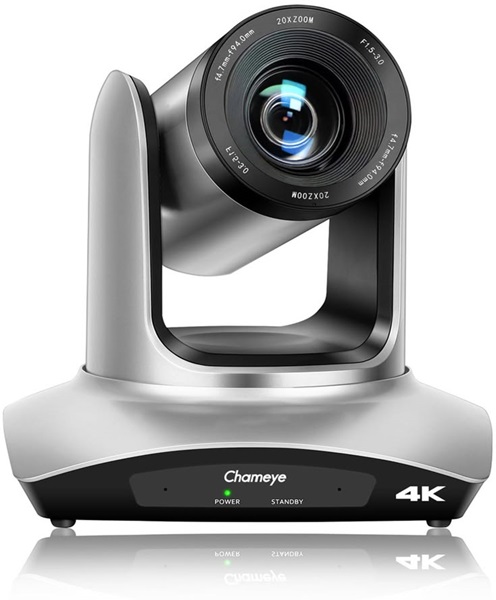
Conference Camera Hire and Rental in Kenya
Professional communication is an important part of successful meetings, corporate conferences, seminars and business events. Whether participants are attending physically or joining remotely, clear video helps create a more engaging and organised experience. A suitable conference camera makes it easier for remote attendees to see speakers, presenters and other participants, helping bridge the gap between in-person and virtual communication.
At Janeson Rentals, we provide conference camera hire and rental in Kenya for organisations, event planners, businesses, institutions and individuals looking for suitable video equipment for their events. Our conference camera rental service is ideal for corporate meetings, boardroom presentations, hybrid conferences, online training sessions, webinars, workshops, panel discussions and other professional gatherings.
Hiring a conference camera offers a practical way to access event video equipment without committing to a permanent purchase. Whether you are organising a small business meeting in Nairobi or a larger corporate conference elsewhere in Kenya, the right camera can help improve the visual experience for both in-person and remote participants.
What Is a Conference Camera?
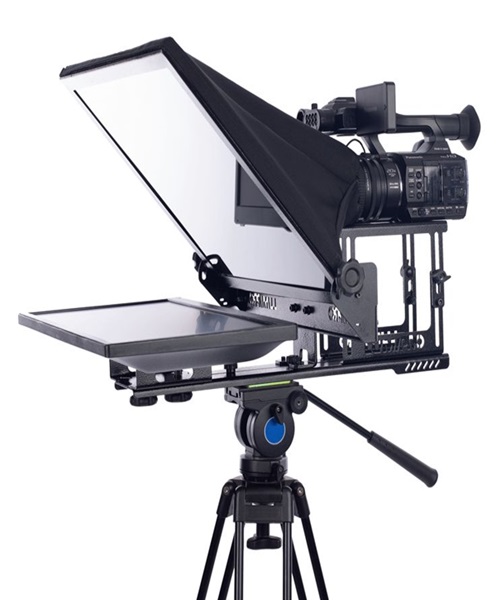
A conference camera is a video camera designed to capture people and activities during meetings, conferences and other communication sessions. It is commonly used in boardrooms, meeting rooms, training facilities, conference venues and hybrid event spaces.
Unlike a conventional camera intended primarily for photography or general video production, a conference camera is selected for its suitability in professional communication environments. Depending on the model, it may offer a wide-angle view, adjustable framing, digital or optical zoom, automatic exposure, autofocus and connectivity options for compatible conferencing equipment.
Conference cameras help remote participants follow discussions by providing a clear view of the people speaking. They can also be incorporated into event production systems where presentations, panel discussions and audience interactions need to be shown to an online audience.
The specific capabilities of a conference camera depend on its model. Some are designed for compact meeting rooms, while others are more appropriate for larger conference spaces where participants may be seated further away from the camera.
Why Hire a Conference Camera Instead of Buying One?
Purchasing professional video equipment may not be practical for organisations that only host occasional meetings or conferences. Conference camera hire gives event organisers access to equipment for the period they need it.
There are several advantages to choosing conference camera rental from Janeson Rentals.
Cost-Effective Equipment Access
A professional conference camera can be a significant investment, especially when it is required for a single event. Renting allows you to access suitable equipment without taking on the full purchase cost.
This is particularly useful for organisations hosting annual conferences, occasional workshops, temporary training programmes and special business meetings.
Suitable for Temporary Events
Not every organisation has a permanent conference room equipped with professional video equipment. If you are organising a temporary meeting space, hiring a conference camera can help you prepare the venue for the occasion.
You can arrange the equipment according to the requirements of the event rather than investing in equipment that may remain unused after the meeting.
Access to Equipment for Different Event Requirements
Different meetings require different camera arrangements. A small boardroom meeting may need a compact camera with a wide field of view, while a larger conference may require a camera with more flexible positioning or zoom capabilities.
Hiring gives organisers the opportunity to select equipment according to the venue, audience size and planned programme.
Reduced Equipment Storage Responsibilities
Professional event equipment requires appropriate storage and handling. By choosing conference camera hire, you avoid having to maintain a permanent inventory for occasional events.
This can be particularly helpful for event planners, training providers and businesses that frequently work with different venues.
Events and Occasions That Require Conference Camera Rental
Conference cameras are useful across a wide range of professional and institutional settings. Their main purpose is to improve video communication, but their applications extend beyond conventional meetings.
Corporate Conferences
Corporate conferences often involve senior management presentations, keynote speakers, panel discussions and important business announcements.
A conference camera helps capture the people participating in the programme, making it easier to include remote attendees or record sessions where the production arrangement supports recording.
Boardroom Meetings
Businesses frequently hold meetings involving directors, managers, partners and stakeholders who may not all be physically present.
A conference camera can help remote participants follow the discussion by providing a view of the meeting room. This is particularly useful when combined with a compatible display, conferencing platform and suitable microphone system.
Hybrid Events
Hybrid events bring together physical and virtual audiences. Participants may attend from a conference venue while others join through an online platform.
A conference camera forms part of the visual communication setup, allowing remote attendees to see presenters and participants. For larger events, additional cameras or a more advanced production arrangement may be required.
Webinars and Online Presentations
Webinars are commonly used for professional training, product demonstrations, educational sessions and business communication.
A conference camera can capture the presenter or discussion area while compatible software handles the online meeting or streaming process.
Training Sessions and Workshops
Training providers, educational institutions and organisations may need to connect participants from different locations.
Conference camera rental is useful when organising temporary training facilities or workshops that require video conferencing.
Panel Discussions
Panel discussions involve several speakers sharing a stage or seated arrangement. A suitable conference camera can capture the panel so that remote participants can follow the conversation.
For larger panels or events requiring close-up shots of individual speakers, additional cameras may be useful.
Government, Institutional and Association Meetings
Professional meetings organised by institutions, associations and other organisations may involve participants joining from different locations.
A conference camera can support the visual component of these sessions, provided it is compatible with the selected conferencing system.
Important Features to Consider When Hiring a Conference Camera
Choosing the right conference camera requires more than selecting a camera based on appearance. The equipment should match the meeting environment and the technical requirements of the event.
Image Quality
Image quality affects how clearly remote participants can see presenters and other people in the meeting room.
Consider the camera’s supported video resolution, image processing and performance under the lighting conditions available at the venue.
Field of View
The field of view determines how much of the room the camera can capture.
A wide-angle camera may be suitable for smaller meeting rooms where several participants need to appear in one frame. A larger venue may require a camera with more flexible framing options.
Zoom Capability
Some conference cameras offer zoom functionality to adjust the framing of the image.
Zoom can be useful when presenters are seated further away or when the camera needs to capture a specific part of the meeting area. It is important to distinguish between optical and digital zoom because they do not deliver the same image quality.
Autofocus and Exposure
Autofocus helps the camera maintain focus on subjects, while automatic exposure adjustments help manage changing lighting conditions.
These functions can be valuable during meetings where presenters move or where lighting conditions vary.
Connectivity and Compatibility
Before hiring, confirm how the camera will connect to the intended computer, conferencing system, video switcher or other equipment.
Depending on the model, connection options may include USB, HDMI or other supported video interfaces. Compatibility should always be checked rather than assumed.
Camera Placement
The position of a conference camera affects the viewing experience.
A camera placed too low may produce an uncomfortable viewing angle, while a camera positioned too far from the participants may make faces difficult to see. The camera should be positioned to provide a natural view of the meeting space.
Conference Camera Hire for Hybrid Conferences in Nairobi
Nairobi hosts corporate conferences, business forums, professional workshops, training programmes and institutional meetings throughout the year. Many of these events involve participants who cannot attend physically.
Conference camera rental provides a practical solution for organisers who want to incorporate remote participation into their programmes.
A hybrid conference setup may include:
-
Conference camera for capturing presenters and meeting participants.
-
Laptop or computer for running the conferencing platform.
-
Microphones for capturing speech clearly.
-
Speakers or an appropriate audio output system.
-
Television, projector or LED screen for displaying remote participants and presentations.
-
Internet connectivity suitable for video conferencing.
-
Video switching equipment where multiple camera sources are required.
The exact equipment needed depends on the event format and the technology being used.
Combining a Conference Camera with Other Event Equipment
A conference camera works best when integrated into a properly planned audiovisual arrangement.
Conference Microphones
Clear audio is just as important as clear video. A conference microphone system helps capture the voices of speakers and participants.
For meetings involving several delegates, a suitable microphone arrangement can help ensure that conversations are audible to remote attendees.
Projectors and Screens
A projector and screen can display presentations, video calls and other meeting content. They are useful in training rooms, conference venues and larger meeting spaces.
Television Displays
Televisions can display remote participants, presentations or meeting information. They are particularly useful in smaller meeting rooms and boardrooms.
Audio Mixers
For larger events, an audio mixer may be used to manage several microphone and audio sources. The equipment required will depend on the complexity of the sound arrangement.
Video Switchers
Events involving multiple cameras, computers or presentation sources may benefit from a video switcher. This allows the production team to select which video source is sent to the display, recording system or live stream.
How to Prepare for Conference Camera Rental
Good preparation helps ensure that the camera works effectively during the event.
Before arranging conference camera hire, consider the following:
-
Confirm the event venue: Identify the room size, seating arrangement and available camera positions.
-
Determine the audience: Establish whether the meeting is entirely physical, virtual or hybrid.
-
Identify the conferencing platform: Confirm which software or video conferencing system will be used.
-
Check the required connections: Determine whether the camera needs USB, HDMI or another supported connection.
-
Plan the lighting: Ensure that presenters and participants are adequately illuminated.
-
Consider audio requirements: Decide whether additional microphones or speakers are needed.
-
Allow time for testing: Test the camera, audio, computer and internet connection before participants arrive.
These steps help minimise technical interruptions and improve the overall meeting experience.
Why Choose Janeson Rentals for Conference Camera Hire in Kenya?
Janeson Rentals provides event equipment hire and rental solutions for clients organising professional and social events in Kenya. Our conference camera hire service supports businesses, event organisers, institutions and individuals who require suitable audiovisual equipment for meetings and conferences.
Clients can consider Janeson Rentals when planning:
-
Corporate meetings and boardroom presentations.
-
Hybrid conferences and business forums.
-
Professional training sessions.
-
Webinars and online presentations.
-
Workshops and seminars.
-
Panel discussions and stakeholder meetings.
-
Institutional and association conferences.
Based in Nairobi, Janeson Rentals serves clients organising events across Kenya. We understand that equipment requirements vary depending on the venue, programme and audience. Our goal is to help clients identify suitable rental equipment for their planned event.
Book Conference Camera Hire and Rental in Kenya
If you are organising a corporate meeting, hybrid conference, seminar, webinar or professional training session, a suitable conference camera can help improve communication between physical and remote participants.
Contact Janeson Rentals to enquire about conference camera hire and rental in Kenya. Share your event date, venue, meeting format and technical requirements so that the appropriate equipment can be considered.
Choose Janeson Rentals for conference camera rental in Nairobi and across Kenya, and prepare your next professional event with an audiovisual setup suited to your needs.