ntroduction: Improve Event Check-In with Digital Registration Screen Hire in Kenya
Registration is one of the most important stages of an organised event. Before attendees can participate in a conference, seminar, exhibition, workshop or corporate function, they may need to confirm their attendance, present an invitation, scan a QR code, collect a badge or receive directions to the appropriate venue area.
When registration information is unclear, guests may become confused, queues may develop and event staff may spend unnecessary time answering repetitive questions. A digital registration screen helps address these challenges by presenting clear visual instructions at the point where attendees arrive.
Janeson Rentals offers digital registration screen hire and rental in Kenya for event organisers who want to improve the presentation and communication of their registration areas. These screens can display check-in instructions, registration desk locations, QR-code guidance, event details, attendee categories and other information that supports a more organised arrival process.
Whether you are coordinating a corporate conference in Nairobi, an exhibition, a business summit, a graduation ceremony, a training workshop or a large-scale public event, a digital registration screen can help attendees understand where to go and what to do.
Digital registration screen rental is particularly useful for events that use electronic registration platforms, ticketing systems or QR-code check-in processes. The screen communicates instructions to attendees, while the actual registration process is handled by the relevant software, scanners, computers and registration personnel.
What Is a Digital Registration Screen?
A digital registration screen is an electronic display used to communicate information related to event registration and attendee check-in.
It is normally placed near an event entrance, registration desk, reception area or designated check-in point. Its purpose is to guide attendees through the arrival process and provide information that makes registration easier to understand.
Depending on the event, the screen may display:
-
Welcome messages for registered attendees.
-
Registration desk directions.
-
QR-code scanning instructions.
-
Ticket or invitation verification guidance.
-
Check-in procedures.
-
Delegate categories and registration points.
-
VIP and general attendee desk information.
-
Workshop and session registration details.
-
Badge collection instructions.
-
Event schedules and venue directions.
-
Important notices and entry requirements.
-
Sponsor and organiser information.
A digital registration screen may display static instructions, rotating slides, graphics or compatible video content. Its exact functionality depends on the display and playback equipment used.
It is important to distinguish the screen from the registration system itself. A digital registration screen does not automatically verify tickets, scan QR codes, retrieve attendee records or generate badges. These functions require compatible registration software and supporting hardware.
Why Hire a Digital Registration Screen for Your Event?
An effective registration area needs more than tables and staff. Attendees should be able to understand the process as soon as they arrive.
1. Make Registration Instructions Easy to See
Digital registration screen hire provides a visible place to communicate check-in instructions.
Instead of relying entirely on verbal explanations or small printed signs, organisers can display clear instructions that attendees can read before reaching the registration desk.
For example, a conference screen can display:
-
Registered delegates: proceed to the main check-in desk.
-
VIP guests: use the designated reception point.
-
Speakers: report to the speaker registration desk.
-
Exhibitors: proceed to the exhibitor check-in area.
The content should be concise and easy to understand.
2. Help Organise Attendee Queues
At busy events, different attendee categories may require separate registration arrangements. A digital registration screen can explain where each group should queue.
This is useful for conferences with delegates, speakers, sponsors, exhibitors, media representatives and invited guests.
The screen does not physically manage queues, but it can communicate instructions that help attendees move towards the correct registration point.
3. Support QR-Code Check-In
Many modern event registration platforms issue electronic tickets or invitations containing QR codes.
A digital registration screen can explain how attendees should present their codes and where scanning will take place.
For example, the display may instruct guests to open their electronic ticket, increase their phone brightness and present the QR code to registration staff.
The screen itself does not scan or validate the code unless it is part of a separately configured interactive system with the appropriate hardware and software.
4. Improve the Professional Appearance of the Registration Area
The registration desk is often one of the first operational areas that attendees encounter.
A digital display with coordinated event graphics can give the area a professional appearance and reinforce the event’s identity.
For corporate conferences and exhibitions, the screen can include the event logo, host organisation, sponsor branding and clear registration instructions.
5. Reduce Repetitive Questions
Attendees may repeatedly ask where to register, where to collect badges or which desk they should use.
A screen displaying this information can answer common questions before guests reach registration staff. This allows the team to focus on tasks that require direct assistance.
6. Communicate Changes More Flexibly
Registration arrangements can change due to updated room assignments, additional attendee categories or programme adjustments.
Where the playback configuration allows content updates, digital screens can be revised without replacing printed signage.
Organisers should establish who will update the content and how changes will be communicated to the playback operator.
Digital Registration Screen Rental for Different Events
Janeson Rentals supports digital registration screen hire for events with different attendee-management requirements.
Corporate Conferences and Business Summits
Corporate conferences often involve different attendee categories, including executives, delegates, speakers, sponsors and media representatives.
A digital registration screen can display the event title, check-in instructions, desk allocation and directions to conference rooms.
For a multi-day business summit, the screen may also display daily registration information and session-specific instructions.
Exhibitions and Trade Shows
Exhibitions may involve visitor registration, exhibitor check-in, media accreditation and VIP access.
A digital registration screen can communicate where visitors should register and where exhibitors should report. It can also display information about badge collection, exhibition hall access and event opening arrangements.
For large exhibitions, several displays may be positioned at different entrances or registration points, subject to the venue layout and equipment availability.
Training Workshops and Seminars
Training events may require attendees to confirm their participation, collect materials or register for specific sessions.
A digital registration screen can display workshop names, room assignments, check-in instructions and session details.
This is especially useful when multiple workshops are taking place simultaneously.
Graduations and Academic Events
Universities, colleges and schools can use registration screens to direct graduates, parents, academic staff and invited guests to their designated registration points.
The display may communicate separate check-in areas, seating arrangements, badge collection and entry instructions.
Church Conferences and Religious Events
Church conventions, ministry conferences, retreats and religious gatherings may attract attendees from different locations.
A registration screen can display welcome information, delegate check-in procedures, group registration instructions and directions to the appropriate reception points.
Product Launches and Corporate Activations
Product launches and brand activations may require guest-list verification, invitation checks and media registration.
A digital registration display can communicate the arrival procedure while maintaining consistent event branding.
Public Events and Community Gatherings
Community forums, public exhibitions, fundraising events and organised celebrations may use registration screens to explain entry procedures and direct participants to relevant desks.
The information should be appropriate to the event and should avoid displaying private attendee details publicly.
Important Features to Consider When Hiring a Digital Registration Screen
The right screen depends on the registration environment, expected attendance and information being communicated.
Screen Size and Visibility
The display should be large enough for attendees to read from an appropriate distance. A small registration desk may need a different screen configuration from a large exhibition entrance.
Consider the width of the queue, the distance between attendees and the screen, and the amount of information being displayed.
Display Resolution and Text Clarity
Registration screens often display instructions, arrows, labels and other text-based content. Clear text is essential.
Graphics should be designed using readable fonts, suitable contrast and appropriate spacing. Avoid overcrowding the screen with too much information.
Portrait and Landscape Display
Portrait displays can work well for vertically arranged instructions, while landscape screens may be suitable for wider layouts, multiple registration categories and event branding.
The content should be designed for the selected orientation rather than simply stretched to fit.
Brightness and Venue Lighting
The screen must remain readable under the venue’s lighting conditions.
Registration points near windows or outdoor entrances may experience glare and changing natural light. Screen placement and brightness should be considered during planning.
Content Playback
Digital registration content may be played through a compatible media player, computer or built-in display system.
The organiser should confirm whether the display needs a single static slide, a rotating sequence of instructions or frequently updated information.
Power and Cable Management
A reliable power arrangement is necessary for continuous display operation.
Power cables and signal connections should be routed safely, protected from foot traffic and arranged so that they do not obstruct registration queues or emergency access routes.
Digital Registration Screen and QR-Code Check-In
QR-code check-in has become a common feature of electronic event registration. It allows attendees to present a digital ticket or invitation for scanning by authorised registration personnel.
A digital registration screen can support this process by displaying clear instructions.
For example, the screen can tell attendees to:
-
Open their event ticket or invitation on their phone.
-
Locate the QR code provided by the registration platform.
-
Present the code to the registration team.
-
Wait for confirmation from the check-in staff.
-
Collect their badge or proceed to the designated entry point.
The screen provides guidance, but the scanning equipment and registration platform perform the actual validation.
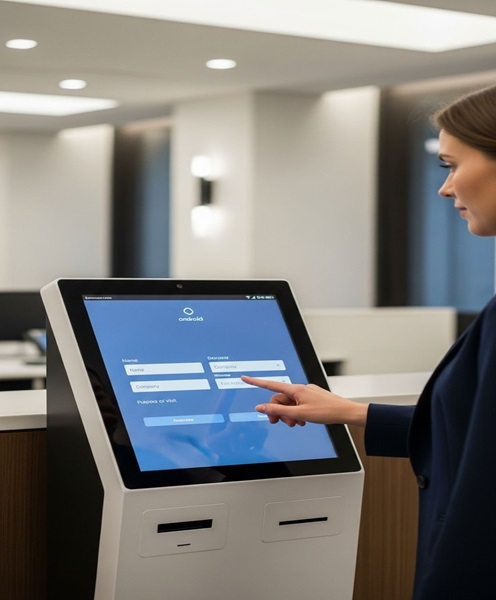
If an event requires self-service check-in, the organiser should request a separately configured interactive kiosk or check-in terminal. A standard digital display should not be assumed to have touchscreen functionality or attendee database access.
Digital Registration Screen Versus Digital Welcome Screen
Although both products are used at event entrances, they serve different purposes.
A digital welcome screen primarily greets guests and introduces the event. It may display the event name, host, welcome message, photographs and branding.
A digital registration screen focuses on the check-in process. It displays registration instructions, desk allocation, QR-code guidance, badge collection information and attendee directions.
The two screens can complement each other at larger events. A welcome screen can greet guests at the entrance, while a registration screen guides them through check-in.
For example, a corporate conference may place a welcome display at the main entrance and registration screens above or beside the delegate check-in desks.
How to Plan an Effective Digital Registration Display
The usefulness of a registration screen depends on the quality of its information and placement.
Keep Instructions Short and Clear
Attendees should understand what to do without reading long paragraphs. Use simple headings, short instructions and clear directional information.
Use Appropriate Text Sizes
The display should be readable from the distance at which attendees are expected to view it.
Separate Different Attendee Categories
If an event has VIPs, speakers, delegates, exhibitors and media representatives, use clearly labelled sections to guide each group.
Protect Personal Information
Avoid displaying private attendee lists, phone numbers, email addresses, identification details or confidential registration records on public-facing screens.
Coordinate the Screen with Registration Staff
The information on the screen should match the actual registration procedure. If the display directs guests to a particular desk, the desk should be correctly labelled and staffed.
Test the Content Before Guests Arrive
Check that the event name, directions, logos, QR-code instructions and other information are correct. Test the playback equipment and confirm that the display remains visible under the venue lighting.
Why Choose Janeson Rentals for Digital Registration Screen Hire in Kenya?
Janeson Rentals provides event equipment hire and rental solutions for organisers planning professional events in Nairobi and across Kenya.
Digital registration screen hire can support a wide range of event formats, from small workshops and private functions to large conferences, exhibitions and corporate gatherings.
Equipment for Different Event Requirements
Registration arrangements vary depending on the venue, attendance and event format. A suitable display should be selected according to visibility, placement, content and technical requirements.
Support for Professional Event Presentation
A well-planned registration area combines clear signage, organised desks, suitable furniture, staff and digital displays. Digital registration screens can form part of a coordinated event setup.
Suitable for Corporate and Social Events
Janeson Rentals supports event equipment requirements for conferences, seminars, exhibitions, weddings, graduations, church functions, corporate activations and private celebrations.
Nairobi-Based with Delivery Arrangements Across Kenya
Janeson Rentals is based in Nairobi and offers delivery arrangements across Kenya. Clients should confirm the event venue, delivery location, equipment requirements and installation arrangements when requesting a quotation.
How to Book a Digital Registration Screen from Janeson Rentals
To enquire about digital registration screen rental, provide the event date, venue, expected attendance and planned registration arrangement.
Explain whether the screen will display general check-in instructions, separate attendee categories, QR-code guidance, badge collection information or room directions.
You should also confirm whether you need one display or multiple screens at different registration points.
Prepare the content before installation. This may include event branding, registration instructions, desk labels, directional arrows and any approved sponsor information.
Janeson Rentals can discuss the suitable equipment arrangement based on the event requirements and equipment availability. Confirm the screen size, orientation, playback method, power arrangements, delivery and installation schedule before the event.
Frequently Asked Questions About Digital Registration Screen Hire
What is a digital registration screen used for?
It displays event check-in information, registration instructions, QR-code guidance, attendee categories, desk locations and other arrival information.
Can the screen scan QR codes?
A standard digital registration display does not automatically scan QR codes. Scanning requires compatible hardware and registration software. The screen can display instructions explaining how attendees should present their QR codes.
Can I hire a digital registration screen for a conference?
Yes. Digital registration screens are suitable for conferences, seminars, exhibitions, business summits, workshops and other organised events.
Can I display different registration instructions on the same screen?
Depending on the playback setup, the display can show a sequence of slides containing different instructions and attendee categories.
Can I hire more than one registration screen?
Multiple displays may be arranged for events with several entrances, registration desks or attendee categories, subject to availability and venue requirements.
Is digital registration screen hire available across Kenya?
Janeson Rentals is based in Nairobi and offers delivery arrangements across Kenya. Confirm the event location and logistical requirements when requesting a quotation.
Book Digital Registration Screen Hire in Kenya from Janeson Rentals
Make your event registration area clearer, more organised and more professional with digital registration screen hire from Janeson Rentals.
Whether you are planning a conference, exhibition, corporate event, graduation, workshop or church gathering, a digital registration display can help attendees understand the check-in process and find the correct registration point.
Contact Janeson Rentals to enquire about digital registration screen rental in Nairobi and across Kenya. Share your event date, venue, attendance and display requirements to discuss a suitable arrangement.