Introduction: Improve Venue Navigation with Digital Wayfinding Display Hire in Kenya
Helping visitors find their way around an event venue is an important part of delivering a well-organised event experience. Whether you are hosting a corporate conference, exhibition, wedding, graduation ceremony, trade show or public gathering, attendees need clear information about where different activities are taking place. When a venue has several entrances, meeting rooms, exhibition areas, registration points or hospitality facilities, navigating the space can become challenging without proper directional signage.
Digital wayfinding displays provide a modern way to communicate directions and location information. Instead of relying entirely on printed signs or verbal instructions from event staff, organisers can use digital screens to show venue maps, directional arrows, room numbers, facility locations and event-specific navigation information.
Janeson Rentals offers digital wayfinding display hire and rental in Kenya for event organisers, businesses, institutions, hotels, exhibition organisers and other clients who need professional digital navigation solutions.
A digital wayfinding display can be positioned at strategic points throughout a venue to help visitors understand the layout and identify where they need to go. Depending on the display configuration, it can present static maps, rotating directional information, floor plans, location directories and other visual guidance.
Whether your event is taking place in Nairobi or another part of Kenya, digital wayfinding display rental can help improve visitor orientation, reduce confusion and create a more professional event environment.
What Is a Digital Wayfinding Display?
A digital wayfinding display is an electronic screen used to provide directions and navigation information within a building, event venue, exhibition centre, conference facility, hotel, shopping centre or public space.
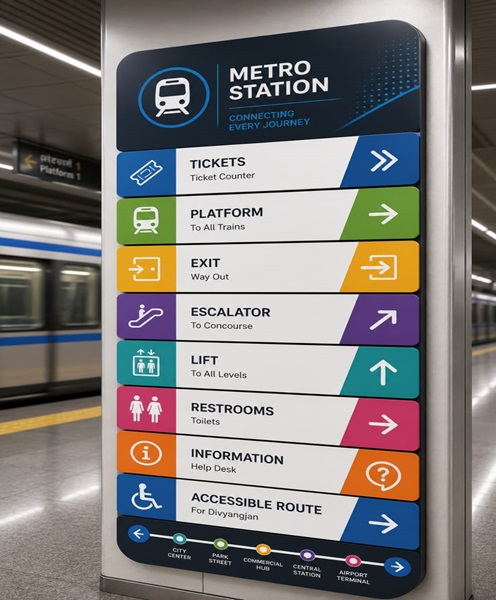
It helps visitors identify locations and understand how to move from one area to another. The screen may display a digital map, floor plan, directional arrows, room names, department listings, venue directories and other location-based information.
For events, digital wayfinding displays are particularly useful where attendees need to locate:
-
Main entrances and exits.
-
Registration and accreditation desks.
-
Conference and meeting rooms.
-
Exhibition halls and exhibitor stands.
-
VIP reception areas.
-
Speaker preparation rooms.
-
Catering and refreshment areas.
-
Restrooms and washrooms.
-
Parking and transport access points.
-
Emergency exits and designated safety information.
-
Networking and entertainment spaces.
-
Workshop and breakout session rooms.
A basic wayfinding display may show fixed directional content, while a more advanced interactive configuration may allow visitors to search for destinations or select locations on a touchscreen.
These capabilities should not be assumed for every screen. Interactive navigation requires compatible hardware, software and properly prepared venue information.
Why Hire a Digital Wayfinding Display for Your Event?
Digital wayfinding display hire provides practical benefits for organisers managing venues with multiple locations and visitor movement requirements.
1. Help Visitors Navigate the Venue
The main purpose of a wayfinding display is to help people find their destinations.
At a large conference, for example, attendees may need to move between the registration desk, main auditorium, breakout rooms, exhibition area and catering section. A digital map or directional display can make these locations easier to identify.
This is especially valuable for first-time visitors who may not be familiar with the venue.
2. Reduce Confusion and Repetitive Questions
Event staff often receive repeated questions about room locations, entrances, registration desks and facilities.
A strategically positioned digital wayfinding display can answer many basic navigation questions before visitors need to approach staff members.
This allows the event team to focus on more complex enquiries, guest assistance and operational responsibilities.
3. Improve the Professional Appearance of the Venue
Digital wayfinding displays contribute to a modern and organised event environment.
They can be designed to match the event’s branding through consistent colours, logos, typography and graphics. For corporate events, this creates a professional presentation. For exhibitions, it provides a coordinated visitor information system.
4. Support Multiple Event Activities
Events with several simultaneous activities require clear communication.
A digital wayfinding display can show where workshops, presentations, demonstrations, networking sessions and other activities are taking place.
When the playback arrangement supports content updates, organisers can revise directions as the programme changes.
5. Make Venue Information Easier to Update
Printed directional signs may need to be replaced whenever room assignments or event arrangements change.
Digital displays can offer more flexibility because their content can be updated through compatible playback equipment or content-management software.
However, organisers should assign responsibility for updating the information and ensure that the displayed directions remain consistent with the actual venue layout.
6. Support Visitor Accessibility
Well-designed wayfinding information can make venues easier to navigate for people with different mobility and communication needs.
Organisers should consider readable text, strong contrast, appropriate display heights and accessible routes. Digital displays should complement, rather than replace, required physical accessibility signs and safety signage.
Digital Wayfinding Display Rental for Different Events
Janeson Rentals provides digital wayfinding display hire for different event types and venue arrangements.
Conferences and Corporate Meetings
Large conferences may use several halls, meeting rooms and breakout spaces. A digital wayfinding display can help delegates locate their sessions and move between programme areas.
The screen may show conference room names, session locations, registration points, networking spaces and catering facilities.
For corporate meetings, it can also display department or meeting-room directions within a temporary event venue.
Exhibitions and Trade Shows
Exhibition centres can be difficult to navigate when they contain numerous exhibitor stands, product demonstration areas and activity zones.
Digital wayfinding displays can show exhibition layouts, stand numbers, hall locations, sponsor areas and visitor facilities.
For large trade shows, organisers may position displays at entrances, corridors, lifts and major decision points to make navigation easier.
Weddings and Social Events
Wedding venues may have separate locations for the ceremony, reception, cocktail area, dining space and photography area.
A digital wayfinding display can direct guests to these different locations and communicate important information about the event layout.
It can also complement the wedding’s visual identity through coordinated graphics and personalised directional messages.
Graduation Ceremonies
Graduation events often involve different arrival arrangements for graduates, parents, academic representatives and invited guests.
Digital wayfinding screens can help visitors locate registration desks, seating areas, graduation halls, photography points and designated entrances.
Hotels and Hospitality Venues
Hotels hosting conferences, meetings, exhibitions and social functions may need to guide visitors to different function rooms and facilities.
Digital wayfinding displays can provide room directories and directions that support the venue’s existing signage.
Universities, Schools and Institutions
Educational institutions can use temporary digital wayfinding displays during open days, academic conferences, admission events, career fairs and graduation ceremonies.
The displays can guide visitors towards departments, lecture theatres, administrative offices and designated event spaces.
Church Conferences and Religious Gatherings
Church conventions and large religious events may use multiple halls, prayer areas, registration points and hospitality spaces.
Digital wayfinding displays can direct visitors towards the appropriate areas while showing event-specific information.
Important Features to Consider When Hiring a Digital Wayfinding Display
The most suitable display depends on the venue, navigation requirements and intended user experience.
Screen Size and Viewing Distance
The display should be visible from the distance at which visitors are expected to read it.
A screen placed at a main entrance may need to accommodate a larger amount of information than one positioned outside a meeting room.
The viewing distance, number of visitors and available installation space should all be considered.
Display Resolution
Maps, room names, directional arrows and location labels need to be clear.
A suitable resolution helps ensure that text and graphical elements remain readable without appearing distorted or pixelated.
Orientation and Screen Layout
Portrait and landscape screens support different information layouts.
Portrait screens can accommodate vertically arranged directories and maps, while landscape displays may be useful for wider venue maps and multiple directional sections.
The graphics should be designed for the selected orientation.
Interactive or Non-Interactive Display
A standard wayfinding screen can show pre-designed navigation information.
An interactive display may allow visitors to search for destinations, select rooms or explore a digital venue map.
Interactive functionality requires compatible touchscreen hardware and suitable software. A standard television or digital signage screen should not automatically be treated as an interactive wayfinding kiosk.
Content Management and Updates
The organiser should establish how maps, directions and room information will be updated.
For events with changing schedules, the ability to revise content can be particularly valuable.
Connectivity and Playback
Depending on the configuration, wayfinding content may be played using a media player, computer, built-in display software or another compatible playback system.
If the venue requires network-based updates or interactive navigation, connectivity and software requirements should be confirmed in advance.
Placement and Installation
A wayfinding display should be positioned at points where visitors naturally need directional information.
Useful locations may include:
-
Main entrances.
-
Reception areas.
-
Registration zones.
-
Corridor intersections.
-
Lift and stairway lobbies.
-
Exhibition hall entrances.
-
Conference room corridors.
-
Large open spaces with multiple activity areas.
The screen must not obstruct walkways, emergency routes or accessibility access.
Digital Wayfinding Display Versus Digital Welcome Screen
A digital wayfinding display and a digital welcome screen may look similar, but they perform different roles.
A digital welcome screen introduces the event and greets arriving guests. It commonly displays the event name, host, logo, welcome message and personalised graphics.
A digital wayfinding display focuses on navigation. It helps visitors identify where they are, where they need to go and how to reach a particular destination.
For a large conference, both can be used together. The welcome screen can greet delegates at the entrance, while wayfinding displays direct them to registration, meeting rooms and exhibition areas.
Digital Wayfinding Display Versus Printed Directional Signage
Printed signs are useful for fixed directions and simple venue information. They are often suitable for smaller events with straightforward layouts.
Digital wayfinding displays provide additional flexibility where information changes, multiple destinations need to be shown or a more dynamic presentation is required.
A digital screen can rotate between different maps, show multiple locations and incorporate event branding. It may also support interactive navigation when equipped with appropriate technology.
For safety, emergency evacuation signage and other legally required notices must remain available in their appropriate approved formats. A digital wayfinding screen should not replace mandatory safety signage.
How to Plan an Effective Digital Wayfinding System
A successful wayfinding arrangement begins with understanding how visitors will move around the venue.
Prepare an Accurate Venue Map
Identify the entrances, exits, rooms, halls, registration desks and facilities that visitors need to locate.
The map should reflect the actual venue layout and should not include misleading routes.
Identify Key Decision Points
Place displays where visitors need to choose between different routes.
A screen positioned at a corridor intersection, for example, can help people identify which direction leads to a particular hall.
Use Clear Directional Language
Use simple room names, floor numbers, arrows and short labels.
Avoid complicated instructions that require visitors to read long paragraphs while moving through a busy venue.
Maintain Consistent Visual Design
Use consistent colours, symbols, fonts and terminology across all wayfinding displays.
This helps visitors recognise directional information more quickly.
Consider Different Visitor Needs
Use readable text, adequate contrast and appropriate placement. Consider wheelchair users, older visitors and people who may have difficulty reading small text.
Confirm Routes with Venue Staff
The directions shown on the screen should be checked against the venue’s actual access arrangements.
This is especially important when certain corridors, lifts or entrances are restricted.
Why Choose Janeson Rentals for Digital Wayfinding Display Hire in Kenya?
Janeson Rentals provides event equipment hire and rental solutions for organisers who need professional presentation and visitor information equipment.
Digital wayfinding display rental can support event layouts where visitors need clear directions and location information.
Suitable Equipment for Different Venues
A small meeting venue and a large exhibition centre have different navigation requirements. The display arrangement should be planned around the venue’s dimensions, visitor flow and information needs.
Support for Professional Event Environments
Digital wayfinding displays can be coordinated with welcome screens, registration screens, digital signage, event branding and other AV equipment.
This helps organisers create a consistent visitor information experience.
Useful for Corporate and Social Events
Janeson Rentals supports equipment requirements for conferences, exhibitions, graduations, weddings, corporate functions, church events and other organised gatherings.
Nairobi-Based with Delivery Arrangements Across Kenya
Janeson Rentals is based in Nairobi and offers delivery arrangements across Kenya. Clients outside Nairobi should confirm their event location and the logistical requirements for equipment delivery and installation.
How to Book a Digital Wayfinding Display from Janeson Rentals
When enquiring about digital wayfinding display hire, provide the event date, venue, expected attendance and a brief description of the venue layout.
Explain the locations visitors need to find, such as registration desks, halls, meeting rooms, exhibition stands, catering areas and other facilities.
If you already have a venue floor plan, share it when discussing the display arrangement. This can help establish the information that needs to appear on the screen.
You should also confirm whether you require a standard display with prepared directional content or an interactive touchscreen navigation system.
Janeson Rentals can discuss the appropriate equipment arrangement, subject to availability and technical requirements. Confirm screen size, orientation, content format, playback method, power arrangements and installation schedule before the event.
Frequently Asked Questions About Digital Wayfinding Display Hire
What is a digital wayfinding display used for?
It helps visitors navigate a venue by showing maps, room locations, directions, entrances, exits and facility information.
Can a digital wayfinding display show a venue map?
Yes. It can display a prepared digital venue map or floor plan in a format suitable for the screen.
Are digital wayfinding displays interactive?
Some configurations support touchscreen navigation and destination searches. Others display prepared information without user interaction. Confirm the required functionality before booking.
Can I hire a digital wayfinding display for an exhibition?
Yes. It can help visitors locate exhibition halls, exhibitor stands, registration points, meeting areas and facilities.
Can the information be changed during an event?
This depends on the playback and content-management arrangement. Confirm the updating process before the event.
Is digital wayfinding display hire available across Kenya?
Janeson Rentals is based in Nairobi and offers delivery arrangements across Kenya. Contact the company to discuss the event location and logistical requirements.
Book Digital Wayfinding Display Hire in Kenya from Janeson Rentals
Help guests navigate your event with digital wayfinding display hire from Janeson Rentals. Whether you are organising a conference, exhibition, corporate gathering, graduation, wedding or public event, clear digital directions can make the visitor experience more organised and convenient.
Contact Janeson Rentals to enquire about digital wayfinding display rental in Nairobi and across Kenya. Share your venue layout, event date and navigation requirements to discuss a suitable display solution.