
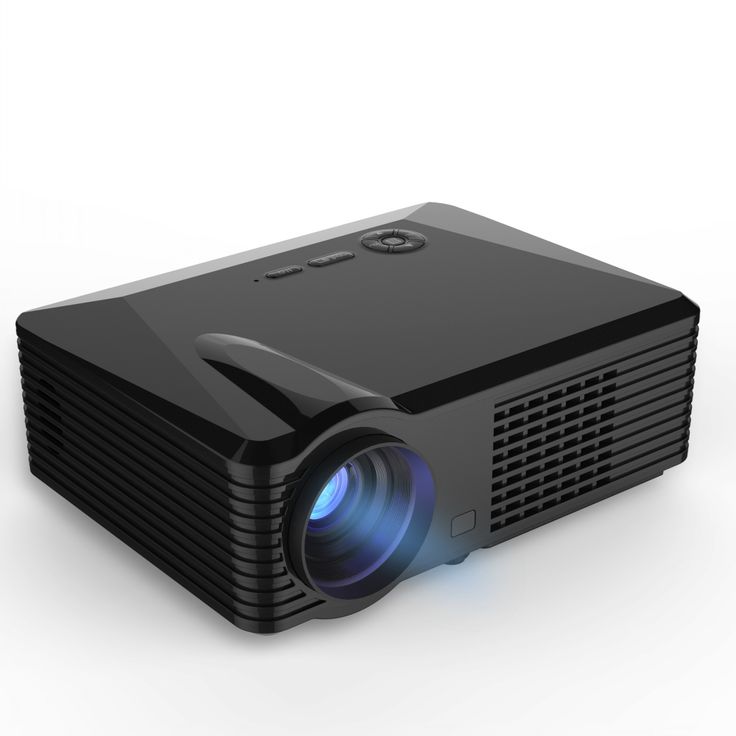
HD Projector Hire and Rental in Nairobi
High-quality visuals can make presentations more engaging, professional and easier to understand. Whether you are showcasing a new product, presenting a business proposal, conducting a training session or organizing a corporate conference, a suitable high-definition projector can help your audience view text, graphics, photographs and videos in greater detail.
An HD projector is a projection device designed to display high-definition images from compatible source equipment. Depending on the model, it may support resolutions such as 1280 × 720 pixels or 1920 × 1080 pixels. The exact resolution and other features should be confirmed before booking because not every projector marketed as HD offers the same specifications.
At Janeson Rentals, we provide event equipment hire and rental solutions for businesses, event planners, institutions and individuals who need reliable equipment for temporary events. Our HD projector rental option is suitable for clients seeking projection equipment for professional presentations, conferences, seminars, workshops, product launches and selected entertainment activities.
Based in Nairobi, Janeson Rentals welcomes enquiries for HD projector hire in Nairobi and across Kenya. Whether you need to display detailed presentation slides, show a promotional video or support a visual presentation at a corporate function, we can discuss your requirements and the suitability of the available equipment.
Choosing the right HD projector involves more than checking its resolution. Brightness, projection distance, screen size, room lighting, input connections and the type of content all affect the viewing experience. Planning these details in advance helps you select equipment that suits your event.
What Is an HD Projector?
An HD projector is a device that projects high-definition visual content onto a screen or suitable surface. It receives a video signal from a compatible source, such as a laptop, desktop computer, media player or other supported device, and enlarges the image for group viewing.
HD commonly refers to high-definition resolution. Full HD typically means 1920 × 1080 pixels, while other HD formats may use different resolutions. The projector’s native resolution is important because it determines the level of detail the device can reproduce directly.
HD projectors are used for business presentations, conferences, training programmes, educational activities, product demonstrations, promotional events and video playback. Their usefulness depends on the image quality required and the conditions in which they will be used.
For example, a presentation containing detailed charts may benefit from higher resolution, while a simple presentation with large text may have more modest requirements. Video content can also benefit from suitable resolution, but the final result depends on the source file, projector specifications and screen conditions.
When hiring an HD projector from Janeson Rentals, clarify the available resolution, brightness rating, supported connections and any included accessories. This helps establish whether the equipment meets your event’s technical needs.
Benefits of Hiring an HD Projector
1. Displays Detailed Visual Content
One of the main advantages of an HD projector is its ability to reproduce high-definition content, subject to the device’s native resolution and the quality of the source material.
This can be useful when presenting detailed photographs, diagrams, charts, product images and presentation slides. Clear visual information helps audiences follow the material being discussed.
For the best result, use high-quality files and avoid stretching low-resolution images beyond their intended size.
2. Enhances Video Presentations
Corporate events and product launches often include videos, promotional clips, demonstrations and recorded messages. An HD projector can display compatible high-definition video content on a large screen.
Before the event, test the video files and ensure the laptop or media player can output a supported signal. If sound is required, confirm the audio connection and availability of suitable speakers.
3. Supports Professional Corporate Presentations
Businesses can use HD projection equipment for proposals, company profiles, reports, marketing presentations and project updates. High-definition visuals can help display photographs, graphics and other detailed content effectively.
A well-planned presentation also requires readable text, suitable contrast and an image size that works for the audience.
4. Useful for Conferences and Seminars
Conference speakers may need to display detailed slides, diagrams, charts, videos and other presentation material. An HD projector can be useful when its resolution and brightness suit the venue and viewing requirements.
For a large hall, however, resolution alone is not enough. The projector must also have sufficient brightness and the ability to produce an appropriately sized image.
5. Suitable for Training and Education
Training providers, schools, colleges and professional institutions may use HD projectors to display instructional material, software demonstrations and educational videos.
Higher image detail can be helpful when the content includes fine text or complex graphics. The audience must still be seated at a suitable distance, and the content should be designed for projection rather than a small computer screen.
6. Supports Brand Activations and Product Launches
Brands can use HD projectors to present product visuals, campaign videos, company introductions and promotional content. The projected image can form part of a presentation area or an appropriately designed event environment.
For events requiring exceptionally bright images, very large displays or strong visual impact in a brightly lit room, a higher-specification projector or LED screen may be more suitable.
7. Offers a Convenient Temporary Solution
Purchasing a projector may not be necessary for an organization that only needs one for a particular event. HD projector hire allows clients to enquire about projection equipment for a planned rental period.
This is useful for businesses, trainers, event agencies, educational institutions and event organizers that need access to presentation equipment occasionally.
8. Can Be Combined with Other Presentation Equipment
An HD projector can be paired with a suitable projection screen, laptop, media player and compatible accessories. Depending on the event, speakers or a presentation clicker may also be useful.
A complete setup should be planned according to the venue, content and audience rather than assuming that all accessories are included in a basic projector rental.
Events That Benefit from HD Projector Rental
Corporate Conferences
Corporate conferences often require speakers to present detailed slides, company information, charts and promotional videos. An HD projector can support these activities when the room’s lighting, size and audience requirements are suitable.
Organizers should test the complete setup and ensure that the image can be viewed comfortably from the back of the room.
Business Meetings and Client Presentations
Businesses can use HD projectors to present proposals, business plans, project reports and product information to clients or colleagues. The ability to display a larger image helps the presenter guide the discussion.
For detailed spreadsheets or documents, select an image size and resolution that keep the information readable.
Training Workshops and Seminars
Facilitators can use an HD projector to display learning material, instructional videos, software demonstrations and diagrams. This is useful for professional development, staff training and group workshops.
The room arrangement should allow all participants to see the screen without obstruction.
Product Launches
Product launches frequently involve visual demonstrations, promotional videos and product information. An HD projector can support the presentation by showing images and video content at a larger size.
For a launch featuring elaborate stage visuals, moving graphics or large-scale branding, evaluate whether the projector’s brightness and image size will meet the intended production standard.
Trade Shows and Exhibitions
Exhibitors can use HD projectors to present product videos, company introductions and detailed visual demonstrations. A projection setup may work well in a controlled-lighting booth or presentation area.
Consider the ambient light in the exhibition hall because bright surroundings can reduce projected-image visibility. Also check whether the venue permits the required equipment placement and cable routing.
Educational Events
Schools, colleges, universities and training institutions may use HD projectors for lectures, academic presentations, workshops and demonstrations. The equipment can support detailed learning content when the projector’s resolution and brightness suit the room.
Church and Community Functions
Churches and community organizations may use HD projectors for presentations, teaching sessions, announcements, photographs and video content. The setup should match the room dimensions, audience size and available lighting.
If the programme includes music or video sound, arrange compatible audio equipment where necessary.
Corporate Training and Hybrid Meetings
HD projection can support in-person training and meetings involving video calls or remote presentations. A compatible laptop or conferencing device can provide the visual signal.
Additional equipment may be required for cameras, microphones, speakers and network connectivity. Confirm these needs separately when planning the event.
Private Screenings and Entertainment Events
An HD projector may be suitable for selected private screenings, video presentations and entertainment activities, provided its brightness and resolution match the viewing conditions. A suitable screen and controlled lighting can help improve the experience.
For outdoor use, ask about the projector’s suitability, power arrangements and the need for additional protection from weather and environmental conditions.
Why Choose Janeson Rentals for HD Projector Hire?
Janeson Rentals provides event equipment hire and rental solutions for clients planning professional presentations and temporary functions.
Flexible rental enquiries: Discuss HD projector requirements for a specific event, presentation or training programme.
Suitable for varied occasions: HD projection may support conferences, seminars, product launches, workshops, exhibitions and selected entertainment events.
Nairobi-based service: Janeson Rentals welcomes enquiries for events in Nairobi and across Kenya.
Practical equipment planning: Sharing your venue dimensions, audience size, lighting conditions and content requirements helps establish whether the available projector is suitable.
Related presentation equipment: You can ask about projection screens, connection accessories and other supporting equipment, subject to availability and the agreed rental package.
When requesting a quotation, specify whether you need the projector alone or a complete presentation arrangement. Confirm the native resolution, brightness, input connections, screen requirements, rental duration and any delivery or setup services.
How to Choose the Right HD Projector
1. Check the Native Resolution
Confirm the projector’s native resolution rather than relying only on the term HD. If your presentation requires detailed graphics or Full HD video, check whether the available model supports the resolution needed.
Also confirm compatibility with the resolution output by your laptop or media player.
2. Evaluate Brightness
Projector brightness is generally measured in lumens. The appropriate rating depends on ambient light, screen size and viewing distance.
A darker room can make projected images easier to see, while a brightly lit conference room may require a brighter projector. Consider whether curtains or lighting adjustments will be available at the venue.
3. Match the Projector to the Room
Room dimensions affect the distance available between the projector and the screen. Check whether the projector can produce the required image size from a practical position.
Consider ceiling height, tables, seating, presenter movement and any possible obstructions.
4. Select an Appropriate Projection Screen
A suitable screen provides a designated viewing surface and can improve consistency compared with an unsuitable wall. The screen’s size should correspond to the projector’s capabilities and the distance from which the audience will view it.
Avoid selecting an unnecessarily large screen if the projector cannot illuminate it adequately.
5. Confirm Connectivity
Check whether the projector supports the ports available on your source device. HDMI is commonly used, but connection options vary by model.
If your laptop requires an adapter, confirm its compatibility before the event. Also check whether the rental includes the necessary cables.
6. Plan for Video and Audio
If you intend to show videos, test playback on the source device and confirm that the projector supports the incoming signal. For presentations with sound, arrange an appropriate audio connection and speakers if required.
Do not assume that the projector’s built-in audio, if present, will be sufficient for a large audience.
7. Consider Image Placement and Focus
Position the projector and screen so that the image is square, focused and unobstructed. Use the projector’s supported adjustment features and follow the manufacturer’s instructions.
Avoid placing equipment where attendees may accidentally knock it or trip over its cables.
8. Conduct a Full Technical Test
Before the event starts, display the actual presentation, check text readability and test any videos. Confirm that the image is correctly aligned and that all connections remain secure.
A full test is particularly important when presentations include animation, high-definition video or multiple source devices.
HD Projector Rental Across Kenya
Janeson Rentals is based in Nairobi and welcomes enquiries for event equipment hire and rental across Kenya. Businesses, educational institutions, event planners and organizations can enquire about HD projector rental for meetings, conferences, seminars, product launches and workshops.
When requesting a quotation, share your event date, venue, rental duration, expected audience size and intended content. Mention whether you need Full HD resolution, a projection screen, connection accessories or audio equipment.
For events outside Nairobi, confirm delivery availability, transportation charges and setup arrangements for your venue. Early planning helps ensure that the equipment and room layout are suitable before the event day.
Frequently Asked Questions About HD Projector Rental
1. Where can I hire an HD projector in Nairobi?
You can contact Janeson Rentals to enquire about HD projector hire for conferences, meetings, workshops, seminars and presentations. Confirm current availability and the projector’s specifications before booking.
2. What resolution does an HD projector offer?
Specifications vary. HD can refer to different high-definition resolutions, while Full HD commonly means 1920 × 1080 pixels. Confirm the native resolution of the available model before booking.
3. Is an HD projector suitable for a corporate conference?
It can be suitable if the resolution, brightness and projected image size meet the venue’s requirements. Large rooms and bright environments may need a higher-brightness model.
4. Can an HD projector display videos from a laptop?
Yes, provided the laptop and projector support compatible video connections and signal formats. Test the connection and content before the event.
5. Does HD projector rental include a projection screen?
The package contents depend on the rental arrangement. Ask whether the quotation includes a screen, cables, adapters and other required accessories.
6. Can an HD projector be used outdoors?
Outdoor use may be possible under suitable conditions, but daylight can make projected images difficult to see. Consider ambient light, weather protection, power access and equipment safety, and confirm that the available projector is appropriate.
7. What is the difference between an HD projector and a standard projector?
An HD projector supports high-definition image resolution, although brightness and other features vary by model. A standard projector may have a lower native resolution. The right option depends on your content and venue requirements.
8. Does Janeson Rentals offer HD projector rental outside Nairobi?
Janeson Rentals is based in Nairobi and welcomes enquiries for events across Kenya. Confirm delivery availability, transportation costs and setup arrangements for your location.
Book an HD Projector from Janeson Rentals
Prepare a clear and professional visual presentation with an HD projector from Janeson Rentals. Whether you are planning a corporate meeting, conference, seminar, training session, product launch or educational event, suitable projection equipment can help your audience engage with the content.
Contact Janeson Rentals to request a quotation for HD projector hire and rental in Nairobi or elsewhere in Kenya. Include your event date, venue, audience size, resolution requirements and any accessories you need.
Choose Janeson Rentals for practical HD projector hire and rental solutions for your next event or presentation.



