
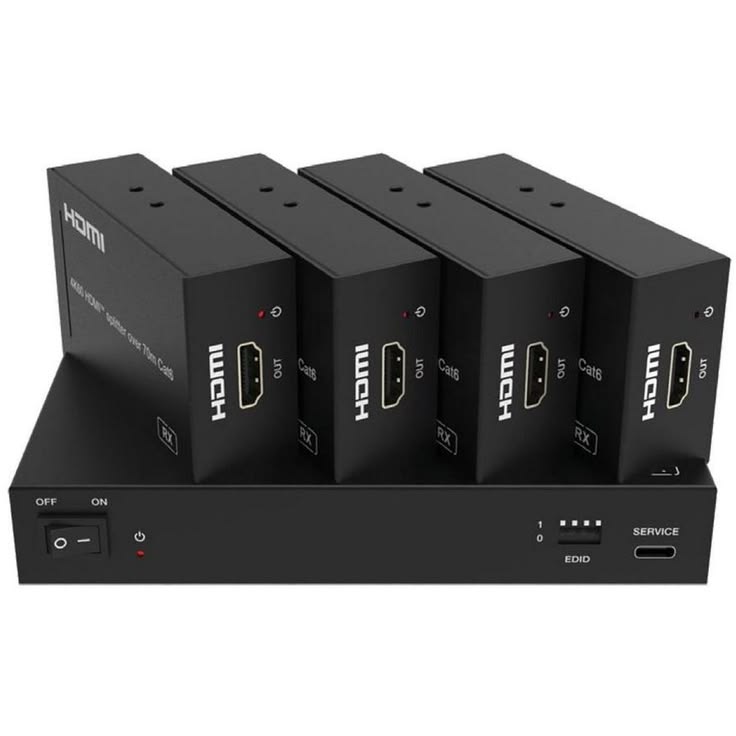
HDMI Extender Hire and Rental in Kenya
An HDMI extender is an audiovisual device designed to transmit high-definition video and audio signals over longer distances than a standard HDMI cable may reliably support. It is useful for events where laptops, media players, cameras, or other HDMI sources need to connect to projectors, LED displays, televisions, or monitors positioned far from the source equipment.
HDMI extenders are particularly useful for corporate conferences, exhibitions, fashion shows, concerts, product launches, weddings, training sessions, and other events with large venues or complex audiovisual layouts. Depending on the model, an HDMI extender may transmit signals over Cat5e or Cat6 network cable, fibre-optic cable, or another supported transmission method.
Janeson Rentals provides event equipment hire and rental solutions for clients in Nairobi and across Kenya. If your event requires reliable HDMI signal transmission between distant devices, you can enquire about HDMI extender hire and rental to suit your venue and display requirements.
Meta Description: Hire an HDMI extender in Nairobi and across Kenya from Janeson Rentals. Explore HDMI extender rental for conferences, exhibitions, LED screens and events.
What Is an HDMI Extender?
An HDMI extender is a device or system that helps transmit HDMI audio and video signals over a longer distance than a conventional HDMI cable can reliably manage in a particular setup.
Many HDMI extender systems use a transmitter connected to the source device and a receiver connected to the display. A compatible cable links the transmitter and receiver. The exact arrangement depends on the extender’s design.
For example, a conference may have a laptop positioned at the presentation desk and a projector mounted at the opposite end of the hall. If the distance is too long for a suitable standard HDMI cable, an HDMI extender may help carry the signal between the laptop and projector.
Different extenders support different resolutions, refresh rates, cable types, transmission distances, and audio formats. Some models may also support additional features, such as infrared control or network-based transmission. These functions are model-dependent and should be confirmed before booking.
An HDMI extender does not necessarily convert HDMI to SDI, process video for an LED wall, or distribute one source to many screens. Additional equipment may be required for those functions.
Why Hire an HDMI Extender?
1. Transmit Signals Over Longer Distances
One of the main reasons to hire an HDMI extender is to connect equipment positioned far apart. This can be helpful in conference halls, hotels, exhibition spaces, auditoriums, and outdoor event venues.
2. Support Large Event Setups
Large productions may place laptops, media players, or control equipment away from projectors and screens. An HDMI extender can help accommodate the venue layout when the selected model supports the required distance.
3. Help Keep the Setup Organised
Using an appropriate transmission system can help event technicians plan signal routes between source equipment and displays. Cable routing should still be organised carefully to reduce trip hazards and avoid damage.
4. Connect Compatible Audiovisual Equipment
A suitable extender can connect compatible HDMI sources and displays across a venue. Before hiring, confirm that the source, extender, cables, and display support the same required video format.
5. Provide a Flexible Rental Option
Hiring an HDMI extender allows event organisers to enquire about equipment for a specific event without purchasing hardware that may only be needed occasionally.
Events That May Require an HDMI Extender
Corporate Conferences and Seminars
Conferences often use laptops connected to projectors or large displays. When the presentation source and display are separated by a long distance, an HDMI extender may help transmit the signal between them.
It can be useful in hotels, conference centres, auditoriums, and large meeting rooms. The required resolution and cable distance should be confirmed before booking.
Exhibitions and Trade Shows
Exhibition stands may feature screens positioned away from computers or media players. An HDMI extender can help connect the source to the display when a standard cable is unsuitable for the distance.
For multiple displays or different video sources, additional distribution or routing equipment may be needed.
Fashion Shows and Runway Events
Fashion shows may use LED screens and projectors to display designer branding, collection visuals, sponsor logos, and promotional videos. HDMI extenders may help connect source equipment to compatible displays located across the venue.
If the production uses a large LED wall, check whether a video processor or dedicated LED control equipment is also required.
Product Launches and Brand Activations
Product launches frequently use presentation screens, promotional videos, and branded visuals. An HDMI extender can help transmit content from a laptop or media player to a display positioned at a distance.
Weddings and Social Events
Some weddings and celebrations use projectors or televisions to show photographs, slideshows, videos, or presentations. An HDMI extender may be useful when the source device cannot be placed close to the display.
Concerts and Live Performances
Concerts and live shows may use monitors, projectors, or screens around the venue. A compatible HDMI extender can form part of the signal chain where HDMI transmission is appropriate.
Professional productions using SDI or fibre-based systems may require a different type of extender.
Church Services and Religious Conferences
Churches may use laptops to display lyrics, scripture, sermon slides, and videos on screens positioned around the sanctuary or auditorium. An HDMI extender can help connect the presentation source to a distant display.
Training Sessions and Educational Events
Training rooms and workshops sometimes require a laptop or demonstration device to connect to a projector or monitor at the opposite end of the room. An extender may help accommodate the distance.
Types of HDMI Extenders
HDMI Over Cat6 Extender
An HDMI over Cat6 extender uses compatible transmitter and receiver units connected through Cat6 cable. Depending on the model, it may support particular resolutions and transmission distances.
Not every Cat6-based extender supports every HDMI feature. Confirm the supported cable type, distance, resolution, refresh rate, and any network-switch requirements.
HDMI Over Cat5e Extender
Some extenders are designed to operate over Cat5e cable. They can be suitable for supported installations, but their performance depends on the device specifications and cable quality.
Do not assume that every network-cable extender can operate through an ordinary Ethernet switch. Some systems require a direct connection between transmitter and receiver.
HDMI Over Fibre Extender
Fibre-based extenders are designed for longer transmission distances or specific high-bandwidth applications. They may be suitable for demanding production environments, depending on the model.
Confirm whether the system uses single-mode or multimode fibre, the required connectors, and whether any special transceivers or power supplies are needed.
Wireless HDMI Extender
Wireless HDMI systems transmit video and audio without a long physical signal cable between the transmitter and receiver. They may be useful where cable routing is difficult, but performance depends on the device, environment, interference, and transmission range.
For important live events, test the wireless connection in the actual venue before relying on it.
Key Features to Consider When Hiring an HDMI Extender
Transmission distance: Measure the distance between the source and display. Choose a device rated for the intended distance under the required signal conditions.
Resolution and refresh rate: Confirm that the extender supports the resolution and refresh rate required by the source and display.
Cable type: Check whether the extender requires Cat5e, Cat6, fibre, or another specified cable.
Audio support: Verify that the required audio format can pass through the extender if sound is carried over HDMI.
HDCP compatibility: Protected content may require compatible content-protection support across the complete signal chain.
Power requirements: Some extenders require power at both the transmitter and receiver, while others have different arrangements. Confirm which supplies are needed.
Control features: Certain models support infrared or other control functions. These should be checked if the source device needs remote operation.
Compatibility: The source, extender, cabling, receiver, and display must work together at the required signal format.
How to Choose the Right HDMI Extender
Begin by identifying the source device and display. This might be a laptop connected to a projector, a media player connected to a television, or a presentation computer connected to a compatible display system.
Next, measure the approximate cable route. Include the distance around walls, stage areas, cable paths, or other obstacles rather than estimating only the straight-line distance.
Determine the required resolution and refresh rate. Check whether the source and display use protected content, require specific audio formats, or depend on any advanced HDMI features.
Choose the transmission method according to the venue and distance. A Cat6-based extender may suit one setup, while fibre or another transmission method may be more appropriate for a different production.
Finally, test the complete setup before the event. Verify the picture, sound, source compatibility, cable connections, and any control features.
HDMI Extender Hire for LED Screens and Projectors
HDMI extender hire can be useful when a laptop or media player needs to connect to a projector or compatible display located far away. It can also form part of a larger signal chain used in exhibitions, conferences, and product launches.
However, an HDMI extender does not automatically replace a video processor, LED sending system, HDMI splitter, or HDMI matrix. If the production uses multiple displays or an LED wall, describe the complete setup when enquiring.
Why Choose Janeson Rentals?
Janeson Rentals provides event equipment hire and rental solutions for clients in Nairobi and across Kenya. Event organisers planning conferences, fashion shows, exhibitions, concerts, weddings, corporate meetings, and other presentations can enquire about HDMI extender rental.
When contacting Janeson Rentals, share your event date, venue, source device, display type, required transmission distance, and video resolution. Ask about availability, rental charges, delivery or collection, and any setup arrangements that may be available.
Confirm the extender’s supported cable type, transmission distance, audio features, and compatibility with your equipment before finalising the booking.
What to Prepare Before Booking
- Event date and rental duration.
- Venue location and event type.
- Source device and display type.
- Approximate cable route and distance.
- Required resolution and refresh rate.
- Preferred transmission method, if known.
- Audio and content-protection requirements.
- Cable and power-supply requirements.
- Whether additional splitters, converters, or processors are needed.
- Delivery, setup, and operating arrangements.
Book an HDMI Extender with Janeson Rentals
If your event requires an HDMI signal to travel between equipment positioned far apart, contact Janeson Rentals to enquire about HDMI extender hire and rental in Nairobi and across Kenya.
Provide the distance, source and display specifications, cable requirements, and event details to help identify a suitable setup. Confirm availability, pricing, technical compatibility, and any additional equipment needs before booking.
Frequently Asked Questions About HDMI Extender Hire
What does an HDMI extender do?
An HDMI extender transmits compatible HDMI audio and video signals over a longer distance using a supported transmission method.
Can an HDMI extender connect a laptop to a projector?
Yes, provided the laptop, extender, cables, and projector support compatible signal formats and the distance is within the extender’s specifications.
Does an HDMI extender use Cat6 cable?
Some models use Cat6 cable, while others support Cat5e, fibre, wireless transmission, or other methods. Check the requirements of the specific device.
Can an HDMI extender support 4K?
Some models support selected 4K resolutions and refresh rates. Check the specifications of the extender and every connected component before booking.
Is an HDMI extender the same as an HDMI splitter?
No. An extender helps transmit a signal over a longer distance, while a splitter distributes one source to multiple displays. Some products combine functions, but this should not be assumed.
Where can I hire an HDMI extender in Kenya?
Contact Janeson Rentals to enquire about HDMI extender hire and rental in Nairobi and across Kenya. Confirm availability, supported resolution, transmission distance, cable requirements, and rental charges before booking.
Janeson Rentals — Event equipment hire and rental solutions for professional audiovisual productions across Kenya.



