
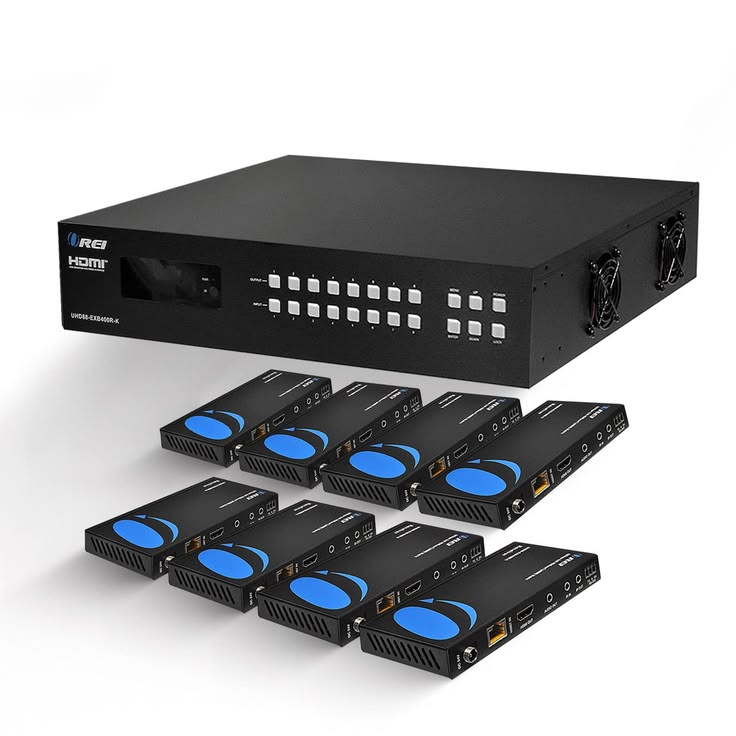
HDMI Matrix Hire and Rental in Kenya
An HDMI matrix is a professional audiovisual device that allows multiple HDMI sources to be routed to multiple compatible displays. Unlike a standard HDMI splitter, which normally duplicates one source to several screens, an HDMI matrix gives users greater flexibility by allowing different sources to be assigned to different outputs.
This makes HDMI matrices useful for corporate conferences, exhibitions, product launches, training facilities, control rooms, fashion events, and venues with complex audiovisual systems. For example, a matrix may allow one laptop presentation to appear on the main projector while a media player sends a promotional video to a separate display.
Janeson Rentals provides event equipment hire and rental solutions for clients in Nairobi and across Kenya. If your event requires flexible routing between several HDMI sources and displays, you can enquire about HDMI matrix hire and rental to suit your production requirements.
Choosing the right HDMI matrix requires attention to the number of inputs and outputs, supported resolutions, refresh rates, audio handling, control options, and content-protection compatibility. The correct device depends on the equipment being connected and the routing arrangements required.
What Is an HDMI Matrix?
An HDMI matrix is a signal-routing device with multiple HDMI inputs and multiple HDMI outputs. It allows an operator to select which input source is sent to each compatible output, depending on the matrix’s capabilities.
For example, a conference venue might have two laptops, a media player, and a camera system connected to an HDMI matrix. The matrix could route one laptop to the main projector, the media player to a foyer screen, and another source to a monitor in a separate room, provided the device supports the required configuration.
An HDMI matrix is different from a splitter because it does not have to send the same source to every display. It is also different from a basic HDMI switch, which generally selects between multiple sources for one output.
Some HDMI matrices offer additional functions, such as remote control, EDID management, audio extraction, or support for high-resolution video. These features vary by model, so the technical specifications should be checked before booking.
Why Hire an HDMI Matrix?
1. Route Different Sources to Different Displays
The main advantage of an HDMI matrix is flexible signal routing. Different screens can receive different sources instead of all showing identical content.
This is useful when a venue operates several presentation areas or displays different content in different rooms.
2. Manage Complex Audiovisual Setups
Conferences, exhibitions, and large corporate events may use multiple laptops, media players, and display systems. An HDMI matrix can provide a central point for routing these signals.
3. Reduce Repeated Cable Changes
Once the sources and displays are connected, an operator may change the routing through the matrix’s supported controls rather than repeatedly moving HDMI cables.
This can make a planned audiovisual workflow more convenient, especially when the programme includes several speakers or presentation sources.
4. Support Multiple Presentation Areas
Some events use a main stage screen, side screens, backstage monitors, foyer displays, and separate breakout rooms. A suitable HDMI matrix can route content to these destinations according to the requirements of the event.
5. Provide a Flexible Rental Option
Hiring an HDMI matrix can be practical when a particular event requires more advanced signal routing than a basic splitter or switch can provide.
Events That May Require an HDMI Matrix
Corporate Conferences and Summits
Corporate conferences may use several laptops for keynote presentations, panel discussions, videos, and sponsor content. Different displays may need to show different sources at the same time.
An HDMI matrix can help the production team route compatible signals between sources and displays according to the event schedule.
Exhibitions and Trade Shows
Exhibition venues often have multiple booths and screens showing different product demonstrations or promotional videos.
A suitable HDMI matrix may help distribute the appropriate source to each display. Confirm the required number of inputs and outputs and whether the displays operate independently.
Product Launches and Brand Activations
A product launch may use a main presentation screen, side displays, and monitors showing different visual content. An HDMI matrix can provide flexible routing when multiple sources and destinations are involved.
Plan the routing requirements before the event and test each output with its intended display.
Fashion Shows and Runway Productions
Fashion events may use several screens for runway visuals, designer information, sponsor content, and backstage monitoring.
An HDMI matrix can help route the required sources to compatible displays. If the event uses LED walls, additional video processing or LED control equipment may be necessary.
Training Facilities and Educational Events
Training sessions may use multiple presentation sources and screens across different rooms. An HDMI matrix can help assign the appropriate laptop or media player to each compatible output.
For permanent training facilities, check whether the matrix supports the expected daily workflow and control requirements.
Hotels, Conference Centres, and Banquet Venues
Venues with several meeting rooms may need to route video sources to different display areas. An HDMI matrix can be useful when each room or screen needs flexible access to several sources.
The selected device must support the number of sources, displays, and required signal formats.
Control Rooms and Monitoring Environments
Control rooms may use multiple computers and video sources connected to several displays. A compatible HDMI matrix can provide flexible routing between the available sources and screens.
More complex environments may require specialised control systems or additional signal management equipment.
Key Features to Consider When Hiring an HDMI Matrix
Number of Inputs and Outputs
HDMI matrices are commonly described by their input and output configuration. For example, an 4×4 matrix typically provides four inputs and four outputs, although exact capabilities depend on the model.
Count the sources and displays that need to be connected. Consider whether additional capacity is required for future sources or backup connections.
Resolution and Refresh Rate
Check the maximum resolution and refresh rate supported by the matrix. Some devices support Full HD, while others support selected 4K formats or higher refresh rates.
The source devices, matrix, cables, and displays must support compatible video formats.
HDMI and HDCP Compatibility
Confirm the HDMI specifications and HDCP version supported by the device. This is important when working with protected content or equipment that has specific compatibility requirements.
EDID Management
EDID information helps source devices identify the display capabilities available through the connection. Some matrices provide EDID management options to help configure compatible source and display combinations.
This can be useful when connected displays have different capabilities, but the correct settings depend on the equipment and signal requirements.
Audio Handling
Some HDMI matrices pass embedded audio through the HDMI connections, while certain models may offer audio extraction or other audio-routing functions.
If the event uses a separate sound system, confirm how audio will be routed and whether additional equipment is necessary.
Control Options
Depending on the model, an HDMI matrix may be controlled through front-panel buttons, a remote control, a computer interface, or a supported automation system.
Choose a control method that suits the event’s technical team and operating requirements.
Cable Distance and Signal Extension
HDMI performance depends on the supported video format, cable type, and cable distance. Long runs may require suitable active cables, extenders, or other compatible transmission equipment.
Measure the distances between sources, the matrix, and displays before booking.
How to Choose the Right HDMI Matrix
Begin by listing every HDMI source, including laptops, media players, cameras with compatible HDMI outputs, and other devices. Then list each display, such as projectors, televisions, monitors, or compatible video processors.
Determine which source must appear on each display during the event. If every screen only needs to show the same content, an HDMI splitter may be a simpler solution. If screens need to receive different sources, an HDMI matrix may be more appropriate.
Next, confirm the resolution, refresh rate, HDMI and HDCP compatibility, and any audio-routing requirements. Check whether the device provides the necessary control options and whether additional cables or extenders will be needed.
Finally, test the complete setup. Verify every input and output, confirm that the routing behaves as expected, and prepare a simple routing plan for the operator.
HDMI Matrix Hire for Professional Events
HDMI matrix hire can be useful for events that require flexible routing between multiple sources and displays. Corporate conferences, exhibitions, product launches, fashion shows, and multi-room meetings may all benefit from a suitable matrix configuration.
Before booking, share the number of sources, number of displays, routing plan, required resolution, cable distances, and audio needs. These details help determine whether a matrix is appropriate for the event.
Why Choose Janeson Rentals?
Janeson Rentals provides event equipment hire and rental solutions for clients in Nairobi and across Kenya. Event organisers planning conferences, exhibitions, corporate meetings, fashion shows, product launches, and other multi-screen productions can enquire about HDMI matrix rental.
When contacting Janeson Rentals, explain your event date, venue, source devices, display count, desired routing, and technical requirements. Ask about availability, rental charges, delivery or collection, and any setup arrangements that may be available.
Confirm the matrix’s input and output configuration, supported video formats, control functions, and compatibility with all connected equipment before finalising your booking.
What to Prepare Before Booking an HDMI Matrix
- Event date and rental duration.
- Venue location and type of event.
- Number of HDMI source devices.
- Number of displays and their locations.
- Desired source-to-display routing.
- Required resolution and refresh rate.
- HDMI and HDCP compatibility requirements.
- Audio-routing needs.
- Cable lengths and extender requirements.
- Control method and operator requirements.
- Delivery, setup, and operating arrangements.
Book an HDMI Matrix with Janeson Rentals
If your event requires multiple HDMI sources to be routed flexibly to several displays, contact Janeson Rentals to enquire about HDMI matrix hire and rental in Nairobi and across Kenya.
Share your source list, display requirements, routing plan, and technical specifications to help identify an appropriate setup. Confirm availability, pricing, supported formats, and any additional equipment requirements before booking.
Frequently Asked Questions About HDMI Matrix Hire
What does an HDMI matrix do?
An HDMI matrix routes multiple HDMI input sources to multiple HDMI outputs, allowing different displays to receive selected sources according to the device’s capabilities.
What is the difference between an HDMI matrix and an HDMI splitter?
A standard splitter duplicates one source to several displays. An HDMI matrix allows multiple sources to be assigned to different outputs.
What does a 4×4 HDMI matrix mean?
It generally means the device has four HDMI inputs and four HDMI outputs. Confirm the specific model’s capabilities and routing options.
Can an HDMI matrix support 4K displays?
Some models support selected 4K formats, while others have lower limits. Check the supported resolution, refresh rate, and HDMI specifications before booking.
Can an HDMI matrix be used with projectors and televisions?
Yes, if the matrix supports the required signal formats and the connected displays are compatible. Additional equipment may be needed for long cable runs or different connection standards.
Where can I hire an HDMI matrix in Kenya?
Contact Janeson Rentals to enquire about HDMI matrix hire and rental in Nairobi and across Kenya. Confirm availability, input and output capacity, compatibility, and rental charges before booking.
Janeson Rentals — Event equipment hire and rental solutions for professional audiovisual productions across Kenya.



