
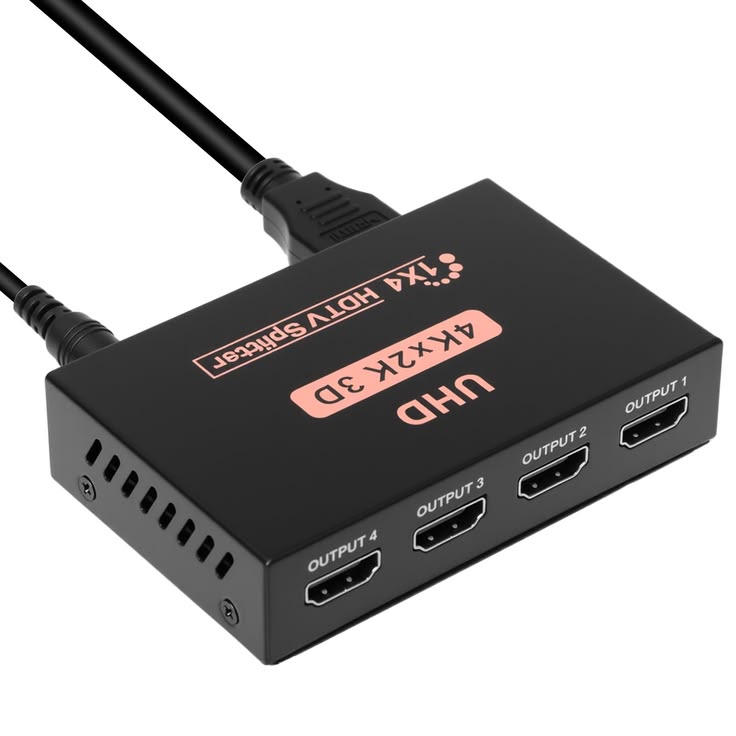
HDMI Splitter Hire and Rental in Kenya
An HDMI splitter is a useful audiovisual device that distributes one HDMI video and audio signal to multiple compatible displays. It allows event organisers to show the same presentation, video, promotional content, or other visual material on several screens using a single source device.
HDMI splitters are useful for corporate conferences, exhibitions, seminars, product launches, training sessions, church events, fashion shows, and other occasions where the same content must be visible in different parts of a venue. Depending on the model, an HDMI splitter may support two, four, or more output connections.
Janeson Rentals provides event equipment hire and rental solutions for clients in Nairobi and across Kenya. If your event requires a laptop, media player, or another HDMI source to feed multiple compatible displays, you can enquire about HDMI splitter hire and rental for your audiovisual requirements.
Choosing the right HDMI splitter involves checking the number of outputs, supported resolution, cable lengths, audio compatibility, and any content-protection requirements. These details help ensure that the source device and connected screens work together correctly.
What Is an HDMI Splitter?
An HDMI splitter is an electronic device that takes a single HDMI input and duplicates its signal across multiple HDMI outputs. The connected displays generally show the same content rather than different content on each screen.
For example, a conference presenter may connect a laptop to an HDMI splitter. The splitter can then send the laptop’s presentation to a main projector and additional monitors, provided the device and displays support the required signal format.
An HDMI splitter is different from an HDMI switch. A splitter distributes one source to multiple destinations, while an HDMI switch allows a user to select between multiple sources for one display or output.
An HDMI splitter also differs from an HDMI matrix, which can route multiple sources to multiple displays in different combinations. Understanding these differences helps you choose the right device for your event.
Why Hire an HDMI Splitter?
1. Display the Same Content on Multiple Screens
The main benefit of an HDMI splitter is that it allows one source to feed several compatible displays. This is useful when attendees are spread across a large room or when a venue has multiple screens.
2. Simplify Presentation Connections
Instead of repeatedly disconnecting and reconnecting cables, an HDMI splitter can provide a central distribution point for a presentation source. This can make a planned audiovisual setup easier to organise.
3. Support Multiple Viewing Locations
A conference may have a main screen at the front and additional monitors positioned around the room. A splitter can help distribute the same visual content to these destinations.
4. Support Audio and Video Distribution
HDMI carries digital video and, in supported configurations, audio through the same connection. A compatible splitter can distribute both, although audio handling depends on the device and connected equipment.
5. Provide a Flexible Rental Solution
Hiring an HDMI splitter can be practical for event organisers who need additional display connections for a particular occasion but do not require permanent ownership of the equipment.
Events That May Require an HDMI Splitter
Corporate Conferences and Business Meetings
Business conferences often use presentation laptops, promotional videos, and speaker slides. An HDMI splitter can send the same source to a projector and additional monitors when the display system requires identical content.
Exhibitions and Trade Shows
Exhibition booths may feature several screens showing the same company presentation, product demonstration, or promotional video. A suitable HDMI splitter can help distribute that content to compatible displays.
Product Launches and Brand Activations
Product launches often use branded videos, product visuals, and presentation slides. If the same content must appear on several screens, an HDMI splitter may be a useful part of the signal distribution setup.
Training Sessions and Workshops
Training rooms may need the same demonstration or presentation to appear on several monitors so participants can follow the material more easily.
An HDMI splitter can help distribute the source to compatible displays, provided the device supports the required resolution and connections.
Church Services and Religious Conferences
Churches and religious gatherings may display lyrics, scripture passages, sermon slides, or videos on multiple screens. An HDMI splitter can distribute a compatible presentation source to several displays showing the same content.
Fashion Shows and Runway Events
Fashion events may use screens to display designer information, promotional videos, sponsor logos, or collection visuals. An HDMI splitter may be suitable when multiple displays need the same feed from one source.
Weddings and Social Events
Some weddings and celebrations use screens to display slideshows, videos, or live content. If the same HDMI source needs to feed more than one display, a splitter may help connect the equipment.
Hybrid Events and Video Presentations
An HDMI splitter may distribute a compatible source to several local displays or devices. However, live streaming usually requires additional capture or encoding equipment, and the splitter should not be assumed to provide streaming functionality.
Key Features to Consider When Hiring an HDMI Splitter
Number of HDMI Outputs
HDMI splitters are available with different output capacities. Count the displays that need to receive the same source and choose a device with enough outputs.
Remember that the number of outputs does not automatically determine the maximum supported resolution or cable distance.
Resolution Support
Different splitters support different video resolutions and refresh rates. Check whether the device supports the required format, such as Full HD or a compatible 4K signal.
The source, splitter, cables, and displays must support compatible formats for the system to work correctly.
HDMI Compatibility
Check the HDMI specifications and features supported by the splitter. Some systems may require particular capabilities for high-resolution video, high refresh rates, or advanced colour formats.
Do not assume that every HDMI splitter supports every modern video format.
HDCP and Content Protection
Some video sources use High-bandwidth Digital Content Protection (HDCP). If protected content is involved, confirm that the splitter and connected devices support the required HDCP version and configuration.
Cable Length
Long HDMI cable runs can affect signal reliability. Consider the distance from the source to the splitter and from the splitter to each display.
For longer distances, suitable active HDMI cables, extenders, or other compatible transmission equipment may be necessary.
Audio Compatibility
If the content includes audio, confirm that the splitter supports the required audio format and that the connected displays or sound equipment can handle it.
Some setups may require separate audio extraction or routing equipment.
Power Requirements
Some HDMI splitters are powered externally, while others may have different power arrangements. Confirm the power requirements and ensure that the correct power supply is available for the device.
How to Choose the Right HDMI Splitter
Start by counting the screens that need to show the same content. If you have a laptop feeding one projector and three monitors, for example, you need a splitter configuration with sufficient compatible outputs.
Next, identify the source device and display specifications. Confirm the resolution, refresh rate, HDMI compatibility, and any audio requirements.
Measure the cable distances between the source, splitter, and screens. If the displays are spread across a large venue, ask whether additional transmission equipment is required.
Determine whether all displays will show identical content. If different screens need separate videos or presentations, an HDMI splitter is not the appropriate standalone solution. An HDMI matrix or another video routing system may be more suitable.
Finally, test the source and every display before the event begins. Confirm that the picture appears correctly on all connected screens and check the audio where required.
HDMI Splitter Hire for Conferences and Exhibitions
HDMI splitter hire can be useful for events where one computer or media player needs to distribute the same content to several displays.
For conferences, this may involve a laptop presentation sent to the main projector and additional monitors. At exhibitions, the same promotional video may need to appear on several screens around a booth.
Before booking, confirm the number of displays, required resolution, cable distances, and audio requirements. If the venue uses a mixture of display types, check whether converters or other signal equipment are needed.
Why Choose Janeson Rentals?
Janeson Rentals provides event equipment hire and rental solutions for clients in Nairobi and across Kenya. Event organisers planning conferences, seminars, product launches, exhibitions, fashion shows, church gatherings, and corporate presentations can enquire about HDMI splitter rental.
When contacting Janeson Rentals, provide your event date, venue, source device, number of displays, resolution requirements, and approximate cable distances. Explain whether the displays will show identical content and whether audio needs to be distributed.
Ask about availability, rental charges, delivery or collection, and any setup arrangements that may be available. Confirm the technical specifications of the proposed splitter before booking.
What to Prepare Before Booking an HDMI Splitter
- Event date and rental duration.
- Venue location and type of event.
- Source device, such as a laptop or media player.
- Number of displays that need the same content.
- Required resolution and refresh rate.
- HDMI cable lengths and display locations.
- Audio distribution requirements.
- HDCP or other compatibility requirements.
- Power supply requirements.
- Whether extenders or converters are needed.
- Delivery, setup, and operating arrangements.
Book an HDMI Splitter with Janeson Rentals
If your event needs one HDMI source to feed multiple compatible displays, contact Janeson Rentals to enquire about HDMI splitter hire and rental in Nairobi and across Kenya.
Share the number of screens, source specifications, resolution, and cable distances to help identify a suitable configuration. Confirm availability, rental pricing, compatibility, and any additional equipment requirements before booking.
Frequently Asked Questions About HDMI Splitter Hire
What does an HDMI splitter do?
An HDMI splitter duplicates one HDMI source signal and sends it to multiple compatible displays.
Can an HDMI splitter show different content on each screen?
Usually, no. A standard HDMI splitter distributes the same source content to all outputs. An HDMI matrix or separate sources may be required to show different content on different screens.
Can I use an HDMI splitter for a projector and television?
Yes, provided the splitter supports the required signal format and both displays are compatible. Differences in resolution or other display capabilities may affect the configuration.
Does an HDMI splitter reduce picture quality?
A compatible, properly functioning splitter should distribute the supported signal without intentionally reducing its quality. Results depend on the device, cables, resolution, and connected equipment.
Is an HDMI splitter the same as an HDMI switch?
No. A splitter sends one source to multiple displays, while a switch selects one of several sources for an output.
Where can I hire an HDMI splitter in Kenya?
Contact Janeson Rentals to enquire about HDMI splitter hire and rental in Nairobi and across Kenya. Confirm availability, output capacity, technical specifications, and rental charges before booking.
Janeson Rentals — Event equipment hire and rental solutions for professional presentations and audiovisual productions across Kenya.



