
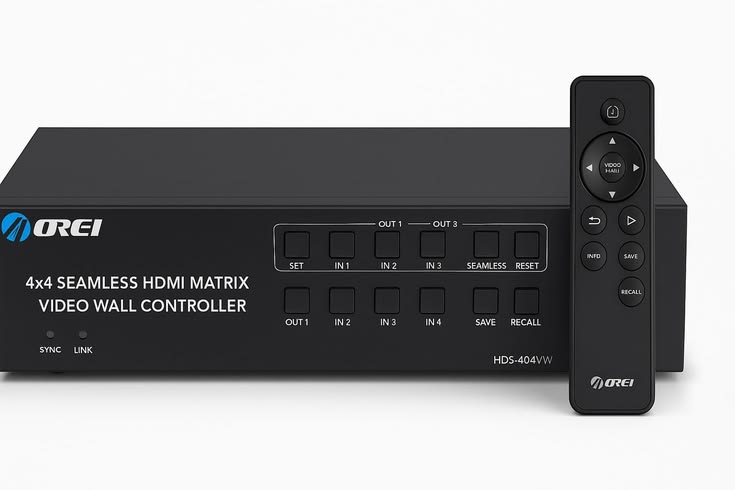
HDMI Video Switcher Hire and Rental in Kenya
An HDMI video switcher is an important piece of audiovisual equipment for events that use multiple video sources and require smooth transitions between them. It allows an operator to switch between compatible HDMI-connected devices, such as laptops, cameras, media players, and other presentation sources, using a central control unit. This makes it useful for conferences, corporate meetings, product launches, exhibitions, live presentations, and event productions where reliable visual content is essential.
Janeson Rentals provides event equipment hire and rental solutions for clients in Nairobi and across Kenya. If you are planning an event that requires multiple video inputs, an HDMI video switcher may help you manage presentations and video feeds more efficiently.
Instead of manually disconnecting and reconnecting cables whenever the presenter changes, an HDMI video switcher allows compatible sources to be connected in advance. An operator can then select the desired input, depending on the switcher’s capabilities. This can help create a more organised presentation workflow and reduce interruptions during a programme.
Whether you are organising a business conference, a training workshop, a church convention, a product launch, or a live event, choosing the appropriate video switching equipment is an important part of audiovisual planning. The right device depends on the number of sources, supported video resolutions, display requirements, and the overall production setup.
What Is an HDMI Video Switcher?
An HDMI video switcher is an electronic device that allows users to select between multiple HDMI video inputs and send the selected source to one or more compatible outputs, depending on the model.
For example, a conference may use one laptop for PowerPoint slides, another for videos, and a camera for a live speaker feed. An HDMI video switcher can allow an operator to change between these sources without repeatedly changing physical connections.
Some switchers are designed for simple presentations, while more advanced models support professional video production features. Depending on the equipment, these features may include multiple outputs, picture-in-picture, transitions, audio handling, multiview monitoring, or integration with live streaming systems.
Not every HDMI switcher includes all these functions. It is important to confirm the specific features and technical specifications before booking.
An HDMI video switcher is also different from an HDMI splitter. A switcher selects one input source for an output, while a splitter generally distributes one input signal to multiple displays. Choosing the correct device helps ensure that the audiovisual system works as intended.
Why Hire an HDMI Video Switcher?
Hiring an HDMI video switcher can be a practical option for event organisers who need professional audiovisual equipment for a specific occasion without purchasing a device for permanent use.
1. Manage Multiple Video Sources
Events often use several content sources throughout the programme. A speaker may use a laptop, the host may introduce a video, and a camera may provide a live feed.
An HDMI video switcher allows compatible sources to be connected in advance and selected as needed. This can make transitions more convenient for the production team.
2. Support Smooth Presentations
Changing cables during a presentation can waste time and interrupt the audience’s attention. With a compatible switcher, the operator can select the next source through the device’s controls.
The actual transition experience depends on the switcher, source devices, display equipment, and signal configuration.
3. Improve Event Production Organisation
A central switching point can help an audiovisual team manage several sources more systematically. It also makes it easier to plan which laptop, camera, or media player will be used at each stage of the event.
This is especially useful when multiple presenters share one screen or when a programme combines slides, videos, and live camera feeds.
4. Flexible for Occasional Events
Purchasing video production equipment may not be practical for organisations that only require it for occasional conferences, workshops, or launches.
HDMI video switcher hire gives event planners an opportunity to enquire about suitable equipment for a particular event and rental period.
5. Support Compatible Display and Production Setups
Depending on the model, an HDMI switcher may work with projectors, monitors, televisions, capture devices, or other compatible equipment.
Before hiring, confirm the input and output connections, supported resolutions, frame rates, and any audio or control requirements.
Events That May Require an HDMI Video Switcher
Corporate Conferences and Business Meetings
Corporate conferences often involve several presenters, presentation laptops, promotional videos, and live camera feeds. An HDMI video switcher can help the production operator select the appropriate source throughout the programme.
For example, the opening presentation may use a company introduction video, followed by a speaker’s slides and then a panel discussion displayed through a camera feed.
A suitable switcher can help coordinate these transitions, provided it supports the required sources and output format.
Product Launches and Brand Activations
Product launches frequently use promotional videos, product demonstrations, branded graphics, and presentation slides.
An HDMI video switcher can allow the production team to move between compatible sources during the launch. This can help maintain programme flow when several types of visual content are planned.
Before the event, test the content and switching sequence to ensure that each source displays correctly.
Church Conferences and Religious Events
Church conferences, conventions, and special services may use presentation laptops, video playback devices, and camera feeds.
An HDMI video switcher can help an audiovisual team select between these sources during sermons, announcements, presentations, and other programme segments.
If the event also involves live streaming, confirm whether the switcher supports the required production workflow. A standard HDMI switcher does not automatically provide streaming or recording functionality.
Training Workshops and Seminars
Training sessions may involve a facilitator’s laptop, a guest speaker’s computer, instructional videos, and demonstrations from other devices.
An HDMI switcher can help the operator change between the connected sources without repeatedly reconnecting cables. This can be useful for workshops where several presenters share a display.
Exhibitions and Trade Shows
Exhibition stands may use laptops, media players, cameras, and other video sources to demonstrate products or display promotional content.
An HDMI video switcher can help exhibitors control which source appears on the connected display. Check the device’s output capabilities and compatibility with the booth’s monitors or screens.
Hybrid Meetings and Live Events
Hybrid events combine in-person participation with remote speakers or online audiences. They may involve presentation computers, camera feeds, and video conferencing equipment.
An HDMI video switcher can form part of the audiovisual setup, but it is only one component. Additional equipment or software may be needed for conferencing, capture, encoding, or streaming.
Confirm the complete signal path before booking equipment for a hybrid event.
Weddings and Private Celebrations
Some weddings, birthdays, anniversaries, and celebrations include slideshows, video tributes, live camera feeds, and entertainment visuals.
An HDMI switcher may be useful when the event requires multiple connected sources to appear on a shared display. For a simple event with one laptop and one screen, a switcher may not be necessary.
Types of HDMI Video Switchers
HDMI video switchers come in different configurations. The most suitable option depends on the number of sources and the required production features.
Basic HDMI Switcher
A basic HDMI switcher allows an operator to select between several connected HDMI sources and send the selected signal to an output.
It may be suitable for simple presentations and small meetings. Confirm the number of inputs and outputs, supported resolution, and switching method before hiring.
Multi-Input HDMI Video Switcher
A multi-input switcher supports several connected sources. This may be useful for conferences with multiple laptops, media players, and other HDMI devices.
The number of available inputs varies by model. Count all planned sources before selecting equipment.
Professional HDMI Production Switcher
Professional models may include advanced controls for live productions, such as transitions, multiple outputs, monitoring, and additional video processing features.
These devices may be appropriate for more complex event productions. Confirm that the specific model supports the required workflow rather than assuming every professional switcher has the same functions.
HDMI Switcher for Live Streaming
Some switchers are designed to work with live production or streaming workflows. Depending on the model, they may support camera switching, audio functions, multiview outputs, or connections to capture and streaming equipment.
An HDMI connection alone does not guarantee direct streaming capability. Check whether a separate capture device, computer, encoder, or streaming platform is required.
How to Choose the Right HDMI Video Switcher
Count the Number of Video Sources
List every device that must connect to the switcher, including laptops, cameras, and media players.
Choose a configuration with enough inputs for all required sources. Allow for any additional devices that may be introduced during the event.
Check Resolution and Frame Rate
Different switchers support different video formats. Common resolutions include Full HD and 4K, but support depends on the particular model.
Check the resolution and frame rate of the source devices, projector, monitors, and other connected equipment. The switcher must be compatible with the required signal format.
Confirm Input and Output Connections
Ensure that the switcher has the correct HDMI inputs and outputs for the equipment being used.
If the production requires additional display feeds, recording, or streaming, verify that the switcher supports those requirements or can work with the necessary accessories.
Consider Audio Requirements
Some switchers pass embedded HDMI audio, while others offer additional audio controls or separate audio connections.
If the event uses a sound system, microphones, music, or separate audio equipment, plan how the sound will be routed. Do not assume that a video switcher can manage every audio requirement.
Review Display Compatibility
The connected projector, television, monitor, or capture device must support the output signal.
Check resolution compatibility, cable lengths, adapters, and any required signal converters before the event. Test the full setup with the actual equipment whenever possible.
Consider the Operator and Control Method
Some switchers use physical buttons, while others offer remote or software-based controls.
For a live event, determine who will operate the equipment and whether that person is familiar with the device. Rehearse source changes before guests arrive.
Plan Cable Management
Multiple video sources can create a large number of cables. Label each input and organise cables to reduce confusion during the programme.
Keep cables away from walkways or secure them appropriately to reduce trip hazards.
HDMI Video Switcher Hire for Corporate Events
For corporate conferences, business forums, and product launches, an HDMI video switcher can help manage multiple presentation sources from one central point.
An event may use a laptop for slides, a second computer for videos, and a camera feed for a panel discussion. With compatible equipment, the operator can select the required source at the appropriate time.
When planning the setup, confirm the number of inputs, output requirements, video resolution, projector compatibility, and audio routing. Test every source before the event starts and prepare a switching plan for the programme.
Why Choose Janeson Rentals?
Janeson Rentals provides event equipment hire and rental solutions for clients in Nairobi and across Kenya. Organisers planning conferences, product launches, exhibitions, training sessions, church events, and other functions can enquire about HDMI video switcher rental for their audiovisual requirements.
Hiring equipment can be useful when you need video switching for a particular event rather than for permanent installation.
When contacting Janeson Rentals, share your event date, venue, number of video sources, desired resolution, and the devices you intend to connect. Explain whether the setup will involve a projector, monitors, cameras, recording, or live streaming.
Before confirming a booking, ask about equipment availability, rental charges, delivery or collection, and any setup or operating support that may be available. Confirm all technical requirements in advance to help ensure the equipment is suitable for the intended use.
What to Prepare Before Booking an HDMI Video Switcher
- Event date: The date and time the equipment is required.
- Venue location: The venue name and town.
- Number of inputs: How many laptops, cameras, or media players will be connected.
- Output requirements: The projector, monitor, capture device, or other equipment receiving the signal.
- Video resolution: The required resolution and frame rate.
- Audio requirements: Whether audio needs to pass through the switcher or use a separate sound system.
- Streaming needs: Whether the event includes online broadcasting or recording.
- Cable requirements: The necessary cable lengths and adapters.
- Operating arrangements: Who will control the switcher during the event.
- Rental duration: How long the equipment will be needed.
Book an HDMI Video Switcher with Janeson Rentals
If your event requires multiple HDMI video sources, contact Janeson Rentals to enquire about HDMI video switcher hire and rental in Nairobi and across Kenya.
Provide the event details and equipment specifications so you can confirm whether a suitable switcher is available for your setup. Ask about pricing, availability, delivery or collection, and any installation requirements before booking.
With compatible equipment and proper preparation, an HDMI video switcher can help make presentations and event visuals easier to manage.
Frequently Asked Questions About HDMI Video Switcher Hire
What does an HDMI video switcher do?
It allows an operator to select between multiple HDMI video sources and send the chosen source to a compatible output.
Can an HDMI video switcher connect multiple laptops?
Yes, if the switcher has enough HDMI inputs and supports the laptops’ video formats. Check the number of inputs and output requirements before booking.
Is an HDMI video switcher the same as an HDMI splitter?
No. A switcher selects between multiple input sources, while a splitter generally distributes one input signal to multiple displays.
Can I use an HDMI video switcher for live streaming?
Some switchers can form part of a live-streaming setup. Depending on the model, additional capture, encoding, computer, or streaming equipment may be required.
Do I need an HDMI video switcher for a simple presentation?
Not necessarily. If you have only one source device connected to one display, a switcher may not be needed. It becomes more useful when you need to change between several sources.
Where can I hire an HDMI video switcher in Kenya?
Contact Janeson Rentals to enquire about HDMI video switcher hire and rental in Nairobi and across Kenya. Confirm the available model, technical specifications, pricing, and booking arrangements.
Janeson Rentals — Event equipment hire and rental solutions for conferences, presentations, and audiovisual productions across Kenya.



