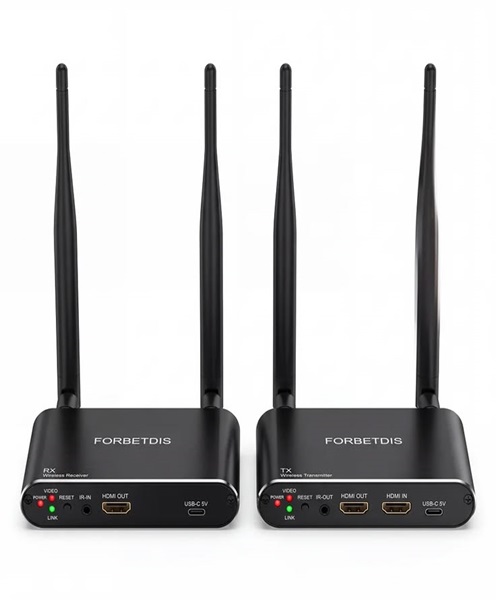
HDMI Wireless Presentation System Hire and Rental in Kenya
Introduction
Presentations are a central part of many professional events. Businesses use them to communicate strategies, demonstrate products, share reports and explain ideas. Training institutions rely on visual content to support learning, while conference organisers use presentations to guide discussions and keep attendees informed.
Traditionally, presenters connect their laptops directly to a screen or projector using an HDMI cable. Although this method remains useful, it can sometimes restrict movement, create cable clutter and make it inconvenient for multiple people to share content.
An HDMI wireless presentation system provides another way to connect compatible devices to a display. Depending on the system, it allows presenters to share their screens or visual content wirelessly, reducing the need for a direct HDMI cable running from the presenting device to the display.
Janeson Rentals offers HDMI wireless presentation system hire and rental in Kenya for corporate events, meetings, seminars, workshops, conferences and exhibitions. Hiring this equipment can help organisers create a more flexible presentation environment without purchasing a system for occasional use.
Whether you are planning a boardroom presentation in Nairobi, a training session or a corporate conference elsewhere in Kenya, the right wireless presentation solution can help simplify how visual content is shared.
What Is an HDMI Wireless Presentation System?
An HDMI wireless presentation system is a device or set of devices that transmits visual content from a compatible source to a display without requiring a direct HDMI cable connection between the source and the receiving display.
Depending on the design, a system may include a wireless transmitter, receiver, connection accessories or software.
The transmitter is connected to or used with the presenting device, while the receiver connects to the display through HDMI. Once configured, the system can transmit compatible visual content to the connected screen.
Some systems use dedicated transmitters that connect to a laptop’s HDMI output. Others use software, wireless network connections or other supported sharing methods.
It is important to distinguish between wireless HDMI transmission and general wireless screen sharing. Not every wireless presentation device uses the same technology or connection method. The compatible devices, supported resolutions, operating requirements and transmission range vary by model.
Before arranging an HDMI wireless presentation system rental, confirm the laptops, tablets or other devices that will be used during the event.
Why Hire an HDMI Wireless Presentation System?
Hiring a wireless presentation system can be useful when an organisation needs a flexible way to share visual content during a temporary event or meeting.
Reduce Presentation Cable Clutter
Direct HDMI connections can create visible cables across tables, presentation areas and walkways.
A compatible wireless presentation system can reduce the need for long HDMI cables between the presenter and display. This can help create a cleaner presentation environment.
Give Presenters More Freedom to Move
Presenters may need to move around the room, interact with participants or demonstrate products while sharing content.
A wireless system can offer more flexibility than a setup that requires the presenter to remain close to a fixed cable connection.
Support Multiple Presenters
Some wireless presentation systems support switching between different presenters or source devices.
This can be useful during meetings where several people need to share slides, documents or other visual material. However, the number of supported devices and the switching method depend on the selected system.
Simplify Temporary Event Setups
Conference venues, hotels and training spaces may not have permanent presentation connections in every room.
A wireless presentation system can provide an additional connection option for compatible equipment, helping organisers adapt the setup to the venue.
Improve Meeting Flexibility
During collaborative meetings, participants may need to share information from different laptops or other devices.
A suitable wireless presentation system can make these transitions more convenient, depending on its supported sharing features.
Avoid Purchasing Equipment for Occasional Use
Businesses that only need wireless presentation technology for specific conferences or training sessions may prefer to hire rather than purchase.
HDMI wireless presentation system rental allows clients to arrange the equipment for the required event period.
Applications of HDMI Wireless Presentation System Rental in Kenya
Wireless presentation equipment can support different event formats and professional environments.
Corporate Meetings and Boardrooms
Business meetings often involve several presenters sharing documents, financial reports, proposals and presentations.
An HDMI wireless presentation system can help compatible devices connect to a shared conference display without requiring every presenter to use a long HDMI cable.
This can make it easier to transition between speakers during a meeting.
Conferences and Seminars
Conference speakers may need to present slides, videos, charts and other visual material.
Wireless presentation equipment can support a more flexible stage or presentation area, especially where speakers use different compatible devices.
Event organisers should test the system with the actual presenter equipment before the programme begins.
Training and Workshops
Trainers may need to share instructional material, software demonstrations and visual examples.
A wireless presentation system can allow a facilitator to move around the room while sharing content, provided the system supports the required connection and operating method.
Product Demonstrations
Companies introducing new products may need to display demonstrations, product information and promotional videos.
A compatible wireless HDMI presentation setup can help presenters share content with a connected monitor, television or projector.
Educational Presentations
Schools, colleges and training institutions can use wireless presentation equipment during lessons, workshops and demonstrations.
The system can be useful when different presenters or instructors need to share material from their own devices.
Exhibitions and Corporate Activations
Exhibition teams may use wireless presentation equipment to display product information, promotional content and demonstrations on screens.
It can also help when the presenting device needs to be positioned away from the display.
Hybrid Meetings
A wireless presentation system may be used to share content on a room display while a separate video conferencing setup connects remote participants.
The wireless display connection and online meeting connection should be tested independently to confirm that both work as intended.
How an HDMI Wireless Presentation System Works
The exact process depends on the equipment model, but a typical system follows a straightforward arrangement.
First, the receiver is connected to a compatible display using an HDMI cable. This display may be a conference monitor, television, projector or another HDMI-compatible screen.
Next, the transmitter or supported sharing device is connected to the presenting source. Depending on the system, this may involve an HDMI transmitter, a USB device, software or a network-based connection.
The transmitter and receiver are then paired or configured according to the manufacturer’s instructions.
Once the connection is established, the presenter can send compatible visual content to the display. The displayed content may include slides, documents, images, videos or a mirrored computer screen, depending on the system’s capabilities.
Before the event, organisers should test the entire connection. This includes confirming that the source device recognises the system, the receiver is connected correctly and the display shows the intended content.
Important Features to Consider When Hiring a Wireless Presentation System
Not all wireless presentation systems offer the same functionality. Consider these factors when arranging an HDMI wireless presentation system rental.
HDMI Compatibility
Check that the receiving unit supports the HDMI connection available on the intended monitor, television or projector.
The source device must also be compatible with the transmitter or sharing method.
Supported Resolution
Resolution determines the level of detail that can be displayed.
If your presentation contains detailed charts, small text or high-resolution video, confirm that the wireless system supports the required resolution and that the display can handle it.
Transmission Range
Wireless systems have different operating ranges. The suitable range depends on the venue layout, distance between transmitter and receiver, obstacles and the surrounding wireless environment.
The equipment should be tested in the actual room whenever possible.
Latency
Latency refers to the delay between the source device and the displayed image.
For ordinary slideshows, a small delay may not be particularly noticeable. For live demonstrations, interactive content or video playback, latency may be more important.
Confirm that the selected system is suitable for the intended activity.
Multiple Presenters
If several people will share content, check whether the system supports multiple transmitters or devices.
Also establish how users switch between presenters and whether a central control device is required.
Wireless Network Requirements
Some wireless presentation systems operate through dedicated transmitter-and-receiver connections, while others rely on an existing network or software-based sharing.
Check whether the selected system requires Wi-Fi, a local network, internet access or a dedicated connection.
Security and Access Control
For corporate and confidential presentations, it is important to understand how the system controls access to the display.
Some systems provide pairing controls, access codes or other security features. The available options depend on the model.
HDMI Wireless Presentation System for Different Venues
The most suitable setup depends on the room and how presenters will use the display.
Boardrooms: A wireless presentation arrangement can help participants share compatible laptops and presentation material during meetings.
Conference rooms: Wireless presentation equipment can support speakers who need to connect to a shared screen.
Training rooms: Trainers can share content while moving around the room, subject to system range and compatibility.
Hotels and event venues: Temporary wireless presentation equipment can support conferences and meetings where permanent display connections are limited.
Exhibition spaces: Wireless transmission can help position a presentation source away from the display area.
Classrooms: Compatible systems can support lessons and demonstrations where instructors need to display material from different devices.
Equipment That Can Complement an HDMI Wireless Presentation System
A wireless presentation system is often part of a larger audiovisual setup. Depending on the event, clients may also require:
-
Conference monitors for displaying shared content.
-
Large-screen televisions for meeting rooms and presentation spaces.
-
Projectors and projection screens for larger audiences.
-
LED screens for conferences and corporate events.
-
Laptops and presentation computers.
-
HDMI cables for receiver-to-display connections.
-
HDMI splitters for supported multi-display arrangements.
-
HDMI switches for selecting between compatible sources.
-
HDMI extenders for suitable wired transmission requirements.
-
DisplayPort and USB-C adapters for compatible source devices.
-
Presentation switchers for managing multiple visual inputs.
-
PA systems for clear audio during presentations.
-
Wireless microphones for presenters and speakers.
-
Conference cameras for hybrid meetings.
The exact equipment combination should be based on the venue, source devices and number of displays required.
Preparing for an HDMI Wireless Presentation System Rental
Before hiring a wireless presentation system, identify the devices that presenters will use. This may include laptops, tablets or other compatible sources.
Check the available output ports on those devices. A laptop with HDMI output may connect differently from one that relies on USB-C or DisplayPort. If adapters are required, they should be compatible with both the source device and the presentation system.
Next, confirm the display equipment. Establish whether the receiver will connect to a television, monitor, projector or LED display processor. The HDMI input and supported resolution should be checked.
Consider the distance between the presenter and the display. The transmitter and receiver should be positioned within the supported operating range, with attention to walls, obstructions and wireless interference.
If several presenters will share content, establish the order of presentations and how users will switch between devices.
Finally, test the complete arrangement before the event. Confirm that the source device connects successfully, the display receives the signal and the content appears correctly. Test videos and other demanding content separately if they are part of the programme.
Why Choose Janeson Rentals for HDMI Wireless Presentation System Hire?
Janeson Rentals provides event and audiovisual equipment hire for businesses, organisations, event planners and individuals in Kenya.
Our HDMI wireless presentation system hire and rental service is suitable for clients who want to share visual content during meetings, conferences, training sessions, seminars and corporate presentations.
We recognise that presentation requirements vary. Some clients need wireless screen sharing for a small boardroom, while others require a wireless connection as part of a larger conference display arrangement.
Discussing the source devices, display equipment, venue layout and presentation requirements before booking helps identify a suitable configuration.
Janeson Rentals serves clients in Nairobi and across Kenya. Our wider AV equipment range can also support related requirements, including monitors, televisions, projectors, LED screens, cables, adapters and audio equipment.
Book an HDMI Wireless Presentation System for Hire in Kenya
Make presentations more flexible with HDMI wireless presentation system hire and rental from Janeson Rentals.
Contact Janeson Rentals to enquire about availability and equipment requirements for your event in Nairobi or elsewhere in Kenya.
Share your event date, venue, number of presenters, source devices and display requirements. This information will help establish which wireless presentation arrangement is suitable.
Whether you are preparing for a boardroom meeting, corporate conference, seminar, training programme or exhibition, Janeson Rentals can help you plan the audiovisual equipment needed to share your content effectively.