
Introduction
LED screens are a popular feature of modern event production because they allow organisers to display presentations, promotional videos, live camera feeds, animations and branded content on large digital displays. They are widely used at concerts, conferences, exhibitions, weddings, product launches, fashion shows, award ceremonies and corporate functions.
To display content correctly, an LED screen needs more than LED panels and cables. Depending on the system, it may also require an LED video processor to manage video signals, adjust image scaling and prepare the content for the display’s configuration.
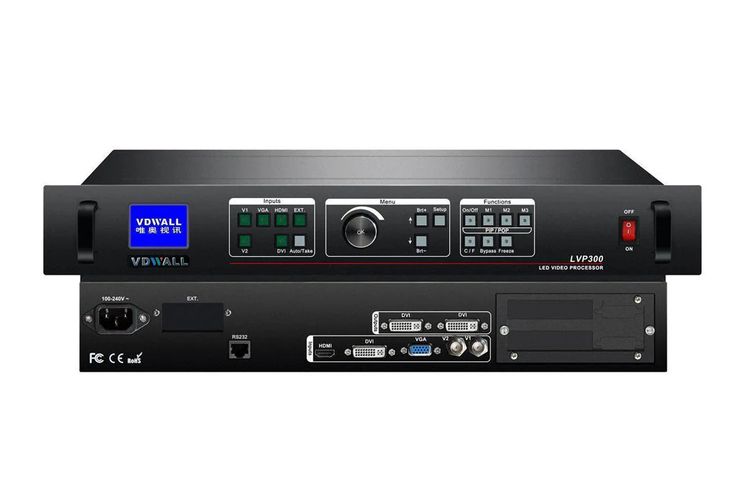
An LED video processor is a specialised piece of audiovisual equipment used to process incoming video signals and prepare them for an LED display system. Depending on the model, it may support input selection, scaling, resolution conversion, image positioning, cropping, multi-window layouts and other processing functions. Some units also incorporate LED sending functionality, while others work with separate sending cards or display controllers.
Janeson Rentals provides event equipment hire and rental solutions in Nairobi, Kenya. If you are organising a concert, corporate conference, exhibition, product launch or private event that requires an LED screen, you can enquire about suitable video-processing equipment for your production.
Choosing the right processor helps the technical team match the content source to the screen’s requirements and plan a more coordinated visual presentation.
What Is an LED Video Processor?
An LED video processor is a device that receives video signals from sources such as laptops, media players, cameras or video switchers and processes them for delivery to a display system.
Its functions vary by model. Some processors can scale an input signal to suit the LED screen’s pixel dimensions, select between multiple input sources, adjust image positioning or manage different display areas. Advanced models may support several inputs, multiple outputs, picture-in-picture layouts or other specialised features.
An LED video processor may be used alongside a separate sending card and receiving-card system. In other installations, processing and sending functions may be integrated into the same device.
The processor must be selected according to the LED display’s resolution, signal requirements, connection types, layout and the content sources used during the event. A processor designed for one system may not be suitable for another.
Why an LED Video Processor Is Important
1. Helps Match Video Signals to LED Screens
Video sources do not always produce signals that match the exact pixel dimensions of an LED screen. A processor with suitable scaling and conversion features can help prepare the input signal for the display.
This is especially useful when content originates from standard laptops or media players but must be displayed on an LED screen with a custom resolution.
2. Supports Multiple Video Sources
An event may use a presentation laptop, media player, live camera feed and other sources. Depending on its specifications, an LED video processor can accept multiple inputs and allow the production team to select the appropriate source.
Some events may require a separate video switcher, particularly when several sources need to be managed with advanced live-production functions. The technical team should confirm the equipment arrangement before booking.
3. Helps Create Flexible Screen Layouts
Certain video processors support features such as image cropping, positioning, multi-window layouts or picture-in-picture. These functions can help production teams present content in different formats when supported by the equipment.
For example, a conference may need a presentation to appear alongside a live camera feed, while a product launch may require a combination of video and branded graphics.
4. Supports Professional Event Presentations
Visual content often plays a central role in modern events. A concert may use animated backgrounds, while a conference may rely on presentations and live camera feeds.
An appropriately configured video processor helps manage the incoming signals and prepare them for the LED screen. This supports a more controlled visual presentation when the entire display system is correctly configured.
5. Helps Coordinate Different Content Resolutions
Presentations, videos and camera sources may use different resolutions and formats. A processor with suitable capabilities can help convert or scale supported signals to match the display requirements.
The production team should test all planned sources in advance to confirm that the processor supports their formats and that the content appears correctly.
6. Provides a Practical Rental Option
Professional video processors can be expensive, and their specifications may vary considerably. Hiring may be practical for event organisers who need specialised processing equipment for a particular production rather than throughout the year.
Renting also allows planners to enquire about equipment suited to a particular LED screen configuration, subject to availability and technical compatibility.
Events That Require LED Video Processors
Concerts and Music Festivals
Concerts often use large LED displays for live camera feeds, performer visuals, animations, sponsor branding and pre-recorded videos. Productions may involve several sources that need to be delivered to the screen in coordination with the performance.
The video processor should support the screen resolution, input formats and required display layout.
Corporate Conferences and Seminars
Conferences use LED screens to display presentation slides, speaker information, videos and remote participation content. Some productions also need to switch between a presentation and a live camera feed.
A suitable processor can help prepare these signals for the LED display, while additional equipment may be required for complex switching arrangements.
Product Launches
Product launches often feature branded videos, product demonstrations, animations and presentations. A video processor can help the technical team manage the source signal and match it to the screen configuration.
Testing the planned video files and presentation devices before the event is important, especially when the programme includes timed visual cues.
Exhibitions and Trade Shows
Exhibitors use LED screens to display product demonstrations, promotional videos and branded content. A video processor may help scale the content to the display dimensions and manage different inputs.
The equipment should be selected to suit the exhibition screen and the content requirements of the stand.
Fashion Shows
Fashion shows often use LED screens for designer branding, collection themes, sponsor messages and live runway footage. Visual content may need to change according to the running order.
A properly configured processor helps the production team prepare video signals for the screen, while coordination with the video playback and show-control team supports smoother transitions.
Weddings and Private Celebrations
LED screens at weddings, birthdays and anniversaries may display photographs, videos, live footage and personalised messages. A suitable video processor can help deliver supported source signals to the screen at the required resolution.
Award Ceremonies and Gala Dinners
Award ceremonies often combine presentation slides, nominee profiles, sponsor videos, winner announcements and live footage. Processing equipment can help the technical team manage the visual presentation across compatible LED screens.
Church Conferences and Worship Events
Churches may use LED screens for lyrics, scripture, sermons, announcements and live camera feeds. Depending on the screen and signal setup, a video processor can help prepare content from the required sources for display.
How to Choose the Right LED Video Processor
Choosing the right processor begins with understanding the display and the content sources.
LED screen resolution: Determine the screen’s total pixel dimensions and whether the processor supports the required output configuration.
Input connections: Identify the connections required by the source devices, such as HDMI, DisplayPort, SDI or other supported interfaces. Do not assume that every processor supports every connection type.
Input resolution and format: Check whether the processor supports the resolutions, refresh rates and signal formats used by the laptops, cameras or media players.
Scaling and conversion: Establish whether the processor needs to scale the image, convert resolutions or adjust the content to fit the display.
Number of sources: Count the devices that will provide video during the event and determine whether the processor can accommodate them or whether a separate switcher is required.
Output configuration: Confirm the number and type of outputs, supported pixel capacity and compatibility with the LED sending system.
Advanced functions: If you need multi-window layouts, picture-in-picture, cropping or other processing features, verify that the selected model supports them.
Control system compatibility: Check whether the processor works with the existing sending card, receiving cards, LED cabinets and configuration software.
Technical support: Arrange for a qualified audiovisual technician to configure and test the system before the event.
Backup planning: For important events, prepare backup content sources and suitable spare cables, and establish a plan for responding to equipment issues.
These considerations help ensure that the processor is suited to the intended production.
LED Video Processor Hire Versus Buying
Benefits of Hiring
Hiring an LED video processor may be suitable when you need processing equipment for a specific conference, concert, exhibition or corporate event. It can reduce the need to purchase a specialised device that may not be used regularly.
Rental can also be helpful when different events require different processing features. One production may need basic signal scaling, while another may require multiple inputs or advanced screen layouts.
Benefits of Buying
Purchasing may be suitable for audiovisual companies and production businesses that frequently operate the same LED screen systems. Ownership offers direct access to the processor but also requires maintenance, storage, staff familiarity and attention to compatibility as equipment changes.
Making the Right Decision
Consider how often the processor will be used, the features required, the screen configuration, the total cost and the availability of technical support. Before renting, provide the supplier with the screen specifications and input-source details so the correct equipment can be identified.
Janeson Rentals can be contacted to discuss your event equipment needs and enquire about availability for your production.
Why Choose Janeson Rentals?
Janeson Rentals is an event equipment hire and rental company based in Nairobi, serving event requirements in Nairobi and across Kenya. Event organisers can enquire about equipment solutions for concerts, conferences, exhibitions, corporate functions, fashion shows and private celebrations.
Practical Event Planning
Different events require different video-processing functions. Sharing your event brief, screen specifications and content sources helps clarify the type of equipment required.
Solutions for Different Event Formats
Whether you are planning a conference presentation, concert visual production, exhibition display or product launch, the processor should match the intended content and screen configuration.
Nairobi-Based Enquiries
Organisers in Nairobi can contact Janeson Rentals to discuss equipment requirements. For events outside Nairobi, confirm delivery arrangements, timing and availability before making final plans.
Flexible Rental Arrangements
Hiring may help event organisers access specialist equipment for a specific project without purchasing it permanently. Availability, rental duration and technical support should be confirmed during the enquiry.
Attention to Equipment Compatibility
Video processors vary in their supported inputs, outputs, resolutions and functions. Sharing the display details before booking helps the technical team assess whether the equipment is suitable for your event.
How to Book an LED Video Processor for Hire
- Share your event details: Provide the event date, venue, event type and expected audience size.
- Identify the LED screen: Share its dimensions, resolution, manufacturer and control-system details where available.
- List the video sources: Indicate whether you will use laptops, cameras, media players or a video switcher.
- Describe the required functions: Explain whether you need scaling, multiple inputs, signal conversion, picture-in-picture or other features.
- Confirm compatibility: Ask the technical team to verify the processor against the screen and the other display equipment.
- Request a quotation: Confirm availability, rental rates, delivery or collection, setup assistance and any additional charges.
- Test the system: Check all sources, output settings, display mapping and content playback before the event begins.
For major productions, arrange equipment checks well in advance to allow time for troubleshooting and configuration.
Frequently Asked Questions
1. What does an LED video processor do?
An LED video processor receives and processes video signals for an LED display system. Depending on the model, it may scale images, convert resolutions, select inputs or manage display layouts.
2. Can I hire an LED video processor in Nairobi?
You can enquire with Janeson Rentals about LED video processor hire in Nairobi. Confirm the required specifications, availability and rental terms before booking.
3. Is an LED video processor the same as an LED controller?
The terms can overlap, but they do not always mean the same thing. A video processor focuses on functions such as signal processing, scaling and input management, while an LED controller may refer more broadly to the equipment managing the display system. Some products combine these functions.
4. Can an LED video processor connect to a laptop?
Many processors support laptop video sources through compatible connections. The supported ports, resolutions and signal formats vary by model, so compatibility should be checked before the event.
5. Do all LED screens need a separate video processor?
No. The required equipment depends on the LED display architecture and the production requirements. Some systems include processing functions within a controller, while others use a separate video processor.
6. Can one video processor manage multiple LED screens?
Some processors support multiple outputs or display configurations, but the capacity varies by model. The required screen layout, total resolution and output specifications must be checked.
7. Should an LED video processor be tested before the event?
Yes. Testing helps confirm signal compatibility, screen resolution, content playback and display settings. It also gives the technical team time to identify and resolve issues before the audience arrives.
Hire an LED Video Processor from Janeson Rentals
An LED video processor can be an important part of a well-planned display system, helping the production team prepare video signals for compatible LED screens. Whether you are organising a concert, corporate conference, exhibition, fashion show, product launch or private celebration, selecting suitable processing equipment is essential.
Contact Janeson Rentals to enquire about LED video processor hire and rental in Nairobi and across Kenya. Provide your LED screen specifications, video sources, event date and required processing features so availability and compatibility can be assessed.
Plan your visual production carefully and test the complete LED display system before the event for a more coordinated presentation.



