
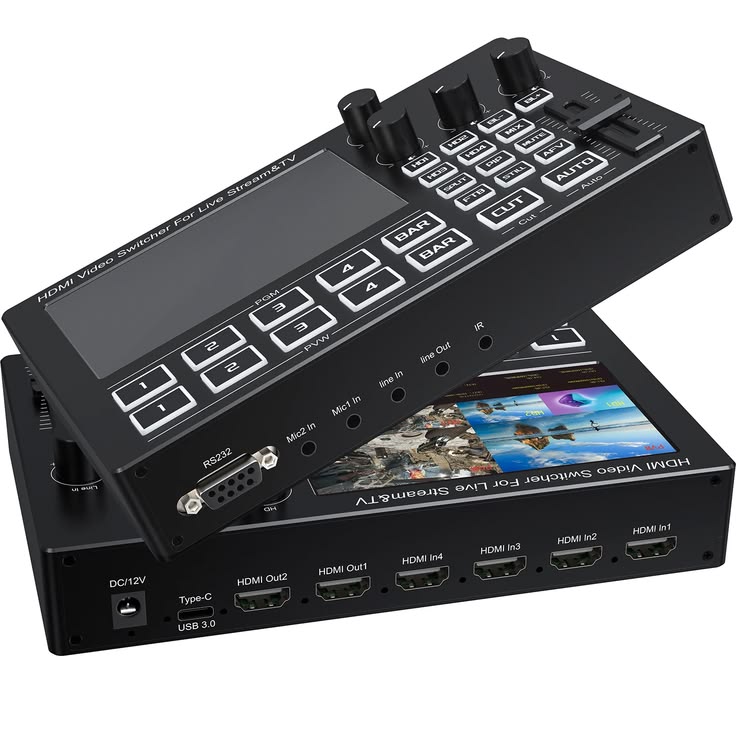
Live Production Switcher Hire and Rental in Kenya
A live production switcher is a specialised audiovisual device used to manage multiple video sources and create a coordinated live programme output. It allows a production operator to select between cameras, presentations, video playback, and other compatible sources as an event unfolds.
Live production switchers are commonly used for corporate conferences, concerts, church services, award ceremonies, product launches, sporting productions, hybrid events, and live-streaming projects. They can help production teams control the visual content sent to venue screens, recording systems, or compatible broadcasting and streaming equipment.
Janeson Rentals provides event equipment hire and rental solutions for clients in Nairobi and across Kenya. If you are organising a live event that requires several cameras or video sources, you can enquire about live production switcher rental for your technical requirements.
Unlike a simple video selector, a live production switcher may include advanced production functions such as preview and programme buses, transitions, multiview monitoring, picture-in-picture, keying, graphics integration, and multiple outputs. These capabilities depend on the equipment model.
Selecting a suitable live production switcher requires careful planning. The production team must consider the number of video inputs, supported resolutions, connection standards, required outputs, operator controls, and whether the event will be recorded or streamed online.
What Is a Live Production Switcher?
A live production switcher is a device that enables an operator to manage and switch between multiple video sources in real time.
For example, a conference may use a wide-angle camera to capture the stage, a second camera for close-ups of the main speaker, a third camera for panel discussions, and a laptop for presentation slides. A live production switcher can help the operator select which source appears on the programme output at different points in the event.
Many production switchers include a preview function, allowing the operator to prepare a source before sending it to the main output. Depending on the model, the operator may also use transitions, overlays, picture-in-picture, and other production effects.
A live production switcher can form part of a larger production system that includes cameras, monitors, microphones, audio equipment, recorders, encoders, and streaming software. It does not automatically replace all these devices.
Some switchers include streaming or recording functions, while others require separate equipment. Confirm the capabilities of the specific model and the full production workflow before booking.
Why Hire a Live Production Switcher?
1. Manage Multiple Cameras in Real Time
Live events can benefit from several camera angles. A wide shot shows the overall stage, while a close-up captures a speaker or performer.
A live production switcher allows the operator to select between compatible camera feeds as the event progresses. This can help the production team provide more varied visual coverage.
2. Coordinate Different Video Sources
Live productions may combine cameras, presentation computers, pre-recorded videos, and graphic content.
A suitable switcher can help the operator manage these sources through a central control system. This is useful when the event programme moves between speeches, presentations, demonstrations, performances, and video playback.
3. Prepare Transitions Before They Appear
Many production switchers offer preview and programme controls. These allow an operator to prepare the next source and then transition to it when appropriate.
The exact controls vary by model, but a planned switching workflow can help reduce mistakes during live production.
4. Support Live Displays and Streaming Workflows
The switched programme output may be used for venue screens, recording, or a compatible live-streaming setup.
The final arrangement depends on the switcher’s outputs and the requirements of the display or streaming system. Additional equipment may be necessary.
5. Adapt to Different Production Sizes
Some live production switchers are designed for relatively simple productions, while others support more complex multi-camera workflows.
Hiring can allow event organisers to enquire about equipment suited to their particular production without necessarily purchasing specialised hardware permanently.
Events That May Require a Live Production Switcher
Corporate Conferences and Summits
Corporate conferences may feature keynote speakers, panel discussions, audience questions, presentation slides, and promotional videos.
A live production switcher can help coordinate the camera feeds and other sources used during the programme. The output may be sent to venue displays, recording equipment, or a compatible streaming system.
For a large conference, plan the camera positions, number of sources, output destinations, and switching sequence before the event.
Concerts and Music Festivals
Concerts and music festivals often use multiple cameras to capture performers, musicians, and stage activity.
A live production switcher can help the video team move between different camera angles and selected visual sources. This may support large-screen displays, recording, or online broadcasting.
The equipment must be selected according to the number of cameras, required resolution, available connections, and production complexity.
Church Services and Religious Conventions
Church services and conventions may involve several cameras, worship presentations, lyrics, scripture passages, announcements, and pre-recorded videos.
A live production switcher can help coordinate the visual programme for in-venue displays, recording, or live streaming. Confirm that the switcher supports the church’s cameras and presentation equipment.
For online broadcasts, establish how the programme output will reach the streaming platform and whether additional encoding or capture equipment is needed.
Product Launches and Brand Activations
Product launches often combine live demonstrations, promotional videos, presentation slides, and close-up camera coverage.
A live production switcher can help the operator select the right source at each stage. If the event includes branded graphics or picture-in-picture, check whether the chosen device supports those functions.
Test all video sources and rehearse the switching sequence before the launch begins.
Award Ceremonies and Gala Events
Award ceremonies involve several types of visual content, including presenter shots, winner announcements, performance coverage, and video tributes.
A live production switcher can help the production team manage the programme output while the event progresses. Plan the camera assignments and transitions to ensure important moments are covered.
Hybrid Events and Online Conferences
Hybrid events combine in-person participation with remote presenters or online viewers. They may need camera feeds, slides, remote speaker feeds, and video playback.
A live production switcher can help manage the visual programme, but remote participation and streaming may require separate conferencing software, capture devices, encoders, or other equipment.
Confirm the entire workflow, including audio, before booking.
Educational Events and Training Productions
Universities, training organisations, and professional institutions may use multiple cameras to record lectures, panel discussions, demonstrations, and educational events.
A live production switcher can help the production team manage the camera views and presentation content. Consider whether the final output needs to be displayed in the room, recorded for later use, or streamed to remote learners.
Sporting and Community Events
Some sporting and community events use multiple cameras to capture different areas of an activity.
A live production switcher may be useful where camera feeds need to be selected for a live display, recording, or broadcast-style production. Outdoor events require additional planning for cable protection, weather conditions, power, and equipment security.
Common Features of a Live Production Switcher
Multiple Inputs
A live production switcher can support multiple video sources, but the number of inputs varies by model.
Count all planned cameras, laptops, media players, and other sources before booking. Confirm whether each input supports the required connection and video format.
Preview and Programme Controls
Some switchers provide separate preview and programme controls. The preview output allows the operator to prepare a source, while the programme output is the video currently being sent to the destination.
This arrangement can help operators manage live transitions with greater control.
Video Transitions
Depending on the device, transition options may include cuts, fades, wipes, or other effects.
These features can support a polished visual programme, but the available choices differ by model. Confirm which transitions are required for your production.
Multiview Monitoring
Multiview monitoring displays several sources and production status views on a compatible monitor.
It can help operators see which cameras are available and prepare the next source. If multiview is important to the production, confirm that the switcher supports it.
Picture-in-Picture and Keying
Some switchers support picture-in-picture, overlays, or chroma keying. These functions can be useful for combining a presenter with presentation slides, displaying graphics, or creating branded visual layouts.
Check the specific model’s capabilities before planning the production around these functions.
Multiple Output Options
Live production may require separate outputs for venue displays, monitors, recording, or streaming equipment.
Check the number and type of outputs supported by the switcher. Additional distribution equipment or signal converters may be necessary when the destinations use different connections.
Streaming and Recording Integration
Some production systems include integrated streaming or recording functions, while others require external equipment.
If your event needs online broadcasting or recording, confirm how the switcher’s output will connect to the capture device, encoder, computer, or recording system.
How to Choose the Right Live Production Switcher
Determine the Number of Sources
Prepare a complete list of cameras, laptops, media players, and other video sources. Choose a switcher with sufficient compatible inputs.
Remember to include any remote speaker feeds or additional content sources that may be introduced during the event.
Check Connection Standards
Identify whether the sources use HDMI, SDI, or other connections. Confirm that the switcher accepts the required connection types.
If converters are needed, include them in the equipment plan and verify that they support the required resolution and frame rate.
Confirm Resolution and Frame Rate
The switcher, cameras, displays, and other connected devices must support compatible video formats.
Check the specifications of the full signal chain rather than assuming that all devices support the same resolution.
Establish the Output Destinations
Determine whether the production output will feed venue screens, a projector, a recorder, a streaming encoder, or several destinations.
Check the available outputs and any additional distribution or conversion equipment needed.
Identify Required Production Functions
Decide whether you need preview and programme controls, multiview monitoring, picture-in-picture, graphics, or advanced transitions.
Choose a model that supports the required functions and avoid assuming that every live production switcher includes the same capabilities.
Plan Audio and Synchronisation
Live events may require microphones, music, commentary, and audio from video playback.
Some switchers support embedded audio or selected audio functions, but a separate audio mixer may be needed. Plan how the audio will be mixed and synchronised with the video.
Prepare the Production Team
Assign an operator who understands the equipment and prepare a rundown showing when each source should appear.
Label the inputs, check the cable connections, test every source, and rehearse the major transitions before the event begins.
Live Production Switcher Hire for Corporate Events
A live production switcher can be valuable for conferences, summits, product launches, and corporate presentations that use multiple cameras and video sources.
It can help the production operator coordinate speaker views, panel discussions, presentation slides, and promotional videos. The output may be used for venue screens, recording, or a compatible streaming workflow.
Before booking, confirm the number of sources, required inputs, supported video formats, output destinations, and production features. A technical rehearsal can help identify connection issues before the programme begins.
Live Production Switcher Rental for Streaming and Multi-Camera Events
Live streaming and multi-camera productions require careful coordination of video sources and output destinations.
A live production switcher can help select the programme feed, but streaming may also require an encoder, capture equipment, computer, software, and reliable internet connectivity.
When planning your event, share the number of cameras, connection standards, desired resolution, streaming platform requirements, and recording needs. This information can help you establish the equipment configuration required for the production.
Why Choose Janeson Rentals?
Janeson Rentals provides event equipment hire and rental solutions for clients in Nairobi and across Kenya. Organisers planning conferences, concerts, church conventions, product launches, award ceremonies, hybrid events, and other live productions can enquire about live production switcher rental.
Hiring specialist equipment may be a practical choice when you need it for a specific event rather than for permanent use.
When contacting Janeson Rentals, provide the event date, venue, number of cameras and other sources, connection types, required production features, and intended output destinations. Explain whether the event includes live streaming, recording, or venue displays.
Before confirming your booking, ask about availability, rental charges, delivery or collection, and any setup or operating arrangements that may be available. Confirm the equipment’s technical capabilities and compatibility with the rest of your production system.
What to Prepare Before Booking a Live Production Switcher
- Event date: When the switcher is required.
- Venue location: The venue name and town.
- Production type: Conference, concert, church service, hybrid event, or live stream.
- Number of sources: Cameras, laptops, media players, and other video feeds.
- Connection types: HDMI, SDI, or other required formats.
- Resolution and frame rate: The intended production format.
- Required features: Transitions, preview controls, multiview, picture-in-picture, or graphics.
- Output destinations: Projectors, venue displays, recorders, or streaming equipment.
- Audio requirements: Microphone, music, and playback audio routing.
- Streaming and recording: Any additional capture or encoding requirements.
- Operating arrangements: Who will manage the switcher during the event.
- Rental duration: The time needed for setup, rehearsal, and the event itself.
Book a Live Production Switcher with Janeson Rentals
If you are planning a multi-camera event or live production, contact Janeson Rentals to enquire about live production switcher hire and rental in Nairobi and across Kenya.
Provide your technical requirements so you can confirm whether a suitable switcher configuration is available. Ask about supported inputs, output options, technical specifications, rental prices, and delivery or collection arrangements before booking.
With compatible equipment, careful planning, and a rehearsed switching workflow, a live production switcher can help your team manage video content more effectively throughout the event.
Frequently Asked Questions About Live Production Switcher Hire
What does a live production switcher do?
It allows an operator to select and manage multiple video sources in real time, creating a programme output for compatible displays, recording systems, or streaming workflows.
What is the difference between a video switcher and a live production switcher?
A basic video switcher may simply select between inputs. A live production switcher may provide additional functions such as preview and programme controls, transitions, multiview monitoring, overlays, and multiple outputs. Capabilities vary by model.
Can a live production switcher be used for live streaming?
Yes, it can form part of a live-streaming setup. Depending on the model, additional capture, encoding, computer, software, and internet equipment may be required.
How many cameras can a live production switcher support?
The number depends on the model and its available inputs. Count all cameras and other sources before choosing equipment.
Can a live production switcher handle both HDMI and SDI?
Some models support both connection types, while others use only one standard. Check the equipment specifications and determine whether converters are needed.
Where can I hire a live production switcher in Kenya?
Contact Janeson Rentals to enquire about live production switcher hire and rental in Nairobi and across Kenya. Confirm availability, technical specifications, rental charges, and setup requirements before booking.
Janeson Rentals — Event equipment hire and rental solutions for live events, conferences, multi-camera productions, and audiovisual presentations across Kenya.



