
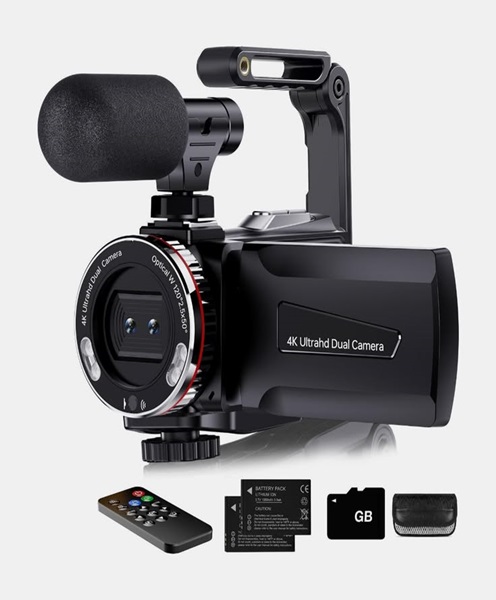
Live Streaming Camera Hire and Rental in Kenya
Live streaming has become an important part of modern event production. Businesses, churches, educational institutions, event organisers, media teams and entertainment professionals increasingly use live broadcasts to reach audiences beyond the physical venue. Whether an event is taking place in a conference room, hotel ballroom, church auditorium, outdoor venue or exhibition space, a suitable live streaming camera helps capture the action and deliver it to viewers watching online.
Janeson Rentals offers live streaming camera hire and rental in Kenya, giving event organisers and production teams access to camera equipment for temporary projects without necessarily having to purchase expensive equipment. From corporate presentations and hybrid conferences to church broadcasts, interviews, concerts and product launches, renting a suitable camera can help improve the quality and consistency of a livestream.
A live streaming camera is selected according to the production requirements. Some events need a compact camera that can connect directly to a computer, while others require professional video cameras with HDMI or SDI outputs for use with a video switcher or streaming encoder. The right choice depends on the venue, camera position, lighting, audio arrangements, broadcast platform and expected production quality.
What Is a Live Streaming Camera?
A live streaming camera is a camera used to capture video for immediate transmission over the internet or through a live production system. Instead of recording footage solely for editing and viewing later, the camera supplies a live video feed that can be sent to a streaming computer, hardware encoder, video switcher or compatible broadcasting device.
Live streaming cameras are used in many types of productions. A small webinar might use a single camera connected to a computer, while a large conference could use several cameras positioned around the venue. A concert or church service may require cameras that can capture speakers, performers, musicians and audience activity from different angles.
Depending on the model, a live streaming camera may offer USB, HDMI, SDI or network-based video connectivity. Some cameras are designed for direct computer connections, while others are intended for professional production environments where additional equipment handles video switching, encoding and distribution.
The term live streaming camera describes the camera’s role in a production rather than one particular camera design. A suitable option may be a mirrorless camera, camcorder, PTZ camera, broadcast camera or another video camera with compatible outputs.
Why Hire a Live Streaming Camera Instead of Buying One?
Purchasing professional video equipment can require a substantial investment. In addition to the camera itself, a production may need lenses, batteries, tripods, power supplies, memory cards, video cables, monitors and other accessories. If the equipment is only required for occasional events, hiring can be a practical alternative.
1. Reduce equipment costs
Live streaming camera hire allows organisers to access suitable equipment for a particular event without committing to the full purchase price. This can be especially useful for companies that host annual conferences, occasional training sessions, product launches or one-off corporate functions.
2. Match the camera to each production
Different productions have different requirements. A panel discussion may need a camera with a clear view of several speakers, while a concert may require longer zoom capabilities to capture performers from a distance. Hiring gives production teams an opportunity to select equipment according to the project.
3. Avoid long-term storage and maintenance
Video equipment needs proper storage, handling and maintenance. Organisations that do not regularly produce livestreams may prefer hiring rather than keeping cameras and accessories that spend much of the year unused.
4. Support temporary and large-scale events
A production may require additional cameras beyond the equipment already owned by the organiser. Hiring can help expand a camera setup for a major conference, hybrid event, festival, church convention or corporate broadcast.
5. Plan around changing production requirements
A small indoor webinar and a large outdoor event should not automatically use the same camera setup. Renting equipment according to each production allows organisers to consider venue size, lighting conditions, camera positions and transmission requirements.
Events and Productions That Need Live Streaming Cameras
Live streaming cameras are useful across a wide range of professional, corporate, religious, educational and entertainment environments.
Corporate Conferences and Business Events
Companies use livestreams to make conferences, seminars, annual meetings and presentations accessible to remote participants. A camera can capture keynote speakers, panel discussions, presentations and audience interactions.
For corporate productions, camera placement should provide a clear view without obstructing attendees. A stable tripod position, suitable lens coverage and dependable video connection help create a professional viewing experience.
Church Services and Religious Gatherings
Churches use live streaming to share services, worship sessions, sermons, conferences and special programmes with members who cannot attend physically. A camera can capture the preacher, worship team, choir and other important parts of the service.
For larger churches, multiple camera angles can make the broadcast more engaging. One camera may provide a wide view of the sanctuary, while another captures the pulpit or musicians.
Hybrid Meetings and Conferences
Hybrid events combine physical attendance with online participation. A live streaming camera helps remote attendees follow presentations, discussions and other activities taking place at the venue.
The camera should be selected with the room layout, seating arrangement, speaker positions and conferencing platform in mind.
Product Launches and Brand Activations
Brands frequently livestream product demonstrations, media announcements, launches and promotional events. A suitable camera helps capture product details, presenters and audience reactions.
For a launch with several activity areas, organisers may benefit from multiple camera positions or a camera with appropriate zoom capability.
Concerts and Entertainment Events
Concerts, performances, award ceremonies and cultural events often require cameras that can capture movement across a stage. Camera selection should consider distance, lighting, performer movement and the need for wide or close-up shots.
A multi-camera setup can provide different perspectives and allow a production team to switch between performers, presenters and audience reactions.
Webinars, Interviews and Online Training
A live streaming camera can also support interviews, virtual presentations, online classes and training sessions. In smaller productions, a straightforward camera-to-computer connection may be sufficient, provided the camera is compatible with the software and computer being used.
Important Features to Consider When Choosing a Live Streaming Camera
Not every camera is suitable for every livestream. Before arranging a rental, it is important to understand the production requirements.
Video resolution: Consider whether the production requires Full HD or 4K capture. The final streaming resolution will also depend on the encoder, computer, internet connection and broadcasting platform.
Frame rate: The camera should support a frame rate suitable for the production. Presentations, interviews and general event coverage have different movement requirements from fast-paced sports or live performances.
Video output: Check whether the camera provides USB, HDMI, SDI or network connectivity. The output must be compatible with the capture device, switcher or streaming system.
Lens and zoom capability: A fixed wide-angle view may work for a small studio, but a larger venue may need optical zoom to capture speakers or performers from a distance.
Low-light performance: Event venues can have changing lighting conditions. Camera sensor performance, lens aperture and available lighting all influence the quality of the captured image.
Autofocus and image stabilisation: These features can be useful when the camera needs to follow movement or when the production involves handheld operation. Their availability and performance vary between camera models.
Power and recording arrangements: Longer events require careful planning for continuous power, batteries, recording media and backup arrangements. Confirm the camera’s supported power options and recording limitations before the event.
Live Streaming Camera Hire for Single-Camera and Multi-Camera Productions
A single-camera production is suitable for many straightforward livestreams. A camera can be positioned to capture a presenter, speaker, interview or stage, with its video feed sent to a compatible computer or encoder.
For more complex productions, a multi-camera arrangement can provide a more engaging broadcast. Different cameras may cover the main stage, presentation screen, audience, performers or interview area. A video switcher can then be used to select which camera feed appears in the livestream.
Before choosing a multi-camera setup, production teams should consider:
-
The number of camera angles required.
-
The distance between each camera and the production control position.
-
Whether the cameras need matching resolutions and frame rates.
-
Compatibility between video outputs and the switcher.
-
Cable routing, power supply and camera mounting.
-
Communication between camera operators and the production team.
-
Whether individual camera feeds need to be recorded.
A well-planned setup helps the production team avoid unnecessary equipment and makes it easier to manage the broadcast.
Equipment That Can Complement a Live Streaming Camera
The camera is only one part of a complete livestreaming arrangement. Depending on the event, additional equipment may be required to capture, process and transmit the video.
-
Tripods and camera supports: Provide stable positioning and help maintain consistent framing.
-
Video capture cards: Convert compatible camera outputs into a format that a computer can receive.
-
HDMI and SDI cables: Carry video signals between cameras, capture devices, monitors and switchers.
-
Video switchers: Allow operators to select between different camera feeds and other video sources.
-
Streaming encoders: Prepare video for transmission to an online streaming platform.
-
Streaming computers: Run compatible broadcasting software and manage video sources.
-
Audio mixers: Combine microphones and other sound sources for the livestream.
-
Wireless microphone systems: Capture speech from presenters, speakers and performers.
-
Lighting equipment: Helps illuminate subjects and maintain consistent image quality.
-
Production monitors: Allow operators to monitor camera feeds and programme output.
The exact equipment required depends on the camera model, production workflow and venue. It is advisable to confirm compatibility before the event rather than assuming that every camera connects directly to every streaming device.
Planning a Successful Live Streaming Camera Setup
A successful livestream begins with preparation. The production team should understand the event programme, venue layout and intended online audience before setting up the equipment.
Start by identifying the main subjects that need to be captured. For a conference, these may include the keynote speaker, panel members and presentation screen. For a church service, the important subjects may include the preacher, worship team and congregation.
Next, determine where the camera will be positioned. The location should provide a useful viewing angle while avoiding unnecessary obstruction. Consider the distance from the subject, lighting direction, access to power and the route for video cables.
The next step is to confirm the signal path. A camera connected to a computer through USB may follow a different workflow from a camera connected through HDMI or SDI to a capture card or video switcher. All connections should be tested with the intended streaming software or encoder.
Audio also deserves careful attention. A livestream can have clear video but still deliver a poor viewing experience if the speech and music are difficult to hear. Microphones and audio mixers should be selected and tested as part of the complete production.
Finally, conduct a full rehearsal before the broadcast begins. Test framing, focus, exposure, audio levels, switching, internet connectivity and recording arrangements. This gives the production team an opportunity to identify problems before viewers join the livestream.
Why Choose Janeson Rentals for Live Streaming Camera Hire in Kenya?
Janeson Rentals provides event equipment hire and rental solutions for clients organising productions in Nairobi and other parts of Kenya. We understand that different events require different technical arrangements, and camera selection should reflect the purpose and scale of the production.
Clients looking for live streaming camera hire can plan their equipment requirements around conferences, corporate functions, church services, hybrid meetings, concerts, interviews, training sessions and promotional broadcasts.
Choosing equipment for a livestream involves more than selecting a camera by its appearance or resolution. The camera must work with the production’s other equipment, provide suitable coverage and support the intended broadcasting workflow.
When making an enquiry, share the event date, venue, type of production, expected duration and whether you intend to use a single camera or multiple camera angles. It is also helpful to explain whether the livestream will use a computer, hardware encoder, video switcher or conferencing platform.
This information helps establish the appropriate camera requirements and identify any additional equipment that may be needed.
Book Live Streaming Camera Hire and Rental in Nairobi and Across Kenya
Whether you are organising a corporate conference, church broadcast, product launch, concert, webinar or hybrid event, having an appropriate camera is an important part of delivering a clear and professional livestream.
Janeson Rentals offers live streaming camera hire and rental solutions for event organisers, businesses, churches, production teams and institutions in Nairobi and across Kenya.
Contact Janeson Rentals to enquire about live streaming camera rental for your next production. Share your event requirements so that the camera and supporting equipment can be considered according to your venue, programme and broadcasting needs.