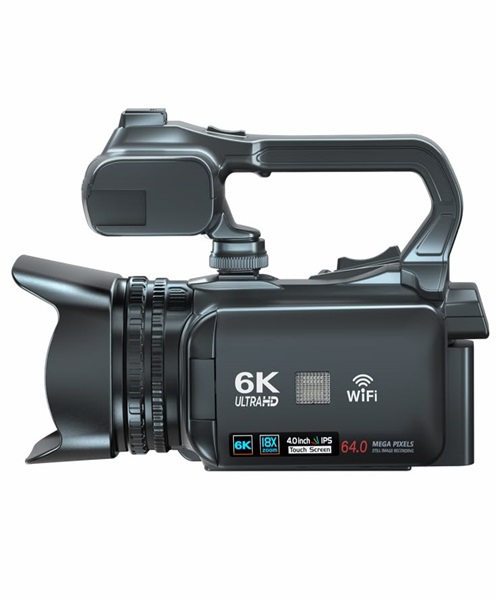
Live Streaming Camera Hire & Rental in Kenya
Live streaming has become an important part of modern event production. Organisations no longer have to depend entirely on physical attendance to reach their audiences. Churches can broadcast services to members watching from home, businesses can stream conferences to remote participants, and event organisers can share concerts, presentations and special occasions with viewers in different locations.
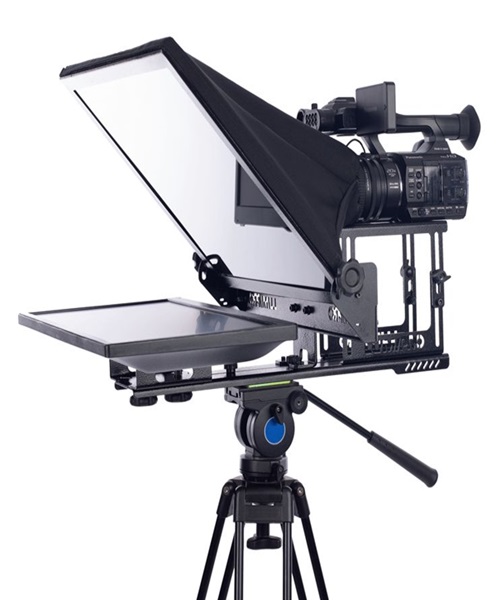
A live streaming camera is a central part of this production process. It captures the visual content that viewers see during a broadcast. Depending on the production requirements, a live streaming camera may be used as a standalone camera connected to a computer or streaming encoder, or as part of a multi-camera system controlled by a video production team.
Choosing suitable camera equipment is important for achieving clear images, reliable operation and a professional viewing experience. Factors such as resolution, low-light performance, connectivity, autofocus, camera movement and compatibility with streaming equipment all influence the final result.
At Janeson Rentals, clients can enquire about live streaming camera hire and rental in Kenya for temporary productions. Whether you are organising a church broadcast, corporate conference, product launch, webinar, concert or educational event, hiring suitable camera equipment can help you prepare for a professional live video production.
What Is a Live Streaming Camera?
A live streaming camera is a video camera used to capture footage for real-time transmission over the internet or another digital video distribution system.
Unlike a camera used exclusively for recording footage for later editing, a live streaming camera is incorporated into a workflow where video is captured and delivered to viewers while the event is taking place.
The camera captures the image and sends a video signal to a compatible device or production system. This may be a computer, video switcher, hardware encoder or streaming workstation.
The signal can then be processed, combined with other camera angles, supplied with graphics and audio, and transmitted to an online platform.
A live streaming camera may be used for:
-
Church services and worship programmes.
-
Corporate conferences.
-
Webinars and online seminars.
-
Concerts and live performances.
-
Product launches.
-
Educational lectures.
-
Interviews and panel discussions.
-
Award ceremonies.
-
Hybrid events.
-
Online training sessions.
The appropriate camera depends on the type of production, the venue, the available lighting and the streaming platform requirements.
Why Live Streaming Cameras Are Important for Events
Live streaming allows an event to reach people who cannot attend physically. It can also create a digital record of presentations, performances and important programme moments.
For event organisers, this means that the camera setup should be planned as carefully as the sound system, lighting and stage arrangement.
A suitable camera helps capture:
-
Speakers and presenters.
-
Performers and musicians.
-
Audience participation.
-
Panel discussions.
-
Product demonstrations.
-
Stage activities.
-
Interviews and guest appearances.
-
Important event announcements.
A well-positioned camera can make it easier for remote viewers to follow the programme. Clear framing and stable footage also help create a more professional presentation.
For example, a conference may require a wide camera angle showing the entire stage and a closer angle capturing the keynote speaker. A concert may require different camera positions for the vocalist, musicians and overall stage performance.
The camera configuration should therefore reflect the content being streamed.
Live Streaming Camera Hire for Corporate Conferences
Corporate conferences often include keynote presentations, panel discussions, product demonstrations and guest speakers. These programmes may need to reach people beyond the physical venue.
Live streaming camera rental can help event organisers capture presentations and share them with remote attendees, employees, clients or business partners.
Corporate applications include:
-
Business conferences.
-
Annual general meetings.
-
Corporate seminars.
-
Product launches.
-
Business summits.
-
Industry forums.
-
Investor presentations.
-
Government conferences.
-
Company town halls.
-
Training workshops.
A camera positioned towards the main stage can capture the speaker, while additional cameras may be used for panel discussions and audience interactions.
For hybrid events, camera positioning should also account for the physical audience. The production team should avoid obstructing sightlines or interfering with the movement of attendees.
Live Streaming Camera Rental for Churches
Churches are among the organisations that can benefit from live video production. Streaming services allows members who are travelling, unwell or living far away to follow worship programmes remotely.
A live streaming camera can capture preaching, worship, choir performances, announcements and special ministry activities.
Common church applications include:
-
Sunday worship services.
-
Bible study sessions.
-
Prayer meetings.
-
Gospel concerts.
-
Worship nights.
-
Church anniversaries.
-
Christian conferences.
-
Weddings and other church ceremonies.
-
Special ministry programmes.
-
Outdoor crusades.
A single-camera setup may be sufficient for a smaller service, while a larger church production may benefit from multiple cameras covering the pulpit, choir and worship team.
The camera should be positioned to capture the important activities without interfering with the congregation or stage performers.
Lighting is also important. Churches may have mixed lighting conditions, dim auditorium areas and bright stage lighting. A camera with suitable low-light performance and exposure controls can help produce clearer images.
Live Streaming Camera Hire for Concerts and Entertainment Events
Concerts and entertainment productions involve movement, changing lighting conditions and multiple performers. The camera system should be capable of capturing the action while maintaining stable and appropriately framed footage.
Live streaming camera rental may be useful for:
-
Music concerts.
-
Gospel performances.
-
Cultural festivals.
-
Dance shows.
-
Fashion events.
-
Talent competitions.
-
School entertainment events.
-
University concerts.
-
Award ceremonies.
-
Outdoor festivals.
A live concert broadcast may use one camera for a wide stage view and additional cameras for close-ups of performers.
Camera operators should coordinate with the lighting and sound teams to ensure that camera positions are appropriate and that the broadcast captures the performance clearly.
For fast-moving events, reliable focus and suitable zoom capabilities are particularly useful.
Live Streaming Camera Rental for Weddings and Private Events
Weddings and private celebrations can also benefit from live streaming. Couples may have relatives and friends who cannot travel to the venue but still want to participate in important moments.
A live streaming camera can capture:
-
Wedding ceremonies.
-
Church proceedings.
-
Speeches and toasts.
-
Family celebrations.
-
Traditional ceremonies.
-
Engagement events.
-
Anniversaries.
-
Private celebrations.
For wedding broadcasts, camera placement should be discreet and carefully planned. The camera operator should have a clear view of important moments without distracting guests or interfering with the ceremony.
A stable camera position is particularly useful during formal proceedings, while a second camera can provide alternative angles if the production requires them.
Important Features to Consider When Hiring a Live Streaming Camera
Different cameras offer different capabilities. The right choice depends on the event’s technical requirements and the streaming workflow.
1. Video Resolution
Video resolution determines the level of image detail captured by the camera.
Common resolutions include:
-
HD 720p: Provides standard high-definition video and may suit basic streaming requirements.
-
Full HD 1080p: Commonly used for conferences, church broadcasts and online presentations.
-
4K UHD: Provides higher image detail and additional flexibility for cropping or producing different output formats.
The camera’s supported resolution should be compatible with the streaming encoder, computer, video switcher and internet delivery workflow.
A 4K camera does not automatically mean the broadcast will be delivered in 4K. The entire production chain must support the selected output resolution.
2. Low-Light Performance
Events do not always take place in brightly lit environments. Churches, conference halls, concert venues and evening functions may have challenging lighting conditions.
A camera with good low-light performance can help maintain image quality when the available lighting is limited.
Sensor size, lens aperture, exposure controls and image processing all influence low-light performance.
3. Optical Zoom
Optical zoom allows the camera to change framing by adjusting the lens rather than digitally enlarging the image.
It is particularly useful when the camera is positioned far from the stage.
For example, a conference camera may need to capture a wide stage view and then zoom in on an individual speaker without moving its position.
4. Autofocus
Autofocus helps keep subjects sharp as they move or as the camera changes framing.
It can be useful for interviews, live presentations, performances and other productions where the camera operator needs to respond quickly to changing scenes.
Some productions may prefer manual focus for greater control, especially where the subject remains in a predictable position.
5. Video Output Connections
A live streaming camera must be compatible with the equipment receiving its video signal.
Depending on the model, available connections may include HDMI, SDI, USB or network-based video output.
The production team should confirm:
-
The camera’s available output connections.
-
Whether the output is clean video without unwanted display overlays.
-
Supported video resolutions and frame rates.
-
Cable distance requirements.
-
Compatibility with the video switcher or encoder.
For longer cable runs in professional event environments, SDI may be appropriate where the camera and receiving equipment support it.
6. Frame Rate
Frame rate describes how many individual frames the camera captures each second.
Common options include 25, 30, 50 and 60 frames per second, depending on the camera and video standard.
The production team should select a frame rate that is compatible with the streaming platform and the rest of the video system.
7. Image Stabilisation
Image stabilisation can help reduce unwanted camera movement, particularly when handheld shooting is required.
For fixed-position event cameras, a stable tripod or mounting arrangement may be more important.
8. Audio Connectivity
Some cameras include audio inputs that allow external microphones or audio feeds to be connected.
However, professional event productions often use a separate audio mixing system. The sound engineer may send a suitable audio feed from the mixing console to the streaming workstation or video system.
It is important to plan audio and video together rather than relying only on the camera’s built-in microphone.
Live Streaming Camera Equipment and Accessories
A camera alone may not provide everything required for a professional broadcast. Depending on the production, additional equipment may be necessary.
Camera Tripods
A tripod provides stable support for the camera. It is useful for fixed shots during conferences, church services and formal presentations.
Video Switchers
A video switcher allows the production team to select between multiple camera feeds and other video sources.
For example, a conference broadcast may switch between a wide stage view, a close-up of the speaker and presentation slides.
Video Capture Devices
A capture device converts a compatible camera signal into a format that a computer or streaming system can receive.
Compatibility with the camera’s output resolution and frame rate should be checked.
HDMI and SDI Cables
These cables carry video signals between cameras and compatible production equipment.
The correct cable type depends on the camera output, the receiving device and the required cable distance.
Streaming Computers
A computer may run streaming software, manage video sources and transmit the broadcast to the selected platform.
Its processing capability should be suitable for the production’s resolution, number of video sources and software requirements.
Audio Mixers
An audio mixer combines microphones, instruments and other sound sources before the audio is sent to the broadcast system.
A separate audio feed can help deliver clearer sound than relying on the camera’s built-in microphone.
Lighting Equipment
Lighting improves the visibility and appearance of subjects on camera. For interviews and presentations, suitable lighting can help create a more consistent image.
Internet Connectivity
Live streaming requires a reliable internet connection with sufficient upload capacity.
The required bandwidth depends on the video resolution, bitrate and streaming platform. A production team should test the connection before the event.
Single-Camera and Multi-Camera Live Streaming Setups
The number of cameras required depends on the event format.
Single-Camera Setup
A single camera can be suitable for smaller events with one main subject or a fixed stage arrangement.
It may work well for:
-
Small church services.
-
Online lectures.
-
Interviews.
-
Webinars.
-
Simple presentations.
-
Small seminars.
The camera should be positioned to capture the most important activity throughout the programme.
Multi-Camera Setup
A multi-camera production uses several cameras positioned at different angles.
It is useful when the event involves multiple speakers, performers or areas of activity.
For example, a concert may use:
-
A wide camera showing the entire stage.
-
A close-up camera focusing on the lead vocalist.
-
A camera capturing the musicians.
-
A roaming camera for selected audience and performance shots.
A video switcher or suitable production software can combine these feeds into one broadcast.
The camera operators and director should coordinate shot selection to maintain a smooth viewing experience.
Why Renting a Live Streaming Camera Can Be Practical
Purchasing professional streaming cameras and related production equipment may be expensive, particularly for organisations that only stream occasional events.
Live streaming camera hire offers an alternative by providing access to equipment for specific production dates.
Potential advantages include:
-
Access to suitable camera equipment without purchasing it.
-
Flexibility for different event formats.
-
Reduced storage requirements between productions.
-
Easier planning for occasional broadcasts.
-
The ability to arrange additional cameras for larger events.
-
More flexibility when testing different production setups.
For churches, businesses, schools and event organisers, renting can be useful when streaming is required for selected programmes rather than every day.
Why Choose Janeson Rentals for Live Streaming Camera Hire in Kenya?
A successful live broadcast depends on more than the camera itself. Camera positioning, lighting, audio, internet connectivity and video processing all contribute to the final production.
Janeson Rentals provides a point of enquiry for live streaming camera hire and rental in Kenya for event organisers, production teams, churches and institutions.
Live streaming camera rental may be useful for:
-
Corporate conferences.
-
Church services.
-
Concerts and live performances.
-
Webinars.
-
Product launches.
-
Weddings.
-
Educational events.
-
Award ceremonies.
-
Hybrid conferences.
-
Online training programmes.
Janeson Rentals is based in Nairobi and serves clients seeking event equipment hire across Kenya.
When making an enquiry, share the event date, venue, broadcast requirements, expected number of camera angles and any video equipment already available. This information helps establish what camera arrangement may be suitable.
How to Prepare for Live Streaming Camera Rental
Before hiring a live streaming camera, prepare the technical details of your event.
-
Define the broadcast purpose: Establish whether the production involves a church service, conference, concert, interview or another programme.
-
Determine the number of cameras: Decide whether one camera is sufficient or multiple angles are needed.
-
Check the venue: Consider camera positions, lighting conditions, stage layout and available space.
-
Identify video connections: Confirm compatibility with the video switcher, computer or streaming encoder.
-
Plan camera support: Establish whether tripods, mounts or other accessories are required.
-
Arrange audio: Identify how the sound will be captured and connected to the streaming system.
-
Confirm internet connectivity: Test the upload speed and stability before the broadcast.
-
Schedule a technical rehearsal: Test video, sound, camera framing and streaming settings before the event starts.
-
Confirm rental dates: Provide the required equipment period and event location.
Preparing these details can help avoid technical delays during the live broadcast.
Book Live Streaming Camera Hire & Rental in Kenya
Live streaming allows events to reach audiences beyond the physical venue. From church services and corporate conferences to concerts, weddings and educational programmes, a suitable camera setup can help deliver clear and engaging video content.
Janeson Rentals provides a point of enquiry for live streaming camera hire and rental in Kenya. Contact Janeson Rentals with your event details, camera requirements, location and rental dates to discuss equipment for your next live broadcast in Nairobi or elsewhere in Kenya.