Live Streaming Router Hire & Rental in Kenya
A successful live stream requires more than professional cameras, microphones and video production equipment. It also depends on a stable internet connection that can transmit the video and audio programme to the intended online audience. Even when a production has high-quality cameras and an excellent video switcher, an unstable internet connection can interrupt the broadcast, reduce picture quality or cause viewers to lose access to the stream.
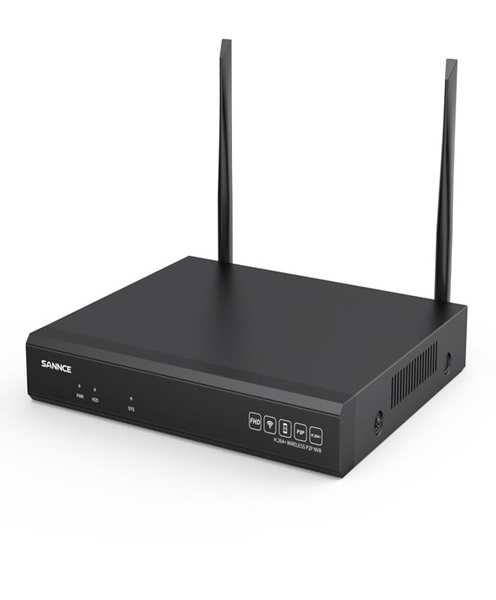
A live streaming router plays an important role in managing network connectivity for a streaming production. It connects compatible devices to a network and provides a route for data to travel between the production equipment and the internet. Depending on its capabilities, a streaming router may support wired Ethernet connections, wireless networking, mobile broadband connections and other networking features.
At Janeson Rentals, we understand that live event production requires reliable technical planning. Our live streaming router hire and rental service in Kenya is designed for event organisers, production companies, churches, corporate clients, broadcasters, educational institutions and content creators who need temporary networking equipment for their broadcasts.
Whether you are streaming a conference in Nairobi, broadcasting a church service, covering a concert or conducting a live product launch, hiring a suitable live streaming router can help establish the network connection required by your production equipment.
What Is a Live Streaming Router?
A live streaming router is a networking device used to connect streaming equipment and other devices to a local network and, where configured, to the internet.
In a typical live streaming setup, the router provides network access for devices such as:
-
Hardware video encoders.
-
Streaming computers.
-
NDI-compatible cameras.
-
IP cameras.
-
Network video switchers.
-
Production laptops.
-
Monitoring and control devices.
-
Other internet-connected production equipment.
The router manages how data moves between connected devices and the wider network. Depending on its design, it may offer wired Ethernet ports, Wi-Fi connectivity, mobile network support and advanced network management features.
A live streaming router is not itself a video encoder. It does not normally capture or compress camera footage into a streaming format. Instead, it provides the network connection that allows the encoder or streaming computer to send the finished video programme to the internet.
Some professional routers also support advanced features such as multiple internet connections, failover, traffic management and bonding through compatible services. These capabilities can be valuable for productions where internet reliability is especially important.
Why Hire a Live Streaming Router?
Live streaming routers are useful for productions that need temporary network connectivity. Purchasing specialised networking equipment may not be practical for organisations that only broadcast occasionally.
Live streaming router rental allows event organisers and production teams to arrange suitable networking equipment for a particular event without having to purchase and maintain a dedicated device.
Dedicated Network Connectivity for Live Events
A live production may involve several devices competing for network resources. Streaming computers, encoders, cameras and control equipment all need appropriate connectivity.
A suitable router helps organise these connections and provides a central point for network access.
For important broadcasts, production teams should plan the network separately from ordinary venue Wi-Fi where possible. This can help reduce competition from guests and other devices, although the final result still depends on the available internet service and network configuration.
Support for Hardware and Software Encoders
A streaming router can provide internet connectivity for hardware encoders and computers running streaming software.
For example, a production computer may prepare the video programme while a hardware encoder transmits the final output to a streaming platform. Both devices can connect through the router if the network arrangement supports their requirements.
Flexible Wired and Wireless Connections
Depending on the router, devices may connect through Ethernet or Wi-Fi. Wired Ethernet is generally preferred for critical streaming equipment because it can offer a more consistent connection.
Wireless connectivity can be useful for control devices and equipment that does not require a fixed cable connection.
Useful for Outdoor and Temporary Venues
Some events take place in locations where permanent internet infrastructure is unavailable or unsuitable. Depending on the router’s capabilities and available network coverage, a mobile broadband router can provide internet access through a supported cellular network.
This can be useful for outdoor concerts, festivals, exhibitions, temporary event spaces and remote production locations.
However, mobile connectivity depends on local network coverage, signal quality, congestion, data allowances and the router’s supported network technology.
Support for Network Backup and Failover
Some advanced routers support multiple internet connections. If one connection becomes unavailable, a configured backup connection may take over.
This is useful for productions where internet interruptions could seriously affect the broadcast. The precise behaviour depends on the router and network configuration.
Events That Benefit from Live Streaming Router Hire
Corporate Conferences and Hybrid Events
Corporate conferences increasingly include remote participants, speakers and audiences. A live streaming router can provide network connectivity for the production system that broadcasts the event.
The router may connect the streaming encoder, production computer and other compatible devices to the internet.
For hybrid conferences, network planning is particularly important because the venue may also be providing internet access to attendees, exhibitors and organisers. Separating critical production traffic where possible can help the streaming team manage its connection more effectively.
Church Services and Religious Broadcasts
Churches and ministries use live streaming to share sermons, worship sessions, announcements and special programmes with online audiences.
A live streaming router can connect the church’s streaming equipment to the internet. Depending on the setup, this may include a streaming computer, encoder, network cameras and other production devices.
For churches that broadcast regularly, a dedicated network arrangement can make it easier to manage the streaming system without depending entirely on the same wireless network used by the congregation.
Concerts and Music Festivals
Concerts and festivals may take place in venues with demanding network conditions. The production team may need to send a continuous video programme to an online destination while managing several cameras and audio sources.
A suitable router can provide network access for the encoder and other production equipment. For outdoor events, mobile broadband support may be useful where fixed internet is unavailable, provided there is sufficient cellular coverage.
Webinars and Online Training
Businesses, schools and educational institutions often host online seminars, workshops and training sessions.
A streaming router can support the network connection used by the production computer, encoder and other equipment. This helps the team establish a dedicated network arrangement for the broadcast.
Product Launches and Corporate Presentations
Product launches often require a live online audience in addition to people attending the physical event. A live streaming router can help connect the video production system to the internet so that the final programme can be transmitted to the selected platform.
Outdoor Events and Remote Productions
Outdoor productions may be organised in gardens, parks, open fields, temporary exhibition spaces and other locations where fixed broadband is not readily available.
A compatible mobile router may use a supported cellular network to provide internet access. Before relying on this option, the production team should assess network coverage and test upload performance at the exact venue.
Important Features to Consider When Hiring a Live Streaming Router
Choosing the right router requires understanding the number of devices, the type of internet connection and the streaming requirements.
Ethernet Ports
Ethernet ports allow production devices to connect directly to the router using network cables.
This is useful for streaming computers, hardware encoders, network cameras and other equipment that benefits from a wired connection.
The number of available ports should be sufficient for the planned setup. Additional network switches may be required when connecting many devices.
Wi-Fi Connectivity
Some routers provide wireless connectivity for laptops, tablets and other devices.
Wi-Fi can be convenient for monitoring and control, but critical streaming devices should use wired Ethernet where possible. Wireless performance can be affected by distance, walls, interference and the number of connected devices.
Mobile Broadband Support
A mobile streaming router may support cellular connectivity through a compatible SIM card or other supported mobile network arrangement.
This can provide an alternative to fixed broadband in temporary venues. The router must support the relevant network bands and technology, and a suitable mobile data plan is necessary.
Dual-WAN and Failover Support
Some professional routers support more than one internet connection. Dual-WAN functionality allows two connections to be configured within the same network arrangement.
Failover can help maintain connectivity when the primary internet connection fails, provided the backup connection is available and properly configured.
Bandwidth Management and Quality of Service
Some routers include traffic management features that allow network administrators to prioritise certain types of traffic or devices.
This can be useful when the streaming encoder needs consistent network access while other devices are connected to the same router.
The actual performance depends on the router’s specifications, the internet service and how the network is configured.
Network Security
A professional event network should be configured with appropriate security settings. This may include password protection, access controls and separate network arrangements for production devices and guest users.
Secure configuration is especially important when the production network carries private event content or connects equipment used to control the broadcast.
Upload Speed and Connection Stability
Live streaming depends heavily on upload bandwidth. Download speed alone is not enough to determine whether an internet connection can support a broadcast.
The required upload capacity depends on the stream’s bitrate, the number of outgoing streams and any additional network traffic. It is advisable to test the connection before going live and maintain enough headroom to accommodate fluctuations.
Live Streaming Router for Professional Broadcast Workflows
A live streaming router is particularly important when several production devices need to share a network connection.
Consider a corporate conference using two cameras, a video switcher, a streaming computer and a hardware encoder. The cameras provide the video feeds, while the switcher selects the camera angles and produces the programme output. The encoder prepares the programme for transmission, and the router provides the network connection to the internet.
A more advanced production may also use NDI-compatible cameras and computers. In this situation, the network must support both the movement of video between local production devices and the outgoing internet stream.
These two network requirements should be planned carefully. NDI video traffic can require substantial local network bandwidth, while the live stream requires sufficient internet upload capacity. A router alone does not guarantee that the network can handle both workloads.
For larger productions, suitable managed network switches, correctly configured Ethernet connections and a dedicated internet service may also be necessary.
Wired Internet, Mobile Internet and Backup Connectivity
The best internet connection for a live event depends on the venue and production requirements.
Fixed Broadband Connection
Where available, a reliable fixed broadband connection can provide a suitable foundation for live streaming. A wired connection to the router is generally preferable to relying on the venue’s guest Wi-Fi.
The production team should test upload speed and stability at the location where the equipment will be used.
Mobile Broadband Connection
Mobile broadband can provide connectivity at venues without fixed internet access. A compatible router uses the available cellular network to connect production devices to the internet.
However, mobile coverage and performance vary by location. Network congestion, signal strength and data limits can affect the quality of the connection.
Backup Internet Connection
For important events, having a secondary internet connection can reduce the risk of a complete streaming interruption. This may involve a second broadband provider or a compatible mobile network connection.
Where the router supports failover, the backup connection can be configured to take over if the primary connection becomes unavailable. It is important to test this arrangement before the event rather than assuming that it will work automatically.
Equipment That Can Work Alongside a Live Streaming Router
A complete live streaming setup may include several additional devices.
-
RTMP encoders: Transmit the prepared video programme to a compatible streaming destination.
-
Streaming computers: Run production software and manage video sources.
-
NDI video systems: Connect compatible video sources through an IP network.
-
Professional video cameras: Capture the event from different angles.
-
PTZ cameras: Provide remotely controlled camera positioning.
-
Video switchers: Combine multiple camera feeds into a final programme.
-
Multiview monitors: Display multiple video sources for production monitoring.
-
Audio mixers: Manage microphones, music and other sound inputs.
-
Wireless video transmission systems: Send camera signals to remote receiving equipment.
-
Network switches: Expand Ethernet connectivity for multiple production devices.
The right combination depends on the number of cameras, streaming destinations, network capacity and event requirements.
How to Prepare for Live Streaming Router Hire
Before arranging a router rental, establish the number of devices that will need network access. Identify whether your encoder or streaming computer requires Ethernet, Wi-Fi or mobile broadband connectivity.
Next, confirm the internet connection available at the venue. If you plan to use mobile broadband, check the cellular coverage in the exact location and test the upload performance.
Determine the required streaming bitrate and account for additional network traffic from NDI sources, monitoring systems and other production devices.
It is also important to plan the physical network layout. Place the router in a suitable location, organise Ethernet connections and ensure that critical equipment can connect without unnecessary cable runs.
Finally, test the complete streaming workflow before the event. Confirm that the encoder can reach the streaming destination, that the connection remains stable and that the production team knows how to respond if the primary connection fails.
Why Choose Janeson Rentals for Live Streaming Router Hire?
Janeson Rentals provides equipment hire solutions for events, corporate functions, conferences and professional productions. We understand that network connectivity is a key part of successful live streaming and that the requirements of each event can differ.
Our live streaming router hire and rental service is suitable for clients who need temporary networking equipment for church broadcasts, conferences, concerts, exhibitions, webinars, corporate events and outdoor productions.
When enquiring, share the event date, venue, number of connected devices and type of internet connection required. It is also useful to explain whether you will be using an RTMP encoder, streaming computer, NDI video system or other network-based production equipment.
Based in Nairobi, Janeson Rentals supports equipment hire requirements in Nairobi and across Kenya.
Book a Live Streaming Router in Kenya
Planning a livestream and need suitable network connectivity? Hire a live streaming router from Janeson Rentals for your next conference, church service, concert, corporate event, webinar or outdoor production.
Contact Janeson Rentals to enquire about live streaming router hire and rental in Nairobi and across Kenya. Share your venue, event date, internet requirements and production setup so that the appropriate equipment can be assessed.
Choose Janeson Rentals for professional event and production equipment hire that helps you prepare for a well-organised live broadcast.