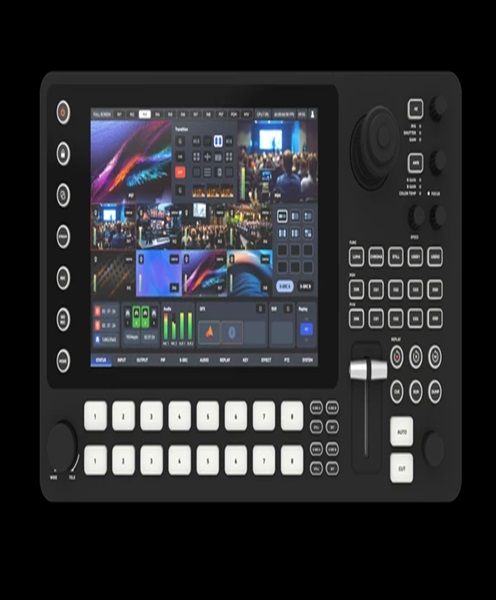
NDI Video System Hire & Rental in Kenya
Video production continues to evolve as event organisers, broadcasters, filmmakers, churches and corporate organisations look for more flexible ways to capture, manage and distribute video content. Traditional production setups often depend on multiple physical video cables connecting cameras, computers, switchers, monitors and recording equipment. While these connections remain important, IP-based video production offers another approach to managing video signals across compatible network equipment.
An NDI video system makes it possible to transmit and receive video over a compatible network. NDI, which stands for Network Device Interface, is a technology used to move video and audio between supported devices and software through network connections. It can help production teams connect cameras, computers, video sources and production applications while creating more adaptable workflows.
At Janeson Rentals, we provide event and production equipment hire solutions for clients who need professional technology for temporary projects. Our NDI video system hire and rental service in Kenya is suitable for event organisers, production companies, broadcasters, churches, educational institutions, content creators and corporate clients looking to use network-based video production.
Whether you are preparing a live conference in Nairobi, streaming a church service, producing a corporate presentation or coordinating a multi-camera event, an NDI video system can help organise your video workflow around compatible network devices.
What Is an NDI Video System?
An NDI video system is a collection of compatible hardware, software and network equipment that uses NDI technology to transmit video and audio over an IP network.
In a conventional video production setup, a camera may connect directly to a video switcher through an HDMI or SDI cable. In an NDI-based workflow, a compatible camera or video source can send its signal through a network connection. Other compatible devices on the network can then discover and receive that video source.
A typical NDI production environment may include:
-
NDI-compatible cameras or video sources.
-
Computers running supported video production software.
-
NDI-enabled video switchers.
-
Network switches and Ethernet cabling.
-
Production monitors and display systems.
-
Recording and streaming computers.
-
Compatible converters or encoders that connect traditional video equipment to an IP workflow.
The exact equipment required depends on the production. A small streaming setup may need only a few compatible devices, while a larger event production may require a managed network, several cameras, multiple computers and dedicated production control equipment.
NDI should not be confused with ordinary internet streaming. It is commonly used to move video between devices within a local network, although additional systems and configurations can support distribution to remote destinations. A production team can use NDI to manage internal video signals before sending the final programme to an online streaming platform.
Why Hire an NDI Video System?
Purchasing an entire NDI production setup may not be necessary for organisations that only use network-based video production occasionally. A company may need the equipment for a one-day conference, while a church may require it for a special service or an event organiser may need it for a temporary multi-camera production.
NDI video system rental gives clients access to suitable production equipment for a defined period without requiring them to purchase every component.
Flexible IP-Based Video Production
One of the major advantages of NDI is the ability to transmit video between compatible devices over a network. This can provide greater flexibility when designing a production workflow.
Instead of treating every camera and computer as an isolated video source, a production team can connect compatible devices to a network and manage their feeds through supported software and hardware.
This is particularly useful when several video sources need to be available to a central production station.
Support for Multi-Camera Workflows
Multi-camera production is common at conferences, concerts, church services, corporate events and live broadcasts. An NDI workflow can allow compatible cameras to send video feeds across a network to a production computer or switcher.
The director or technical operator can then select the required sources using compatible production software.
For example, a conference production may have one camera focused on the presenter, another capturing the audience and a third recording a panel discussion. With an appropriately configured NDI network, these sources can be made available to the production team.
Reduced Dependence on Traditional Video Cabling
NDI can reduce the need for separate direct video cables between certain devices because compatible video sources can communicate over a network connection.
This can simplify some production layouts, particularly where multiple video sources are distributed around a venue.
However, an NDI system still requires a suitable network infrastructure. Ethernet cables, network switches, power connections and other supporting equipment may be necessary. The goal is not to eliminate all cables but to use network connections more efficiently.
Integration with Supported Production Software
NDI is supported by various video production applications and compatible hardware devices. This allows production teams to build workflows that connect network video sources with supported switching, recording and streaming software.
Before hiring, it is important to confirm that the NDI equipment is compatible with the software and operating system being used for the production.
Useful for Temporary and Professional Projects
NDI video system hire is suitable for productions that need professional IP video equipment for a specific period. It can support conferences, exhibitions, concerts, educational events, livestreams, interviews and other projects where network-based video production is appropriate.
Events and Applications That Benefit from NDI Video Systems
Corporate Conferences and Business Presentations
Corporate conferences often involve presentations, panel discussions, keynote speakers and audience participation. A production team may need to capture several camera angles and make video feeds available to a central switching station.
An NDI system can help connect compatible cameras and production computers through a network-based workflow. This can be particularly helpful when the venue layout makes direct video cabling between every source and the control desk inconvenient.
Church Services and Ministry Live Streaming
Churches increasingly use video production to record services and stream programmes to online audiences. An NDI video system can help connect compatible cameras, computers and production software within the church’s network.
A church may use different camera positions to capture the pulpit, worship team, congregation and other parts of the service. These feeds can be made available to a production operator using compatible NDI equipment.
This can support a more organised workflow for live streaming, recording and displaying video on screens within the church.
Concerts and Live Entertainment
Concert productions often require several camera angles to capture performers, stage activity and audience reactions. NDI can support a network-based video workflow when compatible cameras and production equipment are used.
Production teams can plan camera positions around the venue and connect supported sources to a suitable network infrastructure. This may be useful for concerts, award ceremonies, festivals and other live entertainment events.
Educational Institutions and Training Events
Universities, colleges, schools and training organisations may need to record lectures, demonstrations, seminars and workshops.
An NDI video system can help connect cameras and computers for capturing and managing educational content. For example, a lecture room may use a camera for the instructor and a computer to display presentation slides, with both sources available to a compatible production system.
Exhibitions and Product Launches
Product launches and exhibitions may involve live demonstrations, stage presentations, interviews and promotional content. An NDI workflow can help production teams manage compatible video sources across a network.
This can support video switching, recording and distribution to suitable display or streaming systems.
Film, Studio and Content Production
Content creators and production studios may use NDI to connect cameras, computers and supported production applications. It can be useful for interviews, online shows, product demonstrations, training videos and other productions that benefit from multiple video sources.
Important Features to Consider When Hiring an NDI Video System
An effective NDI setup depends on choosing compatible equipment and planning the network correctly. Before arranging a rental, consider the following requirements.
NDI Compatibility
Not every camera, computer, monitor or video switcher supports NDI. The equipment must either have native NDI support or use a compatible conversion or software solution.
It is important to identify the devices that will send and receive video signals before selecting the system.
Network Infrastructure
NDI relies on an appropriate IP network. The network must be capable of handling the number of video sources and the bandwidth requirements of the production.
For multi-camera workflows, a suitable network switch and properly configured Ethernet connections are important. A poorly planned network can result in dropped frames, delays or unstable video feeds.
NDI Formats and Bandwidth Requirements
Different NDI formats have different bandwidth requirements. The appropriate format depends on the available network capacity, video quality requirements and production workflow.
The production team should consider the resolution, frame rate and number of simultaneous video feeds. High-resolution multi-camera productions require more network planning than small setups with only one or two sources.
Video Resolution and Frame Rate
The selected equipment should support the video resolution and frame rate required by the cameras and production software.
A mismatch between source and destination formats can create compatibility problems. Confirming the intended production format before the event helps ensure that the components work together.
Network Switches and Ethernet Connections
Network switches provide the connections needed for compatible devices to communicate. For larger productions, the choice and configuration of network equipment can have a significant impact on performance.
The number of ports, available bandwidth and network configuration should be considered when planning an NDI system.
Software Compatibility
Some NDI workflows depend on software installed on production computers. Confirm that the intended software supports the required NDI functionality and that the computer has sufficient processing power.
It is also important to check operating system compatibility and any necessary software configuration before the production begins.
Audio Integration
NDI workflows can support audio alongside video, depending on the source, format and receiving application. This can help production teams manage audio and video from compatible sources.
However, a separate audio mixer may still be needed for microphones, music and other sound sources. The production team should confirm how audio will be captured, routed and mixed.
NDI Video Systems for Professional Multi-Camera Production
An NDI video system can be especially useful when several cameras and computers need to communicate within one production environment.
For example, a corporate conference may use two NDI-compatible cameras, a presentation computer and a production computer running supported switching software. The cameras provide live video feeds, while the presentation computer supplies slides or other visual content. The production operator can select the required sources and prepare the final programme output.
A church production may use compatible cameras positioned around the sanctuary, with a production computer receiving the video feeds through the network. The operator can switch between camera views and combine them with presentation content where the software supports it.
These workflows require proper planning. The number of sources, network capacity, computer performance and intended output must all be considered. A reliable production setup begins with understanding how each device will connect and what role it will perform.
Equipment That Can Be Used Alongside an NDI Video System
For a more complete production setup, an NDI video system may be combined with other event and video production equipment.
-
NDI-compatible cameras: Provide network-based camera feeds for production.
-
PTZ cameras: Support remotely controlled camera positioning where compatible with the NDI workflow.
-
Video switchers: Allow operators to select and combine different video sources.
-
Streaming computers: Run supported production software and manage the live programme.
-
Streaming encoders: Prepare the final video output for online distribution.
-
Multiview monitors: Allow operators to monitor several video feeds at once.
-
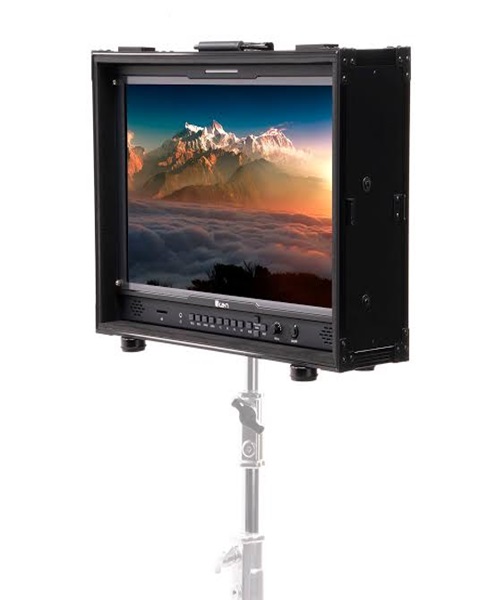
Production monitors: Display selected camera and programme feeds.
-
Video capture cards: Connect compatible external video sources to a computer.
-
Audio mixers: Manage microphones, music and other sound sources.
-
Network switches: Connect the devices within the IP video production network.
-
HDMI and SDI converters: Help connect traditional video equipment to compatible parts of the workflow.
The specific equipment combination should be based on the production’s technical requirements rather than simply the number of devices available.
How to Prepare for an NDI Video Production
Before hiring an NDI video system, prepare a list of all video sources that will be used. Identify which cameras are NDI-compatible and which may require conversion or another connection method.
Next, establish how many video feeds need to be transmitted simultaneously. This will help determine the network capacity and switching equipment required.
You should also identify the location of the production computer, video switcher and other receiving devices. Consider the distance between devices, the available Ethernet cabling routes and the venue’s network environment.
Test the system before the event begins. Confirm that the video sources appear correctly in the receiving software, that the feeds remain stable and that the final output is suitable for recording, display or streaming.
For important productions, prepare a backup plan. This may include an alternative video source, a backup network connection or a compatible wired signal path for critical cameras.
Why Choose Janeson Rentals for NDI Video System Hire?
Janeson Rentals supports event organisers and production teams looking for equipment hire solutions for temporary and professional projects. We understand that video production requirements vary depending on the venue, event size, number of cameras and intended output.
Our NDI video system hire and rental service is intended for clients who need network-based video production equipment for conferences, corporate events, church services, concerts, exhibitions, filming and live streaming.
When making an enquiry, share the number of cameras, the type of video sources, the production software and the equipment you intend to connect. Details about the venue and network arrangement are also useful when assessing the required setup.
Based in Nairobi, Janeson Rentals serves clients in Nairobi and supports equipment hire requirements across Kenya. Whether you are organising a business presentation, a church broadcast or a larger multi-camera production, we can help you assess the equipment needed for your project.
Book an NDI Video System in Kenya
Planning an IP-based video production? Hire an NDI video system from Janeson Rentals for your next conference, concert, corporate event, church service, exhibition or live streaming project.
Contact Janeson Rentals to enquire about NDI video system hire and rental in Nairobi and across Kenya. Provide your event date, venue, number of video sources and production requirements so that the appropriate equipment can be considered.
Choose Janeson Rentals for event and video production equipment hire that helps you plan a professional, organised and adaptable production workflow.