
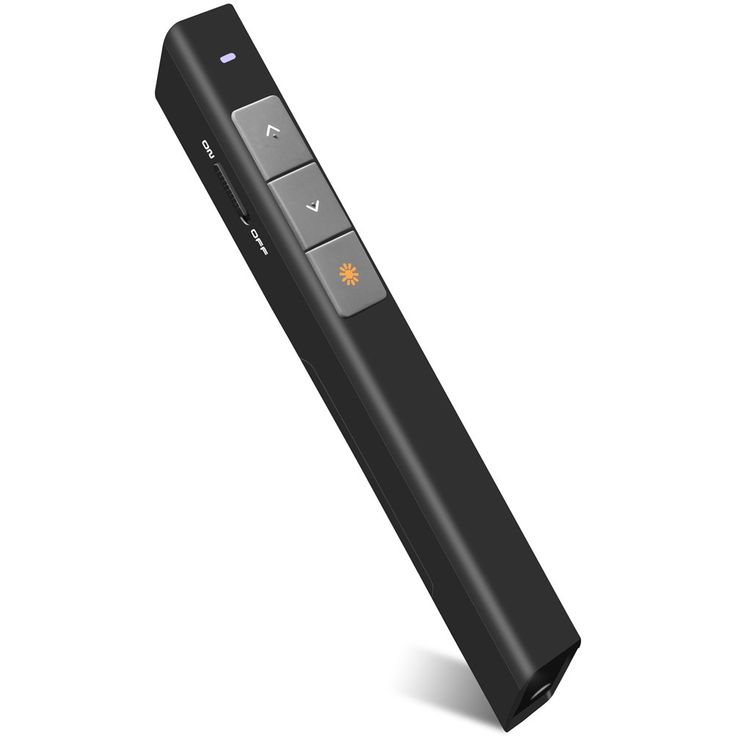
Presentation Remote Hire and Rental in Kenya
Delivering a successful presentation requires preparation, clear communication, and the right equipment. Whether you are addressing a corporate audience, presenting a business proposal, teaching a class, or speaking at a professional conference, having control over your slides can make your presentation more organized and engaging.
A presentation remote is a handheld device that allows speakers to control compatible presentation software without standing beside their computer. Depending on the model, it can provide slide navigation, pointer functionality, media controls, and other useful features. These functions allow presenters to move around the room, interact with participants, and maintain a natural flow throughout their session.
Janeson Rentals provides event equipment hire and rental solutions in Kenya for businesses, institutions, conference organizers, and event professionals. Presentation remote hire is a convenient option for people who need reliable presentation accessories for a particular event without purchasing equipment for permanent use.
From boardroom meetings in Nairobi to seminars, exhibitions, training sessions, and corporate conferences across Kenya, a suitable presentation remote can support a more professional presentation experience.
What Is a Presentation Remote?
A presentation remote is a wireless handheld controller designed to help a speaker operate a slideshow or presentation from a distance. Most devices include buttons for moving forward and backward through slides. Some models also feature a laser pointer, screen blackout button, volume controls, or advanced cursor functions.
Many presentation remotes connect to a computer using a small USB receiver, while others support Bluetooth or multiple connection methods. Compatibility varies according to the model, computer, operating system, and presentation application.
A presentation remote is particularly useful when a speaker needs to move away from the podium or laptop. Instead of asking another person to advance slides, the presenter can manage the slideshow independently.
Why Hire a Presentation Remote from Janeson Rentals?
Hiring a presentation remote is a practical solution for organizations that conduct occasional meetings, seminars, workshops, and conferences. It provides access to useful presentation equipment without requiring a permanent purchase.
Janeson Rentals offers event equipment rental solutions that can support different presentation requirements. Clients can identify the features they need and confirm compatibility before arranging a booking.
Key benefits include:
Improved presentation flow: Speakers can advance slides without interrupting their speech to return to a computer.
Greater mobility: Presenters can move around a stage, classroom, or meeting room while retaining control of compatible presentation software.
Professional audience engagement: Maintaining eye contact and moving naturally can make a presentation feel more interactive.
Convenient event preparation: A presentation remote can be included in the audiovisual equipment checklist for conferences, seminars, training programmes, and business meetings.
Flexible rental arrangements: Equipment can be requested for a specific event or rental period, subject to availability and agreed terms.
Support for visiting speakers: Event organizers can arrange a remote for guest presenters who may not have their own presentation accessories.
Applications of Presentation Remote Rental
Corporate Meetings and Business Presentations
Companies regularly use presentations to communicate business strategies, project updates, financial reports, and sales proposals. A presentation remote helps speakers move through slides while maintaining attention on their audience.
It is useful for management meetings, boardroom discussions, investor presentations, client pitches, and departmental briefings.
Conferences and Professional Seminars
At conferences, speakers may need to deliver presentations from a stage or podium while addressing a large audience. A presentation remote can help them manage their slides independently.
Conference organizers can include presentation remotes in their equipment arrangements for keynote speakers, panel contributors, guest lecturers, and workshop facilitators.
Training Sessions and Workshops
Trainers often move around the room to explain concepts, demonstrate processes, and interact with participants. A presentation remote allows them to control slides while remaining mobile.
It can support employee training, leadership development, professional courses, product demonstrations, and educational workshops.
Universities and Educational Institutions
Lecturers, researchers, students, and academic speakers use presentation software for lectures, project presentations, research seminars, and academic conferences.
A presentation remote can make it easier to manage slides in lecture halls and classrooms, particularly when the computer is positioned at a lectern.
Product Launches and Brand Activations
Product launches often combine presentation slides with promotional videos, product specifications, and visual demonstrations. A presentation remote helps the speaker manage the presentation while interacting with guests.
Exhibitions and Trade Shows
Exhibitors may use presentation remotes to control slides during demonstrations and client discussions. This is especially helpful when the laptop is positioned discreetly within an exhibition booth.
Features to Consider When Hiring a Presentation Remote
The best presentation remote depends on the speaker’s needs and the equipment being used.
Wireless connectivity: Confirm whether the remote uses a USB receiver, Bluetooth, or another supported connection.
Operating system compatibility: Check compatibility with the laptop or computer that will run the presentation.
Slide navigation: Ensure the device supports the forward and backward controls required for the presentation software.
Wireless range: Choose a device with a suitable operating range for the room or stage.
Pointer functionality: Some models feature a physical laser, while others provide digital highlighting or cursor control.
Battery condition: Confirm that the device is ready for use and that its batteries are sufficiently charged.
Receiver connection: Check whether the receiver uses USB-A or USB-C and whether an adapter is required.
Additional controls: Depending on the model, functions may include volume adjustment, screen blackout, or media playback controls.
How to Use a Presentation Remote Effectively
Before the event, connect the remote to the computer and test it with the presentation software. Confirm that the slides move in the correct direction and that any pointer or media functions operate as expected.
Review the presentation file to identify videos, hyperlinks, animations, or other elements that may require special controls.
During the presentation, keep the remote comfortably in hand and become familiar with the location of each button. This reduces the chance of pressing the wrong control in front of the audience.
For large events, test the remote from the farthest point where the presenter is expected to stand. Wireless range can vary depending on the venue, obstacles, and interference.
Always have a backup method of controlling the slides, such as the computer keyboard or another compatible remote.
Presentation Remote Rental for Events Across Kenya
Janeson Rentals supports event equipment hire and rental requirements across Kenya. Presentation remotes can be useful for conferences, training sessions, business meetings, exhibitions, workshops, and other events that rely on digital presentations.
When requesting a quotation, provide the event date, venue, rental period, computer type, presentation software, and any additional features required.
If you are hiring a projector, screen, wireless presentation system, or other AV equipment, mention these requirements as well. Coordinating the equipment in advance can help create a more organized presentation setup.
Why Clients Choose Janeson Rentals
Event planners need practical equipment solutions that fit the purpose and scale of their functions. Janeson Rentals offers equipment hire and rental services for a range of event requirements.
By discussing the intended use and compatibility requirements before booking, clients can make more informed decisions about presentation accessories. This is especially useful when the event includes several speakers, multiple presentation sessions, or equipment supplied by different parties.
Book Presentation Remote Hire and Rental with Janeson Rentals
Looking for presentation remote hire in Kenya? Contact Janeson Rentals to discuss your event requirements, confirm equipment availability, and request a quotation.
Whether you are preparing a corporate presentation, an academic seminar, a training workshop, or a large conference, the right presentation remote can help you manage your slides conveniently and deliver your message professionally.
Janeson Rentals — reliable event equipment hire and rental solutions in Kenya.



