
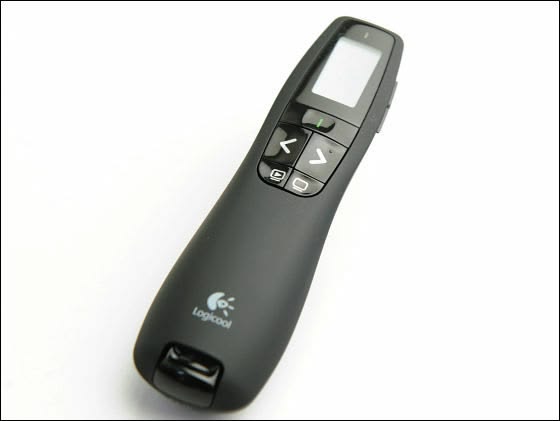
Presenter Remote Hire and Rental in Kenya
A well-organized presentation helps businesses communicate ideas, introduce products, share information, and engage audiences. However, even a carefully prepared presentation can become less effective when the speaker must repeatedly return to a laptop to change slides or control presentation content.
A presenter remote provides a convenient way to operate compatible presentation software from a distance. Depending on the model, it may offer slide navigation, laser pointing, digital highlighting, media controls, or additional functions that help speakers manage their presentations more efficiently.
Janeson Rentals offers event equipment hire and rental solutions in Kenya for clients who require practical audiovisual accessories for conferences, business meetings, training sessions, seminars, and other events. Presenter remote hire is suitable for professional speakers, trainers, lecturers, corporate organizations, conference planners, and event production teams.
Whether you are preparing a business pitch, delivering a keynote speech, conducting a workshop, or presenting at an exhibition, the right presenter remote can help you maintain control of your slides while concentrating on your audience.
What Is a Presenter Remote?
A presenter remote is a handheld controller that allows a speaker to navigate presentation slides without directly operating the computer. It is commonly used with presentation software such as Microsoft PowerPoint and other compatible applications.
Basic presenter remotes typically include forward and backward slide controls. More advanced models may feature a physical laser pointer, an on-screen pointer, cursor control, presentation timers, or vibration alerts.
Many presenter remotes use a USB receiver to communicate wirelessly with a computer, while some support Bluetooth connectivity. Certain models offer multiple connection options, which can be helpful when working with different computers and presentation environments.
Although the terms presenter remote, presentation remote, and wireless presentation clicker are sometimes used interchangeably, the available features can differ significantly between devices. Confirming the required functions before hiring helps ensure that the selected equipment suits the presentation.
Why Hire a Presenter Remote from Janeson Rentals?
Hiring a presenter remote is a convenient solution for people who need presentation equipment temporarily. Instead of purchasing a device for an occasional meeting or conference, organizers can arrange rental equipment for their specific requirements.
Janeson Rentals provides event equipment hire and rental solutions in Kenya, helping clients plan equipment requirements for different functions.
Key advantages of presenter remote hire include:
Greater freedom of movement: Presenters can move around a stage, meeting room, or classroom without being tied to their laptop.
Smoother slide navigation: Remote controls allow speakers to advance and reverse slides while maintaining the flow of their presentations.
Improved audience interaction: Speakers can concentrate on explaining information, answering questions, and engaging participants rather than operating a computer.
Flexible equipment access: Renting is suitable for one-time conferences, seminars, workshops, and other scheduled events.
Support for professional presentations: A presenter remote can help speakers manage their content in a more organized way.
Optional advanced functions: Depending on the model, users may benefit from laser pointing, digital highlighting, timer functions, or cursor control.
Applications of Presenter Remote Rental
1. Corporate Presentations and Business Meetings
Companies use presentations to communicate strategies, financial performance, project updates, business proposals, and operational plans.
A presenter remote allows the speaker to navigate through slides while remaining engaged with colleagues, clients, and decision-makers. This can make meetings feel more natural and reduce unnecessary interruptions.
It is suitable for boardroom meetings, management briefings, sales presentations, client pitches, and investor discussions.
2. Conferences and Keynote Speeches
Conference speakers often need to present from a stage, podium, or central speaking area. A presenter remote allows them to move away from the computer and control their slides independently.
For keynote addresses and professional seminars, this can support a more confident delivery and smoother transitions between sections.
Event organizers can arrange presenter remotes for guest speakers, moderators, trainers, and panel contributors who require slide control.
3. Training Sessions and Workshops
Trainers frequently move between presentation screens, demonstration areas, and participants. A presenter remote helps them manage slides while conducting explanations and practical exercises.
It can be useful for employee training, professional development, leadership workshops, product training, and educational programmes.
4. Educational Institutions
Lecturers, teachers, students, and researchers use presentation software for lessons, project presentations, academic seminars, and research conferences.
A presenter remote can be particularly helpful in large lecture halls where the computer is positioned at a lectern or technical desk.
5. Product Launches and Brand Activations
Product launches often involve a combination of slides, promotional videos, product demonstrations, and marketing messages. A presenter remote can help the speaker navigate these materials during the event.
When media playback controls are required, confirm that the selected remote supports the relevant functions and presentation software.
6. Exhibitions and Trade Shows
Businesses exhibiting at trade shows may use presentation remotes to control digital content during product demonstrations and client meetings.
A wireless remote can provide more flexibility when the computer is positioned behind a display, inside a counter, or away from the primary presentation area.
7. Hybrid Meetings and Online Presentations
Hybrid meetings combine in-person presentations with online participation. A presenter remote can help the speaker advance slides while remaining in front of a camera or engaging participants in the room.
However, the remote’s functions must be compatible with the computer and presentation application. Some advanced digital pointing or timer features may require specific software, while basic slide navigation may work without additional installation.
Features to Consider When Hiring a Presenter Remote
Selecting the right presenter remote requires consideration of the event, the computer being used, and the functions needed by the speaker.
Slide navigation: Confirm that the remote supports forward and backward slide control.
Wireless connection: Check whether it uses Bluetooth, a USB receiver, or another connection method.
Operating range: Ensure the device can operate across the presentation area. The usable range may be affected by obstacles and wireless interference.
Laser pointer: If the speaker needs to highlight information on a physical projection surface, verify whether the remote includes a suitable laser pointer.
Digital highlighting: For online presentations and screen sharing, a software-based pointer or highlighting function may be more effective than a physical laser.
Timer functionality: Some advanced devices provide countdowns or alerts to help speakers manage their time.
Computer compatibility: Confirm the supported operating systems, ports, and presentation applications.
Battery and charging: Check the power source and ensure the remote is ready for the full event.
Ease of use: A device with clear, accessible buttons helps speakers operate it confidently, even when presenting in a dimly lit venue.
Presenter Remote Versus Presentation Clicker
A presenter remote and a wireless presentation clicker often perform similar functions. Both can allow a speaker to navigate slides without directly touching the computer.
The distinction is usually in the features and how the products are marketed. A basic presentation clicker may focus primarily on forward and backward navigation, while a more advanced presenter remote may include cursor control, digital highlighting, timer alerts, or other presentation tools.
For simple slide navigation during a seminar, a basic clicker may be sufficient. For a large conference, interactive demonstration, or hybrid presentation, a remote with additional features may be more appropriate.
When arranging presenter remote hire with Janeson Rentals, describe the functions you need rather than relying solely on the product name.
How to Prepare for Presenter Remote Rental
Good preparation helps prevent technical problems during an important presentation.
Start by identifying the computer and presentation software that will be used. Check whether the remote requires a USB receiver, Bluetooth pairing, or additional software.
Next, test the remote with the actual presentation file. Confirm that the navigation buttons work correctly and check any special functions required for videos, hyperlinks, or digital highlighting.
Test the device from the positions where the presenter expects to stand. If the presentation takes place in a large hall, verify that the remote remains responsive throughout the intended speaking area.
Check the battery level and confirm that the receiver or other accessories are available. If the laptop has limited ports, determine whether an adapter or Bluetooth connection is necessary.
Finally, prepare a backup option, such as using the computer keyboard, in case the remote experiences a connection problem.
Presenter Remote Hire for Events Across Kenya
Janeson Rentals supports event equipment hire and rental requirements across Kenya. Presenter remote rental can be useful for conferences, corporate meetings, training sessions, academic presentations, seminars, product launches, and exhibitions.
When requesting a quotation, provide the event date, venue, rental duration, computer type, presentation software, and the features required.
If the event includes several speakers, multiple presentation rooms, or a combination of physical and online presentations, mention these requirements before booking. This helps the equipment selection match the intended use.
Presenter remotes can also be coordinated with other AV equipment, including projectors, presentation screens, wireless HDMI systems, signal converters, and wireless presentation systems.
Why Clients Choose Janeson Rentals
Janeson Rentals provides event equipment hire and rental solutions for clients organizing different types of functions in Kenya.
By discussing equipment requirements before booking, clients can identify the presentation accessories that best suit their event. This is particularly important when speakers use different computers, presentation applications, or display arrangements.
Hiring presenter remotes can also help event organizers avoid unnecessary equipment purchases when the devices are needed only for a particular occasion.
Book Presenter Remote Hire and Rental with Janeson Rentals
Are you looking for presenter remote hire in Kenya for a conference, business meeting, seminar, workshop, or product launch?
Contact Janeson Rentals to discuss your requirements, confirm availability, and request a quotation. Explain the type of computer you will use, the presentation software, and any additional features needed.
With suitable presentation equipment and proper preparation, you can navigate your slides conveniently and focus on delivering a clear, professional message.
Janeson Rentals — your event equipment hire and rental partner in Kenya



