
Introduction
Successful live events and video productions depend on careful coordination, clear communication and the ability to monitor visual content before it reaches the audience. Whether an event includes presentations, live video feeds, camera production or multimedia playback, a preview monitor can help the production team check what is being displayed and prepare for the next stage of the program.
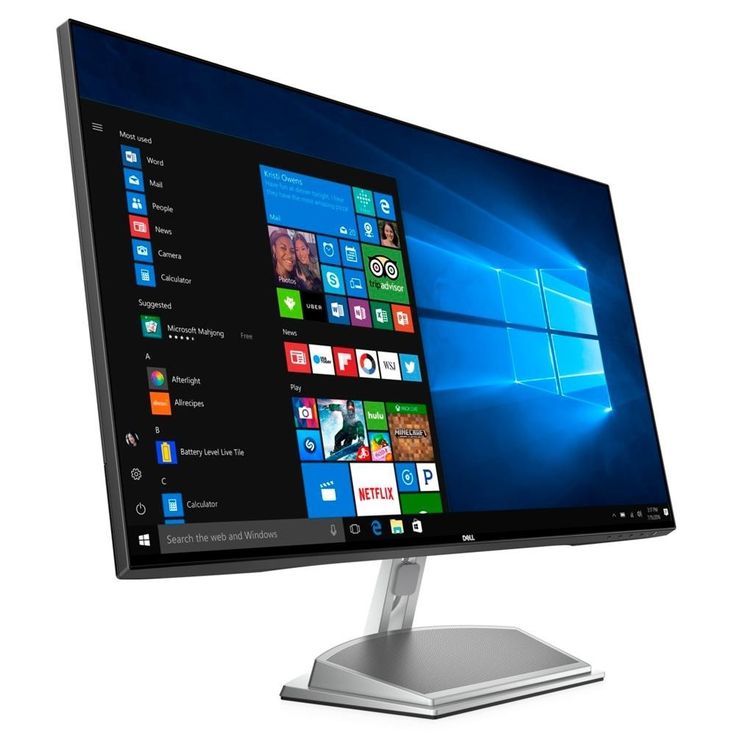
A preview monitor is a screen used to view a video source or visual feed before it is selected for final output, depending on the production system. It is commonly used in live video switching, audiovisual production, event recording, broadcasting and presentations involving multiple sources.
For event planners, a preview monitor can support smoother production by helping technical operators inspect presentation slides, camera feeds, video clips and other visual material before displaying them on the main screen. The exact role of the monitor depends on how the equipment is connected to the production system.
At Janeson Rentals, we provide event equipment hire and rental solutions for event organizers, audiovisual teams, businesses and production professionals. Our preview monitor rental service is suitable for temporary events where an additional screen is needed for monitoring visual content.
Based in Nairobi, Janeson Rentals welcomes enquiries for preview monitor hire in Nairobi and across Kenya. Whether you are preparing a conference, product launch, corporate presentation or live production, the right monitoring arrangement can help your team manage visual content more effectively.
What Is a Preview Monitor?
A preview monitor is a display used to inspect a video or visual source before it is shown as the final output. In live production, it may be connected to a video switcher, presentation system, media player or other compatible source.
For example, an audiovisual operator managing a conference may need to check the next presentation slide or video clip before sending it to the audience-facing display. A preview monitor can provide a dedicated viewing area for that task.
Depending on the production system, a preview monitor may be used to view:
- Video sources from compatible cameras.
- Presentation slides before they are displayed.
- Video clips prepared for playback.
- Graphics and title slides.
- Incoming visual feeds from connected devices.
- Other source material used in the event’s visual production.
A preview monitor is not the same as a confidence monitor. A confidence monitor is primarily positioned for a presenter to view presentation information, while a preview monitor is generally used by a technical operator or production team to inspect a source before it is displayed publicly.
The exact functions available depend on the connected equipment. Some systems provide a dedicated preview output, while simpler arrangements may use a screen connected directly to a computer or media player.
Benefits of Hiring a Preview Monitor
1. Better Visual Source Monitoring
A preview monitor gives technical operators a separate screen for checking visual material. This can be helpful when an event involves several presentations, videos, cameras or digital content sources.
Being able to inspect the material before it is displayed can help the production team identify incorrect slides, unexpected playback screens or other visual issues.
2. Supports Smoother Live Presentations
During conferences and corporate events, transitions between speakers and presentations must be coordinated carefully. A preview monitor can help operators prepare the next source before it is sent to the main display.
This can reduce confusion during transitions and help the event follow its planned sequence.
3. Useful for Multi-Source Production
Events involving several cameras, laptops or media players may require operators to monitor different sources. When the production system supports preview outputs, a preview monitor can provide a dedicated viewing point for a selected source.
For more complex productions, organizers should confirm whether the monitor will display one source at a time or be part of a multi-view monitoring arrangement.
4. Helps Identify Content Problems
Checking visual content before it goes live can help operators identify problems such as an incorrect file, unexpected desktop screen, missing graphics or an unsuitable video feed.
A preview monitor does not automatically correct these issues, but it provides a useful way to inspect content before it reaches the audience.
5. Improves Production Organization
A dedicated monitor can help the production team organize the workflow by separating source checking from audience-facing display monitoring.
This can be particularly useful when several operators are involved in a conference, hybrid meeting, product launch or live video production.
6. Cost-Effective Temporary Equipment Access
Purchasing extra monitoring equipment may not be practical for production teams that only need it for specific events. Hiring a preview monitor provides temporary access without the ongoing responsibilities of equipment ownership.
Preview monitor hire from Janeson Rentals can be a practical option for event companies, audiovisual providers and organizations managing occasional productions.
Events and Productions That Require Preview Monitor Rental
Corporate Conferences
Corporate conferences may involve presentations from multiple speakers, promotional videos, sponsor graphics and live camera feeds. A preview monitor can help technical operators check the next source before switching it to the audience-facing screen.
This is particularly useful when presentations need to follow a fixed program.
Product Launches
Product launches often combine speaker presentations, video demonstrations, promotional graphics and live product displays. A preview monitor can help the audiovisual team inspect these sources and coordinate transitions.
The team should test all media files and connections before the event begins.
Live Video Production
Live productions frequently require operators to manage several visual sources. A preview monitor connected to a compatible switching system can help operators inspect an incoming source before selecting it for the final output.
The monitor’s role will depend on the video switcher and the signal routing configuration.
Hybrid Events and Webcasts
Hybrid events may combine in-room presentations, remote speakers, camera feeds and pre-recorded videos. A preview monitor can help operators check incoming visual sources before they are sent to a stream or venue display.
The production team should take care to separate preview content from the final output to avoid exposing private notes or unintended screens.
Training and Demonstration Sessions
Technical training sessions may involve software demonstrations, presentation slides and video examples. A preview monitor can help the operator check the next item before showing it to participants.
This is useful when the session involves several digital sources or frequent transitions.
Fashion Shows and Entertainment Events
Fashion shows and entertainment productions may include designer videos, sponsor graphics, live camera feeds and presentation content. A preview monitor can support the production team as it prepares the next visual element.
For events with several display outputs, the production team should confirm how the preview monitor will integrate with the existing system.
Exhibitions and Trade Shows
Some exhibition presentations include videos, live demonstrations or several connected devices. A preview monitor can help staff check content before it is shown on a larger display.
This may be particularly helpful when the booth includes a presentation computer or a live demonstration setup.
Award Ceremonies
Award ceremonies often require timed video playback, nominee graphics, presenter introductions and other visual content. A preview monitor can help operators inspect the next item and prepare for transitions.
A clear cueing process between the event host, stage manager and technical team remains essential.
Why Choose Janeson Rentals for Preview Monitor Hire?
Janeson Rentals provides event equipment hire and rental solutions for businesses, event organizers and production teams that need temporary technical equipment.
Flexible rental arrangements: Hire a preview monitor for your event or production instead of purchasing equipment for occasional use.
Suitable for different production needs: Preview monitors can support conferences, video production, product launches, hybrid events and presentations, depending on the available setup.
Nairobi-based service: Janeson Rentals is based in Nairobi and welcomes enquiries for events across Nairobi and other parts of Kenya.
Practical technical planning: Sharing your video sources, switching equipment and intended monitoring function helps establish whether the selected monitor will suit your setup.
Convenience for production teams: Renting provides temporary access to additional monitoring equipment without requiring long-term storage and maintenance.
When requesting a quotation, explain whether the monitor will be connected to a video switcher, laptop, camera feed, media player or another source. Confirm the necessary cables, adapters, stands and signal routing equipment before the event.
How to Choose the Right Preview Monitor
1. Identify the Monitoring Purpose
Determine exactly what you need to inspect. Monitoring a laptop presentation may require a different setup from monitoring several cameras through a video switcher.
Clarifying the purpose helps identify the required screen size, inputs and compatible equipment.
2. Confirm Video Connections
Check the output available from the source device and the inputs supported by the monitor. HDMI is common, but professional production systems may use other video connections or require converters.
Do not assume every monitor supports every signal type. Confirm compatibility before booking.
3. Consider Resolution and Image Detail
The monitor’s resolution should be appropriate for the source material. High-resolution content, detailed graphics and small text may benefit from a suitable screen resolution.
For live video work, the production team should also confirm that the signal format and resolution are supported by the connected equipment.
4. Choose a Suitable Screen Size
The monitor should be large enough for the operator to inspect the content comfortably from the intended position. A compact screen may work well on a production desk, while a larger workspace may require a different size.
Consider the available space in the control area and the number of people who need to view the screen.
5. Check the Production System
If the monitor will be used with a video switcher or multi-camera setup, confirm that the system has the required preview output. Some systems provide separate preview and program outputs, while others use different monitoring arrangements.
Establish which source will appear on the screen and how it will be selected.
6. Plan Cable Routing and Placement
Place the monitor where the operator can see it without obstructing equipment or movement. Secure cables and keep them away from walkways to reduce trip hazards.
For larger events, consider the distance between the monitor and the source equipment when determining cable and signal requirements.
7. Test Before the Event
Test the monitor with the actual source device and content before the event starts. Check that the image appears correctly and that switching between sources works as expected.
A technical rehearsal can help identify connection issues before the audience arrives.
Preview Monitor Rental Across Kenya
Janeson Rentals is based in Nairobi and welcomes enquiries for event equipment rental across Kenya. Event planners, audiovisual operators and production companies can discuss preview monitor requirements for conferences, product launches, live presentations and other productions.
When requesting a quotation, provide your event date, venue, rental period, monitor quantity and the equipment you intend to connect. Explain whether the monitor will be used for a single presentation source, a video switcher or a multi-camera production.
For events outside Nairobi, confirm delivery availability, transport charges and any installation or technical support requirements in advance.
Frequently Asked Questions About Preview Monitor Rental
1. Where can I hire a preview monitor in Nairobi?
You can contact Janeson Rentals to enquire about preview monitor hire for conferences, live productions, corporate events and audiovisual presentations. Confirm current availability and technical specifications.
2. What is a preview monitor used for?
A preview monitor allows an operator to inspect a visual source before it is selected for the final output, depending on the connected production system.
3. What is the difference between a preview monitor and a confidence monitor?
A preview monitor is generally used by a technical operator to check a source before it goes live. A confidence monitor is positioned for a presenter to view slides, prompts or timing information while addressing an audience.
4. Can I connect a preview monitor to a laptop?
Yes, if the laptop’s video output is compatible with the monitor’s input. Confirm the required cable or adapter before the event.
5. Can a preview monitor be used with a video switcher?
Yes, when the switcher provides a compatible preview output and the monitor supports the signal. Confirm the equipment configuration before booking.
6. Is a preview monitor useful for hybrid events?
It can be useful for monitoring presentation sources, camera feeds or other incoming content in a hybrid production, provided the system is configured appropriately.
7. Does Janeson Rentals offer preview monitor rental outside Nairobi?
Janeson Rentals is based in Nairobi and welcomes enquiries for events across Kenya. Delivery availability and transportation charges should be confirmed for your event location.
Book a Preview Monitor from Janeson Rentals
Support smoother audiovisual production with a preview monitor from Janeson Rentals. Whether you are organizing a conference, product launch, hybrid meeting, award ceremony or live video production, a suitable monitoring screen can help your technical team inspect content and prepare transitions more effectively.
Contact Janeson Rentals to request a quotation for preview monitor hire and rental in Nairobi or elsewhere in Kenya. Share your event date, venue, rental duration, intended video sources and connection requirements.
Choose Janeson Rentals for practical event equipment hire and rental solutions that support organized, professional audiovisual productions.



