
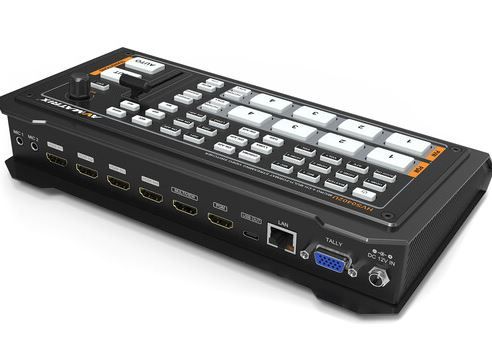
Professional Video Mixer Hire and Rental in Kenya
A professional video mixer is an essential tool for productions that require the management and combination of multiple video sources. It allows an operator to control the visual content displayed during an event, switch between camera feeds, and, depending on the equipment, create transitions or combine different visual elements.
Professional video mixers are used for corporate conferences, live performances, church services, product launches, award ceremonies, exhibitions, educational productions, and hybrid events. They can help production teams manage camera feeds, presentations, and other video content through a coordinated workflow.
Janeson Rentals provides event equipment hire and rental solutions for clients in Nairobi and across Kenya. If you are planning an event that requires professional video control, you can enquire about professional video mixer rental based on your production requirements.
The term “video mixer” can describe equipment with different levels of functionality. Some devices primarily switch between video sources, while advanced production mixers may offer transitions, picture-in-picture, keying, multiview monitoring, graphics integration, and additional output options. The features available depend on the model.
It is important to distinguish a video mixer from an audio mixer. An audio mixer controls sound sources such as microphones and music, while a video mixer manages visual signals. Some professional video systems include audio functions, but separate sound equipment may still be required.
What Is a Professional Video Mixer?
A professional video mixer is a device used to manage multiple video inputs and control which visual source appears on a programme output.
For example, a corporate conference may use two cameras, a laptop for presentation slides, and a media player for promotional videos. A video mixer can allow the operator to switch between these sources according to the event programme.
More advanced models may support visual transitions, picture-in-picture, overlays, chroma keying, multiview monitoring, or several output feeds. These features can be useful when the production requires more than straightforward source selection.
Professional video mixers may use HDMI, SDI, or a combination of video connections. The correct model depends on the cameras, computers, displays, and other equipment being used.
Before hiring a video mixer, identify the sources that must be connected and the destinations that need to receive the output. This helps determine the required input capacity, connections, resolution, and production features.
Why Hire a Professional Video Mixer?
1. Manage Multiple Video Sources
Live events often require several video sources. These may include camera feeds, presentation slides, pre-recorded videos, and other visual material.
A professional video mixer allows the operator to manage compatible sources from a central control point. This can help reduce interruptions when the programme changes from one type of content to another.
2. Improve Live Production Control
Professional video mixers can give operators more control over how visual content appears during an event.
Depending on the device, an operator may switch between camera angles, transition between sources, or combine visual elements. This can help create a more organised production workflow.
3. Support Multi-Camera Coverage
Multi-camera productions use different viewpoints to capture speakers, performers, audiences, and stage activity.
A video mixer can help the operator select the most appropriate view for the audience or recording output. The number of sources supported depends on the device’s input capacity.
4. Create More Engaging Presentations
Some professional mixers support features such as picture-in-picture, overlays, and transitions. These functions may be useful for panel discussions, interviews, product demonstrations, and other events that benefit from multiple visual elements.
Always confirm the availability of these functions on the specific model before booking.
5. Flexible for Temporary Events
Buying professional video production equipment may not be practical for organisations that only require it for occasional events.
Professional video mixer hire allows organisers to enquire about equipment suited to a particular conference, performance, or production without necessarily purchasing and storing the device permanently.
Events That May Require a Professional Video Mixer
Corporate Conferences and Business Forums
Corporate conferences may include keynote presentations, panel discussions, speaker introductions, company videos, and live camera feeds.
A professional video mixer can help an operator manage these sources and select the appropriate visual content at each stage. For a multi-camera conference, it may also help coordinate different views of speakers and panel members.
Product Launches and Brand Activations
Product launches often rely on promotional videos, presentations, product demonstrations, and live stage coverage.
A professional video mixer can help coordinate the visual content, particularly when the production combines camera feeds with computer-based graphics or videos.
Plan the switching sequence in advance and test each source with the final display or recording system.
Church Services and Religious Conferences
Church services may use several cameras to capture the pulpit, worship team, congregation, and stage activities. Presentation computers may also display lyrics, scripture passages, or announcements.
A professional video mixer can form part of the production system used for in-venue displays, recording, or live streaming. Confirm whether the mixer supports the required inputs and whether additional streaming equipment is necessary.
Concerts and Live Performances
Concerts and performances may use multiple camera angles to capture performers and stage activity. Some productions also include video playback or visual effects.
A suitable video mixer can help the operator manage the different sources and select views for the intended output. The equipment should be selected according to the number of cameras, required transitions, and output format.
Award Ceremonies and Gala Events
Award ceremonies may include stage presentations, winner announcements, videos, interviews, and audience reactions.
A video mixer can help the production team move between these visual sources in a planned sequence. Where several displays or recording destinations are involved, check the number and type of outputs required.
Educational and Training Productions
Educational institutions may record lectures, demonstrations, interviews, and panel discussions.
A professional video mixer can help manage multiple camera views and presentation sources, making it useful for selected training and educational productions. Check whether the intended workflow requires recording, streaming, or only a display output.
Hybrid Events and Live Streaming
Hybrid events may require the production team to switch between speakers, presentations, and camera feeds for an online audience.
A professional video mixer can be one part of this setup, but it does not automatically guarantee live-streaming capability. Depending on the model, a capture device, encoder, computer, software, or internet connection may also be required.
Common Features of Professional Video Mixers
Multiple Video Inputs
A professional video mixer may support several camera feeds and other video sources. The number of inputs differs between devices.
Count every planned source and confirm that the mixer accepts the required connection types.
Video Transitions
Some mixers allow operators to transition between sources using cuts, fades, wipes, or other effects.
These features can help organise the visual flow of a production. The available transitions vary by model.
Picture-in-Picture
Picture-in-picture places one video source within another, such as a small speaker view alongside presentation slides.
This can be useful for interviews, presentations, demonstrations, and panel discussions. Confirm that the mixer supports the desired layout.
Multiview Monitoring
Multiview monitoring allows operators to view several inputs and production outputs on one compatible display.
It can help the operator identify which sources are active and prepare for upcoming transitions. Not all video mixers include this feature.
Keying and Graphics
Some professional mixers support overlays, titles, logos, or chroma keying. These functions can be useful for branded productions, interviews, and live presentations.
If your event requires these features, confirm that the device supports the desired graphics workflow.
Multiple Outputs
Some mixers provide multiple outputs for different production needs, such as programme displays, monitoring, recording, or streaming equipment.
Check the output types and whether additional converters or distribution equipment are required.
How to Choose the Right Professional Video Mixer
Identify the Production Requirements
Start by deciding what the mixer needs to do. A basic conference may only require switching between a laptop and a camera, while a multi-camera production may need advanced transitions and monitoring.
Make a list of the required functions before enquiring about equipment.
Count the Inputs
Count all cameras, laptops, media players, and other sources. Choose a mixer with enough compatible inputs for the planned production.
If the event may introduce additional sources, consider whether extra capacity is needed.
Check Video Format Compatibility
Confirm the resolution and frame rate used by every source and destination. The mixer must support the required signal formats.
For mixed HDMI and SDI systems, establish whether the mixer accepts both directly or requires compatible converters.
Review Output Needs
Determine whether the production output will go to a projector, venue screens, monitors, a recorder, or a streaming system.
Check the available outputs and any additional equipment required to distribute the signal.
Consider the Operator’s Experience
Professional video mixers may offer more controls than basic switchers. Identify who will operate the equipment and whether they are familiar with the model.
Prepare a source list and programme rundown, then test the system before the event begins.
Plan Audio Separately Where Necessary
If the event requires microphone mixing, music, commentary, or other sound sources, establish how audio will be managed.
Some video mixers support embedded audio or limited audio control, but a separate audio mixer may be necessary for a more complex sound setup.
Professional Video Mixer Hire for Corporate Events
Professional video mixer hire can be useful for conferences, business forums, product launches, and corporate presentations that use multiple visual sources.
A production may require live camera coverage, presentation slides, promotional videos, and graphics. A suitable mixer can help the operator manage these sources and coordinate what appears on the programme output.
Before booking, confirm the number of sources, input connections, video format, output requirements, and any advanced functions needed. Test the complete setup before the event to reduce the risk of interruptions.
Professional Video Mixer Rental for Live Production
Live productions often require rapid decisions about which camera or visual source should appear at a particular moment.
A professional video mixer can help coordinate the visual side of a concert, conference, church service, interview, or multi-camera recording. The appropriate equipment depends on the complexity of the production and the operator’s workflow.
If the event includes live streaming or recording, confirm how the mixer connects to the relevant devices. Additional equipment may be required to capture, encode, record, or distribute the video signal.
Why Choose Janeson Rentals?
Janeson Rentals provides event equipment hire and rental solutions for clients in Nairobi and across Kenya. Organisers planning corporate events, conferences, product launches, church gatherings, performances, exhibitions, and video productions can enquire about professional video mixer rental.
When contacting Janeson Rentals, provide your event date, venue, number of video sources, connection types, required features, and output destinations. Mention whether you need the equipment for venue displays, recording, or live streaming.
Before confirming a booking, ask about availability, rental prices, delivery or collection, and any setup arrangements that may be available. Confirm the model’s technical specifications so that it can work with your production equipment.
What to Prepare Before Booking a Professional Video Mixer
- Event date and rental duration.
- Venue location and type of production.
- Number of cameras and other video sources.
- HDMI, SDI, or other required connections.
- Resolution and frame rate.
- Required transitions or picture-in-picture functions.
- Graphics, overlays, or keying requirements.
- Number and type of output destinations.
- Audio and synchronisation requirements.
- Recording or live-streaming plans.
- Operator and setup arrangements.
Book a Professional Video Mixer with Janeson Rentals
If your event needs coordinated control of multiple video sources, contact Janeson Rentals to enquire about professional video mixer hire and rental in Nairobi and across Kenya.
Share your production details to help determine the type of equipment that may suit your needs. Confirm availability, supported inputs, outputs, technical specifications, pricing, and delivery or collection arrangements before booking.
Frequently Asked Questions About Professional Video Mixer Hire
What is a professional video mixer used for?
It is used to manage and switch between video sources during live events, conferences, multi-camera productions, and video recordings.
Is a video mixer the same as an audio mixer?
No. A video mixer manages visual signals, while an audio mixer controls sound sources. Some video systems offer audio features, but separate sound equipment may still be necessary.
Can a professional video mixer support live streaming?
Some models can form part of a live-streaming workflow. Additional capture, encoding, computer, or streaming equipment may be required, depending on the device.
What should I consider before hiring a video mixer?
Check the number of inputs, connection types, supported resolution, required features, output destinations, and whether additional equipment is needed.
Where can I hire a professional video mixer in Kenya?
Contact Janeson Rentals to enquire about professional video mixer hire and rental in Nairobi and across Kenya. Confirm availability, equipment specifications, pricing, and booking requirements.
Janeson Rentals — Event equipment hire and rental solutions for professional presentations, live events, and video production across Kenya.



