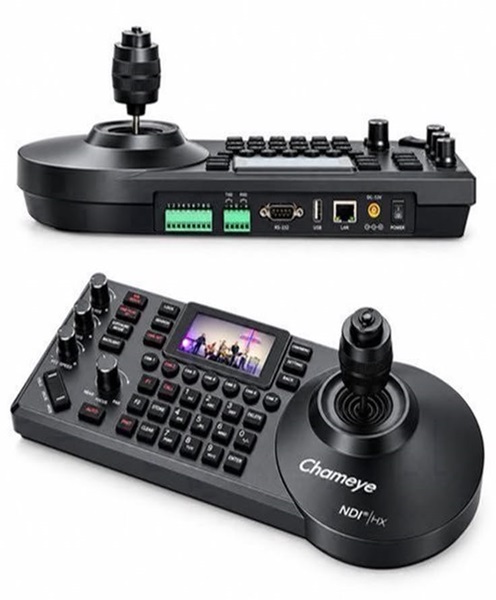
PTZ Camera Controller Hire & Rental in Kenya
Professional live video production requires more than having cameras positioned around a venue. Camera operators also need a convenient way to control camera movement, adjust framing and select the appropriate shots during an event. This is particularly important when several cameras are installed in fixed positions and the production team needs to manage them from one control area.
A PTZ camera controller is designed for this purpose. It allows an operator to control compatible PTZ cameras remotely, including their horizontal movement, vertical movement and zoom functions. Depending on the equipment, the controller may also support focus adjustment, preset positions, camera selection and other operating functions.
PTZ controllers are widely used in churches, conference centres, lecture halls, broadcast studios and live streaming environments. They help production teams manage camera angles without having to physically reposition each camera.
At Janeson Rentals, clients can enquire about PTZ camera controller hire and rental in Kenya for temporary video production requirements. Whether you are organising a church broadcast, business conference, webinar, concert, educational programme or hybrid event, a suitable controller can make remote camera operation more convenient.
What Is a PTZ Camera Controller?
A PTZ camera controller is a device or control interface used to operate compatible PTZ cameras remotely.
PTZ stands for Pan, Tilt and Zoom. These are the three primary camera movements that allow an operator to adjust the viewing direction and framing.
A PTZ camera controller communicates with the camera through a supported control connection or network protocol. The operator uses buttons, a joystick, a touchscreen or other controls to direct the camera.
Depending on the model, a PTZ controller may provide functions such as:
-
Horizontal camera movement.
-
Vertical camera movement.
-
Optical zoom adjustment.
-
Manual focus control.
-
Camera selection.
-
Preset position storage.
-
Preset recall.
-
Camera movement speed adjustment.
-
Exposure and other supported camera settings.
-
Control of multiple compatible cameras.
Not every controller supports every function. Its capabilities depend on the model, connected camera and supported control protocol.
For an event production, the controller gives the operator a central point from which to manage camera movements and framing.
Why PTZ Camera Controllers Are Important in Live Streaming
A live stream becomes more engaging when the production team can change camera angles according to the activity taking place.
For example, during a church service, the operator may need to move from a wide view of the sanctuary to a close-up of the preacher. During a corporate conference, the camera may need to move from the keynote speaker to a panel discussion.
Without remote control, someone may need to physically adjust the camera each time a different angle is required. This can interrupt the production, especially when cameras are mounted on walls, ceilings or tripods positioned far from the control area.
A PTZ camera controller helps solve this challenge.
Its benefits include:
-
Remote control of compatible cameras.
-
Convenient adjustment of camera framing.
-
Faster transitions between camera positions.
-
Centralised operation of multiple cameras, where supported.
-
Access to saved camera presets.
-
Reduced need to physically access mounted cameras.
-
More flexible live video production.
-
Improved coordination between camera operators and the production director.
The controller does not replace the camera, video switcher or streaming computer. It manages camera functions while the video system handles the capture, switching and transmission of footage.
PTZ Camera Controller Hire for Church Live Streaming
Churches increasingly use live streaming to reach members who cannot attend services physically. A church broadcast may include preaching, worship music, choir performances, announcements and special presentations.
PTZ cameras can be positioned around the sanctuary to capture different activities. A controller allows the media team to operate these cameras from a dedicated control area.
For example, the operator may use one camera to capture the pulpit, another to frame the worship leader and a third to provide a wide view of the church.
PTZ camera controller rental may be useful for:
-
Sunday worship services.
-
Midweek services.
-
Bible study sessions.
-
Prayer meetings.
-
Gospel concerts.
-
Worship nights.
-
Church anniversaries.
-
Christian conferences.
-
Youth programmes.
-
Outdoor ministry broadcasts.
A controller with preset functionality can be especially useful for churches with recurring programmes. The operator may save common camera positions and recall them when needed, provided the connected cameras support the feature.
This can make regular broadcasts easier to manage and help maintain consistent camera framing.
PTZ Camera Controller Rental for Corporate Conferences
Corporate conferences often involve multiple presenters, panel members and stage activities. A camera operator may need to adjust camera positions several times during the programme.
A PTZ camera controller makes it possible to operate compatible cameras remotely while the production team remains in the control area.
Corporate applications include:
-
Business conferences.
-
Annual general meetings.
-
Product launches.
-
Corporate seminars.
-
Investor presentations.
-
Business summits.
-
Government functions.
-
Award ceremonies.
-
Hybrid meetings.
-
Panel discussions.
For example, during a panel discussion, the production team may need to capture the entire group before moving to an individual speaker. A PTZ controller allows the operator to adjust the camera’s pan, tilt and zoom without physically approaching the camera.
For a multi-camera production, camera selection and preset recall can also help the operator coordinate different viewing angles.
PTZ Controllers for Webinars and Online Meetings
Online meetings and webinars require cameras that can capture presenters clearly. In larger meeting rooms, a fixed camera may not be sufficient because speakers can occupy different positions.
A remotely controlled PTZ camera can cover a wider area, while its controller allows the operator to adjust framing as the meeting progresses.
Common applications include:
-
Business webinars.
-
Online training sessions.
-
Boardroom meetings.
-
Virtual workshops.
-
Online seminars.
-
Remote presentations.
-
Professional interviews.
-
Educational discussions.
-
Corporate town halls.
For example, a webinar may involve a presenter speaking from the front of a room, followed by questions from participants. A PTZ controller can help the operator adjust the camera towards the active speaker.
The production team should confirm that the controller, camera and video conferencing software work together as required.
PTZ Camera Controller Hire for Educational Institutions
Schools, colleges and universities may use remotely controlled cameras to capture lectures, graduation ceremonies, academic conferences and training programmes.
In a lecture hall, a camera may need to follow a lecturer as they move between a podium, presentation screen and demonstration area.
A PTZ controller allows a technician to manage these camera movements from a separate control desk.
Educational applications include:
-
University lectures.
-
Online classes.
-
Graduation ceremonies.
-
Academic conferences.
-
Guest lectures.
-
School assemblies.
-
Training workshops.
-
Research presentations.
-
Educational webinars.
-
Distance-learning programmes.
For institutions that regularly record or stream educational content, a centralised camera control arrangement can make production more convenient.
PTZ Camera Controller Rental for Concerts and Live Performances
Concerts and entertainment productions often involve several performers and changing stage activities. A multi-camera setup can help viewers follow the performance through different camera angles.
A PTZ controller allows the production operator to move compatible cameras towards the lead vocalist, musicians, choir or other performers.
It may be useful for:
-
Gospel music performances.
-
Live concerts.
-
Choir productions.
-
Dance shows.
-
Theatre performances.
-
Cultural festivals.
-
Talent competitions.
-
Fashion shows.
-
School entertainment events.
-
University concerts.
The controller’s movement speed is important in these environments. Very fast camera movements can appear distracting on a live broadcast, while overly slow movements may make it difficult to follow performers.
The operator should practise camera movements before the event and choose settings suitable for the production.
Important Features to Consider When Hiring a PTZ Camera Controller
PTZ controllers come in different designs and offer varying levels of functionality. The right choice depends on the cameras being used and the operator’s requirements.
1. Joystick Control
Many PTZ controllers feature a joystick that allows operators to move cameras horizontally and vertically.
The joystick may also support zoom functions, depending on the controller design.
A responsive joystick makes it easier to adjust camera positioning smoothly, particularly during live presentations and performances.
2. Camera Selection
A multi-camera production may have several PTZ cameras installed at different locations.
A controller that supports multiple camera selection allows the operator to choose which camera to control.
The number of supported cameras varies by model and should be checked before hiring.
3. Preset Position Controls
Preset functionality allows operators to save camera positions and return to them later.
For example, a conference production may save presets for:
-
The main speaker.
-
The panel discussion area.
-
The presentation screen.
-
The audience.
-
A wide stage view.
Preset availability and the number of saved positions depend on the controller and camera.
4. Zoom Control
Zoom controls allow the operator to adjust how closely the camera frames a subject.
Some controllers provide dedicated zoom buttons, rocker controls or joystick-based zoom functions.
The camera’s optical zoom capability determines how closely the subject can be framed while maintaining image detail.
5. Focus Control
Some controllers allow operators to adjust focus remotely.
This may include manual focus adjustments and, on compatible systems, switching between autofocus and manual focus.
Focus control can be useful when filming presenters or performers at different distances.
6. Control Protocol Compatibility
PTZ controllers communicate with cameras using supported protocols and interfaces.
Common examples include VISCA, VISCA over IP, Pelco-D and Pelco-P. Some manufacturers also provide proprietary control systems.
Compatibility must be confirmed before connecting the equipment. Two devices may both be described as PTZ equipment but still be incompatible if they use different control methods.
7. Network Connectivity
Some PTZ controllers operate through an Ethernet network. This can allow operators to control compatible cameras connected to the same network.
The network configuration, addressing and supported protocols must be correct for reliable operation.
8. Display and Status Information
Some advanced controllers include displays showing camera selection, settings or operating information.
This can help operators identify the camera they are controlling and monitor selected functions.
9. Camera Movement Speed
Movement speed determines how quickly a PTZ camera responds to pan, tilt and zoom commands.
Adjustable speed can be useful because different productions require different movement styles.
A slow, smooth movement may be appropriate for a formal conference, while a different speed setting may be required for a live entertainment production.
Types of PTZ Camera Controllers
Different productions may require different controller designs.
Dedicated PTZ Camera Controllers
These are physical devices designed specifically for controlling PTZ cameras. They may include joysticks, buttons, camera selection controls and preset keys.
They are suitable for production environments where operators need direct access to camera controls.
Network-Based PTZ Controllers
Network-based controllers communicate with compatible cameras over an IP network.
They can be useful in installations where cameras are distributed around a venue and connected through network infrastructure.
Software-Based PTZ Controllers
Some camera systems can be controlled through software installed on a computer.
This may be suitable for smaller productions or workflows where camera control is integrated into a computer-based production environment.
Multi-Camera Controllers
Some controllers are designed to manage several compatible PTZ cameras from one interface.
They can simplify camera selection and preset management in churches, studios and conference venues.
The actual number of cameras supported depends on the controller model and network configuration.
Understanding PTZ Camera Controller Connectivity
The controller and camera must use compatible communication connections. The correct setup depends on the equipment.
Ethernet and IP Control
Network-based PTZ control uses Ethernet connections and supported IP protocols.
This arrangement can be useful where multiple cameras are connected to a shared production network.
Technicians may need to configure IP addresses, network settings and communication parameters.
Serial Connections
Some PTZ cameras and controllers support serial control connections such as RS-232 or RS-422.
These may be used in certain professional installations and older camera systems.
The cable type, connector arrangement and communication settings must match the equipment.
USB Control
Some camera systems support control through USB or compatible software interfaces. However, USB video connectivity and PTZ control are not necessarily the same function.
The equipment documentation should be checked to confirm what USB connections actually support.
Power and Control Arrangements
Some controllers receive power through a dedicated power adapter, while others may support Power over Ethernet.
The controller’s power requirements should be checked before installation.
It is also important to distinguish camera control connections from video signal connections. The controller manages movement and settings, while HDMI, SDI or network video connections carry the camera’s footage to the production system.
Equipment That Works With a PTZ Camera Controller
A PTZ camera controller is usually part of a wider video production arrangement.
Depending on the event, supporting equipment may include:
-
PTZ cameras: Capture video and respond to remote movement commands.
-
PTZ camera joystick: Provides hands-on camera movement and zoom control on compatible controllers.
-
Video switcher: Selects between different camera feeds and other video sources.
-
Streaming computer: Runs software used to manage and broadcast video.
-
Video capture device: Connects compatible camera outputs to a computer.
-
HDMI cables: Carry video signals between compatible devices.
-
SDI cables: Support professional video connections over suitable cable runs.
-
Ethernet cables: Connect network-controlled cameras and controllers.
-
Network switch: Provides network connectivity for compatible IP camera systems.
-
Camera mounts: Support cameras in appropriate positions.
-
Tripods: Provide temporary camera support.
-
Streaming encoder: Processes and transmits video to an online platform.
-
Audio mixer: Manages microphones, instruments and other sound sources for the broadcast.
The exact equipment required depends on the camera system and production workflow.
PTZ Camera Controller Versus PTZ Camera Joystick
The terms PTZ camera controller and PTZ camera joystick are sometimes used interchangeably, but they do not always refer to exactly the same thing.
A PTZ camera controller is the complete device or interface used to manage camera functions. It may include a joystick, preset buttons, camera selection, zoom controls and other settings.
A PTZ camera joystick specifically refers to the joystick control mechanism used to move the camera. It may be integrated into a dedicated controller or form part of a more specialised control interface.
When hiring, it is important to confirm whether the requirement is for a complete PTZ controller or a particular joystick-based control unit.
Why Renting a PTZ Camera Controller Can Be Practical
Purchasing a professional PTZ controller may not be necessary for organisations that only require remote camera control for occasional events.
PTZ camera controller hire offers access to suitable control equipment for specific production dates.
Potential advantages include:
-
Access to a dedicated camera control device.
-
Reduced need to purchase equipment for occasional broadcasts.
-
Flexibility for temporary multi-camera productions.
-
Easier operation of compatible remote cameras.
-
Reduced storage requirements between events.
-
Support for conferences, church programmes and live streaming.
-
The ability to arrange a suitable controller for a particular camera setup.
For event production teams, renting can be especially useful when additional camera control equipment is required for a larger event.
Why Choose Janeson Rentals for PTZ Camera Controller Hire in Kenya?
A PTZ camera controller must be compatible with the cameras and control system used in a production. The controller should also provide the functions needed by the operator, including camera selection, movement and preset recall where required.
Janeson Rentals provides a point of enquiry for PTZ camera controller hire and rental in Kenya for event organisers, churches, corporate clients and video production teams.
PTZ camera controller rental may be useful for:
-
Church live streaming.
-
Corporate conferences.
-
Hybrid events.
-
Webinars.
-
Educational productions.
-
Concert broadcasts.
-
Online seminars.
-
Training programmes.
-
Multi-camera video productions.
-
Professional event recordings.
Janeson Rentals is based in Nairobi and serves clients seeking event equipment hire across Kenya.
When making an enquiry, share the camera brand and model, the number of cameras, preferred control connection and event dates. This information helps establish whether the controller will be suitable for the intended setup.
How to Prepare for PTZ Camera Controller Rental
Before arranging PTZ camera controller hire, consider these steps:
-
Identify the PTZ cameras: Provide their manufacturers and model numbers.
-
Confirm the control protocol: Establish whether the cameras use IP, serial or another supported control method.
-
Determine the number of cameras: Check how many cameras need to be operated.
-
Identify required controls: Establish whether joystick movement, zoom, focus and presets are needed.
-
Check network arrangements: For IP-based systems, confirm the network infrastructure and settings.
-
Confirm power requirements: Establish how the controller will receive power.
-
Plan the operator position: Select a control area with a clear view of the production monitors.
-
Test compatibility: Connect and test the controller with the cameras before the event.
-
Rehearse camera movements: Practise preset changes and camera transitions.
-
Confirm rental dates: Provide the event location and required rental period.
Proper preparation helps reduce compatibility problems and allows the production team to operate the cameras more efficiently.
Book PTZ Camera Controller Hire & Rental in Kenya
A PTZ camera controller provides convenient remote operation of compatible cameras, allowing production teams to adjust camera angles, control zoom and recall saved positions during live broadcasts.
Whether you are preparing a church service, corporate conference, webinar, concert or hybrid event, Janeson Rentals provides a point of enquiry for PTZ camera controller hire and rental in Kenya.
Contact Janeson Rentals with your camera details, control requirements, event location and rental dates to discuss PTZ camera controller rental in Nairobi and across Kenya.