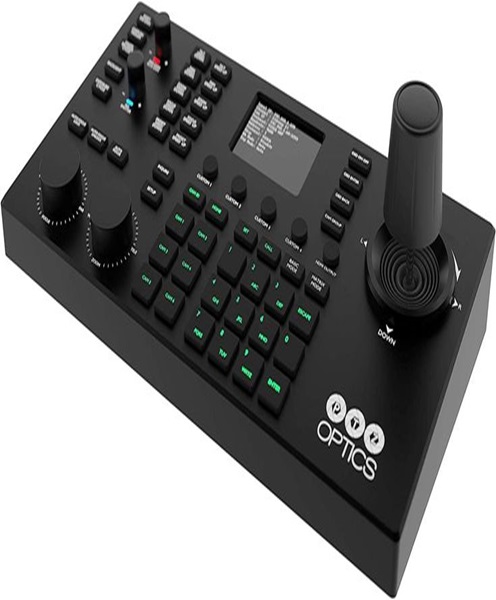
PTZ Camera Joystick Hire & Rental in Kenya
Remote camera operation is an important part of professional live streaming and video production. When cameras are installed in fixed positions around a venue, operators need a convenient way to adjust their viewing angles without physically moving the equipment.
A PTZ camera joystick provides hands-on control of compatible pan, tilt and zoom cameras. It allows an operator to move the camera horizontally, tilt it vertically and adjust the zoom to capture the subject or activity more effectively.
This type of control is particularly useful in churches, conference halls, lecture theatres, studios and event venues where cameras may be positioned at a distance from the production control desk.
A joystick can also make camera movements more controlled and consistent. Instead of relying entirely on buttons or software menus, the operator can use a physical control to guide the camera towards the desired position.
At Janeson Rentals, clients can enquire about PTZ camera joystick hire and rental in Kenya for temporary video production requirements. Whether you are preparing a church broadcast, corporate conference, webinar, concert or educational programme, a suitable PTZ joystick can help simplify camera operation.
What Is a PTZ Camera Joystick?
A PTZ camera joystick is a physical control mechanism used to move compatible PTZ cameras remotely.
The term PTZ represents three camera functions:
-
Pan: Horizontal movement from left to right or right to left.
-
Tilt: Vertical movement upwards or downwards.
-
Zoom: Adjusting the camera’s framing to make a subject appear closer or wider.
A joystick allows the operator to control the direction and, on many systems, the speed of camera movement.
Some PTZ joysticks are integrated into complete PTZ camera controllers. Others are part of specialised control units designed for professional broadcast and video production environments.
Depending on the model, the joystick may work alongside dedicated buttons, dials and controls for selecting cameras, recalling presets, adjusting focus and managing other supported functions.
The exact capabilities depend on the controller and the PTZ camera being used.
Why a PTZ Camera Joystick Is Useful in Live Video Production
A live production often requires the camera operator to react to what is happening on stage or in the venue.
For example, during a conference, a speaker may move from a podium towards a presentation screen. During a church service, the operator may need to change from a close-up of the preacher to a wide shot of the worship team.
A PTZ camera joystick provides a convenient way to make these adjustments remotely.
Some important benefits include:
-
Direct physical control of camera movement.
-
Smooth adjustment of horizontal and vertical framing.
-
Convenient zoom operation on compatible systems.
-
Better control over camera movement speed.
-
Reduced need to physically access mounted cameras.
-
Easier tracking of speakers and performers.
-
Support for multi-camera productions.
-
More flexible live broadcast operation.
A joystick does not independently create a video broadcast. It is a control accessory that works with compatible PTZ cameras and a suitable video production system.
PTZ Camera Joystick Hire for Church Live Streaming
Churches often have fixed camera positions around the sanctuary. These may include cameras facing the pulpit, worship team, choir and congregation.
A PTZ joystick allows the media operator to adjust the cameras remotely from a production desk.
For example, the operator can move a camera towards the preacher during the sermon, zoom in for a closer view and then return to a wide shot when the choir begins performing.
PTZ joystick rental may be useful for:
-
Sunday worship services.
-
Bible study programmes.
-
Prayer meetings.
-
Gospel concerts.
-
Worship nights.
-
Church anniversaries.
-
Christian conferences.
-
Youth ministry events.
-
Special church celebrations.
-
Outdoor ministry broadcasts.
A church with multiple PTZ cameras may benefit from a control arrangement that allows the operator to select different cameras and move them using a joystick.
Where supported, preset positions can also help the operator return to frequently used camera angles.
PTZ Joystick Rental for Corporate Conferences
Corporate conferences involve presentations, keynote speakers, panel discussions and audience participation. The camera system may need to capture different subjects throughout the programme.
A PTZ camera joystick allows the operator to adjust camera framing without leaving the control position.
Corporate applications include:
-
Business conferences.
-
Annual general meetings.
-
Product launches.
-
Corporate seminars.
-
Investor presentations.
-
Business summits.
-
Award ceremonies.
-
Government events.
-
Hybrid conferences.
-
Panel discussions.
During a panel discussion, for example, the operator may use the joystick to move from a wide group shot to a closer view of one speaker.
The joystick can also be useful when following a presenter who moves around the stage.
For formal events, operators should practise smooth movements before the broadcast to avoid sudden or distracting camera transitions.
PTZ Camera Joystick Hire for Webinars and Online Meetings
Webinars and online meetings sometimes take place in larger rooms where a single fixed camera cannot capture every participant effectively.
A remotely controlled PTZ camera can be positioned to cover the meeting area, while the joystick allows the operator to adjust the framing.
Applications include:
-
Business webinars.
-
Online training.
-
Virtual workshops.
-
Boardroom meetings.
-
Educational seminars.
-
Remote presentations.
-
Professional interviews.
-
Online panel discussions.
-
Corporate town halls.
The joystick may be used to direct the camera towards the active speaker or adjust the viewing angle during a presentation.
For this type of production, it is important to ensure that the PTZ camera and control device are compatible with the computer, conferencing platform and video capture system.
PTZ Camera Joystick Rental for Educational Institutions
Educational institutions may use PTZ cameras to capture lectures, seminars, training programmes and academic events.
A lecturer may move around a teaching area while presenting information on a screen or demonstrating a practical activity.
A PTZ joystick allows the camera operator to follow the lecturer remotely.
Potential applications include:
-
University lectures.
-
Online classes.
-
Graduation ceremonies.
-
School assemblies.
-
Academic conferences.
-
Guest lectures.
-
Training workshops.
-
Research presentations.
-
Educational webinars.
-
Distance-learning programmes.
A joystick can make it easier to adjust camera direction without interrupting the lecturer or requiring someone to operate the camera physically.
PTZ Camera Joystick Hire for Concerts and Live Performances
Concerts and entertainment events often involve several performers moving across a stage. A fixed camera may not always capture the action from the most suitable angle.
A PTZ camera joystick allows operators to move compatible cameras towards performers and adjust their framing during the broadcast.
It can be useful for:
-
Live music concerts.
-
Gospel music performances.
-
Choir productions.
-
Dance shows.
-
Theatre performances.
-
Cultural festivals.
-
Talent competitions.
-
Fashion shows.
-
School entertainment events.
-
University concerts.
The joystick’s movement response and speed settings are important in these environments. An operator should be able to follow the performers without making abrupt camera movements that distract viewers.
For a production with several cameras, the operator may need to select the correct camera before adjusting its position.
Important Features to Consider When Hiring a PTZ Camera Joystick
PTZ joysticks differ in their construction, control features and compatibility. Before hiring one, consider the following characteristics.
1. Joystick Responsiveness
A joystick should respond appropriately to the operator’s movements.
Responsive controls allow the operator to make small framing adjustments as well as larger camera movements.
The feel and sensitivity of the joystick are important, especially for productions where smooth camera movement is required.
2. Pan and Tilt Control
The joystick should support the pan and tilt functions of the connected PTZ camera.
These functions allow the operator to move the camera horizontally and vertically.
The camera’s own movement range determines how far it can turn or tilt.
3. Zoom Control
Many PTZ joystick controllers include zoom controls that allow the operator to adjust the camera’s framing.
This may be implemented through a separate rocker, button or another control mechanism.
Zoom functionality depends on the controller and camera compatibility.
4. Adjustable Movement Speed
Some controllers allow the operator to adjust the speed of camera movement.
This can be useful when changing between different production situations.
For example, a slow movement may be preferred during a formal conference, while a different setting may be suitable for a more dynamic live performance.
5. Camera Selection
A multi-camera production may use several PTZ cameras.
A controller with camera selection functions allows the operator to choose which camera to operate.
The number of cameras supported depends on the equipment model and control system.
6. Preset Position Controls
Some PTZ control systems support saved camera presets.
These can be used to return a camera to a preferred viewing angle without manually repositioning it every time.
Examples include a pulpit shot, stage-wide view, presenter close-up or audience angle.
Preset functions depend on the connected camera and controller.
7. Control Protocol Compatibility
PTZ cameras use different control methods. Some common protocols include VISCA, VISCA over IP, Pelco-D and Pelco-P.
The joystick controller must support a compatible protocol and connection method.
It is important to check the camera manufacturer’s documentation rather than assuming that every PTZ joystick works with every PTZ camera.
8. Ergonomic Design
The joystick should be comfortable for the operator to use during an extended production.
Control placement, grip, button arrangement and overall construction can influence ease of operation.
9. Network or Serial Connectivity
Depending on the model, the controller may connect through Ethernet or serial communication.
The production team should confirm the required cable type, connection arrangement and settings before the event.
Types of PTZ Camera Joystick Controls
Different controllers offer different approaches to remote camera movement.
Integrated PTZ Joystick Controllers
These devices combine a physical joystick with other PTZ camera controls.
They may include camera selection buttons, preset controls, zoom functions and displays.
They are useful for operators who need a central device to manage several camera functions.
Standalone Joystick Interfaces
Some systems provide a joystick as part of a more specialised control interface.
Their functionality may be more limited than that of a complete PTZ controller, depending on the design.
Network-Based Joystick Controllers
These controllers communicate with compatible PTZ cameras over an IP network.
They may be suitable for venues where cameras are connected through structured network cabling.
Software-Assisted Joystick Systems
Some production environments combine physical joystick controls with software interfaces.
The software may provide additional settings, camera selection and configuration options.
The correct system depends on the cameras, control requirements and production workflow.
Understanding PTZ Joystick Connectivity and Compatibility
A PTZ camera joystick must communicate correctly with the connected camera or camera control system.
Before hiring, the production team should identify the connection method used by the equipment.
Ethernet Connections
Some controllers use Ethernet to communicate with compatible IP-controlled cameras.
This arrangement can be useful when cameras are installed in different locations around a venue.
The network may require correct IP addressing and configuration.
RS-232 and RS-422 Connections
Some professional PTZ systems use serial communication.
The correct cable, pin arrangement and communication settings must match the connected equipment.
USB Connections
Certain camera control systems support USB-based interfaces, although USB video transmission and USB camera control are separate functions.
The specific controller documentation should be checked before assuming that a USB connection will provide joystick control.
Power Requirements
A PTZ joystick may use an external power adapter or another supported power arrangement.
Some network-based equipment may support Power over Ethernet.
The controller’s power requirements should be confirmed before installation.
Equipment That Works With a PTZ Camera Joystick
A PTZ camera joystick is normally used as part of a wider video production system.
Depending on the event, supporting equipment may include:
-
PTZ cameras: Receive remote movement commands and capture video.
-
PTZ camera controllers: Provide the complete interface for managing camera functions.
-
Video switchers: Select between different camera feeds.
-
Streaming computers: Run the software used for live broadcasting.
-
Video capture devices: Connect compatible camera signals to computers.
-
HDMI cables: Carry video signals between compatible devices.
-
SDI cables: Support professional video signal connections.
-
Ethernet cables: Provide network connectivity for IP-controlled systems.
-
Network switches: Connect compatible cameras and control devices.
-
Camera tripods: Provide temporary mounting support.
-
Wall or ceiling mounts: Support fixed camera installations.
-
Streaming encoders: Process and transmit video to online platforms.
-
Audio mixers: Manage sound for the live broadcast.
The exact arrangement depends on the camera models and the requirements of the production.
PTZ Camera Joystick Versus Traditional Camera Operation
Traditional camera operation often involves a camera operator physically standing beside the camera and adjusting its direction, zoom and focus.
A PTZ camera joystick offers remote control, allowing the operator to remain at a production desk or another suitable location.
This can be useful where cameras are installed high above the audience, mounted on walls or positioned at the back of a large venue.
However, remote PTZ operation and traditional camera operation serve different production needs. A roaming camera operator may still be necessary for moving shots, close-up audience footage and certain live entertainment productions.
A PTZ joystick is particularly useful for cameras that are intended to remain in fixed positions while changing their viewing angles remotely.
Why Renting a PTZ Camera Joystick Can Be Practical
A PTZ joystick may be required only for selected events or temporary video production projects. Purchasing professional control equipment may not be necessary for organisations that do not operate multi-camera systems regularly.
PTZ camera joystick hire offers flexibility for event organisers, churches, production teams and institutions.
Potential benefits include:
-
Access to dedicated camera movement controls.
-
Reduced need to purchase equipment for occasional productions.
-
Flexible arrangements for temporary live streaming setups.
-
Support for multi-camera event coverage.
-
Easier operation of compatible PTZ cameras.
-
Reduced storage requirements between events.
-
Access to control equipment when existing resources are insufficient.
For organisations organising occasional conferences, church broadcasts or special events, renting can be a practical way to arrange the required equipment for the production period.
Why Choose Janeson Rentals for PTZ Camera Joystick Hire in Kenya?
The correct PTZ joystick should be compatible with the cameras and control system used during the production. It should also provide the movement and zoom controls required by the camera operator.
Janeson Rentals provides a point of enquiry for PTZ camera joystick hire and rental in Kenya for event organisers, churches, corporate clients and video production teams.
PTZ camera joystick rental may be useful for:
-
Church live streaming.
-
Corporate conferences.
-
Hybrid events.
-
Webinars.
-
Educational broadcasts.
-
Concerts.
-
Product launches.
-
Online seminars.
-
Training programmes.
-
Multi-camera productions.
Janeson Rentals is based in Nairobi and serves clients seeking event equipment hire across Kenya.
When making an enquiry, provide the PTZ camera brand and model, the number of cameras, the required control functions and the event location. This helps establish whether the joystick will be compatible with the intended setup.
How to Prepare for PTZ Camera Joystick Rental
Before hiring a PTZ camera joystick, consider these practical steps:
-
Identify the cameras: Establish the brand and model of each PTZ camera.
-
Confirm compatibility: Check which control protocols and connection types the cameras support.
-
Determine the number of cameras: Establish how many cameras the controller needs to operate.
-
Identify the required controls: Confirm whether pan, tilt, zoom, focus and preset functions are needed.
-
Check network or serial connections: Prepare the correct cabling and configuration.
-
Plan the operator position: Choose a control location with access to video monitors.
-
Test joystick movement: Confirm that camera movements respond correctly.
-
Practise camera transitions: Rehearse movement speed and framing before the event.
-
Check power arrangements: Confirm the controller’s power requirements.
-
Confirm rental dates: Provide the event venue and required rental period.
These preparations can help avoid compatibility issues and support a smoother live production.
Book PTZ Camera Joystick Hire & Rental in Kenya
A PTZ camera joystick provides convenient hands-on control of compatible remote cameras, helping operators adjust camera movement and framing during live broadcasts and video productions.
Whether you are preparing a church service, conference, webinar, concert or hybrid event, Janeson Rentals provides a point of enquiry for PTZ camera joystick hire and rental in Kenya.
Contact Janeson Rentals with your camera details, control requirements, event location and rental dates to discuss PTZ camera joystick rental in Nairobi and across Kenya.