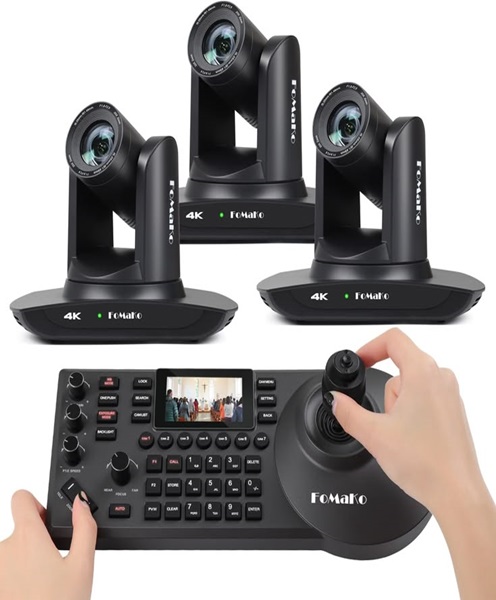
PTZ Conference Camera Hire and Rental in Kenya
Professional conferences and business meetings increasingly require flexible audiovisual equipment capable of capturing speakers, presenters and participants from different positions within a venue. In larger meeting rooms and conference spaces, a fixed camera may not always provide the coverage required. This is where a PTZ conference camera becomes particularly useful.
At Janeson Rentals, we provide PTZ conference camera hire and rental in Kenya for event organisers, businesses, institutions, production teams and individuals planning professional meetings and conferences. A PTZ camera offers remote camera movement and zoom functionality, allowing operators to adjust the viewing angle and framing without physically repositioning the camera.
PTZ stands for Pan, Tilt and Zoom. These three functions allow a camera to move horizontally, move vertically and adjust its zoom level. Depending on the model, a PTZ conference camera may also support remote control, preset positions and integration with compatible video production or conferencing systems.
Whether you are organising a corporate conference in Nairobi, a hybrid business meeting, a webinar, a training session or a large institutional gathering, PTZ conference camera rental can help provide flexible video coverage.
Hiring this equipment from Janeson Rentals gives event organisers an opportunity to access professional camera equipment for the duration of their event without necessarily purchasing a permanent camera system.
What Is a PTZ Conference Camera?
A PTZ conference camera is a remotely controlled video camera designed to capture meetings, presentations, conferences and other events. Its main advantage is the ability to change the camera’s direction and framing through remote operation.
The three main PTZ functions are:
Pan: This allows the camera to move horizontally from left to right or right to left. It is useful when capturing a wide meeting room, following activity across a stage or changing the camera’s view between speakers.
Tilt: This allows the camera to move vertically upwards or downwards. It helps adjust the camera angle when capturing seated participants, standing presenters or different areas of a venue.
Zoom: This adjusts how closely the camera frames a subject. Depending on the camera model, zoom may be optical or digital. Optical zoom is particularly useful when a closer view is needed without relying entirely on digital enlargement.
These functions make PTZ cameras suitable for environments where camera angles need to change during a programme.
Unlike a conventional fixed conference camera, a PTZ camera can provide several different views from one installed camera position. This can reduce the need to physically move equipment whenever the focus of a meeting changes.
Why Hire a PTZ Conference Camera?
Buying a professional PTZ camera may not be necessary for businesses and event organisers that only need one for occasional events. PTZ conference camera hire offers a flexible alternative.
Flexible Camera Positioning
A major advantage of PTZ cameras is their ability to move remotely.
During a conference, the camera may need to capture a keynote speaker, a panel of presenters, a meeting table or a different part of the room. Remote pan and tilt functions make these adjustments possible without manually repositioning the entire camera.
This flexibility is particularly valuable in venues where camera access is restricted or where equipment needs to remain in a fixed position throughout the programme.
Remote Camera Operation
PTZ cameras can be operated using compatible controllers, software or other supported control systems.
An operator can adjust the camera position from a convenient location rather than standing beside the camera. This can help maintain a tidy conference environment and reduce unnecessary movement around the venue.
The exact control method depends on the camera model and its compatibility with the selected controller or software.
Professional Conference Coverage
A PTZ camera can help capture speakers and participants from different angles. This is useful when an event includes several presenters, panel discussions or changes in the programme.
The ability to adjust framing can improve the viewing experience for remote participants and audiences watching a live video feed.
Convenient for Hybrid Events
Hybrid conferences require visual coverage for both the physical audience and participants joining online.
A PTZ camera can be positioned to capture the main presentation area and adjusted as the event progresses. When integrated with suitable video conferencing or production equipment, it can form part of a professional hybrid event setup.
Reduced Need for Physical Camera Movement
Traditional cameras may require an operator to move the equipment manually whenever a new camera angle is needed.
A PTZ camera provides remote movement functions that allow adjustments from a compatible controller. This is useful in boardrooms, auditoriums and conference venues where maintaining a neat setup is important.
Flexible Use Across Different Venues
PTZ conference camera rental can be useful for temporary meeting rooms, hotels, conference centres, training facilities, auditoriums and corporate event venues.
Instead of buying equipment for a single event, organisers can hire a suitable camera according to the requirements of each occasion.
Events That Benefit from PTZ Conference Camera Rental
PTZ conference cameras are suitable for a wide range of professional and institutional applications.
Corporate Conferences
Corporate conferences often feature keynote presentations, panel discussions, executive speeches and business announcements.
A PTZ camera can be directed towards different presenters throughout the programme. This helps provide flexible coverage when the event is being streamed, recorded or shared with remote attendees.
Hybrid Meetings
Hybrid meetings involve participants who attend in person and others who connect remotely.
A PTZ camera can help capture the meeting room and adjust its framing as different people speak. When combined with compatible conferencing software and audio equipment, it supports a more flexible communication arrangement.
Boardroom Presentations
Boardrooms often have fixed seating arrangements, with participants positioned around a central table.
A PTZ conference camera can be installed or positioned to provide a suitable view of the room. The operator can adjust the framing to focus on different participants or presenters as required.
Seminars and Workshops
Seminars and workshops may involve presentations, demonstrations, question-and-answer sessions and group discussions.
A PTZ camera can help capture the presenter and adjust its view to cover other parts of the room. This is useful when sessions are being recorded or streamed through a compatible system.
Webinars and Online Training
Online training sessions and webinars often require clear visual coverage of the presenter.
A PTZ camera can be used to frame the presenter and adjust the shot when the presentation format changes. It can also be integrated into a more advanced production setup where multiple video sources are involved.
Panel Discussions
Panel discussions can involve several speakers seated together on a stage or at a conference table.
A PTZ camera allows an operator to adjust the view between a wide shot of the entire panel and a closer shot of a particular speaker, depending on the camera’s capabilities and the production arrangement.
Religious and Institutional Events
Some religious institutions and organisations use video systems to capture conferences, seminars, leadership meetings and special programmes.
A PTZ camera can support remote-controlled video coverage, particularly where the camera needs to remain in a fixed location during an event.
Live Streaming and Video Production
PTZ cameras are also used in live production environments where the operator needs to change camera framing during a programme.
When connected to compatible video switching and streaming equipment, the camera can provide a video source for a live broadcast.
Important Features to Consider When Hiring a PTZ Conference Camera
Not all PTZ cameras have identical capabilities. Before hiring, it is important to consider the camera’s specifications and how they match the planned event.
Pan and Tilt Range
Pan and tilt range determines how far the camera can move horizontally and vertically.
A wide movement range can be useful when the camera needs to cover a large room or several areas within a venue. The appropriate range depends on the camera model and its installation position.
Optical Zoom
Optical zoom allows the camera to bring distant subjects closer within the frame.
This is particularly useful in auditoriums, conference halls and larger meeting spaces where presenters may be positioned far from the camera.
When selecting a camera, consider the optical zoom capability rather than assuming that all PTZ cameras offer the same zoom performance.
Video Resolution
Video resolution affects the level of detail captured by the camera.
Depending on the model, PTZ cameras may support different resolutions and frame rates. The selected camera should be compatible with the display, recording, conferencing or streaming system being used.
Remote Control Compatibility
PTZ cameras may support different control methods, including dedicated hardware controllers and compatible software.
Before hiring, confirm which controller or control method is required. Compatibility is important because not every controller works with every PTZ camera.
Preset Camera Positions
Some PTZ cameras support programmable presets.
A preset allows the operator to save a particular camera position and return to it later. For example, a camera may have one preset for a wide view of the conference stage and another for a closer view of the main presenter.
The number of available presets and the way they are configured depend on the camera model and control system.
Connectivity Options
PTZ cameras may offer different video and control connections depending on their design.
Possible interfaces include HDMI, SDI, USB, Ethernet and supported network-control connections. Not every model provides all these options.
It is important to confirm the camera’s available connections and ensure they match the equipment used at the venue.
Low-Light Performance
Conference venues do not always have ideal lighting conditions. Some rooms may be dimly lit, while others use a mixture of natural and artificial lighting.
The camera’s sensor, lens and image-processing capabilities influence how well it performs under different lighting conditions. Appropriate venue lighting remains important for producing clear video.
PTZ Conference Camera Hire for Hybrid Events in Nairobi
Nairobi is an important location for corporate meetings, professional conferences, institutional gatherings and business events. As more organisations include virtual participation in their programmes, suitable video equipment has become an important part of event planning.
PTZ conference camera hire gives organisers access to flexible camera equipment without requiring a permanent installation.
A hybrid conference setup may include:
-
PTZ conference camera for adjustable video coverage.
-
Compatible PTZ controller or control software.
-
Laptop or computer for video conferencing.
-
Microphones for presenters and participants.
-
Audio mixer where multiple audio sources need to be managed.
-
Speakers for suitable audio playback.
-
Television, projector or LED display.
-
Video switcher for managing multiple video sources where required.
-
Streaming encoder or compatible computer-based streaming software.
-
Reliable internet connection for online participation.
The equipment arrangement should be planned according to the venue, programme and intended video workflow.
Combining a PTZ Camera with Other Production Equipment
A PTZ camera can become part of a larger audiovisual system. Selecting compatible equipment is important for reliable operation.
PTZ Camera Controller
A compatible PTZ camera controller allows an operator to adjust pan, tilt and zoom functions remotely.
Depending on the camera and controller, operation may involve joysticks, buttons, control software or network connections. Compatibility should be confirmed before the event.
Video Switcher
A video switcher allows an operator to select between different video sources.
For example, a production team may use a PTZ camera, a second camera and a laptop presentation as separate inputs. A compatible switcher can help manage these sources for a live production.
Video Capture Card
A video capture card can connect a supported camera video output to a computer for use with compatible conferencing, recording or streaming software.
The capture device must support the camera’s output format and connection type.
Streaming Encoder
A streaming encoder prepares audio and video for transmission to a compatible online platform or streaming destination.
A PTZ camera captures the image, while the encoder handles the streaming process. These are different functions and may require separate equipment.
Conference Microphone System
A PTZ camera captures video, but clear speech requires appropriate audio equipment.
A conference microphone system can help capture contributions from meeting participants, particularly during discussions involving several speakers.
Displays and Projectors
Displays and projectors can show remote participants, presentations and other meeting content. They help connect the physical meeting room with the virtual audience.
PTZ Conference Camera Hire for Live Streaming
PTZ cameras are useful in live streaming environments because they allow operators to adjust the camera view while a programme is in progress.
For example, during a corporate conference, the camera may begin with a wide shot of the stage, move to a keynote speaker and then return to a wider view for a panel discussion.
When integrated with a compatible video switcher and streaming system, these camera movements can contribute to a more dynamic production.
However, the camera alone does not provide the complete live streaming service. The event may also require a computer or encoder, audio equipment, video connections and suitable internet connectivity.
Organisers should plan the entire workflow before the event to ensure that the camera can connect properly to the production system.
How to Prepare for PTZ Conference Camera Rental
A successful PTZ camera setup begins with understanding the venue and the event’s technical requirements.
Consider the following preparation steps:
-
Assess the venue: Determine the size of the room, stage position, seating arrangement and camera placement.
-
Identify the coverage required: Decide whether the camera needs to capture a stage, boardroom table, panel or several areas.
-
Confirm the camera specifications: Check resolution, zoom capability, movement range and available connections.
-
Check the controller: Confirm that the PTZ camera and its controller or software are compatible.
-
Plan the video workflow: Establish whether the camera will connect to a computer, video switcher, display or streaming encoder.
-
Arrange audio equipment: Identify the microphones and audio connections needed for the event.
-
Check lighting: Make sure presenters and participants are sufficiently illuminated.
-
Test before the programme: Check camera movement, zoom, video output, controller operation and the complete production setup.
Testing helps identify compatibility or connection problems before the audience arrives.
Why Choose Janeson Rentals for PTZ Conference Camera Hire in Kenya?
Janeson Rentals provides event equipment hire and rental solutions for clients organising corporate, institutional and social events in Kenya.
Our PTZ conference camera hire service is intended for organisers who require flexible video coverage for professional meetings, conferences, hybrid events and live productions.
Clients can consider PTZ camera rental for:
-
Corporate conferences and business forums.
-
Boardroom and executive meetings.
-
Hybrid meetings and seminars.
-
Online training and webinars.
-
Panel discussions and presentations.
-
Institutional conferences.
-
Live streaming and video production.
-
Workshops and professional events.
Based in Nairobi, Janeson Rentals serves clients organising events across Kenya. We recognise that every venue and production has different technical requirements, so it is important to establish the intended use, camera connections and supporting equipment before confirming a rental arrangement.
Book PTZ Conference Camera Hire and Rental in Kenya
Are you planning a corporate conference, hybrid meeting, seminar, webinar or live production? A PTZ conference camera can provide flexible video coverage by allowing the operator to adjust the camera’s direction and zoom remotely.
Contact Janeson Rentals to enquire about PTZ conference camera hire and rental in Kenya. Provide your event date, venue, expected setup and technical requirements so that suitable equipment can be considered.
For PTZ conference camera rental in Nairobi and across Kenya, choose Janeson Rentals as your event equipment hire partner.