
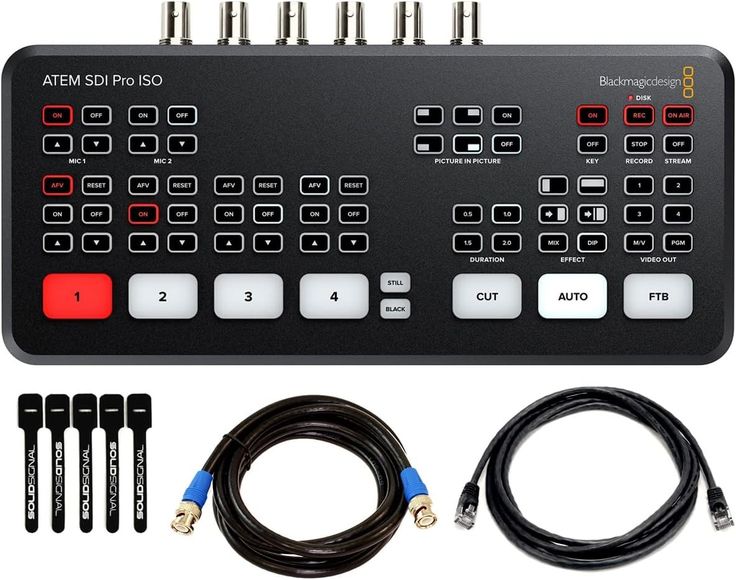
SDI Video Switcher Hire and Rental in Kenya
An SDI video switcher is professional audiovisual equipment used to select and manage video feeds from compatible sources during live productions and recorded events. It is commonly associated with broadcast environments, multi-camera productions, conferences, panel discussions, live performances, and other events that require coordinated video signals.
SDI stands for Serial Digital Interface, a standard used to transmit digital video signals over compatible connections, commonly using coaxial cables with BNC connectors. SDI equipment is frequently used in professional video production because supported formats can be carried over appropriate cable runs, making it useful for setups where video sources and production equipment are positioned at a distance from one another.
Janeson Rentals provides event equipment hire and rental solutions for clients in Nairobi and across Kenya. If you are planning a multi-camera event, conference, live production, or video recording session, you can enquire about SDI video switcher rental for your technical requirements.
An SDI video switcher allows an operator to select between compatible video inputs and route the chosen feed to an output. Depending on the model, it may also provide production features such as transitions, multiple outputs, multiview monitoring, keying, or integration with recording and streaming systems.
Not all SDI switchers offer the same capabilities. Choosing the right equipment requires checking the number of inputs, supported SDI standards, video resolution, frame rate, output connections, and the rest of the production workflow.
What Is an SDI Video Switcher?
An SDI video switcher is a device used to select between multiple compatible SDI video signals and send the chosen source to one or more outputs, depending on the model.
For example, a conference production may use three cameras: one focused on the main speaker, another covering a panel discussion, and a third capturing a wide view of the stage. An SDI switcher can allow the operator to select the camera feed that should appear on the programme output.
In more advanced productions, the switcher may support transitions between shots, preview monitoring, multiple output feeds, or other production controls. The available features depend on the specific device.
SDI is often used in professional video environments because it supports established digital video workflows and can be suitable for longer cable runs when the correct standard, cable type, and signal format are used.
However, SDI and HDMI are not identical. They use different connector types and signal workflows, and compatibility should not be assumed. If a production combines SDI cameras with HDMI laptops or projectors, suitable conversion equipment may be required.
Why Hire an SDI Video Switcher?
Hiring an SDI video switcher can be practical for organisers who need professional video switching for a particular event or production.
1. Manage Multiple Camera Feeds
Events that use several cameras require a way to select which view is sent to the main output.
An SDI switcher can help the production team move between camera feeds during speeches, panel discussions, performances, interviews, and other programme segments.
The number of cameras that can be connected depends on the switcher’s input capacity and supported formats.
2. Support Professional Video Workflows
SDI is widely associated with professional video production systems. A compatible switcher can form part of a setup involving cameras, monitors, recording devices, and other production equipment.
Before booking, confirm that all devices support compatible SDI standards and signal formats.
3. Help Maintain Programme Flow
Switching between sources through a central control unit can help an operator manage live visual content without repeatedly changing physical connections.
For example, the production team can move from a wide stage shot to a close-up of a speaker, then to another camera during a panel discussion.
The quality and smoothness of transitions depend on the equipment, operator, and production configuration.
4. Useful for Temporary Productions
Purchasing professional video switching equipment may not be necessary for organisations that only produce occasional conferences, concerts, corporate functions, or live recordings.
SDI video switcher hire allows organisers to enquire about equipment for a specific event, subject to availability and technical requirements.
5. Integrate with Compatible Production Equipment
Depending on the model, an SDI switcher may be used with compatible cameras, monitors, recorders, converters, and streaming systems.
Some setups may require separate equipment for audio mixing, recording, encoding, or distribution. Confirm the entire signal path before booking.
Events That May Require an SDI Video Switcher
Multi-Camera Conferences and Corporate Events
Large conferences may use multiple cameras to capture speakers, panel discussions, audience questions, and stage activities.
An SDI video switcher can help the production operator select the most appropriate camera feed for the event’s programme output. This may be useful for recordings, venue displays, or a compatible streaming workflow.
When planning the setup, determine how many cameras are required and whether the switcher must feed one or more destinations.
Live Concerts and Music Events
Concerts and live performances may use several cameras to capture performers, musicians, the audience, and wide stage views.
An SDI switcher can help the video production team select between these views in real time. This can support visual coverage on venue screens or within a recording or streaming production.
Camera positions, cable routes, lighting conditions, and operator sightlines should be considered when planning the equipment.
Church Services and Religious Conventions
Church services and religious conventions may use several cameras to capture the pulpit, worship team, congregation, and other activities.
An SDI video switcher can form part of a multi-camera production setup for in-venue displays, recording, or live streaming. Additional equipment may be needed depending on the destination of the video feeds.
Before booking, confirm camera connections, output requirements, audio synchronisation needs, and compatibility with the church’s existing audiovisual system.
Broadcast and Video Production
Production teams may use SDI switchers for studio-style recordings, interviews, panel discussions, and other multi-camera workflows.
A suitable switcher can help manage several video sources while the operator selects the feed for recording or further processing.
The appropriate equipment depends on the production format, camera standards, output requirements, and whether additional graphics or audio functions are needed.
Hybrid Events and Live Streaming
Hybrid events may require camera feeds to be switched before they are sent to an online audience or remote participants.
An SDI switcher can be part of this workflow, but it does not necessarily provide direct internet streaming by itself. The setup may require a capture interface, encoder, computer, streaming software, or other compatible equipment.
Confirm the complete signal chain before the event.
Product Launches and Corporate Presentations
Product launches can combine live presenters, product demonstrations, video playback, and multiple camera views.
An SDI switcher may be suitable when professional cameras or other SDI sources form part of the production. If the event also uses HDMI laptops or projectors, check whether converters or a hybrid switching solution are needed.
Award Ceremonies and Gala Events
Award ceremonies often include presenters, recipients, performances, audience reactions, and video content.
A multi-camera setup can capture different parts of the programme, while an SDI switcher allows the operator to choose the appropriate feed for a compatible output.
Plan the camera coverage and switching sequence before the ceremony to reduce confusion during important moments.
Educational and Training Productions
Institutions may record lectures, panel discussions, demonstrations, and training sessions using several cameras.
An SDI switcher can help coordinate the camera views and send the selected output to a compatible recording or display system. The number of sources and required output format should guide equipment selection.
Types of SDI Video Switchers
The term SDI video switcher covers several equipment configurations. The right option depends on the complexity of the production.
Basic SDI Switcher
A basic SDI switcher allows the operator to select between compatible SDI sources and route the chosen signal to an output.
It may suit a straightforward production that needs camera switching without extensive advanced features. Confirm the available inputs, output connections, and supported signal formats.
Multi-Input SDI Video Switcher
A multi-input switcher accommodates several connected video sources. It may be useful for conferences, panel discussions, live performances, and other multi-camera productions.
Count the planned sources before booking and confirm whether the device has enough inputs for every camera and additional video feed.
Professional SDI Production Switcher
Professional production switchers may offer features such as preview and programme outputs, transitions, multiview monitoring, keying, and multiple output options.
These capabilities vary by model. If your event needs graphics, picture-in-picture, or other advanced functions, confirm that the specific device supports them.
Hybrid SDI and HDMI Switcher
Some production systems combine SDI and HDMI connections or support these formats through converters.
A hybrid arrangement may be useful when professional SDI cameras need to work alongside HDMI laptops, media players, or displays. However, compatibility depends on the actual equipment and supported formats.
Confirm which devices connect directly and whether additional converters are needed.
How to Choose the Right SDI Video Switcher
Count the Video Sources
List every camera, playback device, or other video source that needs to connect to the switcher.
Make sure the device has enough compatible inputs. If you expect additional sources during the event, discuss whether extra capacity is required.
Check the SDI Standard
SDI systems support different signal formats and data rates. The appropriate standard depends on the equipment and video format.
Check the specifications of the cameras, switcher, monitors, recorders, and other connected devices. Do not assume that every SDI device supports every resolution or frame rate.
Confirm Resolution and Frame Rate
The production may use standard-definition, HD, 3G-SDI, 6G-SDI, 12G-SDI, or other supported formats, depending on the equipment.
Confirm the actual capabilities of the proposed switcher rather than relying on the general term “SDI.” Every part of the signal chain must support the required format.
Review Output Requirements
Determine where the selected video feed needs to go. Possible destinations include a production monitor, recorder, projector system, converter, or compatible streaming setup.
If multiple destinations are required, check the number and type of outputs available. Some setups may need distribution amplifiers or additional routing equipment.
Check Cable Lengths and Signal Quality
SDI can support longer cable runs than many basic HDMI setups under appropriate conditions, but performance depends on the SDI standard, cable quality, signal format, and cable length.
Measure the distances between cameras, the switcher, and the destination equipment. Use suitable cables and confirm whether additional signal distribution or conversion equipment is required.
Consider Audio Requirements
A video switcher may pass embedded audio or provide specific audio-handling functions, depending on the model. It should not automatically be treated as a full audio mixer.
If the production uses microphones, music, commentary, or a separate sound system, plan the audio routing and synchronisation separately where necessary.
Determine Whether Streaming Is Required
If the event will be streamed online, confirm how the switcher’s output will reach the streaming platform.
Some production switchers integrate with compatible streaming equipment, while others require a separate capture device, encoder, computer, or software. Make sure the chosen setup supports the intended workflow.
Plan the Operator’s Workflow
Identify who will operate the switcher and whether that person understands the equipment.
Prepare a list of camera names, input assignments, planned transitions, and output destinations. Test the system before the event begins.
SDI Video Switcher Hire for Professional Event Production
Professional event production often involves multiple cameras, displays, recording devices, and technical operators.
An SDI video switcher can help organise these video sources and allow the production team to select the appropriate feed throughout the programme. It may be useful for corporate conferences, concerts, church conventions, interviews, and multi-camera recordings.
Before booking, establish the number of cameras, SDI standards, resolution, frame rate, cable lengths, output destinations, and streaming or recording requirements. These details help determine whether the selected switcher can support the production.
SDI Video Switcher Rental for Conferences and Live Streaming
Conferences and hybrid events may use several camera angles to provide better coverage for attendees in the venue and people watching remotely.
An SDI switcher can serve as part of the production workflow by selecting a camera feed for display, recording, or a compatible streaming system.
If the event includes HDMI laptops, presentation slides, or media players, confirm whether a hybrid switcher or signal converters are required. Plan audio routing and test all sources before the event to reduce the risk of technical interruptions.
Why Choose Janeson Rentals?
Janeson Rentals provides event equipment hire and rental solutions for clients in Nairobi and across Kenya. If you are organising a multi-camera conference, live performance, corporate production, church event, video recording session, or hybrid event, you can enquire about SDI video switcher rental for your technical requirements.
Hiring equipment can be useful when you need video switching for a specific production without investing in permanent equipment.
When contacting Janeson Rentals, share the event date, venue, number of cameras, SDI standards, required resolution, and intended output destinations. Explain whether the production involves recording, live streaming, projectors, or additional HDMI sources.
Before confirming your booking, enquire about equipment availability, rental prices, delivery or collection, and any setup or operating support that may be available. Confirm the technical specifications and compatibility of the full system before the event date.
What to Prepare Before Booking an SDI Video Switcher
- Event date: The date and time the equipment is required.
- Venue location: The venue name and town.
- Production type: Conference, concert, live stream, recording, or another event.
- Number of cameras: The total number of video sources to connect.
- SDI standards: The formats supported by the cameras and other devices.
- Resolution and frame rate: The required video output format.
- Cable distances: Approximate distances between cameras, switcher, and destination equipment.
- Output destinations: Monitors, recorders, projectors, converters, or streaming systems.
- HDMI integration: Whether laptops or other HDMI devices must be included.
- Audio requirements: How sound will be routed and synchronised.
- Operating arrangements: Who will control the switcher during production.
- Rental period: How long the equipment will be needed.
Book an SDI Video Switcher with Janeson Rentals
If you need professional video switching for a multi-camera event, conference, concert, church convention, or live production, contact Janeson Rentals to enquire about SDI video switcher hire and rental in Nairobi and across Kenya.
Share the production requirements to help confirm whether a suitable model is available. Ask about supported inputs, video formats, output options, rental charges, delivery or collection, and any installation arrangements.
Selecting compatible equipment and planning the production workflow in advance can help your team manage video feeds more effectively during the event.
Frequently Asked Questions About SDI Video Switcher Hire
What does an SDI video switcher do?
An SDI video switcher allows an operator to select between compatible SDI video sources and send the selected feed to one or more supported outputs.
What is the difference between an SDI and an HDMI video switcher?
SDI switchers use SDI connections, commonly with BNC connectors, and are frequently used in professional video production. HDMI switchers use HDMI connections and are common in presentation and consumer audiovisual setups. The correct option depends on the connected equipment and required video formats.
Can an SDI switcher be used for live streaming?
Yes, it can form part of a live-streaming production. Depending on the model and workflow, additional capture, encoding, computer, or streaming equipment may be needed.
Can I connect HDMI cameras to an SDI video switcher?
Not directly unless the equipment specifically supports the required connection. A suitable HDMI-to-SDI converter or compatible hybrid setup may be necessary. Check signal formats and resolution compatibility before booking.
How many cameras can an SDI switcher support?
This depends on the model and the number of available inputs. Count your cameras and other video sources before selecting equipment.
Where can I hire an SDI video switcher in Kenya?
Contact Janeson Rentals to enquire about SDI video switcher hire and rental in Nairobi and across Kenya. Confirm availability, technical specifications, rental charges, and the required connections before booking.
Janeson Rentals — Event equipment hire and rental solutions for professional presentations, multi-camera productions, and live events across Kenya.



