Introduction
A professional live stream is not defined by camera quality and lighting alone. The background behind the presenter also plays an important role in how the final video looks. A cluttered room, distracting objects, an unsuitable wall colour or an untidy environment can make a broadcast appear unprofessional, even when the camera and audio equipment are of good quality.
A suitable streaming background helps create a clean, organised and visually appealing environment for live broadcasts and video recordings. It gives the production team greater control over what viewers see and helps establish a consistent visual identity for the presentation.
At Janeson Rentals, we provide streaming background hire and rental in Kenya for businesses, churches, event organisers, content creators, production companies and individuals. Whether you are preparing a corporate webinar, conducting an online interview, broadcasting a church service or recording promotional content, a well-selected background can improve the appearance of your production.
Hiring a streaming background is a practical option for clients who need a professional filming environment for a temporary project. Rather than purchasing and storing backdrop equipment, you can arrange rental equipment according to your event or production requirements.
Janeson Rentals is based in Nairobi and serves clients across Kenya, supporting different types of events and video production projects.
What Is a Streaming Background?
A streaming background is a backdrop or visual setting positioned behind a presenter, speaker, performer or subject during a live broadcast or video recording.
Its purpose is to create a controlled background that complements the subject and reduces visual distractions. It can also support branding, improve the appearance of a filming space and help establish the atmosphere of a particular production.
Streaming backgrounds can take different forms depending on the production requirements. Some are simple fabric or printed backdrops, while others may include branded panels, decorative installations, studio-style backgrounds or digital backgrounds used with compatible software.
The appropriate option depends on the type of content being produced, the available filming space, the number of people appearing on camera and the desired visual style.
For example, a corporate webinar may require a simple, professional background featuring company branding. A podcast interview may use a decorative studio-style backdrop, while a church broadcast may require a background that reflects the visual identity of the ministry.
Why Hire a Streaming Background in Kenya?
There are several reasons why streaming background hire is useful for temporary productions and professional broadcasts.
1. Create a Professional Appearance
The background is part of the overall visual presentation. A clean and carefully arranged backdrop can make a presenter look more organised and prepared.
This is particularly important during corporate webinars, online meetings, interviews, virtual conferences and promotional broadcasts where viewers associate the visual presentation with the organisation.
2. Reduce Visual Distractions
A busy background can distract viewers from the speaker. Unnecessary objects, movement behind the presenter and untidy surroundings can compete for attention.
A dedicated streaming background helps establish a more controlled visual environment, allowing viewers to concentrate on the presentation.
3. Support Corporate Branding
Businesses can use branded streaming backgrounds to display company names, logos, campaign messages or event identities.
A branded backdrop can be particularly useful for virtual product launches, press briefings, online conferences, executive interviews and corporate announcements.
Branding should be positioned carefully so that it remains visible without interfering with the presenter’s appearance or the camera composition.
4. Improve the Appearance of Temporary Filming Spaces
Not every organisation has a permanent recording studio. Businesses, churches and event organisers may need to create a temporary production area in a conference room, office, hall or rented venue.
A streaming background can help transform an ordinary space into a more suitable filming environment without requiring permanent changes to the venue.
5. Avoid the Cost of Purchasing Equipment
Purchasing backdrop systems and decorative materials may not be necessary for organisations that only produce occasional broadcasts.
Streaming background rental provides access to the required setup for the duration of a project. It also reduces the need to store bulky materials after the event.
Types of Streaming Backgrounds for Different Productions
The right background depends on the style of production and the message that the organisation wants to communicate.
Plain Fabric Backgrounds
Plain fabric backdrops provide a simple and uncluttered visual setting. They are useful for interviews, online presentations, product demonstrations and individual presenter recordings.
Neutral colours are often suitable for corporate content because they help keep attention on the speaker. The chosen colour should also work well with the lighting and clothing used during the production.
Branded Corporate Backgrounds
A branded background can feature a company logo, event name, campaign identity or other approved visual elements.
These backgrounds are useful for business conferences, online press briefings, product launches, interviews and corporate training sessions.
For a professional result, branding should be clear and appropriately positioned. Excessive graphics or repeated logos can make the background visually busy.
Printed Event Backdrops
Printed backdrops can display customised designs, event themes, sponsor logos or promotional messages.
They are suitable for virtual events, interviews, media presentations and productions where the background needs to reflect a particular occasion.
The artwork should be prepared with the camera framing in mind so that important text and logos are not hidden behind the presenter.
Decorative Studio Backgrounds
Some productions require a background that looks more like a permanent studio environment. This may include decorative panels, shelves, selected props or other visual elements.
Such backgrounds can work well for podcasts, interviews, educational content and online discussions.
The arrangement should remain tidy and should not contain unnecessary objects that distract viewers.
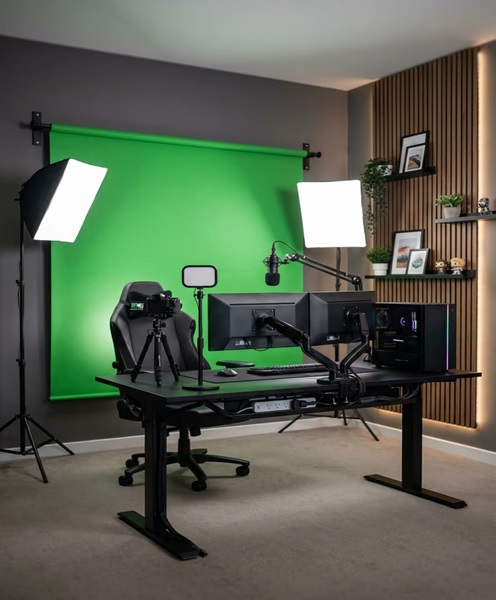
Green Screen Backgrounds
A green screen is a specialised background used with compatible video production software to replace the visible background with a digital image or video.
It is useful for virtual presentations, weather-style displays, educational videos and productions requiring different digital environments.
Green screen production requires careful lighting and positioning. The presenter should be separated from the green surface to reduce unwanted colour spill, and clothing should generally avoid colours that match the screen.
A green screen is not the same as a standard physical backdrop. It requires compatible software and a suitable production workflow to achieve the intended effect.
Digital and Virtual Backgrounds
Digital backgrounds are created or inserted through compatible streaming software or video conferencing platforms.
They can be useful when a physical backdrop is not practical. However, the final result depends on the software, camera quality, lighting, processing capability and the way the subject is separated from the background.
Physical backgrounds may still be preferable when consistent edges, natural movement and a more realistic appearance are important.
Events and Applications That Require Streaming Background Hire
Corporate Conferences and Webinars
Businesses often organise webinars, virtual conferences, executive presentations and online training sessions.
A professional streaming background helps establish a consistent appearance for presenters and speakers. It can also display company branding or the identity of the event.
For conferences with several speakers, a consistent background design can help create a unified visual presentation.
Church Services and Religious Broadcasts
Churches use live streaming to share sermons, worship sessions, announcements and special programmes with online audiences.
A suitable background can help create a dedicated broadcast area within a church hall, office or studio.
Church streaming backgrounds may be simple and neutral or may incorporate approved ministry branding and event themes.
Interviews and Podcasts
Interviews and podcasts benefit from a background that complements the subject and creates a comfortable viewing experience.
A decorative studio background can help establish the identity of a podcast, while a simple backdrop may be more suitable for formal interviews.
When recording multiple participants, the background should be wide enough to cover the camera frame without creating visible gaps.
Product Launches and Promotional Videos
Businesses launching products or campaigns may require a background that communicates the identity of the brand.
A printed or branded backdrop can help create a consistent visual setting for demonstrations, interviews and promotional presentations.
Educational and Training Videos
Educational institutions, trainers and businesses producing instructional content can use streaming backgrounds to create a dedicated teaching environment.
A clean background helps viewers concentrate on the presenter and any supporting graphics displayed during the lesson.
Weddings and Special Events
Some weddings and celebrations include live broadcasts, interviews and recorded messages. A suitable background can create an organised area for guests, speakers and presenters who appear on camera.
The design may reflect the event theme, provided it remains appropriate for the camera setup.
Important Factors to Consider When Hiring a Streaming Background
Selecting a streaming background requires consideration of the venue, camera arrangement and production style.
Background Size
The background should be large enough to cover the area visible within the camera frame.
A single presenter seated in front of a camera may require a smaller backdrop than a panel discussion involving several participants.
Consider the camera’s field of view and the distance between the subject and the background before selecting the size.
Colour and Design
Background colours influence the appearance of the final video. Neutral colours can create a simple and professional look, while branded or decorative designs may be appropriate for specific events.
Avoid designs that are excessively busy or contain patterns that may appear distracting on camera.
Branding and Artwork
If the background includes company or event branding, prepare the artwork before the production date.
Check spelling, logo quality, colour consistency and the placement of important information. Keep essential graphics within the camera frame and avoid placing them where the presenter will cover them.
Material and Finish
Different backgrounds use different materials, each with its own appearance and setup requirements.
Fabric backdrops may need to be arranged carefully to reduce visible creases. Printed materials should be positioned to avoid glare and unwanted reflections.
The material should be appropriate for the venue and the intended lighting arrangement.
Mounting and Support
A physical backdrop may require a suitable support frame, stand or mounting arrangement.
The support system should be stable and suitable for the size and weight of the background. It should also be installed safely so that it does not obstruct walkways or create hazards.
Lighting Compatibility
The background should work with the lighting plan. Uneven lighting can create unwanted shadows, bright patches or colour differences.
For green screen productions, lighting needs to be particularly consistent across the screen surface.
Venue Space
Measure the available filming area before selecting a backdrop. Consider ceiling height, floor space, camera distance and room layout.
A background that is too large for the available space may be difficult to install or position correctly.
How to Set Up a Professional Streaming Background
Start by identifying the camera position and the area that will appear in the final video. This helps determine the required background size and placement.
Next, position the background behind the presenter with enough space for comfortable movement. Where possible, avoid placing the subject directly against the backdrop, as this can create unwanted shadows and make the image appear flat.
Arrange the lighting so that the presenter and background are illuminated appropriately. The subject may need a separate key light, while the backdrop may require its own lighting depending on the design.
Check the camera framing before the broadcast begins. Ensure that support stands, unused equipment, cables and other unwanted objects are outside the visible frame.
For branded backgrounds, confirm that logos and text are readable and not hidden by the presenter. For green screen setups, test the background replacement software and check for visible edges or colour spill.
Finally, record a short test clip or preview the live camera feed. This allows the production team to identify problems and make adjustments before the audience joins.
Combining Streaming Backgrounds with Other Production Equipment
A streaming background is one component of a complete video production environment. Depending on the project, clients may also need:
- Professional video cameras and compatible lenses.
- Streaming tripods and camera support systems.
- LED streaming lights and light stands.
- Softboxes and diffusion accessories.
- Streaming microphones and audio interfaces.
- Video switchers and capture devices.
- Streaming computers and encoders.
- Production monitors and multiview displays.
- Wireless video transmission systems.
- Internet connectivity equipment.
- Suitable power and cable accessories.
Combining these elements creates a more organised production environment and helps the team manage the visual and technical aspects of the broadcast.
Why Choose Janeson Rentals for Streaming Background Hire in Kenya?
Janeson Rentals provides event and production equipment hire solutions for businesses, churches, event organisers and individuals. We understand that a professional broadcast requires attention to both technical equipment and the appearance of the filming environment.
Our streaming background hire and rental service in Kenya supports webinars, corporate events, church broadcasts, interviews, podcasts, promotional videos and other video production projects.
Whether you require a simple background for a presenter or a more customised visual setting for a branded event, planning the backdrop around the venue and camera arrangement is important.
Janeson Rentals is based in Nairobi and serves clients across Kenya. When making an enquiry, share the intended background design, dimensions, event date, venue and whether branding or a particular mounting arrangement is required.
Providing these details helps establish the appropriate background solution for your production.
Book Streaming Background Hire and Rental in Kenya
Are you preparing for a webinar, corporate broadcast, interview, church service or video production? Janeson Rentals can help you arrange streaming background hire in Kenya for your upcoming project.
A suitable backdrop can help create a clean, organised and professional filming environment while supporting your event branding and visual presentation.
Contact Janeson Rentals to discuss your streaming background rental requirements in Nairobi and across Kenya.
Hire a streaming background from Janeson Rentals and create a professional setting for your next live broadcast or video production.