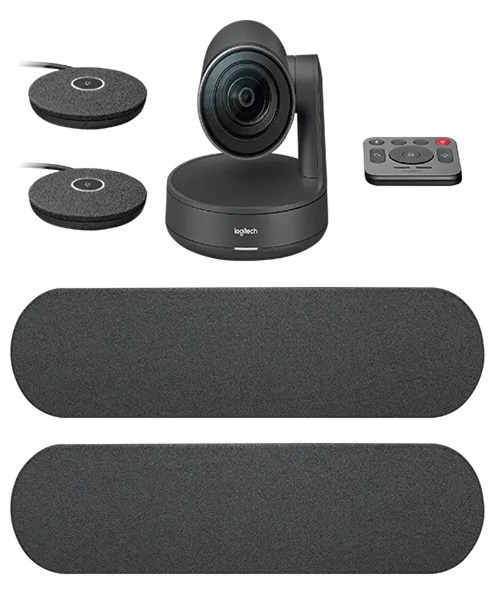
USB Conference Camera Hire and Rental in Kenya
Clear video communication is an important part of modern business meetings, corporate conferences, online training sessions and hybrid events. As organisations increasingly connect participants across different locations, having suitable video equipment can make meetings more professional, engaging and convenient. A USB conference camera provides a practical way to capture meeting participants and presenters and connect them to compatible computers and video conferencing systems.
At Janeson Rentals, we provide USB conference camera hire and rental in Kenya for businesses, event organisers, institutions, training providers and individuals planning professional meetings and events. Whether you are hosting a boardroom meeting in Nairobi, organising a hybrid conference, conducting an online presentation or preparing a temporary training room, hiring a suitable USB conference camera can help you establish an effective video communication setup.
USB conference cameras are particularly useful because they can connect directly to compatible computers through a USB interface. Depending on the camera model, they may offer wide-angle viewing, autofocus, automatic exposure, built-in microphones, remote control and other features designed to support video meetings.
Choosing USB conference camera rental from Janeson Rentals allows you to access suitable equipment for your event without necessarily purchasing a camera that may only be required occasionally. We serve clients in Nairobi and across Kenya, helping event organisers plan equipment requirements for different types of professional gatherings.
What Is a USB Conference Camera?
A USB conference camera is a video camera designed for meetings, video conferencing and online communication. It connects to a compatible computer using a USB connection and provides a video feed for supported conferencing applications, recording software or other video production systems.
These cameras are commonly used in boardrooms, offices, meeting rooms, training centres and temporary conference spaces. They allow participants joining remotely to see the people attending a meeting in person.
Depending on the model, a USB conference camera may be designed for placement on a monitor, mounting on a tripod or positioning on a conference table. Some models provide a wide field of view to capture several participants at once, while others offer adjustable framing or remote-controlled movement.
USB conference cameras can also be integrated into larger audiovisual arrangements. For example, a camera may connect to a laptop running a video conferencing platform while an external microphone system captures voices and a display shows remote participants.
It is important to remember that USB connectivity does not automatically guarantee compatibility with every computer or conferencing platform. The camera’s supported USB standard, operating system requirements, drivers and software compatibility should be checked before use.
Why Hire a USB Conference Camera Instead of Buying One?
Businesses and event organisers do not always need to own permanent video conferencing equipment. Some organisations only require professional cameras for occasional meetings, temporary projects or special events. USB conference camera hire offers a flexible alternative.
Cost-Effective Access to Professional Equipment
Purchasing a conference camera may not be practical when it is only needed for a particular meeting or event.
Hiring allows you to access equipment for the required period without committing to the full cost of ownership. This can be useful for businesses organising annual conferences, temporary training programmes and occasional hybrid meetings.
Convenient for Temporary Meeting Spaces
Not every event venue has a permanent video conferencing setup. A hotel meeting room, conference hall or temporary office may need additional equipment to support online participation.
A USB conference camera can be incorporated into a temporary arrangement using a compatible laptop or computer.
Flexible Equipment Selection
Different meetings have different requirements. A small meeting room may need a compact camera with a wide viewing angle, while a larger boardroom may require a camera with more advanced framing capabilities.
Hiring gives event organisers the opportunity to select equipment according to the room layout and the number of participants.
Reduced Storage and Maintenance Responsibilities
Owning professional audiovisual equipment involves storage, handling, maintenance and compatibility management.
USB conference camera rental is useful for organisations that do not want to maintain a permanent equipment inventory for occasional events.
Suitable for Short-Term Business Projects
Companies may organise temporary workshops, stakeholder consultations, recruitment interviews, product presentations or training sessions that require video conferencing.
Hiring provides a practical way to obtain the necessary equipment for the duration of these activities.
Events and Applications That Require USB Conference Camera Rental
USB conference cameras are suitable for many professional communication environments. Their compact connectivity makes them useful in both permanent offices and temporary event spaces.
Corporate Boardroom Meetings
Boardroom meetings often involve directors, executives, managers and other stakeholders. Some participants may be unable to attend physically and need to join through a video conferencing platform.
A USB conference camera can capture the meeting room and provide a video feed to remote participants. When positioned appropriately, it can help remote attendees follow discussions and see the people speaking.
Hybrid Corporate Conferences
Hybrid conferences combine physical attendance with virtual participation. Organisers need suitable equipment to connect the two audiences.
A USB conference camera can serve as a video source for a compatible computer-based conferencing or production system. For larger conferences, additional cameras and video switching equipment may be required.
Online Training Sessions
Training providers and businesses frequently conduct online sessions for employees, partners and other participants.
A USB conference camera can capture the trainer or presenter while compatible software manages the online meeting. External microphones and lighting may also be useful, particularly for longer training programmes.
Webinars and Presentations
Webinars are used for product demonstrations, educational sessions, professional discussions and business communication.
A suitable USB camera helps capture the presenter and can be connected to a computer running compatible webinar or streaming software.
Workshops and Seminars
Workshops and seminars may involve presentations, discussions and interactive sessions. USB conference camera hire can help organisers provide video coverage for remote participants or recordings where the production system supports it.
Interviews and Recruitment Sessions
Organisations sometimes conduct interviews involving candidates or panel members in different locations.
A USB conference camera can support the visual communication component of an online interview, provided the computer and conferencing software are compatible.
Educational and Institutional Meetings
Schools, colleges, training institutions and professional associations may organise meetings that involve participants joining remotely.
A USB conference camera can support these sessions by providing a video view of the classroom, meeting room or presenter.
Important Features to Consider When Hiring a USB Conference Camera
Choosing the right USB conference camera requires an understanding of the meeting environment and the camera’s capabilities.
Video Resolution
Resolution affects the level of detail visible in the camera feed.
Different cameras support different resolutions, such as Full HD or higher formats. The appropriate choice depends on the conferencing platform, computer, internet connection and display requirements.
A higher camera resolution does not automatically guarantee better video quality if the conferencing software or network limits the transmitted resolution.
Field of View
The field of view determines how much of the meeting space the camera can capture.
A wide-angle camera can be useful in smaller boardrooms where several people need to appear in one frame. A narrower field of view may be suitable when the camera is focused mainly on one presenter.
Consider the room size, seating arrangement and camera position before selecting a camera.
Autofocus
Autofocus helps the camera maintain a clear image when the subject or camera framing changes.
It can be useful during presentations where speakers move within the camera’s field of view. However, autofocus performance varies between models.
Automatic Exposure
Automatic exposure helps the camera adjust image brightness according to available lighting.
This can be useful in meeting rooms where lighting conditions change. Proper room lighting remains important for clear video.
Microphone Support
Some USB conference cameras include built-in microphones, while others rely on separate audio equipment.
For a meeting involving several people, a dedicated conference microphone system may provide more appropriate audio coverage than relying solely on a camera’s built-in microphone.
Before hiring, establish whether the camera includes audio capture and whether the event requires additional microphones.
USB Connectivity
USB conference cameras may use different USB connection types and standards.
Confirm that the camera’s connection is compatible with the intended computer. You may also need to check whether the computer has the correct port, operating system support and any required drivers.
Mounting and Positioning
Camera placement influences the quality of the meeting experience.
A camera may be mounted on a monitor, positioned on a desk or installed on a suitable support, depending on its design. The camera should be placed at an appropriate height and angle to capture participants naturally.
USB Conference Camera Hire for Hybrid Meetings in Nairobi
Nairobi hosts business meetings, corporate conferences, workshops, seminars and training programmes that increasingly involve remote participants.
A USB conference camera can help organisers create a temporary hybrid meeting arrangement without purchasing permanent video conferencing equipment.
A typical setup may include:
-
USB conference camera for capturing participants and presenters.
-
Laptop or desktop computer for running conferencing software.
-
External microphones for clearer speech capture.
-
Speakers or headphones for audio playback.
-
Television or projector for displaying remote participants.
-
Reliable internet connection.
-
Suitable lighting for the meeting area.
For larger events, organisers may also require additional cameras, video switching equipment or a more advanced production system.
The best arrangement depends on the number of participants, the room layout and whether the event will be recorded or streamed.
Combining a USB Conference Camera with Other Event Equipment
A USB conference camera is one component of a complete video communication arrangement. Additional equipment may be required depending on the event.
Conference Microphones
Clear audio is essential for successful video meetings. Conference microphones help capture speech from presenters and participants.
For boardroom meetings involving several people, an appropriate microphone arrangement can improve the sound received by remote attendees.
Laptop and Computer Equipment
A compatible laptop or computer is normally needed to run conferencing software and receive the camera’s USB video feed.
Before the event, confirm the computer’s operating system, USB ports, software requirements and available processing capacity.
Television Displays
A television can display remote participants, presentations and meeting information. This is useful in boardrooms and smaller conference rooms.
Projectors and Screens
For larger meetings, a projector and screen can provide a more visible presentation area. They can display slides, video calls and other meeting content.
Audio Systems
An external audio system may be needed when participants in a large room need to hear remote attendees clearly.
The audio setup should be planned carefully to avoid feedback and unwanted echo, especially when microphones and speakers are used together.
Lighting Equipment
Good lighting helps presenters and participants appear clearly on camera.
Depending on the room, additional LED lighting may help reduce shadows and improve image quality.
How to Prepare for USB Conference Camera Rental
Before hiring a USB conference camera, it is important to understand the technical requirements of the meeting.
Consider the following steps:
-
Confirm the event format: Establish whether the meeting is physical, virtual or hybrid.
-
Assess the room: Consider the room size, number of participants and seating arrangement.
-
Check the computer: Confirm that the computer supports the camera’s USB connection and operating requirements.
-
Identify the conferencing platform: Check that the camera is compatible with the software being used.
-
Plan camera placement: Choose a position that provides a natural view of the presenter or meeting participants.
-
Arrange audio equipment: Determine whether built-in camera microphones are sufficient or whether external microphones are needed.
-
Prepare the lighting: Ensure that the camera area is adequately illuminated.
-
Test the equipment: Check the camera feed, microphone, speakers, conferencing software and internet connection before the meeting begins.
Preparation helps reduce technical interruptions and supports a more professional meeting experience.
Why Choose Janeson Rentals for USB Conference Camera Hire in Kenya?
Janeson Rentals provides event equipment hire and rental solutions for businesses, event planners, institutions and individuals across Kenya.
Our USB conference camera hire service is suitable for clients who need video equipment for temporary professional communication setups. Whether you are organising a small boardroom meeting or a larger hybrid conference, selecting suitable camera equipment is an important part of event preparation.
Clients can consider Janeson Rentals for equipment hire for:
-
Corporate meetings and presentations.
-
Hybrid conferences.
-
Boardroom discussions.
-
Online training sessions.
-
Webinars and seminars.
-
Professional workshops.
-
Institutional meetings.
-
Temporary video conferencing setups.
Based in Nairobi, Janeson Rentals serves clients across Kenya. We encourage clients to share their event requirements in advance so that camera compatibility, connectivity and supporting audiovisual equipment can be considered.
Book USB Conference Camera Hire and Rental in Kenya
Are you planning a corporate meeting, online presentation, hybrid conference or professional training session? A USB conference camera can help connect your physical meeting space with participants joining remotely.
Contact Janeson Rentals to enquire about USB conference camera hire and rental in Kenya. Share your event date, venue, number of participants and technical requirements to help determine the appropriate equipment for your setup.
Choose Janeson Rentals for USB conference camera rental in Nairobi and across Kenya, and prepare your next meeting with suitable audiovisual equipment.