Video Conferencing Computer Hire and Rental in Kenya
Introduction
Video conferencing has become an important part of modern business communication. Organisations use virtual meetings to connect employees, clients, suppliers, partners and stakeholders across different locations. Conferences, training sessions, interviews and corporate presentations can also involve participants joining remotely.
For these activities to run smoothly, the computer managing the meeting must be suitable for the conferencing application and the connected audiovisual equipment. It may need to process video, manage microphones and speakers, display presentations, share screens and support communication with remote participants simultaneously.
Janeson Rentals provides video conferencing computer hire and rental in Kenya for businesses, event organisers, institutions and individuals who need computer equipment for temporary conferencing requirements.
Whether you are hosting a boardroom meeting, organising a hybrid conference, running a webinar or setting up a temporary video conferencing room, hiring a suitable computer can help you prepare the technical environment without purchasing equipment for occasional use.
Our video conferencing computer rental service is suitable for events in Nairobi and across Kenya. Clients can discuss their software, connection and equipment requirements before arranging a suitable setup.
What Is a Video Conferencing Computer?
A video conferencing computer is a desktop or laptop computer used to run video meeting applications and manage connected conferencing equipment.
It serves as the central computing device in a computer-based conferencing arrangement. Depending on the setup, it can run applications, connect to cameras and microphones, display meeting content and facilitate communication between participants in different locations.
A video conferencing computer may be used to:
-
Run compatible video conferencing applications.
-
Connect to USB conference cameras and webcams.
-
Receive audio from compatible microphones and speakerphones.
-
Send sound to connected speakers or headphones.
-
Display remote participants on a monitor or television.
-
Share presentations, documents and computer screens.
-
Support webinar and virtual event applications.
-
Manage compatible recording or streaming software.
The required computer specifications depend on the conferencing platform, number of connected devices and activities taking place during the meeting.
A simple online meeting may require less processing power than a hybrid conference involving multiple cameras, presentation software, recording and live streaming.
Why Hire a Video Conferencing Computer?
Not every organisation needs to own a dedicated conferencing computer. Some businesses already have computers for everyday office work but require additional equipment when hosting large meetings, temporary events or specialised presentations.
Hiring provides a flexible way to access suitable computer equipment for a defined period.
Cost-Effective Access to Equipment
Purchasing a computer specifically for an occasional conference can be expensive. Video conferencing computer hire allows organisations to arrange equipment for a particular event without committing to a permanent purchase.
This can be especially useful for businesses that host conferences, workshops or hybrid meetings only a few times a year.
Support for Temporary Conference Venues
Some meetings take place in hotels, conference centres, rented offices and other temporary locations. These venues may not have a dedicated computer configured for the required conferencing application.
Hiring a computer can help organisers prepare the technical setup according to the meeting’s requirements.
Additional Equipment for Busy Periods
An organisation may already have a conferencing room but need an extra computer for simultaneous meetings, additional breakout rooms or a special event.
Rental provides an option for expanding the available equipment temporarily.
Flexibility for Different Applications
Different events may require different software and computer configurations. A webinar may require screen-sharing and presentation software, while a hybrid conference may involve multiple audio and video devices.
Discussing the intended application before booking helps identify an appropriate computer configuration.
Avoid Long-Term Storage and Maintenance
Equipment purchased for occasional events may remain unused for extended periods. Hiring can reduce the need to store and maintain additional computers between events.
Applications of Video Conferencing Computer Rental in Kenya
Video conferencing computers support a wide range of professional and event activities.
Corporate Meetings
Businesses use video conferencing computers to run online meetings, connect remote employees and communicate with clients or business partners.
The computer can manage the conferencing application, display shared documents and connect compatible cameras, microphones and speakers.
Hybrid Conferences
Hybrid conferences bring together in-person and remote participants. A computer can serve as the meeting platform host, allowing organisers to connect the room’s audiovisual equipment to the online conference.
The computer may also manage presentations and screen sharing, depending on the event setup.
Webinars and Online Presentations
Webinars often require presenters to share slides, demonstrate software and communicate with remote audiences.
A suitable computer can run the webinar application and manage connected presentation equipment. If the event includes recording or streaming, additional processing and software requirements should be considered.
Training and Workshops
Training organisers may use a computer to present learning materials, conduct online sessions and connect remote instructors or participants.
It can also support demonstrations involving software applications, digital documents and other teaching resources.
Virtual Interviews and Recruitment
Businesses conducting remote interviews may require a computer to host the meeting, connect a camera and microphone, and display interview materials.
Hiring can be useful when recruitment activities take place at temporary locations or when additional computer equipment is needed.
Conferences and Seminars
Conference organisers may use a dedicated computer to manage remote speakers, presentations and online audience participation.
A separate computer can also help divide responsibilities between presentation management and other event production activities.
Church and Institutional Meetings
Churches, ministries, educational institutions and associations may use video conferencing computers for virtual meetings, remote presentations and hybrid gatherings.
A suitable computer can help connect the venue’s conferencing equipment to participants joining from other locations.
Important Features to Consider When Hiring a Video Conferencing Computer
Selecting the right computer requires understanding the software and equipment it will support.
Processor Performance
The processor helps the computer handle conferencing applications and other tasks.
For basic meetings, a standard modern computer may be sufficient. More demanding arrangements involving several applications, video processing or simultaneous recording may require stronger processing capabilities.
Memory Capacity
Memory, commonly referred to as RAM, affects the computer’s ability to manage applications and multitask.
A meeting involving conferencing software, presentations and several connected devices may benefit from adequate memory capacity.
Storage
Storage is important when the computer needs to keep presentation files, software or recorded meeting content.
The required capacity depends on the type and size of the files being used. If recording is involved, organisers should establish where recordings will be stored and how much space will be required.
Operating System and Software Compatibility
The computer should support the intended conferencing platform and any additional applications required for the event.
Before booking, identify the software that will be used and confirm its operating system requirements.
Do not assume that every application is compatible with every computer configuration.
USB and Display Connections
Video conferencing computers often need to connect to several external devices.
Check whether the computer has the required USB ports for cameras, microphones, speakerphones and other peripherals. Display outputs such as HDMI, DisplayPort or USB-C may also be necessary, depending on the monitor and presentation equipment.
Where adapters or hubs are needed, their compatibility should be confirmed.
Network Connectivity
Video conferencing depends on a stable network connection.
The computer may connect through Wi-Fi or a wired Ethernet connection, depending on the available hardware and venue network. For important conferences, a reliable wired connection may be worth considering where supported.
Graphics and Video Processing
The computer’s graphics capabilities can affect video playback, display output and certain conferencing or production applications.
For ordinary video meetings, basic integrated graphics may be sufficient. More demanding video workflows may require a more capable configuration.
Using a Video Conferencing Computer with Other AV Equipment
A video conferencing computer is often part of a wider audiovisual arrangement.
It may connect to a conference camera that captures participants, microphones that collect speech and speakers that reproduce remote audio.
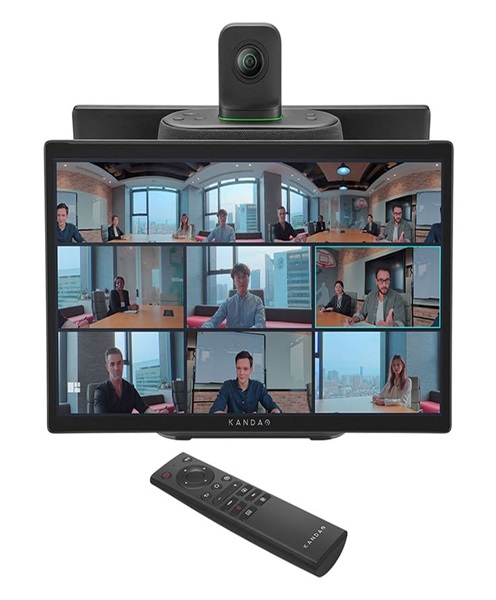
A conference monitor or television can display remote participants and shared presentations. In larger rooms, a PA system may be required to provide adequate audio coverage.
For hybrid events, the computer may also connect to additional production equipment, depending on how the event is being transmitted.
Before the event, organisers should establish which device will handle each function. For example, one computer may run the conferencing application while another manages presentations or streaming. Separating these responsibilities can be useful for more complex productions, provided the equipment is configured correctly.
Choosing Between a Laptop and Desktop Computer
Both laptops and desktop computers can be used for video conferencing. The choice depends on the venue, mobility requirements and intended workflow.
Laptop Computers
A laptop is useful when the computer needs to be moved between rooms or positioned close to a presenter.
It usually includes an integrated screen, keyboard, trackpad and camera, although an external conference camera and microphone may still be preferable for professional meetings.
Laptops can be practical for temporary event setups and mobile presentation requirements.
Desktop Computers
A desktop computer may be suitable for a fixed conferencing position, control desk or dedicated event production area.
It can support external monitors and peripherals, with the exact connection options depending on the computer.
For larger productions, the desktop may be configured as part of a more extensive audiovisual workflow.
The most appropriate option should be selected according to the event’s software, connection and mobility requirements.
Preparing for a Video Conferencing Computer Rental
Before arranging a rental, identify the purpose of the computer and the software it needs to run.
Provide details about the conferencing platform, expected meeting duration, number of connected devices and whether the computer will also handle recording, streaming or presentation playback.
Next, check the external equipment that will connect to the computer. List the cameras, microphones, speakerphones, monitors, projectors and other devices required.
Confirm the connection types and operating requirements. A computer may need multiple USB ports, an HDMI output, an Ethernet connection or compatible adapters.
It is also important to establish the venue’s internet arrangements. Test the network connection before the meeting, especially when several participants will join remotely.
Prepare presentation files and install or configure the required software in advance. Where possible, sign in to the relevant platform and test the camera, microphone, speakers and screen-sharing functions before the event.
For important meetings, conduct a full rehearsal using the actual computer and connected equipment. This helps identify compatibility problems before participants arrive.
Why Choose Janeson Rentals for Video Conferencing Computer Hire?
Janeson Rentals provides event and audiovisual equipment hire for clients organising corporate meetings, conferences, training sessions and other professional events in Kenya.
Our video conferencing computer hire and rental service is intended for clients who need temporary computer equipment to support virtual and hybrid communication.
We recognise that different meetings have different technical requirements. A small boardroom meeting may need a straightforward computer setup, while a hybrid conference may require a more capable configuration connected to several audiovisual devices.
Discussing your intended software, peripherals, venue and event format before booking helps establish the most appropriate equipment arrangement.
Janeson Rentals serves clients in Nairobi and across Kenya. Our wider audiovisual equipment range can also support related requirements, including conference cameras, microphones, speakerphones, monitors, displays and presentation equipment.
Book a Video Conferencing Computer for Hire in Kenya
Prepare your next virtual meeting, webinar or hybrid conference with video conferencing computer hire and rental from Janeson Rentals.
Contact Janeson Rentals to enquire about availability and suitable computer equipment for your event. Share your event date, location, conferencing platform, software requirements and the devices you need to connect.
Whether you are organising a corporate meeting, online training session, conference or hybrid presentation, Janeson Rentals can help you plan the computer equipment needed for your audiovisual setup.