
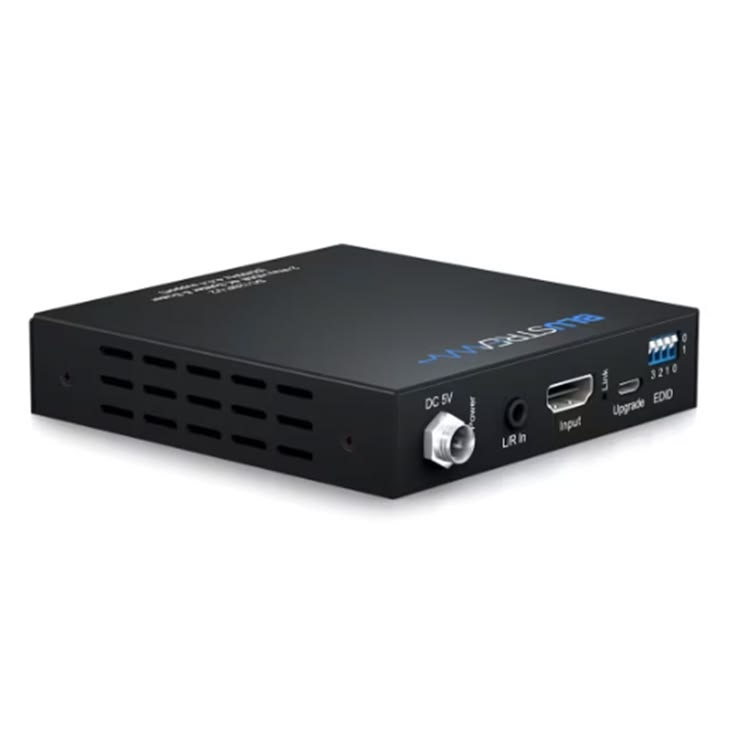
Video Scaler Hire and Rental in Kenya
A video scaler is an important audiovisual device used to adjust the resolution and format of video signals so they can work with compatible displays and production equipment. It is commonly used at corporate conferences, exhibitions, product launches, fashion shows, concerts, church conventions, training workshops, and other events that rely on professional visual presentations.
Janeson Rentals provides event equipment hire and rental solutions for clients in Nairobi and across Kenya. If you are planning an event that uses projectors, LED screens, monitors, laptops, cameras, or other audiovisual equipment, you can enquire about video scaler rental for your technical requirements.
Different video sources may produce different resolutions and formats. For example, a laptop may output a resolution that differs from the preferred format of an LED display system or projector. A compatible video scaler can help convert the incoming signal into a supported output format, making it easier to integrate different devices into one audiovisual setup.
Video scalers are particularly useful for professional presentations and live productions where display compatibility and consistent visual output matter. However, not every scaler supports every resolution, frame rate, connection type, or video standard. Selecting the right equipment requires checking the specifications of the source devices, scaler, and destination displays.
What Is a Video Scaler?
A video scaler is an electronic device that changes the resolution or other supported characteristics of a video signal to make it suitable for a connected display or production system.
For example, a presentation laptop may output video at one resolution, while the display system at an event venue requires another supported resolution. A suitable video scaler can convert the incoming signal to a compatible output format.
Depending on the model, a video scaler may also support functions such as aspect-ratio adjustment, image positioning, signal processing, frame-rate conversion, or multiple output formats. These capabilities vary between devices, so the required features should be confirmed before booking.
A video scaler is different from a video switcher. A switcher selects between different video sources, while a scaler processes a signal to change its resolution or format. Some professional audiovisual devices combine switching and scaling functions, allowing operators to manage sources and adjust output formats through one system.
A video scaler also does not automatically improve the original quality of low-resolution footage. It can resize an image to match a display’s requirements, but it cannot recreate genuine detail that was not present in the original source.
Why Hire a Video Scaler?
1. Improve Compatibility Between Video Sources and Displays
Events often involve equipment from different manufacturers, with varying video output capabilities. A laptop, media player, camera, projector, and LED display processor may not all use the same preferred resolution.
A compatible video scaler can help convert the source signal to a format supported by the destination equipment. This can simplify the process of integrating different devices into an event’s audiovisual system.
2. Support Professional Presentations
Corporate presentations may use laptops, video playback devices, and other sources to display slides, charts, demonstrations, and promotional videos.
A video scaler can help prepare signals for the intended display format when the original source resolution is unsuitable. This can support a more consistent presentation setup.
3. Assist with Large-Screen Displays
Large displays, projection systems, and LED walls may have specific resolution and signal requirements. A compatible scaler can help adapt incoming video to the supported output format.
The correct configuration depends on the display system and the scaler’s specifications. Always confirm the required resolution and connection types before hiring.
4. Support Multi-Source Event Production
Events that use several laptops, cameras, or media players may encounter differences in output formats. A video scaler can help process supported signals before they reach the display or production system.
For events requiring frequent changes between sources, a scaler may be used alongside a seamless switcher or video switcher.
5. Provide a Flexible Rental Option
Purchasing specialist video-processing equipment may not be practical for organisations that only need it occasionally.
Video scaler hire allows event organisers, production teams, and businesses to enquire about suitable equipment for a specific event without necessarily purchasing a device for permanent use.
Events That May Require a Video Scaler
Corporate Conferences and Business Meetings
Corporate conferences often use presentation laptops, video playback devices, projectors, monitors, and LED screens.
A video scaler may be useful when a source signal needs to be converted to a format supported by the display system. This can be particularly important when several presenters use different laptops throughout the programme.
Before the event, confirm the required resolution, output connection, aspect ratio, and compatibility of the scaler with the projector or display processor.
Product Launches and Brand Activations
Product launches may feature promotional videos, digital presentations, live demonstrations, and branded visuals displayed on large screens.
A video scaler can help prepare compatible video signals for the display system. This is useful when the production combines content from several devices with different output settings.
Test all source devices and visual content before the launch to identify any resolution or compatibility problems.
Fashion Shows and Runway Events
Fashion shows often use LED walls, projection surfaces, monitors, and digital content to support the runway experience. Visuals may include designer profiles, sponsor messages, collection videos, and branded backgrounds.
A video scaler can help adapt supported video signals to the requirements of the display system. If the production uses multiple screens or video sources, the technical team should confirm whether additional switching or signal distribution equipment is necessary.
Exhibitions and Trade Shows
Exhibition stands may use monitors, projectors, LED displays, and laptops to demonstrate products or present promotional material.
A video scaler can help ensure that a compatible source signal matches the display’s supported format. This can be useful when exhibitors use equipment with different resolution requirements.
The appropriate setup depends on the screen specifications, available connections, and the number of devices being used.
Concerts and Live Performances
Concerts and live performances may use large LED screens, projectors, cameras, and video playback equipment.
A video scaler can form part of the signal-processing system by converting supported video formats to match the requirements of the destination display. The equipment must be compatible with the production’s resolution, frame rate, and connection standards.
For complex productions, the technical team should plan how signals will move between cameras, switchers, scalers, processors, and screens.
Church Services and Religious Conventions
Church services may use presentation computers for lyrics, scripture passages, announcements, and video content. Some venues also use projectors, monitors, LED screens, and cameras.
A video scaler may help match compatible source signals to the display system. Where multiple cameras and presentation sources are involved, a video switcher may also be required.
For live-streaming services, confirm how the scaler fits into the overall workflow and whether separate recording or encoding equipment is needed.
Training Workshops and Educational Events
Training sessions and seminars may use laptops, projectors, interactive displays, and external video sources.
A video scaler can be helpful when the source resolution differs from the format required by the display. This may be particularly relevant when presenters use different computers during the same session.
Check the equipment connections and display settings before the workshop begins.
Hybrid Events and Live Streaming
Hybrid events can involve presentation laptops, cameras, video conferencing systems, venue displays, and streaming equipment.
A video scaler may help prepare a compatible signal for one part of the production chain, but it does not automatically provide live-streaming capability. Additional capture devices, encoders, computers, or software may be necessary.
Confirm the entire signal path before booking.
Common Features of Video Scalers
Resolution Conversion
Resolution conversion is one of the main functions of a video scaler. It changes the incoming signal’s resolution to a supported output resolution.
The available formats depend on the device. Some scalers support selected HD resolutions, while others may support certain 4K formats.
Aspect-Ratio Adjustment
Video sources and displays may use different aspect ratios. Depending on the model, a scaler may offer options to preserve proportions, add borders, crop an image, or stretch it to fill the display.
The correct choice depends on the content and the intended presentation. Preserving the original proportions is generally preferable when stretching would distort people, logos, or other visual elements.
Input and Output Connections
Video scalers may support HDMI, SDI, DisplayPort, VGA, or other connections, depending on the equipment.
Do not assume that every scaler supports all these interfaces. Check the source output, scaler input, scaler output, and destination input before booking. Converters or adapters may be required in some setups.
Frame-Rate Compatibility
Some devices support specific frame rates or conversion functions, while others require compatible input and output formats.
Confirm the video formats used by the source equipment and the display system. Frame-rate support can be especially important for live camera feeds and video playback.
Image Positioning and Processing
Certain scalers provide controls for image position, aspect ratio, scaling mode, and other supported picture settings.
These controls can help the operator configure the output for the intended display. Available adjustments differ between models.
Multiple Outputs
Some video scalers provide more than one output, while others have a single output connection.
If your event needs to feed multiple displays, confirm the number of outputs and whether separate distribution equipment is required.
How to Choose the Right Video Scaler
Identify the Source Equipment
Start by listing all the devices that will supply video signals. These may include laptops, cameras, media players, presentation systems, and video switchers.
Record the output connections and supported resolutions for each device. This information helps establish whether a scaler is needed and which specifications matter.
Check the Destination Display
Identify whether the video will be sent to a projector, LED wall processor, television, monitor, or another device.
Check the display’s supported input connections, preferred resolution, frame rate, and aspect ratio. The scaler must be compatible with the destination equipment.
Confirm Resolution Requirements
Determine the output format required for the event. For example, the display system may require a particular HD or 4K resolution.
Select a scaler that supports the necessary conversion. Avoid assuming that every model can upscale or downscale every video format.
Check Input and Output Interfaces
Confirm that the scaler has the correct input and output connections. If the source uses HDMI and the destination requires SDI, for example, establish whether the selected device supports that conversion or whether separate equipment is needed.
Consider the Complete Signal Chain
A video scaler is only one part of an audiovisual system. The source device, scaler, switcher, distribution equipment, display processor, and screen must all work with compatible signal formats.
If multiple sources are involved, determine whether a separate video switcher or seamless switcher is also required.
Test Before the Event
Connect the actual source equipment and display system before guests arrive. Check image quality, resolution, aspect ratio, cable connections, and signal stability.
Testing helps identify compatibility issues early and gives the operator time to make the necessary adjustments.
Video Scaler Hire for Professional Event Production
Video scaler hire can be useful for event organisers who need to integrate different video sources with a projector, monitor, LED screen, or other compatible display system.
Corporate conferences, fashion shows, exhibitions, concerts, product launches, and church conventions may all have specific video-processing requirements. A suitable scaler can help convert supported signals to a compatible output format.
Before booking, establish the source resolution, destination resolution, input and output connections, frame-rate requirements, and number of display destinations. This information helps determine whether the scaler is suitable for the planned production.
Why Choose Janeson Rentals?
Janeson Rentals provides event equipment hire and rental solutions for clients in Nairobi and across Kenya. Organisers planning conferences, exhibitions, product launches, fashion shows, church events, training sessions, and live productions can enquire about video scaler rental for their audiovisual needs.
Hiring specialist equipment can be a practical option when a particular event requires video signal conversion without the need to purchase equipment for permanent use.
When contacting Janeson Rentals, share your event date, venue, source devices, display type, required resolution, and input and output connections. Explain whether the setup includes projectors, LED screens, video switchers, multiple displays, or live production equipment.
Before confirming a booking, enquire about availability, rental charges, delivery or collection, and any setup arrangements that may be available. Confirm the technical specifications and compatibility of the equipment with the complete audiovisual system.
What to Prepare Before Booking a Video Scaler
- Event date: When the equipment is required.
- Venue location: The venue name and town.
- Event type: Conference, fashion show, exhibition, concert, or presentation.
- Source devices: Laptops, cameras, media players, or video switchers.
- Input connections: The interfaces used by the source devices.
- Required output resolution: The format supported by the destination display.
- Display equipment: Projector, LED screen, monitor, or television.
- Frame-rate requirements: The video formats used by the production.
- Aspect ratio: The intended image proportions.
- Number of outputs: How many display or production destinations are required.
- Additional equipment: Whether a switcher, converter, or distribution device is needed.
- Rental period: How long the equipment will be required.
Book a Video Scaler with Janeson Rentals
If your event requires video resolution conversion or compatibility between different audiovisual devices, contact Janeson Rentals to enquire about video scaler hire and rental in Nairobi and across Kenya.
Provide your equipment specifications and display requirements to help establish whether a suitable model is available. Ask about supported resolutions, connection types, rental prices, availability, and delivery or collection arrangements before booking.
Choosing compatible equipment and testing the complete signal chain in advance can help your event team prepare a reliable visual presentation.
Frequently Asked Questions About Video Scaler Hire
What does a video scaler do?
A video scaler changes the resolution or other supported characteristics of a video signal to make it compatible with a connected display or production system.
Is a video scaler the same as a video switcher?
No. A switcher selects between video sources, while a scaler changes the resolution or format of a signal. Some professional devices combine both functions.
Can a video scaler be used with a projector?
Yes, provided the scaler and projector support compatible connections and video formats. Check the specifications of both devices before booking.
Does a video scaler improve video quality?
A scaler can resize a video signal to suit a display, but upscaling does not recreate detail missing from the original footage. The final result depends on the source quality, processing capabilities, and display system.
Can a video scaler support 4K?
Some models support selected 4K formats, while others have lower maximum resolutions. Confirm the exact resolution and frame-rate requirements before hiring.
Do I need a video scaler for an LED screen?
It depends on the source and the LED display system. If the source signal is incompatible with the required input format, a suitable scaler or another compatible video-processing device may be needed.
Where can I hire a video scaler in Kenya?
Contact Janeson Rentals to enquire about video scaler hire and rental in Nairobi and across Kenya. Confirm availability, supported connections, resolution capabilities, rental charges, and compatibility before booking.
Janeson Rentals — Event equipment hire and rental solutions for presentations, displays, and professional audiovisual productions across Kenya.



