
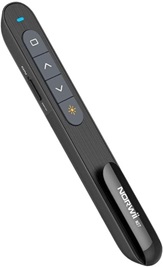
Wireless Presentation Clicker Hire and Rental in Kenya
Delivering a professional presentation requires more than well-prepared slides. Presenters also need convenient tools that allow them to navigate their content smoothly, maintain audience engagement, and move confidently through their presentation without repeatedly returning to a laptop.
A wireless presentation clicker is a practical accessory for conferences, corporate meetings, training sessions, seminars, workshops, exhibitions, and other professional events. It allows a presenter to advance or move back through slides remotely, depending on the device’s supported functions. This provides greater freedom to move around the stage, interact with the audience, and maintain a natural presentation flow.
Janeson Rentals offers event equipment hire and rental solutions in Kenya for organizers who need practical audiovisual accessories for their functions. Wireless presentation clicker hire is suitable for businesses, educational institutions, conference organizers, event planners, trainers, and professional speakers who require presentation equipment for a limited period.
Whether you are hosting a business conference in Nairobi, conducting a training workshop, delivering a keynote address, or organizing an exhibition, renting a wireless presentation clicker can help you prepare for a more organized presentation experience.
What Is a Wireless Presentation Clicker?
A wireless presentation clicker is a handheld device that allows a presenter to control a slideshow remotely. Most models communicate with a computer through a USB receiver or another supported wireless connection.
The presenter can use the device to move forward or backward through slides without standing beside the computer. Depending on the model, additional functions may include a laser pointer, screen blackout, presentation start controls, volume adjustment, or other media controls.
Wireless presentation clickers are commonly used with presentation software such as Microsoft PowerPoint and other compatible slideshow applications. However, supported features vary by model and operating system, so compatibility should be confirmed before hiring.
Why Hire a Wireless Presentation Clicker from Janeson Rentals?
Purchasing presentation accessories for a single conference or occasional meeting may not be necessary. Hiring allows event organizers to access the equipment they need for a specific event without committing to permanent ownership.
Janeson Rentals provides equipment hire and rental solutions for different event requirements in Kenya. Renting a wireless presentation clicker can offer several advantages.
Cost-effective access: Avoid buying a device that may only be used for a single presentation or a few events each year.
Convenient presenter movement: Control compatible slides from a distance instead of remaining beside the laptop throughout the presentation.
Professional delivery: Maintain a smoother transition between slides while speaking to an audience.
Flexible event preparation: Arrange presentation accessories for conferences, seminars, workshops, corporate meetings, and training sessions.
Support for different speakers: A clicker can be useful when a business, institution, or event organizer needs presentation equipment for visiting speakers or guest presenters.
Applications of Wireless Presentation Clicker Rental
Corporate Meetings and Business Presentations
Business presentations often involve reports, proposals, financial results, sales strategies, and company updates. A wireless clicker allows the presenter to move through slides while maintaining eye contact and engaging colleagues or clients.
It is useful for management meetings, boardroom presentations, investor briefings, client pitches, and departmental meetings.
Conferences and Seminars
Conference speakers often present from a stage or podium, where continuously returning to a laptop can interrupt the flow of their speech. A wireless presentation clicker makes slide navigation more convenient and allows speakers to focus on communicating their message.
It can be useful for keynote addresses, panel presentations, industry seminars, award ceremonies, and professional conferences.
Training Sessions and Workshops
Trainers frequently use slides to explain procedures, introduce concepts, and guide participants through learning materials. A clicker makes it easier to advance through a presentation while moving around the room or demonstrating practical activities.
Educational Presentations
Lecturers, students, researchers, and educational institutions can use wireless clickers for lectures, academic conferences, project presentations, and research seminars.
Product Launches and Exhibitions
Businesses can use presentation clickers during product launches, exhibitions, and promotional events where slides support product demonstrations, marketing messages, or business proposals.
Features to Consider When Hiring a Wireless Presentation Clicker
Before booking a wireless presentation clicker, consider the features needed for your event.
- Wireless range: Confirm that the device can operate at the distance between the presenter and the computer.
- Compatibility: Check that the clicker works with the computer, operating system, and presentation software.
- Slide controls: Confirm that the device supports forward and backward navigation.
- Additional functions: Determine whether you need a laser pointer, blackout button, or other presentation controls.
- Battery requirements: Check whether batteries are included and whether the device is charged or ready for use.
- Receiver compatibility: Confirm whether the clicker uses a USB receiver or another connection method supported by your computer.
How to Prepare for a Presentation Clicker Rental
Start by identifying the computer and presentation software you intend to use. Check whether the device requires a USB receiver, Bluetooth pairing, or another connection method.
Next, test the clicker with the actual presentation file. Confirm that the forward and backward buttons work correctly and that any additional controls perform as expected.
Check the battery level before the session begins. For important presentations, arrange a backup method of advancing slides in case the clicker encounters a connection or battery problem.
If several speakers will share the device, establish who will use it and when it will be handed over.
Why Clients Choose Janeson Rentals
Janeson Rentals provides event equipment hire and rental solutions for different occasions across Kenya. Clients can discuss their presentation requirements and confirm the accessories needed for their event.
Hiring a wireless presentation clicker is a practical option for organizations that want to prepare professional presentations without purchasing every accessory required for a temporary event.
Book Wireless Presentation Clicker Hire in Kenya
Looking for wireless presentation clicker hire in Kenya? Contact Janeson Rentals to discuss your event date, rental duration, equipment requirements, and availability.
Whether you are planning a seminar, corporate meeting, training session, or conference, a suitable presentation clicker can help you deliver your slides with greater convenience and confidence.
Janeson Rentals — event equipment hire and rental solutions in Kenya.



