
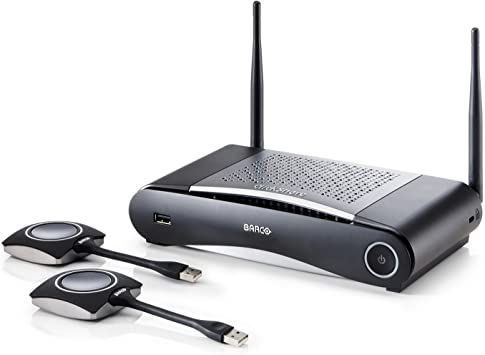
Wireless Presentation System Hire and Rental in Kenya
Professional presentations play an important role in corporate meetings, conferences, training sessions, seminars, exhibitions, and business events. Whether a company is introducing a new product, presenting financial results, conducting employee training, or hosting an industry conference, reliable presentation technology helps communicate information clearly and professionally.
Traditional presentation setups often require presenters to connect their laptops directly to projectors, monitors, or large display screens using physical cables. Although wired connections remain useful, they can create challenges when several speakers need to share content, when presenters use different devices, or when the room layout makes cable connections inconvenient.
A wireless presentation system provides an alternative by enabling compatible devices to share screen content with a central display through a supported wireless connection. Depending on the system, users may connect through a dedicated transmitter, a software application, a browser-based interface, or a compatible mobile device.
Janeson Rentals offers event equipment hire and rental solutions in Kenya for organizers seeking practical audiovisual equipment for professional and social occasions. Wireless presentation system rental can help businesses, institutions, conference planners, and event production teams access presentation technology for temporary use without necessarily purchasing equipment.
Whether you are planning a boardroom meeting, a corporate conference, a training workshop, or an exhibition, a suitable wireless presentation system can help create a more flexible and organized presentation environment.
What Is a Wireless Presentation System?
A wireless presentation system is an audiovisual solution that allows users to display content from compatible computers, tablets, or other devices on a shared screen without requiring a direct video cable from every presenter.
Depending on the model, the system may include a receiver or central presentation unit connected to a projector, monitor, or display. Presenters then share their screens using a compatible application, a dedicated wireless transmitter, or another supported connection method.
Some systems support multiple presenters, allowing users to switch between presentations without repeatedly disconnecting and reconnecting cables. More advanced solutions may offer collaborative features, screen moderation, touchback functionality, annotation, or simultaneous content display.
The features available depend on the equipment selected, so event organizers should confirm the supported operating systems, connection methods, and collaboration tools before hiring.
A wireless presentation system differs from a basic wireless HDMI system. Wireless HDMI equipment primarily transmits a video signal from a compatible source to a receiver. A wireless presentation system is designed around sharing content from one or more user devices and may provide additional tools for meetings and collaboration.
Why Hire a Wireless Presentation System from Janeson Rentals?
Purchasing a wireless presentation system may not be cost-effective for businesses or event organizers that only need one for occasional functions. Hiring provides temporary access to presentation technology for a specific event, training session, conference, or business activity.
Janeson Rentals supports event equipment rental requirements for different occasions across Kenya. Clients planning to hire a wireless presentation system can consider the type of event, number of presenters, display equipment, venue connectivity, and desired collaboration features.
The main benefits of hiring include:
Cost-effective access to presentation technology: Rental can reduce the initial expense of purchasing specialist equipment for a one-time event or occasional meeting.
Flexible presenter transitions: Compatible systems can allow speakers to share content without repeatedly changing physical cable connections.
A cleaner presentation environment: Reducing the number of cables connected to presenters’ laptops can help maintain an organized meeting room or conference stage.
Support for different event formats: Wireless presentation systems can be used for corporate meetings, seminars, workshops, exhibitions, and professional training sessions.
Improved collaboration: Depending on the system, participants may be able to share ideas, compare content, or switch between presenters more conveniently.
Integration with existing AV equipment: Many systems can work with compatible projectors, televisions, monitors, and large-format displays.
Applications of Wireless Presentation System Rental
1. Corporate Meetings and Boardroom Presentations
Business meetings often involve reports, presentations, spreadsheets, financial data, proposals, and strategic plans. Several participants may need to contribute content during a single session.
A wireless presentation system can simplify screen sharing by allowing compatible users to present their content through a supported wireless connection.
This can be useful for board meetings, departmental briefings, management presentations, sales meetings, client pitches, and internal planning sessions.
Before hiring, businesses should check whether the system supports the operating systems and devices used by participants. For confidential meetings, security and access-control features should also be considered.
2. Conferences and Seminars
Conferences commonly feature keynote speakers, panel discussions, guest presentations, and multiple sessions throughout the day. Changing laptops between speakers can interrupt the programme if the audiovisual arrangement is not planned properly.
A suitable wireless presentation system can help presenters share slides and other content while reducing the need to connect a new cable for every speaker.
For conferences with many presenters, organizers should confirm how users will be authenticated, how presentations will be selected, and whether the system supports the expected number of connected devices.
A technical rehearsal is particularly important when multiple presenters use different computers or presentation software.
3. Training Workshops and Educational Events
Training sessions often require instructors to demonstrate software, share instructional slides, display documents, and invite participants to contribute to discussions.
Wireless presentation technology can support these activities by making it easier for compatible devices to share content on a central screen.
It may be suitable for corporate training, professional development, university workshops, seminars, educational demonstrations, and skills-development programmes.
If participants are expected to share their own screens, the organizer should verify whether the system supports guest access and whether participants need to install an application or join a specific network.
4. Product Launches and Business Demonstrations
Product launches require clear communication and well-coordinated audiovisual displays. A company may need to present product specifications, demonstration videos, marketing materials, and digital presentations.
A wireless presentation system can help connect compatible presenter devices to the event’s display equipment, making transitions between speakers more convenient.
For large product launches, organizers should also consider screen size, projector brightness, LED display compatibility, sound reinforcement, and the overall visibility of the presentation from guest seating areas.
5. Trade Shows and Exhibitions
Exhibitors use presentations to introduce services, explain product features, demonstrate applications, and engage prospective customers.
Wireless presentation equipment can help businesses share content from compatible laptops and mobile devices without requiring a permanent wired connection for every demonstration.
This can be useful for exhibition stands, conference booths, business expos, industry showcases, and promotional activations.
Because exhibition halls can contain many competing wireless networks, organizers should test the equipment at the actual venue whenever possible and consider network congestion before selecting a system.
6. Hybrid Meetings and Events
Hybrid events combine in-person participation with remote attendance through video conferencing platforms. Presenters may need to share slides while interacting with participants in the room and those joining online.
A wireless presentation system can form part of the room’s AV setup, but it does not automatically provide video conferencing, remote participant management, or online streaming.
The selected system must be compatible with the intended meeting workflow. Additional equipment, such as cameras, microphones, speakers, and a conferencing computer, may be required to support remote participation effectively.
7. Hotels, Conference Centres, and Training Venues
Hotels and conference facilities frequently host business meetings, workshops, seminars, and corporate events for clients with different presentation requirements.
Wireless presentation equipment can support flexible room arrangements and simplify the process of sharing content from compatible devices.
Event planners should confirm the number of rooms involved, the display connections, the expected number of presenters, and whether the equipment will be used independently in different spaces.
Features to Consider When Hiring a Wireless Presentation System
Choosing the right equipment involves more than checking whether it supports wireless screen sharing. Several technical and practical considerations affect performance.
Device compatibility: Confirm that the system supports the laptops, tablets, mobile devices, and operating systems used by presenters.
Connection method: Determine whether users connect through an application, browser, dedicated transmitter, local network, or another supported method.
Number of presenters: If multiple speakers will share content, verify how many devices can connect and how presenters switch between them.
Display compatibility: Check the output connections and supported resolutions of the presentation unit, projector, monitor, or display screen.
Network requirements: Some systems require a local network, while others can establish a direct wireless connection. Clarify whether internet access is necessary.
Security features: For business meetings, check authentication options, access restrictions, and any supported protections for confidential presentations.
Screen moderation: Some systems allow an organizer or moderator to approve content before it appears on the main display. This can be useful during conferences and collaborative workshops.
Audio and video support: Confirm whether the system supports the media formats, embedded audio, and video playback required for the presentation.
Latency and stability: Smooth screen sharing is important when presenters demonstrate software, play videos, or interact with live content.
Ease of use: A system with a straightforward connection process can reduce technical interruptions and help speakers begin their presentations on time.
How to Prepare for Wireless Presentation System Rental
Effective preparation helps event organizers avoid delays and compatibility issues.
Begin by identifying the devices that presenters will use. Gather information about their operating systems, presentation software, connection options, and any security restrictions that may prevent application installation.
Next, determine the display equipment. This could be a projector, television, professional monitor, or LED screen system. Check its available inputs and supported resolutions.
Establish the expected number of presenters and decide whether they will share content individually or collaborate during the session.
Review the venue’s wireless network conditions. If the system depends on a local network, confirm whether the venue can provide the necessary connection and whether network access is restricted.
Test the complete setup before the event. Each presenter should have an opportunity to connect, display content, play any required videos, and disconnect successfully.
Finally, prepare a backup option, such as a compatible HDMI connection, for critical presentations. A backup can help the programme continue if wireless interference or device compatibility issues occur.
Wireless Presentation System Hire for Events Across Kenya
Janeson Rentals provides event equipment hire and rental solutions for clients organizing functions in Kenya. Wireless presentation system rental can support corporate meetings, training sessions, conferences, exhibitions, business demonstrations, and other events requiring professional presentation technology.
Whether your event is taking place in a hotel conference room, an office meeting space, a university venue, an exhibition hall, or another suitable location, planning your presentation requirements in advance helps ensure that the selected equipment matches the event.
When requesting a quotation, provide the event date, venue, rental duration, number of presenters, types of devices being used, display specifications, and any additional audiovisual requirements.
If the event includes multiple presentation rooms, hybrid participation, or a large audience, explain these requirements before booking. This allows the equipment configuration to be assessed more accurately.
Additional equipment may include projectors, screens, wireless HDMI systems, signal converters, video switchers, monitors, and other compatible AV accessories.
Why Clients Choose Janeson Rentals
Successful presentations depend on suitable equipment, clear planning, and coordination between organizers and technical teams.
Janeson Rentals offers event equipment hire and rental solutions designed to support different event requirements. Clients can discuss the intended use of a wireless presentation system, the devices involved, and the display setup before confirming a booking.
Rental is also a practical choice for organizations that need access to specialized audiovisual equipment for a limited period rather than permanent installation.
By identifying the technical requirements early, event organizers can make more informed decisions and prepare a presentation setup that supports the event programme.
Book Wireless Presentation System Hire and Rental with Janeson Rentals
Are you looking for wireless presentation system hire in Kenya for an upcoming corporate meeting, conference, exhibition, seminar, or training workshop?
Contact Janeson Rentals to discuss your presentation requirements, check equipment availability, and request a quotation. Provide details of the devices your presenters will use, the display equipment available at the venue, and the number of people expected to share content.
With the appropriate wireless presentation setup, you can organize a more flexible and professional presentation environment for your guests and participants.
Janeson Rentals — your partner for event equipment hire and rental in Kenya.



