Introduction to Audio Recording System Hire and Rental in Kenya
Sound is one of the most important elements of an event, presentation or professional production. A speech that cannot be heard clearly, an interview with distracting background noise or a musical performance with distorted audio can significantly reduce the quality of a recording. Having the right audio recording equipment helps preserve important sound content for editing, distribution, documentation and future use.
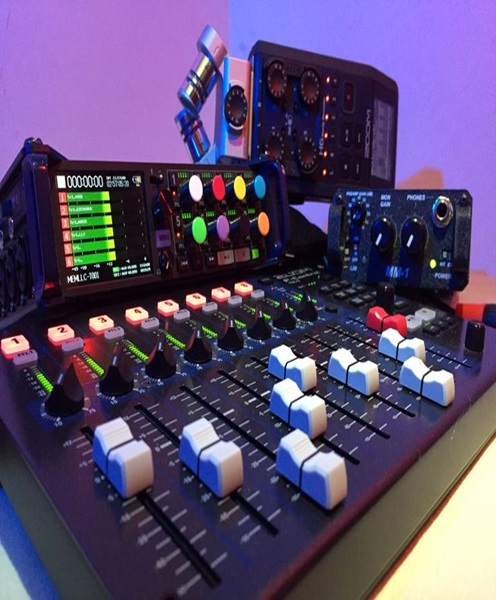
An audio recording system is a collection of equipment designed to capture, process and store sound from one or more sources. Depending on the production, it may include microphones, audio mixers, digital recorders, audio interfaces, headphones, monitoring equipment, cables and recording computers.
Janeson Rentals offers audio recording system hire and rental in Kenya for event organisers, corporate clients, production companies, institutions, churches, musicians, presenters and creative professionals. Based in Nairobi, Janeson provides event equipment rental solutions with delivery arrangements across Kenya.
Hiring an audio recording system is a practical option for organisations that need professional recording equipment for a specific event or production but do not want to purchase and maintain an entire recording setup.
Whether you need to record a keynote presentation, a business interview, a panel discussion, a live performance, a church service or a training session, the equipment should be selected according to the sound sources, recording environment and intended output.
What Is an Audio Recording System?
An audio recording system is a combination of compatible devices used to capture sound and convert it into a recording that can be stored, reviewed, edited or distributed.
The system may record a single microphone or several independent audio sources. More advanced setups can capture multiple channels simultaneously, allowing an editor to adjust individual microphones or instruments during post-production.
For example, a conference recording may use microphones for several speakers, an audio mixer to manage the signals and a digital recorder to capture the final sound. A musical performance may require separate channels for vocals, instruments and the mixing console output.
An audio recording system can be used to capture:
-
Corporate speeches and presentations.
-
Conference and seminar discussions.
-
Interviews and podcasts.
-
Live musical performances.
-
Church services and worship sessions.
-
Educational lectures and training sessions.
-
Voice-overs and narration.
-
Panel discussions and round-table conversations.
-
Product demonstrations and promotional recordings.
-
Instrumental performances and rehearsals.
-
Announcements and public-address content.
The system’s configuration depends on the number of sound sources, the required recording quality and whether the content will be used for immediate playback or later production.
Why Hire an Audio Recording System?
Access Professional Recording Equipment
Professional audio recording can require equipment that is more specialised than ordinary consumer recording devices.
Hiring allows clients to access suitable microphones, recorders, mixers, interfaces and accessories for a particular production.
Reduce Equipment Purchase Costs
Purchasing a complete audio recording system can be expensive, particularly when multiple microphones, recording channels and professional accessories are needed.
Audio recording system rental allows organisers to pay for equipment use during a specific event or production instead of making a large permanent investment.
Capture Clearer Speech and Sound
The quality of a recording depends on microphone selection, placement, signal levels, room acoustics and recording equipment.
A suitable system helps capture speech and other sound sources more clearly when properly configured and operated.
Record Multiple Sound Sources
Some productions require more than one microphone or instrument input.
A multichannel recording setup can capture different sources separately, depending on the recorder and interface configuration. This provides greater flexibility when balancing and editing the final audio.
Support Post-Production
Recordings can be edited, cleaned, balanced, mixed and prepared for different distribution platforms.
Separate tracks can be particularly useful because the editor can adjust individual speakers, instruments or other sound sources without having to change the entire recording.
Preserve Important Event Content
Audio recordings provide a lasting record of presentations, discussions, performances and announcements.
Organisations can use approved recordings for internal archives, training, promotional content, reports and future reference.
Main Components of an Audio Recording System
The components of an audio recording system vary according to the production requirements.
Professional Microphones
Microphones capture sound and convert it into electrical audio signals that can be processed and recorded.
Different microphones serve different purposes.
-
Dynamic microphones: Commonly used for live vocals, speeches and general-purpose sound capture.
-
Condenser microphones: Often used for detailed vocal, instrumental and studio recordings, depending on the model and recording environment.
-
Lavalier microphones: Small microphones that can be attached to clothing for interviews, presentations and demonstrations.
-
Shotgun microphones: Directional microphones used in video production and other applications where focused sound capture is required.
-
Wireless microphones: Useful when speakers or performers need freedom of movement.
Microphone choice should consider the sound source, recording environment, connection requirements and intended result.
Audio Mixer
An audio mixer receives signals from microphones and other audio sources and allows an operator to control their levels.
It may provide equalisation, routing, auxiliary sends and other processing functions depending on the model.
A mixer can supply a recording feed to a dedicated recorder or audio interface. The recording connection should be planned carefully to ensure that the signal is appropriate for the receiving equipment.
Digital Audio Recorder
A digital audio recorder captures sound and saves it as digital audio files.
Depending on the model, a recorder may support different input types, channel counts, sample rates, bit depths and storage media.
Portable recorders are useful for interviews, field recording and smaller productions. Larger multichannel recorders may be more appropriate for concerts, conferences and complex live productions.
Audio Interface
An audio interface connects compatible microphones, instruments or other audio sources to a computer.
It converts incoming analogue audio signals into digital data for recording software. Some interfaces also provide outputs for monitoring and playback.
The number of inputs is an important consideration when recording several microphones or instruments simultaneously.
Recording Computer and Software
A computer running compatible audio recording software can capture, organise and manage audio tracks.
The software may provide multitrack recording, editing, mixing, playback and export functions.
Computer performance, available storage and software compatibility should be considered when planning a recording session.
Headphones and Monitoring Equipment
Monitoring headphones allow the operator to listen to the incoming audio while recording.
This helps identify problems such as clipping, unwanted background noise, microphone handling noise, signal interruptions and incorrect recording levels.
Studio monitors may also be used when listening back to recordings in a controlled environment.
Audio Cables and Accessories
The system may require XLR cables, TRS cables, instrument cables, adapters, microphone stands, extension cables and suitable power connections.
Cable selection should match the equipment’s input and output connections. Balanced connections are often useful for professional audio installations because they help reduce interference over suitable cable runs.
Storage Devices
Audio recordings require sufficient storage space.
The required capacity depends on the number of channels, recording duration, sample rate, bit depth and file format.
For longer productions, organisers should plan storage and backups before the recording begins.
Applications of Audio Recording System Hire
Corporate Events and Business Presentations
Businesses often organise conferences, launches, seminars and internal meetings that involve important speeches and discussions.
An audio recording system can capture the voices of presenters, panel members and other participants for future reference or approved distribution.
A recording feed from the venue’s sound mixer may be suitable for some events, while others may require dedicated microphones or independent recording channels.
Conferences and Seminars
Conferences can include multiple speakers, panel discussions and audience questions.
A suitable recording setup should capture the different voices clearly and maintain consistent sound levels throughout the programme.
For multi-speaker sessions, separate microphone channels can provide greater control during editing when supported by the recording equipment.
Interviews and Podcasts
Interviews and podcasts rely heavily on clear speech.
A suitable system may include microphones for each participant, an audio interface or recorder, monitoring headphones and recording software.
The number of participants, recording location and preferred recording workflow determine the appropriate configuration.
Concerts and Musical Performances
Music recording requires careful attention to the different instruments and vocal sources.
A live performance may involve microphones for singers, instrument feeds, drum microphones and a signal from the venue’s mixing console.
A multichannel recorder can capture separate sources when the necessary inputs and routing are available.
The production team should check recording levels carefully to avoid distortion during loud performances.
Church Services and Religious Events
Churches may require audio recordings of sermons, worship sessions, conferences and special programmes.
A recording system can capture speech and music using suitable microphone feeds and mixer outputs.
Where the church already has a sound system, the recording equipment should be connected through an appropriate output rather than assuming that every mixer connection provides the same signal.
Educational and Training Sessions
Educational institutions and training providers can record lectures, workshops and demonstrations for future learning.
The recording arrangement may use a microphone for the instructor, additional microphones for participants and a recorder or computer to preserve the session.
Voice-Overs and Narration
Voice-over production requires clear and consistent speech recording.
Depending on the recording environment, the system may include a suitable microphone, audio interface, headphones and recording software.
Room noise, microphone distance and acoustic conditions should be considered to achieve a usable result.
Field Recording and Documentary Production
Production teams may need to record interviews, ambient sound, location audio and other material outside a studio.
Portable recorders and appropriate microphones can support these applications.
Equipment should be selected for the expected environment, recording duration and available power arrangements.
Multitrack Audio Recording Explained
Multitrack recording is an important feature of many professional audio recording workflows.
Instead of combining every sound source into one final audio file during the recording process, a multitrack system can record separate sources onto individual tracks.
For example, a conference may record the keynote speaker, panel microphones and audience microphone separately. A music production may record vocals, drums, guitars and keyboards on different channels.
This arrangement offers several advantages.
Independent Audio Control
Each recorded source can be adjusted without affecting the other tracks.
An editor can increase the level of a quiet speaker or reduce an instrument that is too prominent.
Flexible Editing
Unwanted sections, pauses or interruptions can be edited from individual tracks where the recording format allows.
Better Mixing Options
Separate recordings provide more control over equalisation, dynamics, balance and other processing during post-production.
Improved Production Workflow
Multitrack recording can help production teams prepare different versions of the same content, such as a full conference recording, a clean interview edit or a music mix.
The required recorder or audio interface must have enough inputs and recording channels for all sources.
Choosing the Right Audio Recording System
Identify the Number of Audio Sources
The first step is determining how many microphones, instruments or other audio sources need to be recorded.
A one-person interview has different requirements from a panel discussion with six speakers or a concert with multiple instruments.
The number of inputs should match the actual recording plan.
Choose the Right Recording Method
Decide whether the production will use a dedicated recorder, a computer-based recording system or a combination of both.
Portable recorders can be useful for mobile productions, while computer-based setups may be appropriate for sessions that require extensive editing and multitrack management.
Consider the Recording Environment
The environment has a major effect on sound quality.
A quiet meeting room, a reverberant hall, an outdoor venue and a busy exhibition space each present different recording challenges.
Microphone choice and placement should account for background noise, room reflections, audience movement and the distance between the speaker and microphone.
Confirm Audio Quality Requirements
The required sample rate, bit depth and file format should be selected according to the intended production.
Professional recording commonly uses uncompressed formats such as WAV when editing flexibility and audio quality are priorities. Other formats may be appropriate for distribution or smaller files.
The recorder, interface and software should support the intended settings.
Check Microphone Compatibility
Microphones may use different connection types and power requirements.
Some condenser microphones require phantom power, while other microphones do not. Wireless systems may require compatible receivers and appropriate frequency planning.
The recording equipment should be checked before the event to avoid connection or power problems.
Plan Monitoring
Monitoring is essential during recording.
An operator should be able to listen to the incoming signal and identify problems before they affect the final files.
Headphones should be connected to an appropriate monitoring output, and levels should be checked during a full sound test.
Estimate Storage Requirements
Long recordings and multiple channels require more storage.
The recording team should calculate the expected file sizes and provide sufficient storage for the entire programme, including additional space for backups where possible.
Consider Post-Production
If the recordings will be edited, the file format and track arrangement should be suitable for the intended editing software.
Organisers should also determine whether they need individual audio files, a mixed recording or both.
Audio Recording System Versus Event Recording System
An event recording system may capture both video and sound, while an audio recording system focuses specifically on capturing audio.
An event recording setup may use cameras, video capture devices, monitors and audio equipment. An audio recording setup may use microphones, audio mixers, recorders, interfaces and headphones without requiring any video equipment.
The two systems can work together.
For example, a conference may use cameras to capture the speakers while a dedicated audio recording system captures clean microphone feeds. The audio and video can then be synchronised during post-production.
This distinction is important when hiring equipment because clients should identify whether they need audio-only recording or a complete audiovisual solution.
Technical Planning and Recording Best Practices
Professional audio recording requires preparation, testing and monitoring.
Before the recording begins, the production team should:
-
Identify every microphone and audio source.
-
Confirm the number of recording inputs required.
-
Check all microphone and line-level connections.
-
Confirm phantom power requirements where applicable.
-
Set suitable recording levels and avoid clipping.
-
Test headphones and monitoring outputs.
-
Check recording formats and storage capacity.
-
Test the complete signal path.
-
Listen for background noise and unwanted interference.
-
Confirm power arrangements and backup procedures.
-
Organise file naming and storage locations.
During recording, operators should monitor levels and listen for interruptions or distortion. Important events should not be left unattended without an appropriate recording check.
For longer sessions, file management should be planned carefully. Where supported, recordings can be divided into manageable sessions to reduce the risk associated with very long uninterrupted files.
If the recordings include private conversations, personal information or commercially sensitive material, organisers should obtain appropriate consent and control access to the resulting files.
Why Choose Janeson Rentals for Audio Recording System Hire?
Janeson Rentals provides equipment hire and rental solutions for event organisers, businesses, institutions, churches, production companies and creative professionals in Kenya.
When arranging an audio recording system rental, clients can discuss the number of sound sources, recording environment and intended production workflow.
Reasons to consider Janeson Rentals include:
-
Flexible equipment rental: Hire suitable audio recording equipment for specific events and production projects.
-
Recording-focused equipment planning: Identify microphones, mixers, recorders and accessories according to the recording requirements.
-
Related AV equipment: Coordinate audio recording with compatible PA systems, microphones, video equipment and event production accessories.
-
Different production applications: Discuss solutions for conferences, seminars, interviews, concerts, training sessions and church programmes.
-
Nairobi-based service: Janeson Rentals is based in Nairobi, with delivery arrangements available across Kenya.
The final equipment configuration should be confirmed according to the event’s requirements, product availability and compatibility between the selected devices.
How to Hire an Audio Recording System from Janeson Rentals
When contacting Janeson Rentals, provide the following details to help identify a suitable setup:
-
Recording date and location.
-
Type of event or production.
-
Expected recording duration.
-
Number of microphones and other audio sources.
-
Whether the recording is speech, music or a combination.
-
Whether separate tracks or a mixed recording are required.
-
Whether a dedicated recorder or computer-based setup is preferred.
-
Whether microphones, stands, mixers and headphones are needed.
-
Whether the recording will be connected to an existing PA system.
-
Whether setup and technical operation are required.
These details help determine the appropriate equipment and supporting accessories for the project.
Book Audio Recording System Rental in Kenya
Capture speeches, interviews, discussions, performances and other important sound content with a suitable audio recording system from Janeson Rentals.
Whether you are planning a corporate conference, a seminar, a podcast, a church programme, a musical performance or a professional production, the right recording equipment can help preserve clear and usable audio.
Contact Janeson Rentals to enquire about audio recording system hire and rental in Nairobi and across Kenya. Share your recording requirements to help identify an appropriate equipment solution for your next event or production.