Backup Recording System Hire and Rental in Kenya
Important events and professional productions often involve content that cannot easily be recreated. A conference may feature important executive presentations, a wedding captures once-in-a-lifetime moments, and a concert may involve performances that happen only once. Losing the recording because of equipment failure, storage problems or unexpected interruptions can be costly and disappointing.
For this reason, professional production teams often plan for recording redundancy. A backup recording system provides an additional way to capture or preserve important audio and video content alongside the primary recording arrangement.
Janeson Rentals offers Backup Recording System Hire and Rental in Kenya for event organisers, conference planners, production companies, videographers, broadcasters, corporate organisations, churches and AV professionals.
Whether you are recording a corporate conference in Nairobi, documenting a wedding, producing a live concert, streaming a church service or managing a multi-camera production, a backup recording arrangement can help protect valuable media.
A backup recording system may involve an independent recorder, a secondary recording computer, additional storage devices, redundant camera recording or a separate audio recording path. The correct configuration depends on the primary system, the content being captured and the level of redundancy required.
Hiring backup recording equipment gives production teams access to additional recording resources without purchasing an entire second production system.
What Is a Backup Recording System?
A backup recording system is an additional recording arrangement designed to capture or preserve a copy of important audio or video content in case the primary recording process fails or produces an unusable file.
It may operate independently from the main recording system or receive a duplicate signal from the same source.
For example, a conference may use a primary computer-based video recording system and a separate recorder that captures the programme feed. If the primary recording computer experiences a problem, the secondary recorder may still have a usable copy of the event.
Similarly, an audio production may record the main sound mix while a separate recorder captures an additional feed from the audio console.
A backup recording system can include:
-
Secondary video recorders.
-
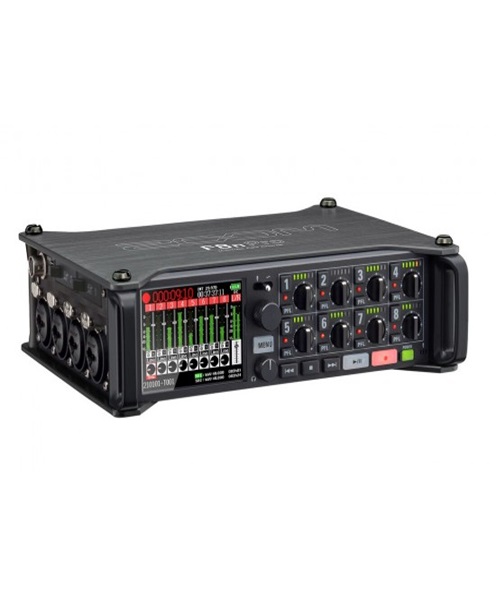
Additional audio recorders.
-
Independent recording computers.
-
Secondary camera recording devices.
-
Additional recording hard drives or SSDs.
-
Signal splitters and distribution equipment.
-
Redundant power arrangements.
-
Monitoring equipment.
-
Backup storage and file-transfer accessories.
The exact equipment depends on the recording workflow. A backup system should be planned as part of the complete production setup rather than added without considering signal routing and compatibility.
Why Hire a Backup Recording System in Kenya?
Events and productions often involve valuable footage, important speeches and content that must be preserved.
A backup recording arrangement helps reduce the risk of losing this material.
Reduced Risk of Losing Important Footage
Recording devices can experience unexpected failures. A computer may crash, a storage device may become unavailable or a recording file may become corrupted.
An independent backup recording path can help preserve another copy of the content if the primary recording is interrupted.
Protection for Important Event Audio
Audio is a major part of many event recordings. A video may appear visually complete but still be unusable if the sound is missing or distorted.
A backup audio recorder can capture a separate audio feed, providing an additional source for post-production or recovery.
Support for Professional Multi-Camera Productions
Multi-camera productions may involve several independent video feeds, a switched programme output and separate audio recordings.
A backup recording system can provide an additional recording path for important feeds, depending on the production’s requirements.
Greater Recording Confidence
Knowing that an additional recording arrangement is operating can give production teams greater confidence during important events.
However, redundancy only works when the backup system is independent enough to protect against the failure being considered. Simply recording twice on the same computer or storage device may not protect against a computer failure or drive failure.
Reduced Financial and Reputational Risk
Some recordings have significant business or personal value. Corporate presentations may be needed for internal communication, while wedding footage may be essential to clients.
A backup recording arrangement helps reduce the possibility of having no usable recording after the event.
Flexible Rental Arrangements
A full backup system may only be needed for major events or occasional productions. Hiring allows organisers to access additional equipment when required without maintaining a permanent backup inventory.
Events That Require Backup Recording System Rental
Corporate Conferences
Corporate conferences may include keynote presentations, executive speeches, panel discussions, product demonstrations and important announcements.
Organisers may need recordings for internal communication, training, marketing or future reference.
A backup recording system can capture an additional copy of the programme feed or important speaker audio.
Weddings and Private Events
Weddings, anniversaries and milestone celebrations are events that cannot be recreated in exactly the same way.
A backup recording arrangement can help protect important footage, particularly during the ceremony, speeches and other major programme moments.
Videographers may use cameras with internal recording alongside an additional recording path where the equipment supports it.
Concerts and Live Music Events
Concerts involve live performances that may not be repeated. Audio and video production teams may need additional recording arrangements to protect the final material.
A backup recording system can be used to capture the programme feed, separate camera feeds or an additional audio mix.
The system should be planned around the number of recording channels, audio sources and expected performance duration.
Film and Television Production
Film and television projects may generate valuable original camera footage and production audio.
A backup recording workflow can help preserve source material and reduce the risk of losing important takes.
Depending on the production, redundancy may be provided through simultaneous camera recording, separate audio recorders or independent storage copies.
Livestreaming and Broadcast Events
Livestreaming introduces additional recording considerations. An internet connection may fail even when local recording continues, and a streaming computer may experience an unexpected problem.
A backup recording system can provide a local recording of the event or programme feed independently of the streaming process.
This helps ensure that a usable copy may still be available even if the online transmission is interrupted.
Church Services and Religious Conferences
Church services, worship events, conventions and conferences may include sermons, music performances, testimonies and important announcements.
A backup recording system can help preserve the programme content for future viewing, archiving or online distribution.
Educational and Training Events
Schools, universities, training institutions and professional organisations may record lectures, seminars, workshops and training sessions.
A secondary recording arrangement can help protect educational material that may be difficult or expensive to reproduce.
Product Launches and Corporate Productions
Product launches often involve carefully planned presentations, demonstrations and promotional content.
A backup recording system can provide an additional copy of the event, supporting future marketing, internal reporting and content distribution.
Types of Backup Recording Systems
Backup recording requirements vary depending on the type of content being captured and the primary recording arrangement.
Backup Video Recording System
A backup video recording system captures an additional video recording of an event or production.
It may receive a duplicate camera signal, a switched programme feed or another compatible video source.
The backup arrangement should be designed to capture the most important content without relying entirely on the primary recording device.
Backup Audio Recording System
A backup audio recording system captures an additional audio feed using a separate recorder or recording path.
For example, a live event may have its primary audio recording through a computer while a separate audio recorder captures a suitable output from the mixer.
The audio engineer must check levels, signal routing and potential clipping before the event begins.
Multi-Camera Backup Recording System
A multi-camera production may require redundancy for several camera feeds.
Some cameras can record internally while also sending video signals to a central recording system. Other configurations may use dedicated external recorders.
The recording team should establish which feeds need independent backup and whether all cameras can record simultaneously at the required quality.
Backup Computer Recording System
A secondary recording computer may be used to capture an additional programme feed or recording source.
For effective redundancy, the backup computer should not depend on the same critical components as the primary computer where those components represent a failure risk.
Backup Storage System
A backup storage system provides additional space for copies of recorded files.
This may involve external hard drives, SSDs or other compatible storage solutions.
It is important to distinguish between a second recording and a file copy made after recording. A secondary recording can protect against some recording failures, while a separate storage copy helps protect against data loss after the original file has been created.
Backup Recording System vs Event Recording System
An Event Recording System is designed to capture audio, video or other event content as part of the main production.
A Backup Recording System provides an additional recording arrangement to protect against failure or loss of the primary recording.
For example, an event may use a main video recorder to capture the programme feed and a separate backup recorder to capture the same signal.
The two systems may share some equipment, but their purposes are different. The event recording system performs the primary capture, while the backup arrangement provides redundancy.
Backup Recording System vs Recording Hard Drive
A recording hard drive is a storage device used to save digital content.
A backup recording system is a broader arrangement that may include separate recorders, additional storage, duplicate signal feeds and monitoring equipment.
A second hard drive can be part of a backup strategy, but it does not automatically create a fully independent recording system.
For example, if two drives are connected to the same computer and that computer fails before writing the recordings, both drives may be affected. A separate recorder receiving a duplicated signal may provide a different level of protection.
Backup Recording System vs ISO Recording System
An ISO Recording System captures separate sources independently, allowing individual camera or input recordings to be retained.
A Backup Recording System creates an additional recording path or copy to protect important content.
An ISO recording arrangement may form part of a backup strategy, but the two terms are not interchangeable.
For example, a production may independently record four camera feeds and also maintain a separate backup recording of the final programme output.
How a Backup Recording System Works
The exact workflow depends on the production, but a typical arrangement involves several stages.
1. Identify the Primary Recording System
The production team first establishes how the main event recording is being captured.
This may involve cameras, a video switcher, an audio mixer, a recording computer or a dedicated recorder.
2. Identify Potential Failure Points
The team considers what could interrupt the primary recording.
Potential risks include computer failure, storage device failure, cable disconnection, power interruption, recording software problems and incorrect signal routing.
3. Create an Additional Recording Path
A suitable signal is routed to an independent backup recorder or recording device.
For video, this may be a duplicate programme output or a separate camera feed. For audio, it may be a dedicated mixer output or another appropriate signal source.
4. Configure Backup Storage
The backup device must have sufficient storage capacity and compatible recording settings.
Storage requirements should account for the recording duration, bitrate, resolution and number of sources.
5. Test the Backup Recording
The production team should confirm that the backup device is receiving the correct signal and successfully saving files.
It is not enough to connect a recorder and assume it is working.
6. Monitor During the Event
An operator should check that the backup recording remains active and that storage capacity and signal quality are adequate.
7. Verify and Preserve the Files
After the event, the recording files should be checked and copied to appropriate storage.
Important recordings should not be deleted from the original device until the backup copies have been verified.
Important Factors to Consider When Hiring a Backup Recording System
Type of Recording
Determine whether you need backup video, audio or both. A conference may prioritise the programme feed and speaker audio, while a concert may require additional camera and multitrack audio recordings.
Number of Recording Sources
The number of cameras, microphones, audio channels and video feeds affects the equipment required.
A system designed for one video feed may not support several independent recordings.
Recording Quality
The backup should capture content at a quality suitable for its intended use.
Check resolution, frame rate, bitrate, audio sample rate and other recording parameters.
Storage Capacity
The backup system must have enough storage for the expected recording duration.
For multi-camera productions, estimate the storage requirement for each source and account for simultaneous recording.
Independence of the Backup Path
Consider which components are shared between the primary and backup systems.
If both systems rely on the same computer, power supply or storage device, certain failures may affect both.
Where appropriate, separate devices and power arrangements can improve redundancy.
Signal Compatibility
The backup recorder must accept the signal being supplied.
Check HDMI, SDI, audio connections, signal formats, resolution and frame-rate compatibility.
Power Protection
Power interruptions can stop recordings or damage files. The production team should consider suitable power protection or backup power where necessary.
Monitoring and Testing
The backup system should be tested before the event and monitored during operation.
A recording indicator alone may not confirm that the file is being saved correctly, so practical testing and post-event verification are important.
Best Practices for Reliable Backup Recording
A good backup recording strategy requires planning and careful operation.
-
Test the primary and backup systems before the event.
-
Use separate recording devices where practical.
-
Confirm that the backup receives the correct audio or video signal.
-
Check storage capacity before recording begins.
-
Monitor recording status throughout the event.
-
Use appropriate power protection.
-
Keep spare cables and compatible storage available.
-
Avoid changing recording settings during critical sessions unless necessary.
-
Verify that recorded files can be opened and played.
-
Create additional copies of important recordings.
-
Keep backup storage separate from the original recording device.
-
Document file names, recording sources and handover details.
For high-value productions, the backup strategy should be agreed upon by the event organiser, production manager and technical team before the event begins.
Why Choose Janeson Rentals for Backup Recording System Hire?
Janeson Rentals provides event and production equipment hire solutions for clients who need dependable recording arrangements for important occasions.
Clients choose Janeson Rentals because:
-
Flexible recording solutions: Backup equipment requirements can be discussed according to the production’s scale and recording objectives.
-
Support for different event types: Backup recording solutions can be considered for conferences, concerts, weddings, corporate events, church gatherings and video productions.
-
Nairobi-based service: Janeson Rentals is based in Nairobi, with delivery arrangements across Kenya.
-
Recording equipment coordination: Backup arrangements can be planned alongside cameras, recorders, audio mixers, recording monitors and storage devices.
-
Practical technical planning: Clients can discuss recording sources, storage capacity, signal routing and redundancy requirements before booking.
-
Event-focused equipment hire: Rental solutions can be considered for one-day events, longer productions and special recording projects.
The aim is to help production teams plan additional recording protection that matches the importance and technical requirements of their content.
Book Backup Recording System Hire and Rental in Kenya
If you are organising a conference, concert, wedding, corporate event, livestream, church service or professional video production, consider including a backup recording arrangement in your technical plan.
Contact Janeson Rentals to discuss your backup recording system hire requirements. When requesting a quotation, provide the event date, venue, type of recording, number of cameras or audio sources, recording duration and primary equipment being used.
This information helps establish the appropriate backup recording configuration and the equipment needed to support it.
Janeson Rentals offers Backup Recording System Hire and Rental in Kenya for event organisers, production companies, videographers, broadcasters, corporate organisations and AV professionals.
Choose Janeson Rentals for backup recording system hire in Nairobi and across Kenya, and give your important event recordings an additional layer of protection