Broadcast Camera for Hire and Rental in Kenya
Broadcast cameras play an important role in professional television production, live event coverage, studio recording and video broadcasting. They are designed to capture moving images for professional production workflows where reliable operation, consistent picture quality, accurate colour reproduction and integration with other broadcast equipment are important.
Whether you are producing a television programme, covering a live concert, recording a church service, broadcasting a corporate conference or filming a public event, the right broadcast camera can help your production team capture clear and professional footage.
At Janeson Rentals, we provide broadcast camera hire and rental services in Nairobi for television production teams, event organisers, media companies, churches, institutions and professional videographers across Kenya. Hiring a broadcast camera gives you access to suitable filming equipment for your project without the long-term financial commitment of purchasing a complete broadcast camera system.
Broadcast cameras come in different configurations. Some are designed for studio production, while others are built for field broadcasting, electronic news gathering and live event coverage. Their features, connections, recording capabilities and operational requirements vary depending on the model.
Choosing the correct equipment requires an understanding of your production environment, the required video output, available accessories and the workflow through which the footage will be recorded, switched or transmitted.
What Is a Broadcast Camera?
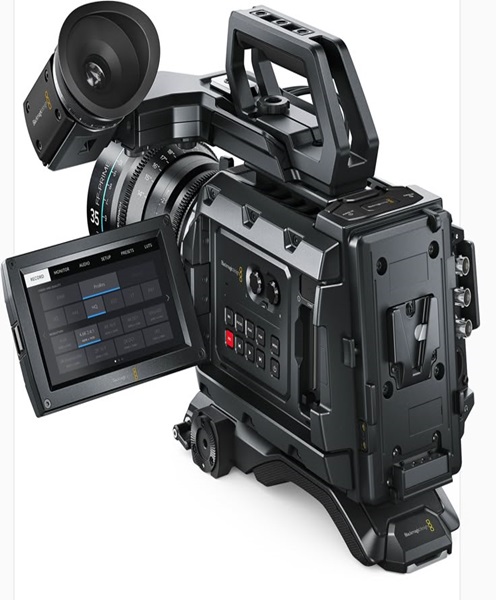
A broadcast camera is a professional video camera designed for television, live production and other broadcast-oriented applications. It captures video signals that can be recorded, transmitted or integrated into a wider production system.
Unlike a typical consumer video camera, a broadcast camera may provide specialised operational controls, professional video connections, advanced image settings and compatibility with production equipment.
Depending on the model, a broadcast camera may feature:
-
Professional image sensors.
-
Interchangeable or integrated zoom lenses.
-
Manual focus, iris and zoom controls.
-
Professional video output connections.
-
External monitoring options.
-
Timecode and synchronisation support.
-
Professional audio inputs.
-
Tally indicators for live production.
-
Remote camera control capabilities.
-
Compatibility with video switchers and production systems.
Not every broadcast camera includes all these features. Some systems require separate camera control units, external recorders, lens controllers or additional accessories.
The appropriate configuration depends on whether the camera will be used for studio recording, live event production, outside broadcasting or another professional application.
Why Hire a Broadcast Camera Instead of Buying?
Broadcast cameras can be expensive, especially when a production requires supporting equipment such as lenses, tripods, camera control systems, monitors, cabling and signal converters.
For organisations that only need broadcast equipment for selected productions, hiring can be a practical alternative to purchasing.
Cost-Effective Access to Professional Equipment
Hiring allows production teams to access broadcast cameras for a defined project or event without committing to the full cost of ownership.
This is useful for independent broadcasters, event organisers, churches, media companies and production agencies that do not require permanent camera inventory.
Flexibility for Different Productions
A television interview, live concert and corporate conference may require different camera arrangements.
Hiring makes it easier to plan equipment requirements according to the production’s needs. You can discuss the camera configuration, supporting equipment and connection requirements before booking.
Reduced Storage and Maintenance Responsibilities
Professional broadcast cameras require proper storage, careful handling and regular technical checks. Hiring reduces the need to maintain equipment that may only be used occasionally.
Suitable for Temporary Broadcast Projects
A broadcast camera may be needed for a one-day conference, a multi-day event, a temporary studio production or a special live programme.
Rental provides access to equipment for the required period, subject to availability.
Applications of Broadcast Cameras
Broadcast cameras are used in a wide range of professional media and event production environments.
Television Studio Production
Television studios rely on cameras to capture presenters, guests, interviews, discussions and other programme content.
Broadcast cameras can be positioned around a studio to provide different views. One camera may capture the presenter, another may cover a guest, while another provides a wider view of the set.
When connected to a compatible production switcher, the camera feeds can be selected and combined into a programme output.
Live Event Broadcasting
Concerts, conferences, award ceremonies, public events and corporate launches may require broadcast cameras to capture activities for live viewing or streaming.
A camera operator can follow speakers, performers and important moments while the production team manages the video feeds.
For larger events, several cameras may be used to provide wide shots, close-ups and alternative viewing angles.
Church Services and Religious Broadcasts
Churches and ministries increasingly use professional video equipment to record and broadcast services, conferences, worship sessions and special programmes.
Broadcast cameras can support wide views of the sanctuary, close-ups of speakers and coverage of musicians and worship teams.
For a church production, camera placement should consider the stage, altar, congregation, lighting and available cable routes.
News and Journalism
Broadcast cameras can be used for interviews, news coverage, field reporting and documentary-style journalism.
The appropriate camera depends on the production format, mobility requirements, recording duration and whether the footage will be transmitted live or recorded for later editing.
Sports and Live Competitions
Sports broadcasts often require multiple camera positions to follow action across a playing area. Broadcast cameras may be used to capture wide shots, close-ups, player reactions and important moments.
The production may also require long zoom lenses, stable camera supports and a compatible video switching system.
Corporate Conferences and Public Presentations
Corporate events may feature keynote speakers, panel discussions, product demonstrations and award presentations.
Broadcast cameras can capture these activities for live streaming, internal communication, promotional videos and archived recordings.
A multi-camera arrangement can help ensure that important details are captured from different angles.
Educational and Institutional Broadcasting
Schools, colleges, universities and training institutions may use broadcast cameras for lectures, seminars, graduation ceremonies and educational programmes.
Hiring can be useful when an institution needs professional video equipment for a specific event or temporary production.
Important Features to Consider When Hiring a Broadcast Camera
Selecting a broadcast camera requires attention to the technical requirements of the production.
Image Resolution
Broadcast cameras support different video resolutions depending on the model and recording or output configuration.
Full HD may be sufficient for many standard live productions, while 4K may be required for higher-resolution recording or particular broadcast workflows.
The camera’s output resolution should be compatible with the video switcher, monitors, recording equipment and streaming system.
Sensor Performance
The image sensor affects image detail, colour reproduction and performance in different lighting conditions.
For live events, low-light performance can be particularly important because venues may have changing stage lighting, dark backgrounds and bright spotlights.
The sensor characteristics should be considered alongside the lens and available lighting.
Lens and Zoom Capabilities
Broadcast cameras may use integrated zoom lenses or interchangeable lenses, depending on their design.
Zoom capability is especially important when filming from a fixed camera position. It allows the operator to move between wide shots and close-ups without physically relocating the camera.
When selecting a camera, consider the required focal range, lens aperture, focus control and compatibility with the production environment.
Professional Video Outputs
A broadcast camera may provide different video output connections depending on the model. These can include SDI, HDMI or other professional interfaces.
SDI connections are commonly used in professional production environments because they support suitable long-distance video cabling and broadcast workflows.
Before hiring, confirm that the camera’s output format and connection are compatible with the intended switching or recording equipment.
Audio Inputs
Audio is an essential part of broadcast production. Some broadcast cameras support professional external audio inputs, while others require separate audio recording or connection equipment.
Depending on the model, audio may be received from microphones, wireless microphone receivers or a mixing console.
For conferences and live performances, the production team should establish how the camera audio will be integrated with the main sound system.
Tally and Camera Control
Some broadcast camera systems support tally indicators that show camera operators when their camera is selected for the programme output.
Other systems may support remote camera control through compatible equipment.
These features can help coordinate multi-camera productions, but their availability depends on the camera and supporting control system.
Power and Recording Requirements
Broadcast productions can last several hours. Camera power, recording media and backup arrangements should therefore be planned carefully.
Some broadcast cameras record internally, while others may rely on external recorders or connected production systems.
The exact recording workflow should be confirmed before the event.
Broadcast Camera for Multi-Camera Production
Multi-camera production is one of the most common applications of broadcast cameras.
Instead of depending on a single camera angle, a production team uses several cameras to capture different views of the same event.
For example, a corporate conference may use:
-
A wide camera showing the entire stage.
-
A close-up camera focused on the keynote speaker.
-
A camera covering panel discussions.
-
An additional camera capturing audience reactions.
The camera feeds can be connected to a compatible video switcher. A director or technical operator can then select the most suitable shot for the programme output.
For a successful setup, all cameras should be configured with compatible video formats and frame rates. Their exposure and colour settings should also be matched as closely as practical to maintain visual consistency.
Broadcast Camera vs Professional Camcorder
Broadcast cameras and professional camcorders can both record high-quality video, but they are designed around different operational priorities.
A professional camcorder often combines a lens, recording system, audio connections and camera controls in one integrated body. This makes it convenient for event videography, interviews and mobile recording.
A broadcast camera is generally designed to integrate into a professional television or live production workflow. Depending on the model, it may support studio connections, remote control, tally systems, professional signal outputs and other broadcast functions.
For example, a videographer recording a wedding may prefer an integrated professional camcorder, while a television studio may require broadcast cameras connected to a central production switcher.
The best option depends on the production requirements rather than the name of the camera category.
Complementary Equipment for Broadcast Camera Hire
A broadcast camera is often part of a larger production system. Depending on the project, supporting equipment may include:
-
Broadcast lenses: Provide suitable focal lengths and zoom capabilities.
-
Camera tripods: Support stable filming during long events.
-
Pedestals: Provide controlled camera movement in compatible studio environments.
-
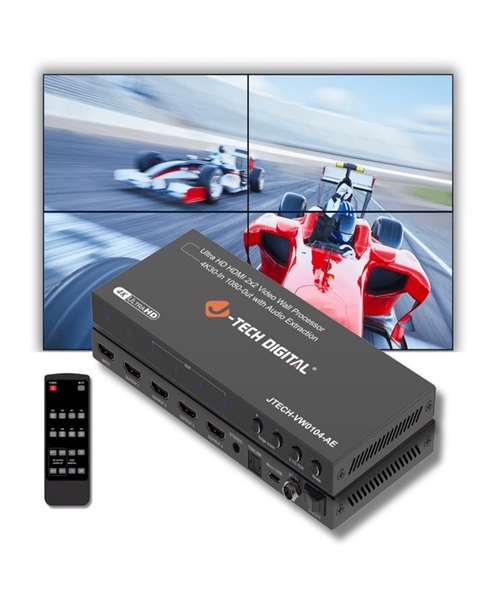
Video switchers: Combine multiple camera feeds into one programme output.
-
Camera control units: Support remote camera adjustments in compatible systems.
-
External monitors: Allow operators and directors to view camera feeds.
-
SDI cables: Carry compatible video signals between cameras and production equipment.
-
Signal converters: Convert between supported video connection formats.
-
Video routers: Distribute video signals to different production destinations.
-
Streaming encoders: Prepare compatible video feeds for live online distribution.
-
Audio mixers: Manage microphones, music and other audio sources.
-
Wireless microphone systems: Capture speech from presenters and performers.
-
Lighting equipment: Supports appropriate exposure and visual consistency.
The compatibility of every component should be checked before the production begins.
Preparing a Broadcast Camera Setup for an Event
Good preparation is essential when using broadcast cameras for live production.
Begin by establishing the production format. Determine whether the camera will be used for recording, live switching, streaming or a combination of these applications.
Next, plan the camera positions. Consider the stage layout, audience seating, available mounting points, cable routes and operator movement.
Check the video output format and ensure it is compatible with the switcher, monitors and recording equipment.
Audio connections should also be tested. If the production uses a central audio mixer, establish how the sound will be routed to the recording or streaming system.
Before the event, test all camera feeds and confirm that the picture is stable. Match the cameras’ exposure and white balance where possible.
For extended events, prepare the power and recording arrangements. Where uninterrupted coverage is important, establish an appropriate backup plan.
Finally, conduct a rehearsal with the camera operators and technical team. This helps everyone understand camera positions, shot assignments and switching responsibilities.
Why Choose Janeson Rentals for Broadcast Camera Hire in Kenya?
Janeson Rentals provides event equipment hire and rental solutions in Nairobi for production companies, broadcasters, corporate clients, churches and event organisers.
We understand that professional broadcast production requires compatible equipment and careful technical planning. A camera must work with the intended lenses, video connections, monitoring equipment and production workflow.
Whether you are preparing a television production, live concert, church broadcast, corporate conference or multi-camera event, contact Janeson Rentals to discuss your broadcast camera requirements and equipment availability.
Based in Nairobi, Janeson Rentals serves clients across Kenya, supporting temporary production and event equipment requirements.
Book a Broadcast Camera for Hire and Rental in Nairobi
If you need a broadcast camera for a television programme, live event, conference, studio production or professional video project, contact Janeson Rentals to enquire about rental arrangements.
Share your production date, location, required camera quantity, preferred video format and intended connection to the production system. This information helps establish the most suitable camera arrangement for your project.
Choose Janeson Rentals for broadcast camera hire and rental in Nairobi, with services available to clients across Kenya.