DisplayPort Cable Hire and Rental in Kenya
DisplayPort cables are important connectivity accessories for compatible computers, graphics systems, and professional monitors. They are commonly used where digital video quality, supported high resolutions, or high refresh rates are important.
For corporate presentations, exhibitions, production workstations, and events that use compatible display equipment, having the correct DisplayPort cable helps establish a suitable connection between the source and the receiving display.
Janeson Rentals provides event equipment hire and rental solutions in Kenya. Organizers who need DisplayPort cables for a temporary installation can enquire about suitable accessories for their devices, cable lengths, and event requirements.
What Is a DisplayPort Cable?
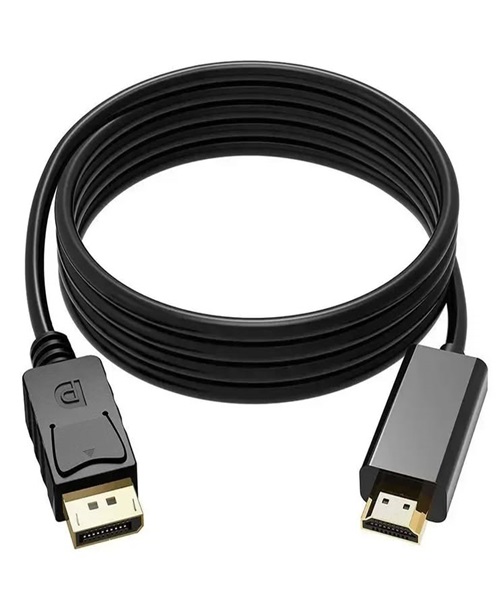
DisplayPort is a digital interface developed for transmitting video and, where supported, audio between compatible devices. DisplayPort connections are found on many desktop computers, laptops, graphics cards, and monitors.
A DisplayPort cable connects compatible DisplayPort source and display ports. Depending on the equipment and cable specification, DisplayPort supports different resolutions, refresh rates, and additional display features.
Some systems also support Multi-Stream Transport (MST), which can enable multiple displays from a suitable source through supported hardware. However, this depends on the source device, graphics system, monitors, and connection configuration.
DisplayPort should not be confused with HDMI, even though both are digital display interfaces. If the source and destination use different interfaces, you may need an adapter or converter instead of a standard DisplayPort cable.
Why Hire DisplayPort Cables?
Flexible equipment access: Hiring is useful when an event requires more cables than are available in your existing inventory.
Cost-conscious planning: Temporary access may be preferable to purchasing accessories for a one-off exhibition, conference, or presentation.
Support for professional monitors: Compatible DisplayPort connections can be useful for computer-based presentations, digital content, control-room displays, and certain production applications.
Simplified equipment sourcing: You can enquire about DisplayPort cables alongside monitors, laptops, projectors, adapters, and other audiovisual accessories.
Adaptable event setups: The cable length and quantity can be planned around the specific layout of your meeting room, exhibition booth, or technical workstation.
Applications of DisplayPort Cable Rental
Corporate Presentations
Businesses may use compatible monitors to display reports, dashboards, presentations, and other digital content. DisplayPort cable hire can support setups where the source computer and monitor use the interface.
Exhibitions and Trade Shows
Exhibitors may use professional monitors for digital catalogues, product demonstrations, interactive displays, and promotional presentations.
Conference Technical Rooms
Some technical rooms use multiple monitors for presentation management, production monitoring, and event coordination. DisplayPort cables may support these systems when the devices are compatible.
Training and Demonstration Environments
Training teams may need to connect a computer to a high-resolution monitor for software demonstrations, technical instruction, or data presentation.
Creative and Media Workstations
Video editing, design, and other visual production workflows may use DisplayPort-connected monitors. Cable requirements depend on the display’s specifications and the equipment’s output capabilities.
Digital Display Installations
DisplayPort may be used in compatible digital signage or information-display systems, depending on the hardware design and the available inputs.
How to Select the Right DisplayPort Cable
Start by checking that both devices have standard DisplayPort connectors. A Mini DisplayPort connector is physically different, and USB-C requires a compatible video-output mode or suitable adapter.
Next, confirm the resolution and refresh rate required. A cable intended for basic display use may not meet the requirements of a demanding high-resolution or high-refresh-rate setup.
Consider cable length and routing. The required length should accommodate the actual route without creating unnecessary clutter. If a display is positioned far from the computer, confirm that the cable can support the required signal over that distance.
Check whether you need features such as MST support, high dynamic range, or particular audio capabilities. These functions depend on the complete system, not simply the presence of a DisplayPort connector.
For multiple monitors, establish how many outputs the source device supports and whether it can drive the intended display configuration. A cable alone cannot overcome hardware limitations.
DisplayPort Cable Hire for Events
Before an event, prepare a list of the equipment that needs to connect. Record the source devices, display models, input types, cable lengths, and number of connections required.
During setup, connect the devices and confirm that the display recognizes the source. Check resolution settings, image orientation, and any extended-desktop or duplicated-display requirements.
If you intend to connect a DisplayPort computer to an HDMI projector, request the correct adapter rather than assuming a standard DisplayPort cable will work. Where audio is required, test it separately if the signal path does not support it.
Cable safety should also be part of the plan. Route cables away from busy walkways and protect them where they cross areas used by guests or event staff.
DisplayPort Cable Hire Across Kenya
Janeson Rentals provides event equipment rental solutions for clients organizing professional events in Nairobi and across Kenya. You can enquire about DisplayPort cables for conferences, exhibitions, corporate presentations, training sessions, and temporary display installations.
When requesting a quote, provide your event date, venue, rental period, required cable length, quantity, and device specifications. If you need monitors, projectors, adapters, or other presentation accessories, include them in the same enquiry.
Confirm availability and rental arrangements directly with Janeson Rentals.
Frequently Asked Questions
1. What does a DisplayPort cable do?
It carries digital video and supported audio between compatible DisplayPort source devices and displays.
2. Is a DisplayPort cable compatible with HDMI?
Not directly in every configuration. An appropriate adapter or converter may be required when the source and display use different interfaces.
3. Can I hire DisplayPort cables for an exhibition?
You can enquire with Janeson Rentals about suitable cables for exhibitions, conferences, and other temporary display installations.
4. How do I choose the right cable length?
Measure the complete cable route and allow sufficient length for safe routing and connection.
5. Will a DisplayPort cable support every monitor resolution?
No. Supported performance depends on the cable specification and the capabilities of the source device and monitor.
Book DisplayPort Cable Hire and Rental with Janeson Rentals
Prepare a reliable digital display connection for your next event. Contact Janeson Rentals to enquire about DisplayPort cable hire and rental in Kenya and request a quotation for your presentation or production requirements.