Professional DisplayPort Cable Hire and Rental in Kenya
DisplayPort cables are widely used in professional computer systems, high-resolution monitors, workstations, presentation environments and audiovisual production. They provide a digital connection between compatible video source devices and displays, making them useful for corporate events, exhibitions, conferences, training facilities and technical production setups.
Janeson Rentals offers event equipment hire and rental solutions in Nairobi, Kenya, for clients who require DisplayPort cables as part of their temporary audiovisual arrangements. Whether you need to connect a desktop computer to a monitor, link a compatible workstation to a professional display or support a multi-screen presentation environment, selecting the correct cable is essential.
DisplayPort is particularly common in computer monitors and graphics workstations. It supports high-resolution digital video and, depending on the DisplayPort version and connected equipment, can support high refresh rates and additional display capabilities.
For organisers who only need DisplayPort connections for a specific event or project, hiring can be a convenient alternative to purchasing cables for occasional use.
What Is a DisplayPort Cable?
A DisplayPort cable is a digital video connection cable used to transmit video and, where supported, audio between compatible electronic devices.
It is commonly used to connect:
- Desktop computers to monitors.
- Laptops to compatible external displays.
- Graphics workstations to professional monitors.
- Video production computers to monitoring equipment.
- Compatible media systems to digital displays.
- Multi-monitor workstation setups.
- Presentation computers to compatible screens.
DisplayPort is different from HDMI, USB-C and VGA. Although these connection types can sometimes work together through suitable adapters or converters, they are not interchangeable simply because they are all used for display connections.
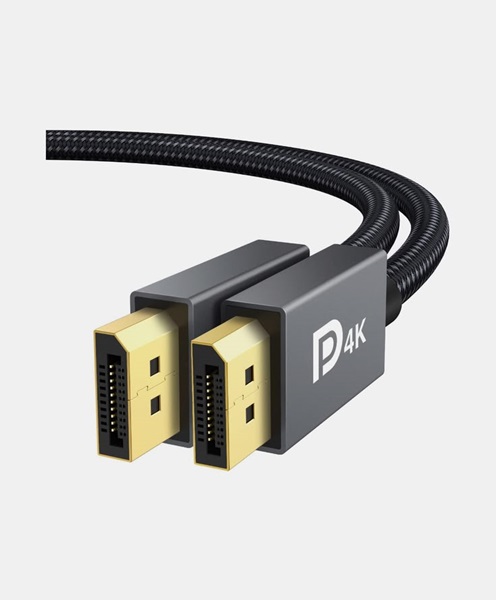
A standard DisplayPort cable has a DisplayPort connector at each end. The cable should be selected according to the ports available on the source device and display.
DisplayPort Cable Hire for Corporate Events
Corporate events often require computer systems to connect to professional monitors, large displays and presentation equipment.
DisplayPort cable hire can support business environments where compatible computers and screens are used for presentations, demonstrations, meetings and digital content display.
Janeson Rentals can assist clients planning DisplayPort connections for:
- Corporate conferences.
- Boardroom presentations.
- Business seminars.
- Product launches.
- Company training sessions.
- Executive meetings.
- Financial presentations.
- Professional exhibitions.
For a corporate presentation, organisers should confirm the connection type available on the presentation computer and the receiving display.
If the computer has DisplayPort output and the monitor has DisplayPort input, a compatible DisplayPort cable may provide a direct connection. If the receiving equipment only supports HDMI, a suitable adapter or active converter may be required depending on the devices and signal requirements.
Checking these details before the event can help avoid last-minute connection problems.
DisplayPort Cable Rental for Professional Monitors
DisplayPort is commonly used with computer monitors, including professional displays designed for graphic design, video editing, photography, animation and other visual work.
These applications can require higher resolutions, accurate display output and refresh rates supported by the computer and monitor.
DisplayPort cable rental may be useful when setting up temporary workstations or presentation areas that require compatible monitor connections.
Possible applications include:
- Connecting editing computers to external monitors.
- Connecting desktop workstations to professional displays.
- Supporting graphics and design workstations.
- Connecting computers to high-resolution monitors.
- Setting up temporary control-room displays.
- Connecting compatible computers to multiple monitors.
The cable’s supported DisplayPort version and capabilities should be considered alongside the graphics card, computer output and monitor input.
A newer cable does not automatically upgrade the capabilities of older equipment. The final performance depends on the complete connection chain.
DisplayPort Cable Hire for Video Production
Video production environments may use computer workstations and professional monitors to review footage, operate production software and display visual content.
DisplayPort connections can be useful where compatible editing computers, graphics systems and monitors are part of the production workflow.
Janeson Rentals can help clients plan DisplayPort cable requirements for suitable temporary production setups, including:
- Video editing workstations.
- Graphics and animation stations.
- Production control rooms.
- Digital content review areas.
- Computer-based playback systems.
- Technical monitoring positions.
- Presentation and demonstration stations.
When connecting professional monitors, production teams should verify the required resolution, refresh rate, colour workflow and any additional display features supported by their equipment.
DisplayPort is a digital display interface. It should not be confused with SDI, which is commonly used in professional broadcast and video production signal workflows. If a production system uses SDI equipment, a suitable SDI connection or conversion system may be required instead.
DisplayPort Cable Rental for Exhibitions and Trade Shows
Trade shows and exhibitions frequently use computer displays to demonstrate products, present information and operate interactive digital installations.
DisplayPort cables can connect compatible computers to monitors used at exhibition stands, demonstration stations and temporary work areas.
Janeson Rentals supports equipment hire planning for exhibitions and trade shows in Nairobi and across Kenya, subject to availability and logistics.
DisplayPort cable rental may be appropriate for:
- Computer-based product demonstrations.
- Digital design presentations.
- Interactive exhibition stations.
- Professional monitor installations.
- Temporary workstation setups.
- Multi-screen information displays.
- Technical demonstration booths.
For a successful exhibition setup, cable length and routing should be considered carefully. The cable should reach the source and display without being stretched or placed where visitors may trip over it.
Where cables cross walkways, organisers should use appropriate cable management and floor protection.
DisplayPort Cable Hire for Multi-Monitor Setups
Many professional workstations use more than one monitor to improve productivity and provide additional screen space.
DisplayPort can support multi-monitor configurations through compatible graphics cards, monitor connections and supported technologies.
Some systems support daisy-chaining through DisplayPort Multi-Stream Transport (MST), where compatible monitors and equipment allow multiple displays to operate from a suitable DisplayPort connection.
However, not every monitor or computer supports MST. The maximum number of displays, resolution and refresh rate depend on the graphics hardware, DisplayPort version, monitor features and system configuration.
Janeson Rentals can assist clients who need DisplayPort cables for temporary multi-monitor installations, subject to the compatibility of the equipment involved.
Before arranging rental, confirm:
- The number of monitors required.
- Available outputs on the computer or graphics card.
- Available inputs on each monitor.
- Whether the monitors support DisplayPort MST.
- The required resolution and refresh rate.
- Whether adapters or additional equipment are necessary.
This information helps establish the correct cable arrangement rather than assuming that one cable can support every multi-screen configuration.
Understanding DisplayPort Versions and Performance
DisplayPort has evolved through several versions, with different supported bandwidth and feature capabilities.
The performance of a DisplayPort connection depends on the version supported by the source device, cable and receiving display.
When choosing a DisplayPort cable for hire, consider the following:
DisplayPort version: The source device and monitor determine the supported connection capabilities. A cable should be suitable for the intended DisplayPort standard and performance requirements.
Resolution: Higher resolutions require sufficient bandwidth across the complete connection. Confirm that the computer, graphics hardware, cable and monitor can support the required resolution.
Refresh rate: Gaming, simulation, motion graphics and specialist monitoring applications may require higher refresh rates. These depend on the equipment and connection standard.
Audio support: DisplayPort can carry digital audio when supported by the connected devices and configuration.
Adaptive display features: Some systems support technologies such as Adaptive-Sync. Compatibility depends on the graphics hardware, monitor and software configuration.
Cable length and quality: Longer cable runs may introduce signal reliability challenges, especially at higher bandwidths. The appropriate cable should be selected for the intended distance and performance.
For demanding applications, it is advisable to test the complete connection before the event.
DisplayPort Cable Hire for Training and Educational Institutions
Training centres, universities and professional development facilities often use desktop computers, laptops and external monitors for teaching and demonstrations.
DisplayPort cable hire can support temporary computer laboratory setups, workshops, conferences and technical training sessions.
Common applications include:
- Computer training workshops.
- Graphic design classes.
- Video editing demonstrations.
- Technical seminars.
- University presentations.
- Professional certification training.
- Temporary computer workstations.
Where several computers and monitors are involved, organisers should prepare a connection plan showing which computer connects to which display.
This helps ensure that the correct cable lengths and quantities are requested before equipment installation.
DisplayPort Versus HDMI: What Is the Difference?
DisplayPort and HDMI are both digital interfaces used to transmit video and, where supported, audio. However, they are different connection standards and are commonly found in different types of equipment.
DisplayPort is frequently used in desktop computers, graphics cards and professional computer monitors. HDMI is common in televisions, projectors, media players and many presentation displays.
The best option depends on the ports and capabilities of the connected devices.
A DisplayPort-to-HDMI connection may be possible using a compatible adapter or converter. However, the direction of conversion and the required resolution, refresh rate and audio support should be checked.
A standard DisplayPort cable cannot simply be plugged into an HDMI port. The correct connection accessory is necessary.
Janeson Rentals encourages clients to confirm both device connections before requesting DisplayPort cable rental.
How to Choose the Right DisplayPort Cable for Hire
Selecting the correct DisplayPort cable helps ensure that the connection is suitable for the intended application.
Consider these factors when making your request:
- Source device: Identify whether the computer, laptop or graphics workstation has a full-size DisplayPort output or another type of connection.
- Display input: Confirm that the monitor or receiving device has a compatible DisplayPort input.
- DisplayPort version: Check the supported version and required bandwidth.
- Resolution: Establish the resolution needed for the event or production.
- Refresh rate: Confirm whether the application requires a standard or higher refresh rate.
- Cable length: Measure the distance between the computer and display.
- Connector type: Distinguish full-size DisplayPort from Mini DisplayPort and USB-C.
- Adapters: Identify whether the setup requires DisplayPort-to-HDMI, USB-C-to-DisplayPort or another compatible solution.
- Multi-monitor requirements: Confirm whether the system uses multiple outputs or supported MST daisy-chaining.
Providing this information helps avoid ordering a cable that physically fits but does not meet the technical requirements.
Why Hire a DisplayPort Cable Instead of Buying One?
DisplayPort cables may be needed for temporary workstations, exhibitions, corporate events and productions. Purchasing accessories for every short-term project can create unnecessary costs and storage requirements.
DisplayPort cable hire provides a practical option for clients who need a specific cable for a limited period.
Benefits include:
- Flexible quantities: Request the number of cables required for the project.
- Convenience: Arrange cables as part of a wider equipment rental request.
- Reduced purchasing needs: Avoid buying accessories for occasional event use.
- Temporary installation support: Access suitable connections for exhibitions and conferences.
- Equipment coordination: Plan display connections alongside monitors and other audiovisual equipment.
- Project-based planning: Match cable requirements to the specific event setup.
Hiring can be especially useful for organisations that operate temporary presentation systems rather than permanent computer installations.
Why Choose Janeson Rentals for DisplayPort Cable Hire in Kenya?
Janeson Rentals provides event equipment hire and rental solutions in Nairobi, Kenya, for clients organising corporate events, exhibitions, presentations and audiovisual productions.
Choosing a suitable DisplayPort cable involves checking compatibility, signal requirements, connector types and cable length. A reliable setup begins with understanding the equipment being connected.
Janeson Rentals encourages clients to share their technical requirements when requesting DisplayPort cable rental. This makes it easier to assess whether a direct DisplayPort connection is suitable or whether an adapter or alternative connection is needed.
Clients can enquire about:
- DisplayPort cable hire for corporate events.
- Cables for professional monitors and workstations.
- Temporary exhibition display connections.
- Presentation and training equipment connections.
- Multi-monitor workstation cable requirements.
- Coordination with other event equipment.
- Delivery arrangements across Kenya, subject to availability, location and logistics.
The goal is to help clients plan their equipment requirements before installation and reduce avoidable technical difficulties during their events.
DisplayPort Cable Rental in Nairobi and Across Kenya
Janeson Rentals is based in Nairobi and provides event equipment hire solutions for clients looking for practical audiovisual accessories and connectivity equipment.
DisplayPort cable rental can support conferences, corporate meetings, exhibitions, workshops and production environments in Nairobi.
Clients in other parts of Kenya can also enquire about delivery arrangements. These depend on the event location, cable requirements, equipment availability and transport logistics.
When making an enquiry, include the event date, venue, number of cables, cable length, source device and receiving display. If possible, provide the computer and monitor models to help confirm compatibility.
Frequently Asked Questions About DisplayPort Cable Hire
1. Can I hire DisplayPort cables in Nairobi?
You can enquire with Janeson Rentals about DisplayPort cable hire and rental for corporate events, presentations, exhibitions, professional monitors and production setups in Nairobi.
2. What is a DisplayPort cable used for?
It connects compatible computers and other video source devices to compatible monitors and displays, transmitting digital video and supported audio.
3. Can a DisplayPort cable connect a laptop to a monitor?
Yes, provided the laptop has a compatible DisplayPort output and the monitor has a suitable DisplayPort input. Some laptops may require a USB-C-to-DisplayPort cable or adapter instead.
4. Is DisplayPort the same as HDMI?
No. They are different digital display standards. A suitable adapter or converter may allow compatible devices with different connection types to work together.
5. Can I use DisplayPort for a 4K monitor?
Potentially, yes. The supported resolution and refresh rate depend on the DisplayPort version and the capabilities of the computer, graphics hardware, cable and monitor.
6. Can DisplayPort support multiple monitors?
Some systems support multiple displays through separate graphics outputs or compatible DisplayPort MST daisy-chaining. The computer and monitors must support the required configuration.
7. Does DisplayPort carry audio?
DisplayPort can carry digital audio when the source device, receiving display and configuration support it.
8. What is the difference between DisplayPort and Mini DisplayPort?
They are related connection standards but use different connector sizes. The physical connector must match the equipment or be connected through a suitable adapter.
9. What information should I provide when requesting DisplayPort cable rental?
Provide the event date, venue, quantity, required cable length, source device, monitor model, resolution and refresh-rate requirements.
10. Does Janeson Rentals arrange delivery outside Nairobi?
Delivery arrangements across Kenya can be discussed, subject to availability, location and transport logistics.
Book DisplayPort Cable Hire with Janeson Rentals
Need DisplayPort cables for a corporate presentation, exhibition, conference, professional workstation or video production setup? Janeson Rentals can assist with your DisplayPort cable hire and rental enquiry in Nairobi, Kenya.
Contact Janeson Rentals with your event date, venue, required quantity, cable length and equipment specifications. Confirming the source and display connections in advance will help establish the appropriate cable requirements for your project.
Choose Janeson Rentals for practical event equipment hire and professional connectivity planning for your next event.