Event Playback System Hire and Rental in Kenya
Well-planned events often depend on more than live speakers, performers and presentations. Many productions also require carefully prepared media to be played at specific moments. This may include opening videos, company profiles, sponsor advertisements, presentation slides, background music, promotional content, walk-in videos, award announcements, recorded speeches, transition graphics and closing videos. To deliver these elements smoothly, event organisers need a reliable event playback system.
Janeson Rentals offers Event Playback System Hire and Rental in Kenya for event planners, production companies, corporate organisations, conference organisers, churches, schools, hotels, exhibition organisers and private clients. Our event playback solutions support the controlled playback of digital audio and video content during live productions.
Whether you are organising a corporate conference in Nairobi, a wedding reception, a product launch, an awards ceremony, a church convention, a graduation, an exhibition or a large entertainment event, having the right playback equipment helps your production team deliver media at the correct time and in the appropriate format.
Hiring an event playback system allows you to access suitable playback equipment without purchasing and maintaining a complete setup for occasional events. Janeson Rentals helps clients plan playback requirements according to the type of event, content format, venue, display arrangement and production workflow.
What Is an Event Playback System?
An event playback system is a combination of equipment and software used to play prepared audio, video, graphics and other digital media during a live event.
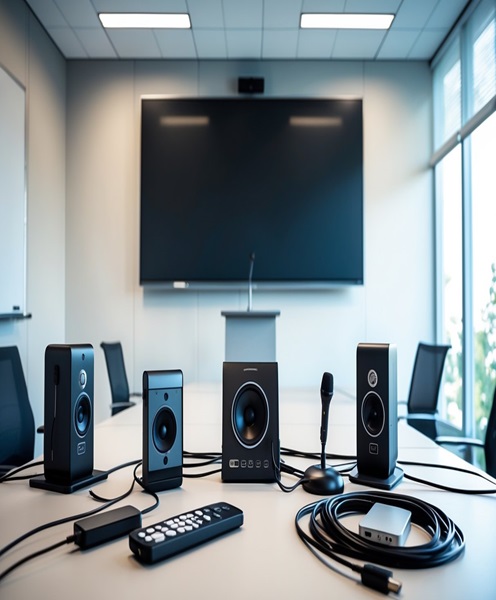
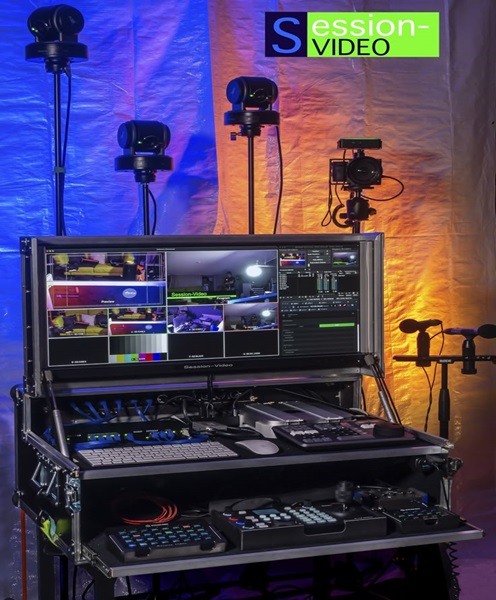
The system may include a computer, dedicated media player, playback software, video output devices, audio interfaces, switching equipment, control monitors and the necessary cables and accessories. The exact configuration depends on the production requirements.
For example, a corporate event may require a playback system to display a company introduction video before the managing director’s speech. A wedding may need music, couple photographs, pre-recorded messages and highlight videos. A conference may require speaker introduction videos, presentation content, sponsor messages and transition graphics.
An event playback system makes it possible to prepare these media elements in advance and present them during the programme. Instead of relying on someone to manually open files and search through folders at the last minute, a properly organised playback workflow helps the production team manage content more efficiently.
Why Hire an Event Playback System in Kenya?
Purchasing professional playback equipment can be expensive, especially for organisations that only organise occasional events. Hiring provides a practical alternative by giving you access to suitable equipment when you need it.
Access to Professional Playback Equipment
Professional events often require more reliable playback arrangements than an ordinary laptop connected directly to a television. Depending on the production, organisers may need multiple outputs, controlled audio routing, dedicated playback software, backup media and integration with a video switcher.
Event playback system rental gives you access to an appropriate setup without requiring you to invest in every component.
Improved Event Programme Flow
A live event usually follows a running order. Media may need to play between speakers, before performances, during award presentations or at specific moments in a product launch.
A well-prepared playback system helps the production team organise these media elements and deliver them at the correct points in the programme. This reduces unnecessary delays and helps presenters, performers and technical operators coordinate their activities.
Better Audio and Video Presentation
An event may use LED screens, projectors, television displays, PA systems and stage monitors. The playback system can be configured to work with the available production equipment, subject to compatible signal formats and connections.
This helps ensure that video appears on the intended display and that audio is routed to the appropriate sound system.
Reduced Equipment Ownership Costs
Buying playback equipment for a single conference, wedding or annual corporate event may not be financially practical. Event playback equipment hire allows you to use a suitable configuration for the duration of your event.
It also reduces the responsibility of storing, maintaining and upgrading equipment that may only be used occasionally.
Support for Different Event Formats
An event playback system can serve many types of productions. The configuration can be adjusted to suit a small meeting, a large conference, a wedding reception, a concert or a multi-screen exhibition.
Events That Require Event Playback System Rental
Corporate Events and Product Launches
Corporate productions frequently use videos and branded content to introduce companies, demonstrate products and communicate important messages. An event playback system can support company profile videos, product demonstrations, promotional clips, sponsor content and executive presentation media.
For product launches, playback can be coordinated with stage lighting, LED screens, presenters and sound effects to create a more engaging presentation.
Conferences and Seminars
Conferences may involve several speakers, panel discussions, presentation slides, recorded messages and sponsor announcements. A playback system helps the technical team prepare and deliver these media elements throughout the programme.
It can also support pre-session holding content and scheduled transition videos.
Weddings and Private Celebrations
Weddings often include photo slideshows, couple introduction videos, pre-recorded family messages, entertainment clips and background music.
An event playback system helps the organiser or production team present these materials during the reception. It can also support birthday celebrations, anniversaries, engagement parties and other private functions.
Concerts and Live Entertainment
Concerts and entertainment productions may use pre-recorded introductions, backing tracks, visual backgrounds, intermission content and promotional videos.
The playback arrangement must be coordinated with the audio engineer, video operator and stage manager. For music performances, audio routing and backup arrangements are especially important.
Church Events and Religious Gatherings
Church conferences, worship nights, conventions, crusades and special services may require worship lyrics, sermon videos, announcements, recorded testimonies and presentation content.
A playback system can form part of the church’s wider audio-visual setup, working alongside projectors, LED screens, mixers and the sound system.
Exhibitions and Trade Shows
Exhibitors use video content to attract visitors, demonstrate products and communicate brand messages. Playback systems can support continuous promotional loops, product videos and scheduled demonstrations.
The configuration may be designed for one display or several compatible screens, depending on the exhibition stand.
Graduation and Award Ceremonies
Graduation ceremonies and awards events may require candidate introduction videos, presentation graphics, background music, sponsor content and recorded messages. Reliable playback helps the production team maintain a consistent programme.
Key Components of an Event Playback System
The equipment required depends on the content and production setup. A typical configuration may include several of the following components.
Playback Computer
A computer can store and play digital content through suitable playback software. It may be used for video files, audio tracks, presentation content and other media.
The computer should have sufficient processing capability, storage, compatible output connections and the ability to handle the intended content formats.
Dedicated Media Player
A dedicated media player may be used where a production requires straightforward video or audio playback. Some devices are suitable for continuous loops or scheduled digital signage content.
The choice between a computer and a dedicated player depends on the required control features, file formats and production workflow.
Playback Software
Playback software allows an operator to organise and control media. Depending on the application, it may support playlists, cue points, video output selection, audio control, transitions and scheduled playback.
The software must be compatible with the operating system, media formats and playback hardware.
Video Output Equipment
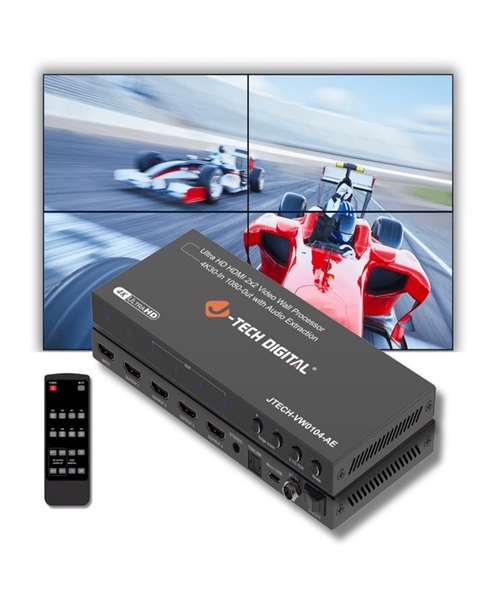
The playback system may connect to an LED video wall processor, projector, television or video switcher. HDMI, SDI, DisplayPort and other compatible interfaces may be used depending on the equipment.
Signal converters or distribution equipment may be required where the playback output does not match the receiving device.
Audio Interface and Connections
If the playback content includes sound, the system needs a suitable audio output route. This may involve an audio interface, mixer input, DI box or compatible computer audio connection.
The production team should test audio levels and routing before the event begins.
Monitoring Equipment
A technical operator may need a confidence monitor or preview display to confirm what is being played. In more advanced productions, the operator may also require a separate control monitor for managing playlists and cues.
Backup Media and Accessories
Depending on the importance of the event, a production may include backup copies of media files, spare cables, adapters and an alternative playback source.
Backup arrangements should be planned before the event rather than improvised after a failure occurs.
Event Playback System for LED Screens and Projectors
Large events often use LED screens and projectors to display videos and presentations to audiences. An event playback system can provide the media signal that feeds these displays.
For an LED wall, the playback output may connect to a video processor or compatible switching system. The operator must confirm the required resolution, refresh rate, signal format and input connection.
For projection, the playback output must be compatible with the projector and the intended screen format. Content should be prepared in an appropriate resolution and aspect ratio to avoid unwanted cropping, distortion or black bars.
When several displays are involved, the production team should establish whether all screens need the same content or whether separate playback outputs are required. This decision affects the equipment configuration and signal distribution plan.
How to Prepare Content for Event Playback
Equipment alone cannot guarantee a smooth presentation. The media files must also be prepared correctly.
Before the event, organisers should:
-
Gather all videos, audio tracks, slides and graphics in one organised folder.
-
Use clear file names that correspond to the event running order.
-
Confirm that the files open and play correctly.
-
Check the resolution and aspect ratio of video content.
-
Confirm that audio is present and recorded at an appropriate level.
-
Avoid relying on internet streaming where offline playback is possible and more dependable.
-
Provide the production team with the final approved versions.
-
Identify the exact point in the programme when each media item should play.
-
Keep backup copies of important content.
Any changes to videos or presentations should be communicated to the technical team before the event. Replacing files at the last minute can create unnecessary risks.
Factors to Consider When Hiring an Event Playback System
The correct system depends on the technical and operational requirements of your event.
Type of Content
Determine whether you need video playback, audio playback, presentations, image slideshows, graphics or a combination. Some productions require only one output, while others need several independent media feeds.
Number of Screens
A setup using one television has different requirements from a production using several LED screens and projectors. Confirm whether the same content will appear on every display or whether separate feeds are needed.
File Formats and Resolution
Confirm that the playback equipment supports the media formats and resolutions supplied by the organiser. Test unusual or high-resolution files before the event.
Audio Requirements
If the videos contain sound, establish how the audio will reach the PA system. Confirm the required connections and whether audio needs to be embedded in the video signal or routed separately.
Operator Requirements
A simple setup may be managed by an existing AV technician. A complex production with multiple cues, outputs and switching requirements may need a dedicated playback operator.
Venue and Installation Conditions
Consider the distance between the playback position and the stage, screens and control area. Cable routing, power availability, equipment security and operator visibility should be planned in advance.
Why Choose Janeson Rentals for Event Playback System Hire?
Janeson Rentals supports event organisers and production teams looking for practical event equipment hire and rental solutions in Kenya.
Clients choose Janeson Rentals because:
-
Event-focused equipment solutions: Playback requirements can be considered alongside screens, projectors, PA systems and other AV equipment.
-
Flexible rental arrangements: Clients can arrange equipment for different event durations and production needs.
-
Support for different event types: Playback equipment can be considered for corporate functions, conferences, weddings, church events, exhibitions and entertainment productions.
-
Nairobi-based service: Janeson Rentals is based in Nairobi, with delivery arrangements available across Kenya.
-
Integrated AV planning: Playback can be coordinated with compatible audio, video and display equipment.
-
Practical equipment guidance: Clients can discuss their content, screen arrangement and technical requirements before selecting a rental configuration.
The aim is to help clients plan a playback setup that suits the event rather than hiring equipment without considering how it will connect to the wider production system.
Book Event Playback System Hire and Rental in Kenya
If you are organising a conference, wedding, corporate function, product launch, concert, exhibition, graduation or church event, a reliable playback arrangement can help your technical team deliver prepared media smoothly.
Contact Janeson Rentals to discuss your event playback system hire requirements. Share your event date, venue, number of screens, content types, audio requirements and any other AV equipment you plan to use.
Janeson Rentals can help you consider an appropriate event playback system rental configuration for your production in Nairobi and other locations across Kenya.
Choose Janeson Rentals for event playback system hire in Kenya and make your event media an organised part of the production.