HDMI Splitter Hire and Rental Services in Kenya
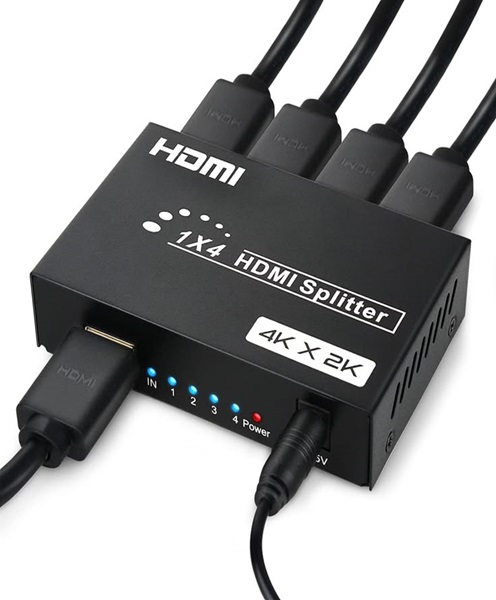
When an event requires the same visual content to appear on several screens, an HDMI splitter can help simplify the display setup. This device distributes a single HDMI source signal to multiple compatible displays, allowing audiences in different parts of a venue to view the same presentation or video.
Janeson Rentals provides event equipment hire and rental solutions in Kenya for conferences, exhibitions, corporate functions, training sessions, and other events that use audiovisual equipment.
If you need to connect one laptop, media player, or other HDMI source to several screens, you can enquire about HDMI splitter rental and compatible display accessories.
What Is an HDMI Splitter?
An HDMI splitter is a device that takes one HDMI input and distributes its signal to two or more HDMI outputs. It is commonly used when the same content needs to appear simultaneously on multiple displays.
For example, a conference organizer may want a presentation displayed on the main projector and additional monitors around the venue. An HDMI splitter may support this arrangement if the source, splitter, displays, and cabling are compatible.
An HDMI splitter is different from an HDMI switch. A splitter distributes one source to multiple outputs, while a switch selects one source from several inputs for a single output.
Benefits of HDMI Splitter Rental
Display the same content on multiple screens: A splitter can help distribute compatible video from one source to several displays.
Support larger audiences: Additional displays can make presentations easier to see in larger rooms or venues with multiple viewing areas.
Reduce unnecessary equipment purchases: Renting can be practical for a single conference, exhibition, or temporary display installation.
Simplify presentation planning: A suitable splitter can help organize the connection between a source computer and multiple displays.
Support varied event layouts: Splitters may be useful for conference rooms, exhibition stands, training facilities, and corporate event spaces.
Applications of HDMI Splitter Hire in Kenya
Corporate Conferences
Presentations may need to appear on the main screen and additional monitors so guests seated farther away can follow the content.
Training Sessions
Training organizers may use multiple displays to show the same instructional material to different groups in a room.
Exhibitions and Trade Shows
An exhibitor may want the same product demonstration or promotional video displayed across several compatible screens.
Product Launches
A splitter can help distribute a presentation from one source to multiple displays positioned around a launch venue.
Churches and Community Events
Compatible HDMI splitters can distribute the same presentation or video feed to multiple displays within a building.
Corporate Displays and Demonstrations
Businesses can use a suitable splitter for product demonstrations, information sessions, and temporary multi-screen arrangements.
Choosing the Right HDMI Splitter
Before hiring, identify the number of displays you need to connect. Splitters are available in different configurations, including two-output and multi-output models.
Check the required resolution and refresh rate. The splitter must support the intended signal, and the connected displays must be compatible with the chosen output format.
Consider audio requirements, HDCP compatibility, and any source-device limitations. Some systems may experience resolution negotiation or compatibility issues when different displays have different capabilities.
Cable length also matters. Long HDMI runs may require suitable active cables or extenders, depending on the signal and equipment.
For more demanding systems, check whether the splitter supports the relevant HDMI specification, HDR requirements, audio formats, and other features your presentation needs. A basic splitter may not support every advanced feature.
HDMI Splitter vs HDMI Switch
These devices perform different functions.
-
HDMI splitter: Sends one source signal to multiple displays.
-
HDMI switch: Selects one of several sources and sends the chosen signal to a display.
-
HDMI matrix: Can route multiple inputs to multiple outputs, depending on the model.
If your event uses several laptops but only one display, an HDMI switch may be more appropriate. If you need multiple source devices to feed several displays independently, an HDMI matrix may be necessary.
Choosing the correct device before booking helps prevent equipment mismatches.
Planning a Multi-Screen Presentation
Start by drawing a basic diagram showing the source device, splitter, displays, and cable routes. This helps determine the number of outputs and cable lengths required.
Confirm that the splitter supports the display resolution and that the source device can provide the required signal. If the screens have different specifications, test the setup in advance to identify any resolution limitations.
Place the splitter where connections can be accessed safely. Keep power supplies and cables organized, and avoid leaving devices in areas where they could be knocked over.
Before guests arrive, test every display. Check image quality, signal stability, and any audio requirements. If one display fails to show the image, inspect the relevant cable and connection before replacing the entire setup.
HDMI Splitter Hire Across Kenya
Janeson Rentals provides event equipment rental solutions for clients organizing events in Nairobi and across Kenya. If your event requires one HDMI source to feed multiple compatible displays, enquire about splitter availability and suitable supporting accessories.
For a quotation, provide the event date, venue, number of screens, required resolution, source device, cable distances, and rental duration. Mention whether you also require HDMI cables, screens, projectors, or monitors.
Confirm availability and delivery arrangements directly with Janeson Rentals.
Frequently Asked Questions
1. What does an HDMI splitter do?
It distributes one compatible HDMI source signal to multiple HDMI displays.
2. Can I hire an HDMI splitter for a conference?
You can enquire about availability for conferences, meetings, exhibitions, and presentations.
3. Does an HDMI splitter show different content on each screen?
A standard splitter duplicates the same source signal. Different content generally requires a different switching or distribution arrangement.
4. Can an HDMI splitter connect one laptop to several projectors?
Yes, if the splitter, source, projectors, and cables support the required signal.
5. How many screens can one splitter support?
That depends on the model. Confirm the required number of outputs before requesting a quotation.
Book HDMI Splitter Hire and Rental with Janeson Rentals
Make multi-screen presentations easier to plan with suitable video distribution equipment. Contact Janeson Rentals to enquire about HDMI splitter hire and rental in Kenya for conferences, exhibitions, training sessions, and corporate events.