Introduction to ISO Recording System Hire and Rental in Kenya
Professional video production often requires more than recording a single finished programme output. When an event involves multiple cameras, different viewpoints and several activities happening simultaneously, retaining each camera’s original footage can provide significant advantages during post-production.
An ISO recording system makes this possible by recording individual video sources independently. The term ISO refers to isolated recordings, meaning that each selected camera or video input can be captured separately rather than being preserved only as part of a switched programme recording.
For example, a conference may use three cameras: one covering the entire stage, another capturing the keynote speaker and a third recording audience reactions. An ISO recording workflow can preserve each camera feed as a separate recording, allowing editors to choose the best shots later.
Janeson Rentals offers ISO recording system hire and rental in Kenya for event organisers, broadcasters, production companies, corporate clients, churches, institutions and creative professionals. Based in Nairobi, Janeson provides event and audiovisual equipment rental solutions, with delivery arrangements available across Kenya.
Hiring an ISO recording system is especially useful for productions where editing flexibility, independent camera footage and comprehensive documentation are important. Instead of relying entirely on a live-switched recording, clients can retain separate source recordings for more detailed post-production.
What Is an ISO Recording System?
An ISO recording system is a video production arrangement designed to capture individual video sources independently.
In a multi-camera production, the system can record separate feeds from compatible cameras while the production team also creates a live programme output.
This means the production may retain:
-
An independent recording from Camera 1.
-
An independent recording from Camera 2.
-
An independent recording from Camera 3.
-
Additional recordings from other supported sources.
-
A switched programme recording, where the equipment supports it.
The main benefit is that each camera recording remains available for editing without being limited to the camera selections made during the live production.
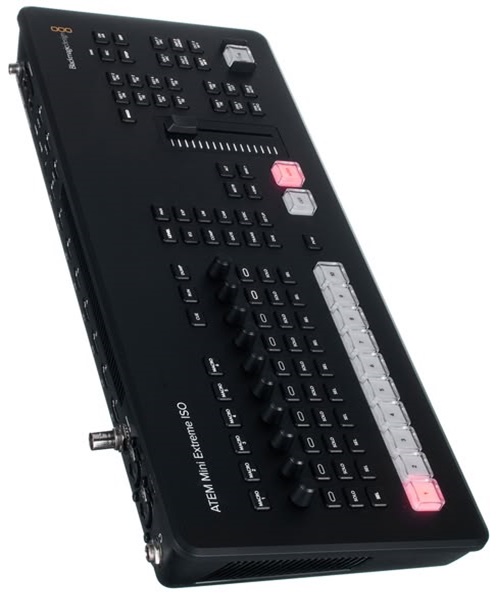
An ISO recording system may use multi-channel recorders, computer-based capture systems, compatible video switchers or specialised production equipment.
The number of independent recordings supported depends on the equipment configuration. It is important to distinguish a device that records several isolated inputs from one that only records a single switched programme output.
Why Hire an ISO Recording System?
Preserve Independent Camera Footage
One of the biggest advantages of ISO recording is the ability to retain separate camera recordings.
If the live production switches away from a particular camera at an important moment, the original camera footage may still contain useful material.
Editors can review each recording independently and select the most appropriate shots.
Improve Post-Production Flexibility
Independent recordings allow editors to make different decisions after the event.
They can change camera angles, adjust pacing, create alternative edits and produce different versions of the same programme.
This is valuable for corporate videos, documentaries, interviews, conferences and promotional content.
Create Multiple Video Deliverables
A production may require more than one final video.
For example, a corporate conference may need full-session recordings, short highlights, individual speaker videos and promotional clips.
Separate camera recordings provide additional source material for creating these different outputs.
Support Professional Multi-Camera Productions
Concerts, conferences, church services and other live productions often use several camera positions.
An ISO recording system helps preserve the footage from those cameras, giving the post-production team greater control over the final result.
Reduce Dependence on Live Switching Decisions
Live switching requires operators to make decisions while the event is happening.
Although experienced operators can produce excellent results, an important moment may occasionally be missed in the switched programme output.
ISO recordings provide an additional layer of flexibility because individual camera feeds can be reviewed later, subject to the cameras and recorders capturing the required footage.
Avoid Purchasing Specialist Recording Equipment
Multi-channel recording devices and compatible production equipment can be expensive.
ISO recording system rental allows production teams to access suitable equipment for specific projects without investing in a permanent setup.
Main Components of an ISO Recording System
The components required depend on the number of cameras, recording format, production workflow and storage requirements.
Multiple Video Cameras
Cameras provide the individual video sources that the ISO system records.
A production may use professional camcorders, mirrorless cameras, cinema cameras or PTZ cameras.
Each camera should be configured to deliver a compatible video output. Camera settings such as resolution, frame rate and colour profile should also be considered to support a consistent post-production workflow.
Multi-Channel Video Recorder
A multi-channel recorder is one of the central components of an ISO recording setup.
It receives video signals from multiple sources and records them independently, provided it supports the required number of isolated inputs.
Before hiring, confirm the maximum number of simultaneous recording channels, supported input standards, recording formats and storage requirements.
Video Capture Cards
Video capture cards can bring camera feeds into a computer-based recording system.
Some capture devices support multiple independent inputs, while others are designed for a single video source.
The capture hardware must support the required number of inputs and the intended resolution and frame rate.
Video Switcher
A video switcher allows an operator to select between camera feeds and create a programme output.
In an ISO workflow, the switcher may work alongside separate recording equipment to capture individual camera feeds while producing a live-switched programme.
Not every video switcher supports ISO recording. The required recording capability must be verified for the specific model and configuration.
Recording Computer
A computer-based ISO recording system may use specialised capture hardware and recording software.
The computer needs sufficient processing capability, memory, storage speed and compatible connections to handle the required video sources.
A multi-camera recording workload can be considerably more demanding than recording a single source.
Audio Recording Equipment
Audio may be recorded through the video production system, an external recorder or a compatible audio interface.
For productions involving speakers, panel discussions or performances, the audio workflow should be planned carefully.
Where separate camera recordings will be synchronised during editing, the production team should establish how audio will be captured and synchronised.
Monitoring Equipment
Production monitors allow operators to review incoming camera signals and confirm that each recording source is functioning.
Monitoring is particularly important when several independent feeds are being recorded simultaneously.
Storage Devices
ISO recording can generate substantial amounts of data because multiple camera feeds are being saved independently.
Suitable storage may include high-capacity SSDs, external drives or supported recording media.
Storage planning should account for the number of cameras, recording duration, video quality and file format.
Signal Cables and Accessories
The setup may require SDI, HDMI, USB, power and other compatible connections.
The cable type and length should be appropriate for the recording equipment and camera positions.
Where signals need to travel longer distances, suitable transmission equipment may be required.
Applications of ISO Recording System Hire
Corporate Conferences
Corporate conferences frequently use multiple cameras to cover speakers, presentations, panels and audience activities.
ISO recording allows the production team to preserve each camera angle independently.
This is useful when creating full conference recordings, individual speaker videos, internal training resources and promotional highlights.
Concerts and Music Events
Concert productions may involve cameras positioned at the front of the stage, side-stage areas, audience locations and other strategic positions.
Recording each camera independently provides editors with more material for producing concert videos, performance highlights and promotional content.
Church Services and Religious Conferences
Churches and religious organisations may use ISO recording to preserve sermons, worship performances, conferences and special programmes.
Separate camera recordings make it possible to choose suitable angles during post-production, especially when the service includes speakers, musicians and audience participation.
Television and Broadcast Productions
Broadcast and production teams may require independent camera recordings for editing, replay, archiving or other production purposes.
The ISO workflow can support multi-camera productions where individual source footage is required.
Interviews and Panel Discussions
Interviews involving several participants can benefit from isolated recordings.
Separate camera feeds may capture each participant and a wider view of the discussion, giving editors greater flexibility when assembling the final programme.
Product Launches and Promotional Productions
Product launches often involve demonstrations, presenter speeches and audience reactions.
ISO recording can preserve different camera views, allowing editors to produce promotional videos and other marketing materials after the event.
Educational and Training Productions
Educational organisations can use isolated recordings to capture instructors, practical demonstrations and presentation areas.
The separate recordings may be useful when producing edited lessons or training resources.
Award Ceremonies and Formal Events
ISO recording can preserve different perspectives of speeches, award presentations and stage activities.
This is especially useful where the organiser wants comprehensive coverage and several edited deliverables.
ISO Recording Versus Multi-Camera Recording
Multi-camera recording refers to using multiple cameras to capture an event from different positions.
ISO recording refers to preserving those camera feeds as independent recordings.
A multi-camera production does not automatically include ISO recording. It may simply switch between the cameras and save one combined programme output.
An ISO-capable workflow goes further by retaining individual camera recordings, provided the recording equipment supports the required inputs.
For example, a four-camera production could generate one switched programme recording, four independent camera recordings, or both.
The right arrangement depends on the client’s editing requirements and the capabilities of the hired equipment.
ISO Recording Versus Programme Recording
A programme recording captures the finished output of a live video switcher.
It records the sequence of camera selections made by the production operator.
An ISO recording preserves individual source feeds independently.
The two recordings serve different purposes. A programme recording provides an immediately usable version of the switched production, while ISO footage offers greater flexibility during editing.
For professional events, having both can be beneficial when the equipment supports simultaneous recording.
How to Choose the Right ISO Recording System
Determine the Number of Sources
Identify how many cameras and other video sources need independent recording.
The number of inputs required determines the type of recorder or capture system needed.
Confirm Simultaneous Recording Capability
Not all equipment with multiple video inputs can record every input independently.
Confirm that the selected equipment supports simultaneous isolated recording across the required channels.
Check Video Formats
Cameras, capture cards and recorders must support compatible resolutions, frame rates and signal standards.
This is particularly important when combining cameras from different manufacturers.
Plan Storage Capacity
Each independent recording consumes storage space.
Calculate the expected storage requirement using the number of sources, recording duration, video quality and file format.
Allow additional capacity for file organisation and backups.
Establish Audio Synchronisation
The production team should determine whether audio will be embedded in each camera feed, recorded separately or managed through a combination of sources.
Synchronisation methods should be planned before recording begins.
Consider the Editing Workflow
Clients should explain how the footage will be used after the event.
Some productions need raw camera files, while others need a switched programme recording and individual source recordings.
The selected equipment should support the intended file delivery and post-production workflow.
Technical Planning and Safety Considerations
ISO recording requires careful technical preparation because several sources may be recorded at the same time.
Before the production starts, the team should:
-
Test every camera input.
-
Confirm independent recording on each required channel.
-
Check resolution and frame-rate compatibility.
-
Verify recording media and available storage.
-
Test audio capture and synchronisation.
-
Confirm that the programme output is being recorded if required.
-
Check power connections and backup arrangements.
-
Monitor recording indicators throughout the event.
-
Secure cameras, tripods and cable routes.
-
Confirm that files can be accessed and transferred after recording.
For longer productions, recording checks should be scheduled without interrupting important programme activities.
Where footage includes identifiable participants, confidential presentations or private discussions, appropriate recording permissions and access controls should be established.
Why Choose Janeson Rentals for ISO Recording System Hire?
Janeson Rentals provides audiovisual and event equipment hire and rental solutions for businesses, event organisers, production teams and institutions in Kenya.
Clients can discuss their multi-camera recording requirements and identify suitable equipment for capturing individual video sources.
Reasons to consider Janeson Rentals include:
-
Flexible equipment hire: Access specialist recording equipment for a specific event or production.
-
Multi-camera production support: Discuss recording configurations based on the number of camera feeds and required outputs.
-
Related AV equipment: Coordinate ISO recording requirements with cameras, switchers, monitors, capture devices and signal cables.
-
Different production applications: Arrange equipment for conferences, concerts, corporate events, interviews, church programmes and video productions.
-
Nairobi-based service: Janeson Rentals is based in Nairobi and provides delivery arrangements across Kenya.
Equipment availability, simultaneous recording capacity, technical compatibility and installation requirements should be confirmed before booking.
How to Hire an ISO Recording System from Janeson Rentals
When contacting Janeson Rentals, provide the following information:
-
Event or production date.
-
Venue and location.
-
Number of cameras and video sources.
-
Required number of independent recording channels.
-
Camera output types, if known.
-
Required resolution and frame rate.
-
Whether a live-switched programme recording is also needed.
-
Whether separate audio recording is required.
-
Expected recording duration.
-
Preferred storage or file-delivery requirements.
-
Whether installation and technical operation are required.
These details help determine an appropriate recording configuration and the supporting equipment required.
Book ISO Recording System Rental in Kenya
Preserve individual camera feeds and create greater flexibility for post-production with a suitable ISO recording setup from Janeson Rentals.
Whether you are recording a corporate conference, concert, church service, interview, broadcast production or multi-camera event, an ISO-capable recording system can help retain valuable source footage for editing and future use.
Contact Janeson Rentals to enquire about ISO recording system hire and rental in Nairobi and across Kenya. Share your camera count and recording requirements to discuss a suitable production solution.