Media Playback Computer Hire and Rental in Kenya
Digital media is an important part of modern event production. Corporate presentations, conferences, exhibitions, product launches, concerts, weddings and live broadcasts frequently depend on computers to play videos, display presentations, run graphics and deliver other prepared content. The quality of the playback arrangement can affect how smoothly these materials appear on event screens and how effectively the technical team manages the programme.
Janeson Rentals offers Media Playback Computer Hire and Rental in Kenya for event organisers, AV production companies, conference planners, exhibition teams, corporate clients, churches, schools and entertainment professionals. Our media playback rental solutions are intended to support computer-based playback for a wide range of event applications.
A media playback computer is useful when a production needs more control and flexibility than a basic consumer media player may provide. It can run compatible playback applications, organise multiple media files, support suitable video outputs and connect to other AV equipment. Depending on its configuration, it may be used for presentation slides, promotional videos, event graphics, background visuals, recorded messages and other digital content.
Whether you are planning a business conference in Nairobi, a product launch, an awards ceremony, a church convention, an exhibition or a large-scale entertainment production, hiring a suitable media playback computer can help you prepare a more organised technical workflow.
What Is a Media Playback Computer?
A media playback computer is a computer configured or selected to play digital media during an event or production. It may be a desktop computer, laptop or another compatible computer platform, depending on the processing requirements, connections and software needed.
Unlike a computer used primarily for general office work, a media playback computer is selected with attention to the demands of continuous or scheduled media playback. These may include playing high-resolution video, running presentation software, displaying graphics, managing playlists and sending content to external displays.
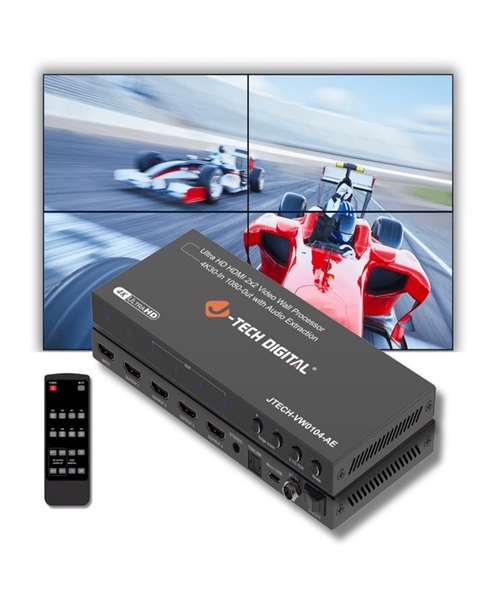
The computer may connect directly to a projector or television, or it may feed a larger AV system that includes a video switcher, LED wall processor, distribution equipment and multiple screens.
A media playback computer is not necessarily a complete event playback system. It is one important component within a wider setup. Additional equipment may be needed for audio routing, video distribution, screen processing, switching, monitoring and backup.
Why Hire a Media Playback Computer in Kenya?
Purchasing a computer specifically for occasional event playback may not be cost-effective. Hiring allows event organisers to access a suitable computer for a particular production without committing to long-term ownership.
Access to a Suitable Computer Configuration
Different media tasks place different demands on computer hardware. A simple presentation may require a different configuration from a production that plays high-resolution videos, multiple visual layers or complex graphics.
Media playback computer rental allows clients to discuss the intended workload and identify a suitable configuration for the event.
Better Organisation of Event Media
A dedicated playback computer can be prepared with the relevant files and software before the event. This allows the operator to organise videos, presentations, graphics and audio tracks according to the running order.
A clear folder structure and tested playback sequence can reduce the risk of searching for files while the event is underway.
Support for Multiple Media Formats
Events may use MP4 videos, audio files, image slideshows, presentation files and other digital formats. A computer running compatible software can provide a flexible platform for managing different types of content.
However, compatibility should always be confirmed in advance. Not every application supports every codec, file type, resolution or playback requirement.
Integration with Professional AV Equipment
A media playback computer can form part of a larger production system. It may connect to projectors, LED video wall processors, televisions, video switchers, monitors and audio mixers through suitable interfaces.
This makes it useful for productions that combine computer-based content with live cameras, presenters and other video sources.
Flexible Use Across Different Events
The same general type of equipment may be used for a corporate presentation, a conference, a product demonstration, an exhibition or a wedding slideshow. The software and configuration can be adjusted according to the event’s needs.
Common Applications of Media Playback Computer Rental
Corporate Presentations and Business Meetings
Corporate events often require more than a single PowerPoint presentation. A programme may include company profile videos, financial presentations, executive speeches, product demonstrations, sponsor messages and closing content.
A media playback computer can help the technical team organise these materials and present them through the venue’s display system.
For important meetings, it is advisable to test all presentations and media files before the event. Fonts, embedded videos, animations and linked files should be checked to avoid unexpected display problems.
Conferences and Seminars
Conferences may feature several presenters using different presentation formats. A media playback computer can be prepared to support speaker presentations, introduction videos, session graphics and sponsor content.
Where a conference uses several screens, the production team should confirm whether one output is sufficient or whether additional outputs and video processing equipment are required.
LED Video Walls and Large Displays
LED screens are frequently used at conferences, concerts, exhibitions and corporate events. A media playback computer can provide the video content sent to a compatible LED wall processor.
The computer’s output resolution and refresh rate must be compatible with the receiving equipment. The production team should also confirm the screen’s required canvas dimensions and whether the content needs to be prepared in a custom aspect ratio.
For large or complex LED walls, a computer alone may not provide all the processing or output capabilities required. A dedicated video processor or media server may be necessary.
Product Launches and Brand Activations
Product launches often use videos, animations, promotional graphics and product demonstrations to create an engaging experience. A media playback computer can help organise these digital elements and deliver them at planned moments.
For brand activations, it may also be used to display promotional loops or interactive content where the relevant software and hardware support the intended experience.
Exhibitions and Trade Shows
Exhibition stands frequently use screens to display product demonstrations, brand videos, company introductions and promotional loops.
A media playback computer can support scheduled or continuous content playback. The configuration should consider the number of displays, duration of operation, content format and whether the screen needs to operate unattended.
Weddings and Social Celebrations
Weddings, birthdays, anniversaries and other celebrations may include photo slideshows, couple videos, background visuals and recorded messages.
A media playback computer gives the production team a flexible way to organise these items. It can be connected to a television, projector or LED screen, depending on the venue setup.
Churches and Religious Events
Churches may use computers to display worship lyrics, sermon presentations, announcements, recorded messages and background videos. A media playback computer can be integrated into the church’s existing or hired AV system.
For services involving live cameras and multiple displays, the computer may connect to a video switcher or other signal-routing equipment.
Concerts and Entertainment Productions
Concerts and stage productions may require visual backgrounds, promotional clips, video introductions, intermission content and other media. A media playback computer can form part of the visual production workflow.
Where synchronised playback with lighting, sound effects or performance cues is required, the production team should confirm whether additional playback or show-control software is needed.
Important Features to Consider in a Media Playback Computer
The correct computer depends on the type of media and how it will be used. Some of the most important considerations include the following.
Processor Performance
The processor affects how efficiently a computer handles applications and media tasks. Basic video playback may have modest requirements, while demanding content, multiple applications and complex visual processing may require greater processing capability.
The intended software and media formats should guide the selection.
Memory Capacity
Sufficient RAM helps the computer run its operating system and playback applications smoothly. Memory requirements depend on the software, number of applications and complexity of the content.
A production should avoid assuming that any standard office computer will perform equally well with demanding playback tasks.
Storage Capacity and Speed
Videos and high-resolution media files can occupy significant storage space. The computer should have enough available storage for the complete event media library, with room for temporary files and operational requirements.
Fast storage can also improve file access and general responsiveness. Important media should be backed up separately rather than relying on a single internal drive.
Graphics and Video Output
The graphics hardware and output connections determine which displays and resolutions the computer can support. Depending on the configuration, available connections may include HDMI, DisplayPort, USB-C with video output or other compatible interfaces.
The production team should confirm the number of independent outputs required. A computer with several physical ports does not automatically support several independent display feeds.
Operating System and Software Compatibility
The operating system must support the required playback and presentation applications. Software should be installed, configured and tested before the event.
If a client supplies its own files or application, compatibility should be confirmed early enough to resolve installation or licensing issues.
Cooling and Continuous Operation
Event playback may run for extended periods. The computer should have adequate ventilation and be positioned away from conditions that could cause overheating, excessive dust exposure or accidental disconnection.
The technical team should also ensure that power settings do not cause the computer to sleep, restart unexpectedly or interrupt playback.
Connectivity and Peripheral Support
Depending on the production, the computer may require a keyboard, mouse, USB storage device, audio interface, network connection or external control equipment.
The availability and compatibility of these accessories should be confirmed during the rental planning process.
Media Playback Computer vs Media Player
A media playback computer and a dedicated media player can both play digital content, but they serve different operational needs.
A dedicated media player is often designed for straightforward playback. It may be suitable for a simple video loop, a single display or a limited range of supported formats.
A media playback computer offers a more flexible software environment. It can run presentation applications, organise different media types, manage playlists and support more involved production workflows.
The right choice depends on the event. A simple exhibition display may only need a dedicated media player. A conference with multiple presentations, videos and changing content may benefit from a computer-based playback solution.
The equipment should be selected according to the actual workflow rather than assuming that one type is always better than the other.
Media Playback Computer vs Video Playback Computer
A video playback computer is closely related to a media playback computer, and the terms may sometimes be used interchangeably. However, the emphasis can differ depending on the production.
A video playback computer is generally focused on playing video content. A media playback computer may have a broader role, supporting video, audio, presentations, graphics and other digital media.
In practical event production, the same computer may perform both functions if its hardware, software and outputs support the required workload. The important consideration is the intended application and configuration, not simply the product name.
Using a Media Playback Computer with Other Event Equipment
A media playback computer rarely operates in isolation at a professional event. It may be connected to several other components.
LED Wall Processors
The computer provides visual content to a compatible processor, which prepares the signal for the LED display. Resolution and signal compatibility must be confirmed.
Video Switchers
A video switcher allows the production team to select between sources such as a playback computer, live camera, presentation laptop and other video inputs.
Projectors and Television Displays
The computer can feed a projector or television through a suitable connection. Adapters or converters may be necessary where the available outputs and inputs differ.
Audio Mixers
If playback includes sound, audio must be routed to the appropriate mixer inputs. The team should check levels, connector types and whether the audio is being carried separately or through an audiovisual connection.
Monitoring Displays
A separate monitor can help the operator manage playback software while checking the output being sent to the audience.
How to Prepare a Media Playback Computer for an Event
Good preparation is essential for reliable playback.
Before the event:
-
Provide the technical team with the final media files as early as possible.
-
Confirm the file formats, resolutions and audio requirements.
-
Organise files according to the event programme.
-
Test every video, audio track and presentation.
-
Check that fonts, animations, embedded videos and linked files work correctly.
-
Confirm the number of required display outputs.
-
Test connections to the projector, LED processor, switcher or television.
-
Check audio routing through the PA system.
-
Disable unnecessary notifications and automatic interruptions.
-
Confirm power settings and ventilation.
-
Keep backup copies of critical files on separate storage.
-
Agree on cue names and playback instructions with the event operator.
If the event uses a custom LED screen layout, the content should be tested using the actual display configuration where possible.
Factors to Consider When Hiring a Media Playback Computer
Before arranging media playback computer hire, consider the following requirements.
Event type: A business presentation, exhibition loop and concert visual production may require different software and performance levels.
Media workload: Establish whether the computer will play videos, presentations, graphics, audio or several types of content.
Resolution and screen configuration: Confirm the resolution, aspect ratio and number of independent outputs needed.
Software requirements: Identify the applications required and confirm compatibility before the rental date.
Operating duration: Consider whether the computer must run for a short session or continuously throughout a full-day or multi-day event.
Audio integration: Determine how sound will be sent to the venue’s audio system.
Technical operator: Decide whether the event team needs a dedicated operator to manage playlists, cues and troubleshooting.
Backup arrangements: Important presentations should have an alternative playback plan in case the primary computer or media file becomes unavailable.
Why Choose Janeson Rentals for Media Playback Computer Hire?
Janeson Rentals provides event equipment hire and rental solutions for clients organising corporate functions, conferences, exhibitions, weddings, church gatherings, product launches and entertainment productions.
Clients choose Janeson Rentals for several reasons:
-
Event-focused rental solutions: Media playback computer requirements can be considered alongside the wider AV setup.
-
Flexible equipment planning: The computer configuration can be discussed according to the intended content and event requirements.
-
Support for different productions: Media playback solutions can be considered for small meetings, large conferences, exhibitions and live events.
-
Nairobi-based service: Janeson Rentals is based in Nairobi and has delivery arrangements across Kenya.
-
AV equipment coordination: Playback computers can be planned alongside compatible projectors, LED screens, video switchers, monitors and audio equipment.
-
Practical technical considerations: Clients can discuss software, file formats, screen connections and playback requirements before the event.
The goal is to help clients identify a media playback solution that fits their production workflow and connects appropriately with the equipment being used at the venue.
Book Media Playback Computer Hire and Rental in Kenya
If your event requires a computer for video playback, presentations, graphics, audio tracks or other digital content, Janeson Rentals can help you discuss a suitable rental arrangement.
When making an enquiry, provide your event date, venue, type of media, expected screen resolution, number of displays, software requirements and any other AV equipment involved. Sharing this information helps establish the appropriate computer configuration and accessories.
Contact Janeson Rentals for Media Playback Computer Hire and Rental in Kenya for conferences, corporate events, exhibitions, weddings, church functions, product launches and live productions.
Hire a media playback computer from Janeson Rentals and give your event production team a flexible platform for managing digital content.