Media Player Hire and Rental Services in Kenya
Reliable media playback is an important part of modern event production. Conferences, exhibitions, corporate meetings, product launches, weddings, and promotional events often require videos, photographs, music, presentations, and other digital content to be displayed or played at the right time. A suitable media player helps event organizers deliver this content through compatible audiovisual equipment.
Janeson Rentals provides event equipment hire and rental solutions in Kenya for clients planning professional and social events. If you need a media player for an upcoming conference, business presentation, exhibition, or celebration, you can enquire about suitable equipment for your playback requirements.
Media player hire is a practical option when you need temporary access to content playback equipment without purchasing a device for occasional use. It can also help event planners coordinate playback equipment with projectors, television screens, monitors, LED displays, sound systems, and other audiovisual components.
Whether you are preparing a corporate presentation or arranging video playback at a special event, selecting the right media player helps support an organized technical setup.
What Is a Media Player?
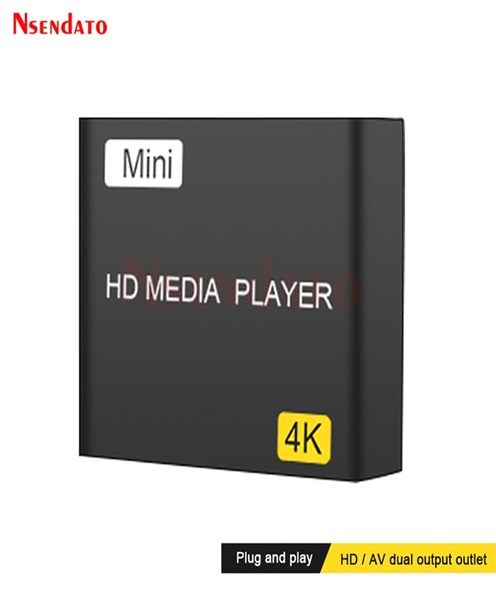
A media player is a device or software application used to play digital content, including audio, video, images, and other supported media files. In event production, the term often refers to a dedicated hardware device that connects to a display or sound system and plays content from local storage, removable media, a network, or a supported streaming source.
Different media players have different capabilities. Some are designed for simple video and audio playback, while others support high-resolution video, playlists, digital signage, scheduled content, or network-based playback.
A media player may connect to a television, monitor, projector, or video system through HDMI or another supported interface. Audio may be delivered through HDMI, an analogue output, or another compatible connection, depending on the equipment.
The appropriate player depends on the content format, display requirements, available connections, storage method, and features needed for your event.
Why Hire a Media Player from Janeson Rentals?
Cost-Effective Access to Playback Equipment
Purchasing equipment for a single event may not be economical. Media player rental allows organizers to enquire about temporary access to suitable playback equipment for the required period.
Support for Professional Presentations
A media player can help deliver pre-recorded videos, promotional content, product demonstrations, photographs, and other digital materials during professional functions.
Convenient Audiovisual Planning
When arranging a complete event setup, you can enquire about media players alongside projectors, monitors, televisions, LED screens, HDMI cables, and other compatible equipment.
Flexible Playback Options
Depending on the device, media players may support local files, USB storage, memory cards, network playback, or other media sources. Confirm the available features before booking.
Suitable for Different Event Types
Media players can support a wide range of events, from small business meetings to large exhibitions and celebrations. The appropriate equipment depends on the venue, content, audience, and display configuration.
Applications of Media Player Hire in Kenya
1. Corporate Meetings and Conferences
Businesses often use recorded videos, company presentations, training materials, and promotional content during meetings and conferences. A compatible media player can deliver pre-prepared content to the event’s display system.
For example, a company may play an introductory video before a conference session or display a recorded presentation during a break. Organizers should prepare the files in advance and verify that the player supports their formats.
2. Exhibitions and Trade Shows
Exhibitors use screens to attract visitors and communicate product information. A media player can help display promotional videos, product demonstrations, company profiles, and other approved content on compatible screens.
Continuous playback may be useful for exhibition booths where visitors arrive throughout the day. If continuous looping is required, confirm that the selected player supports repeat playback and the intended file formats.
3. Product Launches
Product launches often feature brand videos, promotional clips, product demonstrations, and visual introductions. A media player can help event teams deliver these materials to the display system.
Testing playback before the programme begins is important, especially when videos must start at precise moments or contain audio that must synchronize with the event’s sound system.
4. Weddings and Social Celebrations
Media players may be used to play photo slideshows, recorded messages, videos, and other personal content during weddings, anniversaries, birthdays, and family celebrations.
Organizers should confirm the file format, screen connection, and audio requirements before the event. Where music playback is involved, the media player must be connected to a suitable sound system or compatible audio output.
5. Church Events and Religious Conferences
Churches and religious organizations may use media playback for recorded messages, announcements, presentations, worship-related video content, and conference materials.
A suitable player can support these activities when connected to compatible screens, projectors, and sound equipment.
6. Educational Workshops and Seminars
Training facilitators may use recorded demonstrations, instructional videos, and other multimedia resources. Media player hire can provide an option for workshops where dedicated playback equipment is required temporarily.
7. Digital Displays and Promotions
Some media players are designed to deliver content continuously on digital displays. These devices may support promotional messages, informational videos, and scheduled playlists, depending on their features.
For advanced digital signage requirements, enquire about a dedicated digital signage player rather than assuming every general-purpose media player includes scheduling or remote content management.
Choosing the Right Media Player for Your Event
Selecting a suitable media player begins with understanding what you need it to do.
Content formats: Confirm that the player supports your video, audio, and image formats. Do not assume every device can play every file type.
Video resolution: If you need Full HD or 4K playback, confirm that the player, cables, and display support the required resolution.
Connectivity: Check the available outputs, such as HDMI or other supported interfaces, and compare them with the receiving display.
Audio requirements: Determine whether sound will travel through HDMI or a separate audio connection. Test the complete system before the event.
Storage and playback source: Establish whether your content will be played from USB storage, internal storage, a memory card, a local network, or another supported source.
Playlist and looping functions: If several videos must play in sequence or repeat continuously, confirm that the device supports the required playback behaviour.
Remote control: A remote may make it easier to operate the player without accessing the equipment directly. Confirm whether this feature is available.
Reliability: For important events, test all media files and prepare backup copies of the content. A compatible backup playback method can reduce disruption if the primary device encounters a problem.
Media Player Rental for Professional AV Setups
A media player is often one part of a wider audiovisual system. Before hiring, identify the display, sound equipment, and connection accessories needed for your event.
For a video presentation, for example, the player may connect to a projector or television through HDMI. If the display is positioned far away, cable length and signal transmission should be considered. If multiple screens must show the same content, you may need an HDMI splitter or another compatible distribution system.
For events involving large LED displays, confirm whether the media player’s output can connect directly to the relevant equipment or whether a video processor or other interface is required.
If audio is essential, test the player with the actual sound system. Check volume levels, audio format compatibility, and synchronization with the video.
Preparing a technical checklist helps ensure that the media player, display, cables, power supply, and sound equipment work together as intended.
Media Player Hire Across Nairobi and Kenya
Janeson Rentals provides event equipment rental solutions for clients organizing functions in Nairobi and other locations across Kenya. Event planners, businesses, institutions, exhibitors, and production teams can enquire about media player rental for their specific requirements.
When requesting a quotation, provide your event date, location, rental duration, content type, required playback resolution, and intended display equipment. If you need additional accessories, such as HDMI cables, monitors, projectors, or sound equipment, include these in your enquiry.
Availability, delivery arrangements, equipment specifications, and rental conditions should be confirmed directly with Janeson Rentals before booking.
Frequently Asked Questions
1. What is a media player used for at events?
A media player delivers digital audio, video, images, and other supported content through compatible display or sound equipment.
2. Can I hire a media player for a corporate presentation?
You can enquire with Janeson Rentals about availability for corporate meetings, conferences, product launches, and other events.
3. Can a media player play videos from a USB drive?
Some models support USB playback, but this depends on the device. Confirm compatibility with your storage device and file formats.
4. Can a media player connect to a projector?
Yes, if the player and projector have compatible connections and support the intended video signal.
5. Can I hire a media player with a screen?
You can request a combined quotation for a media player and compatible display equipment, subject to availability.
6. What should I test before the event?
Test every file, verify video and audio playback, confirm display resolution, check the connections, and prepare backup copies of essential content.
Book Media Player Hire and Rental with Janeson Rentals
Prepare your event for reliable digital content playback with the appropriate audiovisual equipment. Whether you are organizing a conference, exhibition, corporate meeting, product launch, or celebration, Janeson Rentals can help you enquire about suitable rental solutions.
Contact Janeson Rentals to enquire about media player hire and rental in Kenya, confirm availability, and request a quotation tailored to your event.