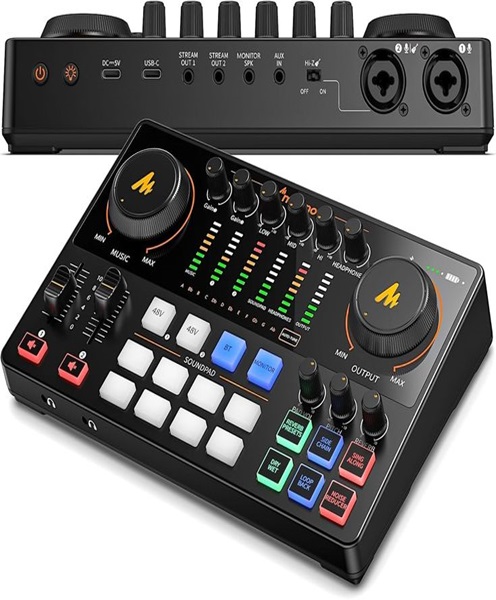
Podcast Audio Interface Hire and Rental in Kenya
Professional podcast recording depends on a reliable connection between microphones and the devices used to capture audio. While a microphone converts sound into an electrical signal, a computer requires a suitable way to receive and process that signal. This is where a podcast audio interface becomes important.
Janeson Rentals provides podcast audio interface hire and rental in Kenya for podcasters, recording professionals, production companies, businesses, content creators and educational institutions. Whether you are recording a solo podcast, conducting interviews, producing a video podcast or setting up a temporary studio, an audio interface can help connect professional microphones and other audio sources to a computer.
An audio interface converts analogue audio signals into digital data that recording software can process. Many interfaces also provide microphone preamplifiers, headphone outputs, instrument inputs and monitoring controls. Some models support multiple microphone channels, making them suitable for interviews and group recording arrangements.
Hiring a podcast audio interface allows you to access suitable recording equipment for your production without purchasing a device that may only be needed occasionally.
Based in Nairobi, Janeson Rentals supports equipment hire requirements in Nairobi and across Kenya. Our podcast audio interface rental service is suitable for temporary studios, corporate interviews, voice recording, livestreaming and other digital audio production projects.
What Is a Podcast Audio Interface?
A podcast audio interface is an electronic device that connects microphones and other audio sources to a computer or compatible recording system.
Most professional microphones produce analogue audio signals. Computers process digital information, so an audio interface converts the incoming analogue signal into digital audio that can be recorded and edited using suitable software.
Many interfaces also perform the reverse process. They convert digital audio from the computer into an analogue signal for headphones, studio monitors or other compatible equipment.
An audio interface can therefore act as the central connection point between microphones, a computer and monitoring equipment.
Common applications include:
-
Podcast recording.
-
XLR microphone connection.
-
Voiceover production.
-
Interview recording.
-
Music and spoken-word recording.
-
Video podcast production.
-
Livestreaming.
-
Online broadcasting.
-
Educational content creation.
-
Corporate audio production.
The appropriate interface depends on the number of microphones, the connection requirements and the recording workflow.
Why Hire a Podcast Audio Interface from Janeson Rentals?
Audio interfaces are important components in many professional recording setups, but purchasing one may not be necessary for every user.
Podcast audio interface hire provides a flexible alternative for clients who need recording equipment for a specific project.
1. Connect Professional XLR Microphones to Computers
Many XLR microphones cannot connect directly to a standard computer USB port.
An audio interface provides compatible microphone inputs and converts the microphone signals into digital audio.
This makes it an important component in computer-based podcast recording setups that use professional XLR microphones.
2. Support Multiple Microphones
Some audio interfaces provide more than one microphone input.
This can be useful for interviews and small group podcasts where multiple people need to be recorded through separate microphone channels.
The number of required inputs should be considered before hiring.
3. Control Microphone Input Levels
Audio interfaces commonly include preamplifier gain controls that allow the operator to adjust incoming microphone signals.
Correct gain settings help achieve suitable recording levels while reducing the risk of distortion.
4. Headphone Monitoring
Many interfaces provide headphone outputs so that presenters and operators can listen to the recording signal.
This allows the production team to check microphone quality and identify potential problems during a session.
5. Flexible Recording Workflows
An audio interface can be used with compatible recording software, allowing users to capture, edit and manage digital audio.
Depending on the model, it may support different sample rates, bit depths and channel configurations.
6. Cost-Effective Project-Based Access
Purchasing professional recording equipment can increase the initial cost of producing a podcast.
Hiring an audio interface allows you to access the required equipment for the duration of your project without making a long-term investment.
Applications of Podcast Audio Interface Rental
Podcast Studio Recording
A podcast studio may use an audio interface to connect microphones to a recording computer.
The interface receives the microphone signals, converts them into digital audio and sends them to the selected recording software.
This arrangement is suitable for independent podcasters and professional production teams.
XLR Microphone Recording
XLR microphones are widely used in professional audio environments.
An audio interface with compatible microphone inputs can connect these microphones to a computer, making it possible to record spoken content through digital audio software.
Interviews and Guest Conversations
Interviews may involve two or more microphones.
An interface with enough independent inputs can capture the participants through separate channels, allowing the editor to manage their voices individually during post-production.
Corporate Podcast Production
Businesses can use audio interfaces to record leadership interviews, internal podcasts, promotional discussions and company training material.
An interface can form part of a temporary recording arrangement in a boardroom, office or conference venue.
Video Podcast Production
Video podcasts require both audio and video recording.
The audio interface can capture the microphone signals while cameras record the presenters. The resulting audio and video can then be combined during editing.
Voiceover and Narration
Voiceover artists and production teams can use audio interfaces to connect suitable microphones to computers for narration, advertisements, explainer videos and other spoken-word projects.
Livestreaming and Online Broadcasting
An audio interface can provide a microphone signal to compatible streaming software.
This can be useful for presenters conducting live interviews, online discussions and podcast broadcasts.
The production team should verify the software input settings and routing before starting the livestream.
Educational and Training Content
Schools, colleges, universities and training organisations can use audio interfaces to record lessons, interviews and digital learning material.
A suitable interface helps connect professional microphones to computers used for recording and editing.
Types of Podcast Audio Interfaces
Audio interfaces are available in different configurations. Selecting the correct type depends on the size and complexity of the recording project.
Single-Channel Audio Interfaces
Single-channel interfaces are designed for recording one main audio input at a time.
They can be suitable for solo presenters and voiceover recording, depending on the interface design and microphone connection requirements.
Two-Channel Audio Interfaces
Two-channel interfaces provide two main recording inputs.
They may be suitable for a host-and-guest interview or a recording arrangement involving two microphones.
The interface should have the correct input types for the microphones being used.
Multi-Channel Audio Interfaces
Multi-channel interfaces provide additional inputs for more complex recording arrangements.
They can support several microphones and other audio sources, depending on the model.
These interfaces are useful for group podcasts and panel discussions when the production requires separate audio channels.
USB Audio Interfaces
USB audio interfaces connect to compatible computers through USB.
They are commonly used in home studios, temporary podcast spaces and professional recording environments.
Different models support different channel counts, computer compatibility and recording capabilities.
Portable Audio Interfaces
Portable interfaces are designed for users who need a compact recording solution.
They may be suitable for mobile podcast recording, interviews and temporary recording setups where space is limited.
Desktop Studio Interfaces
Desktop interfaces are designed for use in studio and production environments.
They may offer multiple inputs, dedicated monitoring controls and additional connectivity for more advanced recording arrangements.
Important Features to Consider When Hiring a Podcast Audio Interface
Number of Inputs
The number of inputs determines how many audio sources can be connected simultaneously.
For a solo podcast, one microphone input may be sufficient. For a four-person interview, an interface with four suitable microphone inputs may be required if every participant is to have an individual channel.
Microphone Preamplifiers
Microphone preamps amplify incoming microphone signals before they are converted into digital audio.
Their gain range and performance are important when working with different microphone types.
Phantom Power
Some condenser microphones require phantom power, commonly supplied by compatible audio interfaces.
Before hiring, confirm whether the microphone needs phantom power and whether the interface can provide it.
USB Connectivity
The interface must connect to the intended computer.
Check the available USB connection, required cable, computer operating system and recording software compatibility.
Headphone Output
A headphone output allows the presenter or recording operator to monitor the audio.
For several presenters, a separate headphone amplifier or additional monitoring arrangement may be necessary.
Sample Rate and Bit Depth
Audio interfaces support particular sample rates and bit depths.
These specifications affect the digital audio recording format and should be compatible with the requirements of the recording project.
Direct Monitoring
Some interfaces provide direct monitoring, allowing the user to hear incoming audio with very low monitoring latency.
This can be useful when presenters need to monitor their microphones while recording.
Output Connectivity
Check whether the interface has the appropriate outputs for headphones, studio monitors, mixers or other production equipment.
This is especially important when the interface is part of a larger podcast studio.
How to Set Up a Podcast Audio Interface
Setting up an audio interface correctly helps ensure that microphones and recording software work together.
Prepare the computer: Confirm that the computer meets the interface’s operating system and connection requirements.
Connect the interface: Use the appropriate USB or other supported connection to connect the interface to the computer.
Install required software or drivers: Some interfaces require manufacturer software or drivers, while others may operate using built-in operating system support.
Connect the microphone: Use the appropriate XLR or other compatible cable to connect the microphone to an input.
Check phantom power: If a connected condenser microphone requires phantom power, confirm that the interface supports it and activate it according to the manufacturer’s instructions.
Set microphone gain: Adjust the input gain while the presenter speaks at their normal recording volume.
Configure recording software: Select the audio interface as the recording device and assign the correct input channels.
Connect headphones: Use the interface’s headphone output to monitor the incoming sound.
Test the recording: Record a short sample and listen for clarity, distortion, unwanted noise and missing channels.
A successful test should be completed before recording an important interview or podcast episode.
Podcast Audio Interface for Multi-Microphone Recording
An audio interface becomes particularly useful when a podcast involves more than one speaker.
For example, a host-and-guest recording may use two XLR microphones connected to a two-input interface. Each microphone can be assigned to its own recording channel, depending on the interface and software configuration.
For larger discussions, a multi-channel interface may be required.
Separate microphone channels provide greater flexibility during editing. The production team can adjust the level of each participant without affecting every other speaker in the recording.
However, the number of inputs must match the recording requirements. It is also important to consider headphone monitoring, microphone placement, cable management and the computer’s recording capabilities.
Complementary Equipment for Podcast Audio Interface Rental
An audio interface works as part of a broader recording system. Depending on the production, useful complementary equipment may include:
-
XLR podcast microphones: Capture spoken audio from presenters and guests.
-
Dynamic microphones: Suitable for many close-range spoken-word applications.
-
Condenser microphones: Useful for detailed voice recording in suitable environments.
-
XLR cables: Connect compatible microphones to the interface.
-
Microphone stands: Support microphones during recording.
-
Pop filters: Help reduce plosive sounds.
-
Headphones: Allow presenters and operators to monitor audio.
-
Headphone amplifiers: Support multiple headphone users.
-
Recording computers: Run the digital audio software.
-
Audio mixers: Manage several audio sources and support more complex routing.
-
Studio monitors: Provide audio playback for editing and monitoring.
-
Video cameras: Capture visual content for video podcasts.
-
LED lights: Improve the visual presentation of the recording environment.
The exact equipment combination should be selected according to the number of speakers, interface inputs and production workflow.
Common Podcast Audio Interface Problems to Avoid
Even a suitable audio interface can produce poor results if it is not configured correctly.
One common issue is selecting the wrong input device in the recording software. Always confirm that the software is receiving sound from the intended interface.
Another problem is incorrect gain adjustment. If the input level is too high, the audio may distort. If it is too low, the recording may require excessive amplification during editing.
Using incompatible cables can also prevent the microphone from working correctly. Check the connection type and cable requirements before the session.
For multi-microphone recording, make sure that the software recognises every input channel. Do not assume that all connected microphones are being recorded separately.
Finally, always monitor a test recording before beginning the main production. This helps identify technical problems while there is still time to correct them.
Why Choose Janeson Rentals for Podcast Audio Interface Hire in Kenya?
Janeson Rentals provides event and production equipment hire solutions for businesses, content creators, media professionals and other clients.
Our podcast audio interface hire service is suitable for people who need compatible recording equipment for temporary studios, interviews, voiceovers, livestreams and digital content production.
Reasons to choose Janeson Rentals include:
-
Flexible equipment hire: Access recording equipment for specific projects and production schedules.
-
Support for professional microphones: Plan setups involving compatible XLR microphones and other audio sources.
-
Different recording applications: Suitable for solo podcasts, interviews and multi-person productions.
-
Nairobi-based service: Convenient for clients organising productions in Nairobi.
-
Kenya-wide service arrangements: Enquire about equipment requirements for projects across Kenya.
-
Complementary production equipment: Consider microphones, mixers, headphones and other supporting equipment.
-
Project-specific planning: Discuss input requirements, computer compatibility and recording arrangements before booking.
Book a Podcast Audio Interface for Hire in Kenya
A podcast audio interface is an important part of many computer-based recording systems. It connects compatible microphones to computers, manages audio inputs and supports the conversion of analogue sound into digital recordings.
Janeson Rentals offers podcast audio interface hire and rental in Nairobi and across Kenya for podcast studios, interviews, corporate productions, voiceovers, livestreaming and other recording projects.
Contact Janeson Rentals to discuss your requirements, including the number of microphone inputs needed, microphone connection types, computer compatibility and additional recording equipment.
Choose Janeson Rentals for your next podcast audio interface rental in Kenya and create a recording setup that supports clear, organised and professional audio production.