Podcast Monitor Hire and Rental in Kenya
A well-organised podcast studio requires equipment that supports both audio and visual production. Microphones capture voices, cameras record presenters and guests, lighting improves the appearance of the video, and monitoring equipment helps the production team manage what is happening during the recording process.
A podcast monitor is a display screen used to view recording software, camera feeds, production controls, editing timelines and other information needed during podcast production.
For video podcasts, monitors can help operators view camera footage, check framing, review recorded content and manage the recording workflow. They may also be used to display recording software, livestream controls, presentation materials and production information.
At Janeson Rentals, we provide podcast monitor hire and rental in Kenya for podcast creators, production companies, businesses, livestream operators, video producers and content creation teams.
Whether you are setting up a temporary podcast studio, recording interviews, managing a multi-camera podcast or producing a livestream, hiring a suitable monitor can help you establish a more organised production environment.
Based in Nairobi and serving clients across Kenya, Janeson Rentals provides event, audiovisual and production equipment rental solutions for different project requirements.
Our podcast monitor rental service is suitable for temporary studios, video recording assignments, interviews, digital broadcasts, corporate productions and content creation projects.
What Is a Podcast Monitor?
A podcast monitor is a display device used during podcast recording and production to show visual information required by presenters, operators, editors or technical teams.
The term can refer to a computer display used with podcast recording software, a video monitor used to view camera feeds or a production display used to monitor several sources.
The correct type depends on the purpose of the monitor.
For example, a podcast producer may use a computer monitor to operate recording software and manage audio tracks. A camera operator may need a video monitor to check framing, focus and exposure. A production team may also use a separate display to view a programme feed during a livestream.
Depending on the model, a podcast monitor may offer:
-
A high-resolution display.
-
HDMI connectivity.
-
DisplayPort connectivity.
-
USB-C connectivity.
-
Multiple video inputs.
-
Adjustable brightness.
-
Colour adjustment controls.
-
Height and tilt adjustment.
-
Built-in speakers.
-
Headphone or audio connections.
-
VESA mounting compatibility.
Not every monitor has all these features. Some are standard computer displays, while others are dedicated video production monitors.
Before hiring, identify whether you need a computer monitor, a camera field monitor or a larger production display.
Why Hire a Podcast Monitor Instead of Buying One?
A podcast monitor may only be required for a particular recording project, event or temporary studio arrangement.
Hiring can help clients access suitable display equipment without purchasing a permanent monitor.
1. Reduce Podcast Studio Setup Costs
Establishing a podcast studio involves several expenses, including microphones, cameras, audio equipment, lighting, furniture and computers.
Purchasing additional monitors can increase the initial setup budget.
Podcast monitor hire provides a practical option for clients who need an extra display for a temporary project or recording session.
2. Support Multi-Camera Podcast Production
Video podcasts may use several cameras to capture different angles of the presenters and guests.
A separate monitor can help the production team view camera feeds or programme output.
This can make it easier to check framing and identify visual issues during recording.
3. Improve Recording Workflow
A dedicated display allows the operator to view recording software without constantly switching between different windows on a single computer screen.
For example, one monitor may display the recording timeline while another shows camera footage or production controls.
The arrangement depends on the computer’s graphics capabilities and the available connections.
4. Useful for Temporary Studios and Events
Businesses and creators may organise podcast recordings in offices, conference venues, event spaces and temporary production locations.
Hiring a monitor allows the production team to establish the required display arrangement without purchasing equipment for occasional use.
5. Flexible Display Requirements
Different productions need different screen sizes and display capabilities.
A small monitor may be suitable for a desk-based podcast workstation, while a larger display may be more convenient for a production team that needs to view camera feeds from a distance.
Rental makes it possible to plan around the specific recording environment.
Applications of Podcast Monitor Rental in Kenya
Podcast monitors support different stages of audio and video production.
Podcast Recording Software
During podcast recording, a computer monitor can display digital audio workstation software, recording applications and production controls.
The operator may use the display to:
-
Monitor recording levels.
-
View audio waveforms.
-
Manage recording tracks.
-
Control audio inputs.
-
Organise recording files.
-
Monitor software settings.
-
Review recorded material.
A larger display can make it easier to view complex recording sessions, especially when several tracks are involved.
Video Podcast Production
Video podcast production involves cameras, microphones, lighting and recording equipment.
A monitor can help the production team view the camera feed and assess the appearance of the presenter and guests.
It can be used to check:
-
Camera framing.
-
Subject positioning.
-
Background appearance.
-
Lighting balance.
-
Focus.
-
Exposure.
-
Recorded footage.
The specific monitoring features depend on whether the display is a standard computer monitor or a dedicated video monitor.
Multi-Camera Podcast Setups
Some podcasts use multiple cameras to capture different perspectives.
For example, one camera may show the host, another may show the guest and a third may capture a wider view of the recording space.
A production monitor can help the operator view incoming video signals or the selected programme output when connected through compatible equipment.
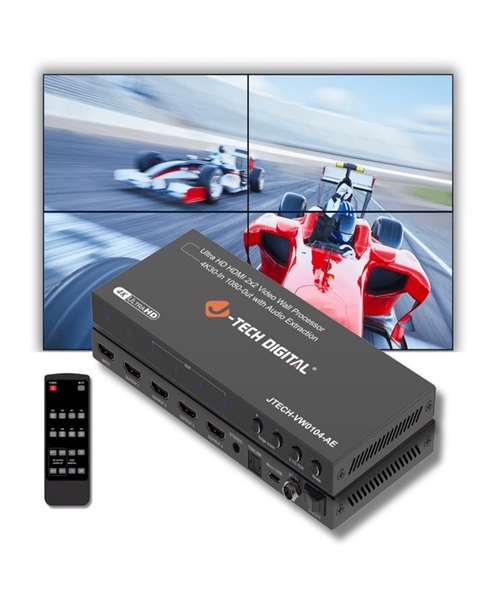
For larger setups, a video switcher or multiview system may be required to display several feeds simultaneously.
Livestreaming and Online Broadcasting
Livestreamed podcasts require the production team to manage camera feeds, audio levels, graphics and streaming software.
A monitor can provide additional screen space for viewing the broadcast interface and production controls.
It may also be used to display the programme output or a separate camera feed.
For a multi-display streaming setup, confirm that the computer or video production system supports the required number of screens.
Podcast Editing and Post-Production
After recording, podcast episodes may need video editing, audio synchronisation, colour correction, graphics and export preparation.
A monitor provides a display for editing software and allows editors to review the recorded material.
For video editing, screen resolution, colour characteristics and display size can influence the editing workflow.
Guest and Presenter Monitoring
Some podcast studios use displays to show presenters their camera framing, discussion notes or visual prompts.
A separate monitor can help presenters follow the recording process without needing to look directly at the main production workstation.
For this purpose, screen placement should be planned carefully so that presenters maintain natural eye contact with the camera.
Corporate and Educational Podcasts
Businesses and educational institutions may use podcast-style video recordings to communicate information to employees, customers and students.
A monitor can support the recording and production team by displaying scripts, presentation materials, recording software and video feeds.
It is useful for executive interviews, internal communication programmes, educational discussions and training content.
Types of Monitors Used in Podcast Production
The term podcast monitor can describe several different display types. Selecting the right one depends on the task.
Computer Monitor
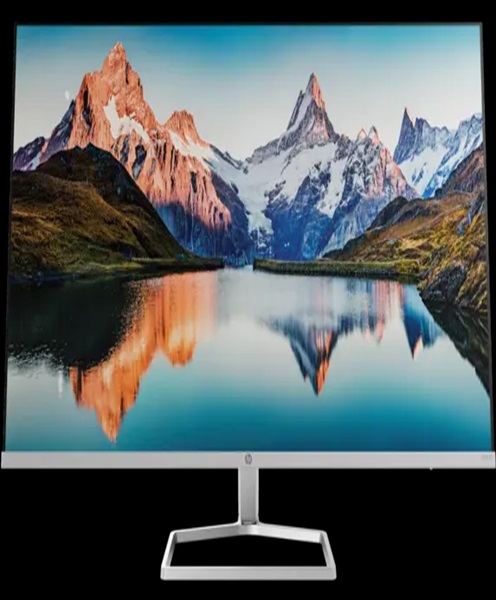
A computer monitor is used with a desktop computer or compatible laptop to display recording software, editing applications and production controls.
It is suitable for podcast studios where the operator needs a larger workspace for managing audio and video.
When hiring, consider screen size, resolution, connectivity and compatibility with the computer.
Video Production Monitor
A video production monitor is designed to display video signals from compatible cameras and production equipment.
It may provide tools for evaluating the image, such as focus assistance, exposure indicators and other monitoring functions.
These features vary by model.
A dedicated video monitor may be useful for camera operators and video production teams who need to assess footage more directly than a standard computer display allows.
Camera Field Monitor
A camera field monitor is a display connected to a camera or compatible video source.
It helps camera operators view the image on a larger screen than the camera’s built-in display.
It may be used for checking composition, focus and exposure during podcast interviews and video production.
Large Production Display
A larger display may be used in a podcast control area where several team members need to view the programme output or production information.
It can also be useful for presentations, live audience viewing and production monitoring.
The required display size depends on viewing distance, room layout and the intended use.
Important Features to Consider When Hiring a Podcast Monitor
Before hiring a monitor, consider its technical capabilities and how it will connect to your production equipment.
Screen Size
Screen size affects how comfortably the operator can view recording software and video footage.
Smaller displays may be suitable for desktop workstations, while larger monitors may be preferable for production control rooms and shared viewing.
Choose a size appropriate for the available space and viewing distance.
Display Resolution
Resolution determines the number of pixels displayed on the screen.
Higher-resolution monitors can provide more workspace and allow detailed video content to be viewed more clearly.
For video production, consider whether the monitor supports the resolution required by your camera or production system.
HDMI and DisplayPort Connections
HDMI and DisplayPort are commonly used to connect monitors to computers, cameras and compatible video equipment.
Before hiring, confirm the output connection on the source device and the input connection on the monitor.
Where necessary, suitable adapters may be required.
USB-C Connectivity
Some modern monitors support USB-C video connections.
This may allow compatible laptops to connect through a single cable, depending on the monitor and computer capabilities.
USB-C does not guarantee video output on every device, so compatibility should be checked.
Colour Accuracy
Colour characteristics are important when reviewing video content.
For productions involving colour grading or detailed image evaluation, consider a monitor designed for more accurate colour reproduction.
A standard office monitor may be adequate for general recording controls but may not be ideal for professional colour-critical editing.
Brightness and Viewing Conditions
Monitor brightness should suit the lighting conditions in the recording or production room.
A display that is too bright can be uncomfortable, while one that is too dim may make it difficult to assess footage.
Mounting and Positioning
Monitors may be positioned on desks, stands or compatible mounting systems.
Some support VESA mounting, while others require their own stands.
Consider the available desk space, viewing angle and cable arrangement before selecting the equipment.
Complementary Equipment for Podcast Monitor Hire
A podcast monitor works as part of a wider production environment. Depending on your requirements, you may also need:
Podcast cameras: Capture presenters, guests and the recording environment.
Camera tripods: Provide stable support for video recording equipment.
Video switchers: Manage multiple camera feeds and programme output.
Multiview systems: Display several video sources on one screen when supported by the production equipment.
Computers: Run podcast recording, livestreaming and editing software.
Audio recording interfaces: Connect microphones and other audio sources to computers.
Podcast microphones: Capture speech from presenters and guests.
Podcast lighting kits: Illuminate the recording environment.
Studio headphones: Allow the production team to monitor sound.
Video cables and adapters: Connect compatible cameras, computers and displays.
The exact combination depends on whether the monitor will be used for computer operation, camera monitoring, video switching or programme display.
How to Prepare a Podcast Monitor Setup
Before the recording session, identify what the monitor will display and which equipment it needs to connect to.
If the monitor is being used with a computer, check the available video outputs and ensure that the computer supports the required display resolution.
If it will receive a camera feed, confirm the camera’s video output and the monitor’s supported input format.
For multi-camera production, determine whether a video switcher or multiview processor is needed.
Before recording:
-
Confirm the required screen size.
-
Check the display resolution.
-
Identify the video source.
-
Confirm HDMI, DisplayPort or USB-C compatibility.
-
Prepare suitable cables and adapters.
-
Test the display connection.
-
Adjust brightness and viewing position.
-
Secure the monitor and its power cables.
-
Confirm that all production displays show the intended content.
Testing the complete setup before recording helps prevent interruptions caused by incompatible connections or display settings.
Why Choose Janeson Rentals for Podcast Monitor Hire in Kenya?
Janeson Rentals provides equipment hire and rental solutions for events, audiovisual productions, businesses and creative projects.
Our podcast monitor rental service is intended for clients who need display equipment for recording, production monitoring, editing and livestreaming.
Whether you are creating a temporary podcast studio, managing a multi-camera recording, producing a corporate interview or setting up a livestream, we can help you discuss the display requirements for your project.
Based in Nairobi, Janeson Rentals serves clients in Nairobi and across Kenya.
When making an enquiry, provide the intended monitor use, required screen size, production dates, location and the equipment you need to connect. This helps establish the appropriate display arrangement.
Book a Podcast Monitor for Hire in Kenya
Looking for podcast monitor hire in Nairobi or across Kenya?
Contact Janeson Rentals to discuss your production requirements and arrange suitable display equipment for your recording session.
Whether you need a computer monitor for podcast software, a video monitor for camera feeds or a display for livestream production, Janeson Rentals can help you plan your equipment rental.
Choose Janeson Rentals for podcast monitor hire and rental in Kenya.