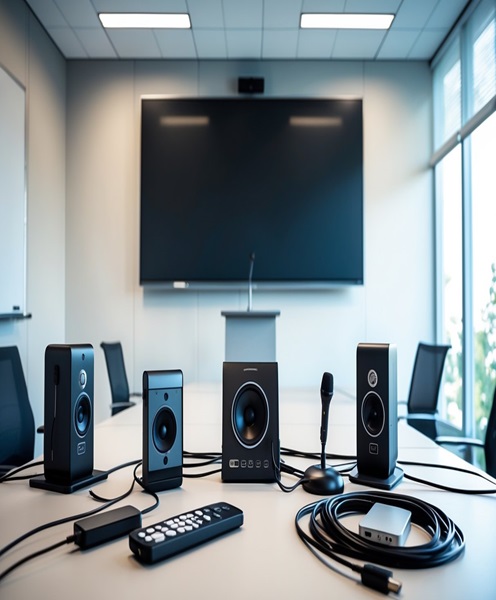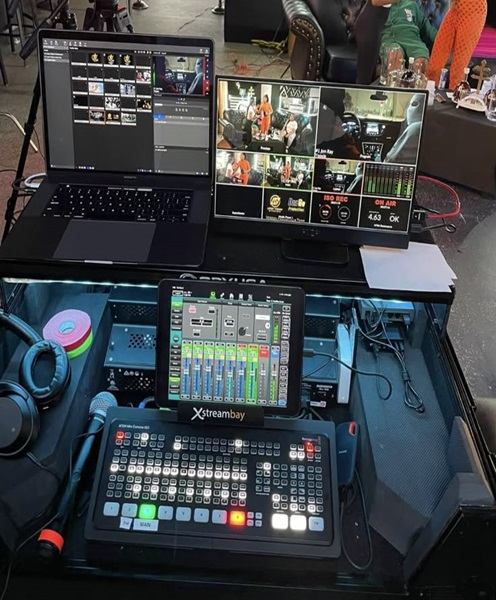
Introduction to Presentation Recording System Hire and Rental in Kenya
Presentations are an important part of corporate events, educational programmes, business meetings, conferences and professional training. Speakers use slides, videos, demonstrations and other visual materials to communicate information to their audiences. Recording these presentations helps organisations preserve valuable content and make it available for future reference.
A presentation recording system is designed to capture the content being presented, which may include PowerPoint slides, computer screen demonstrations, presenter video and audio. Depending on the requirements, the system can record the presentation screen independently, combine it with camera footage or produce a synchronised recording showing both the presenter and their visual materials.
Janeson Rentals offers presentation recording system hire and rental in Kenya for corporate clients, event planners, educational institutions, training organisations, churches, conference organisers and production teams. Based in Nairobi, Janeson provides event and audiovisual equipment rental solutions, with delivery arrangements available across Kenya.
Hiring a presentation recording system is useful when the organiser needs to document a seminar, preserve a training session, capture a keynote speech or produce educational material. It also allows organisations to repurpose recorded presentations into online learning resources, internal communication videos and promotional content.
A well-planned presentation recording setup captures more than the speaker’s voice. It considers the visual presentation, computer output, camera framing, audio quality and synchronisation of the different sources.
What Is a Presentation Recording System?
A presentation recording system is an arrangement of audiovisual equipment used to capture and store the content of a presentation.
Depending on the configuration, it may record:
-
PowerPoint slides and other presentation materials.
-
The presenter’s computer screen.
-
Software demonstrations and digital workflows.
-
The speaker’s video image.
-
Audio from microphones.
-
Video from presentation cameras.
-
A combined screen-and-camera output.
A simple setup may record a laptop presentation with microphone audio. A more advanced system may use a camera, computer capture equipment, video switcher, recording computer and dedicated audio connections.
Some systems can produce a picture-in-picture recording, where the speaker appears in a small window alongside the presentation slides. Others can create separate recordings of the screen and camera for editing later.
The most suitable configuration depends on the intended audience, presentation format and final recording requirements.
Why Hire a Presentation Recording System?
Preserve Important Presentations
Businesses and institutions often deliver presentations containing information that may be needed later.
Recording helps preserve the speaker’s explanations, slides and demonstrations for future reference.
Support Employee and Student Training
Training presentations can be recorded and used as learning resources.
Employees, students and participants may be able to revisit important topics after the session, subject to the organiser’s distribution and access arrangements.
Create Online Learning Materials
Educational institutions and training providers can use recorded presentations to develop digital learning content.
A system that captures both the slides and speaker can make the final material easier to follow.
Improve Corporate Communication
Organisations can record executive briefings, company announcements, policy presentations and internal meetings.
These recordings may help communicate information to employees or authorised stakeholders who could not attend the original session.
Support Conference Documentation
Conference organisers can preserve keynote speeches, panel presentations and technical sessions.
Recorded presentations can also be used to prepare post-event reports, highlights and future promotional material.
Reduce Recording Equipment Costs
Purchasing cameras, capture cards, recorders, microphones and computers for occasional use can be costly.
Presentation recording system rental gives clients access to suitable equipment for a specific programme without the expense of owning a complete setup.
Main Components of a Presentation Recording System
The equipment required depends on whether the presentation is screen-only, presenter-only or a combination of both.
Presentation Computer
A laptop or desktop computer provides the presentation source.
It may display PowerPoint slides, PDF documents, videos, software demonstrations and other digital content.
The computer should be tested with the presentation display and capture equipment before the event.
Video Capture Device
A video capture device receives the computer’s display output or camera signal and makes it available to compatible recording equipment.
The capture device must support the required resolution, frame rate and input connection.
For computer presentations, it is important to confirm that the laptop output and capture device are compatible.
Presentation Camera
A camera can capture the presenter while they speak.
Depending on the production, this may be a professional camcorder, mirrorless camera or PTZ camera.
Camera positioning should allow the speaker to be recorded clearly without obstructing the audience or the presentation screen.
Audio Recording Equipment
Microphones capture the presenter’s voice and other relevant audio.
A presentation recording system may use wireless handheld microphones, lapel microphones, headset microphones or a direct audio feed from the venue’s mixing console.
An audio interface or external recorder may be used where required.
Clear audio is particularly important because participants may rely on the recording to understand the information presented.
Video Switcher
A video switcher can combine or select different video sources.
For example, the operator may switch between the presentation slides, a camera showing the speaker and a wider view of the venue.
Some configurations can create picture-in-picture layouts, allowing the presenter and presentation content to appear together.
Recording Computer
A computer can capture the presentation through compatible video capture hardware and recording software.
The system should have sufficient processing capacity, storage and supported connections for the required recording format.
External Video Recorder
A dedicated recorder may capture the presentation feed directly.
This can be useful where the organiser prefers a standalone recording workflow rather than relying entirely on a computer.
Production Monitor
A monitor allows the operator to check the incoming presentation feed and camera images.
This helps confirm that slides are visible, the presenter is framed correctly and the recording signal is working.
Storage Devices
Recorded presentations require sufficient storage space.
Storage requirements depend on the number of video sources, resolution, recording duration and format.
The organiser should decide whether the files will be delivered as separate screen and camera recordings or as a combined video.
Applications of Presentation Recording System Hire
Corporate Conferences
Corporate conferences often include keynote presentations, executive speeches, business reports and product demonstrations.
A presentation recording system can capture the speaker and their visual materials, helping preserve the content for internal communication and post-event use.
Seminars and Workshops
Seminars and workshops frequently involve detailed information that participants may want to review later.
Recording the slides and speaker together provides a useful reference for attendees and authorised viewers.
Educational Institutions
Schools, colleges, universities and professional training institutions can use presentation recording equipment to capture lectures and academic presentations.
A suitable setup can record the lecturer, slides and audio, creating resources that can support learning beyond the classroom.
Corporate Training Programmes
Companies regularly organise training on software, procedures, customer service, compliance and other business subjects.
A presentation recording system can capture the trainer’s explanations and screen demonstrations for later use.
Product Demonstrations
Product demonstrations may involve presentations, software interfaces, physical products and live explanations.
Recording the screen and presenter separately or together gives the organisation useful content for training and marketing.
Church Conferences and Religious Seminars
Churches and religious organisations may record sermons, Bible study presentations, leadership seminars and conference sessions.
The recording system should be planned around the speaker, presentation screen and venue sound system.
Business Meetings and Executive Briefings
Important meetings may include presentations, reports and strategic discussions.
Where recording is appropriate and authorised, a presentation recording setup can preserve the information for internal review.
Webinars and Hybrid Events
Presentation recording systems can also support hybrid events and webinars.
The captured screen and speaker video may be sent to a compatible streaming workflow, allowing the same presentation content to be recorded and distributed online.
Streaming requires suitable additional equipment and a reliable internet connection.
Types of Presentation Recording Configurations
Screen-Only Recording
Screen-only recording captures the content displayed on the presentation computer.
It is useful for software demonstrations, slide presentations, tutorials and digital training sessions where the speaker’s video is not required.
Presenter-Only Recording
This configuration focuses on the speaker using one or more cameras.
It may be appropriate for presentations where the visual emphasis is on the presenter rather than slides or computer content.
Screen and Presenter Recording
This setup captures both the presentation material and the speaker.
The sources may be recorded independently or combined into a single output.
Picture-in-Picture Recording
Picture-in-picture recording displays the presenter in a smaller video window while the main screen shows the slides or computer demonstration.
This format is common in educational videos, corporate presentations and online training content.
Multi-Source Presentation Recording
A more advanced setup may include several cameras, presentation computers, playback devices and microphones.
A video switcher or compatible production system can manage the sources and create the desired recording output.
Presentation Recording System Versus Conference Recording System
A conference recording system is designed to document conference proceedings, which may include speeches, panel discussions, audience participation and several programme sessions.
A presentation recording system focuses more specifically on capturing the content delivered through a presentation, including slides, screen demonstrations, presenter video and associated audio.
The two can overlap. A conference may use a presentation recording system for individual sessions as part of a broader conference recording setup.
The appropriate solution depends on whether the client needs to capture an entire conference or focus on the presentation material itself.
Presentation Recording System Versus Video Recording System
A video recording system is a general arrangement for capturing video footage from cameras or other video sources.
A presentation recording system is designed around the additional requirement of capturing screen-based content and synchronising it with the presenter and audio.
It may therefore require computer capture devices, presentation inputs and layouts that are not necessary in a basic camera recording setup.
How to Choose the Right Presentation Recording System
Identify the Presentation Format
Determine whether the session uses PowerPoint slides, PDF documents, software demonstrations, videos or other digital content.
This helps establish how the presentation signal should be captured.
Decide Whether Presenter Video Is Required
Some clients only need a recording of the presentation screen and audio.
Others want the speaker visible throughout the recording. This affects the number of cameras and the required switching or recording equipment.
Check Computer Connections
The presentation computer must connect correctly to the capture or display equipment.
Confirm the available video output, supported resolution and any required adapters before the event.
Consider Audio Quality
The presenter’s voice should be captured clearly.
The recording setup should identify the microphone being used and determine whether audio will come directly from the venue sound system or from a separate recording source.
Plan the Recording Layout
Decide whether the final video should show full-screen slides, a split-screen arrangement or picture-in-picture content.
The intended layout should be tested before the presentation begins.
Consider Recording Duration
Long training sessions and conferences require sufficient storage and stable power arrangements.
The recording equipment should support the planned programme duration.
Plan Post-Production and Distribution
Establish whether the client requires raw recordings, edited presentation videos, individual session files or combined recordings.
This determines the preferred recording format and file-management workflow.
Technical Planning and Safety Considerations
Before the presentation starts, the production team should test the complete recording setup.
Important checks include:
-
Testing the presentation computer and display output.
-
Confirming compatibility with capture equipment.
-
Checking the camera framing and focus.
-
Testing microphones and audio levels.
-
Confirming that presentation slides are readable.
-
Verifying picture-in-picture or split-screen layouts where required.
-
Checking storage capacity and recording settings.
-
Testing the recording before the audience arrives.
-
Securing equipment and routing cables safely.
-
Confirming that recordings can be accessed after the session.
The organiser should also confirm permission to record the presenter, participants and any confidential presentation material.
For presentations containing personal information, proprietary business content or restricted educational materials, appropriate access and file-handling arrangements should be established.
Why Choose Janeson Rentals for Presentation Recording System Hire?
Janeson Rentals provides event and audiovisual equipment hire and rental solutions for corporate clients, event planners, institutions, churches and production teams in Kenya.
Clients can discuss their presentation format and recording objectives to identify suitable equipment.
Reasons to consider Janeson Rentals include:
-
Flexible equipment rental: Access presentation recording equipment for specific events and training programmes.
-
Presentation-focused solutions: Arrange equipment for capturing slides, screen demonstrations, presenter footage and audio.
-
Related audiovisual equipment: Coordinate cameras, microphones, monitors, capture devices, recorders and video switching equipment.
-
Different event applications: Hire equipment for conferences, workshops, corporate presentations, lectures, seminars and product demonstrations.
-
Nairobi-based service: Janeson Rentals is based in Nairobi and provides delivery arrangements across Kenya.
The final equipment configuration should be confirmed according to the presentation format, recording duration, technical compatibility and availability.
How to Hire a Presentation Recording System from Janeson Rentals
When contacting Janeson Rentals, provide the following information:
-
Event date and venue.
-
Type of presentation or programme.
-
Expected presentation duration.
-
Whether PowerPoint slides or other computer content will be recorded.
-
Whether presenter video is required.
-
Whether picture-in-picture recording is needed.
-
Number of presenters.
-
Microphone and audio requirements.
-
Preferred recording resolution and format, if known.
-
Whether the presentation will also be live-streamed.
-
Whether installation and technical operation are required.
This information helps determine the appropriate recording devices, capture equipment, cameras, microphones and supporting accessories.
Book Presentation Recording System Rental in Kenya
Preserve important presentations, lectures, seminars and corporate training sessions with a suitable presentation recording setup from Janeson Rentals.
Whether you are organising a conference, educational workshop, business presentation, product demonstration, church seminar or hybrid event, the right equipment can help capture both the speaker and the information being presented.
Contact Janeson Rentals to enquire about presentation recording system hire and rental in Nairobi and across Kenya. Share your presentation requirements to discuss a suitable recording solution for your next event.