Recording Hard Drive Hire and Rental in Kenya
Recording and video production generate large amounts of digital data. A conference may involve several hours of recorded presentations, while a concert or corporate event may require multiple camera recordings, audio tracks and supporting production files. Film crews, livestreaming teams, photographers and event production companies also need dependable storage for the media they capture.
Having suitable storage is therefore an important part of professional recording. A recording hard drive provides a destination for saving video footage, audio recordings, photographs, project files and other digital content. The right storage device helps production teams manage their files and transfer recorded material for editing, backup and distribution.
Janeson Rentals offers Recording Hard Drive Hire and Rental in Kenya for event organisers, videographers, photographers, production companies, broadcasters, conference organisers, corporate clients and AV professionals. Our storage rental solutions can be considered for different recording workflows, depending on the capacity, connection type, performance and compatibility required.
Whether you are documenting a corporate conference in Nairobi, recording a wedding, capturing a live concert, producing an interview, managing a multi-camera event or creating professional video content, suitable recording storage is essential.
Hiring recording storage equipment can be useful when a project requires additional capacity or temporary storage without the expense of purchasing multiple drives. Janeson Rentals helps clients consider the storage requirements of their production and identify an appropriate recording hard drive configuration.
What Is a Recording Hard Drive?
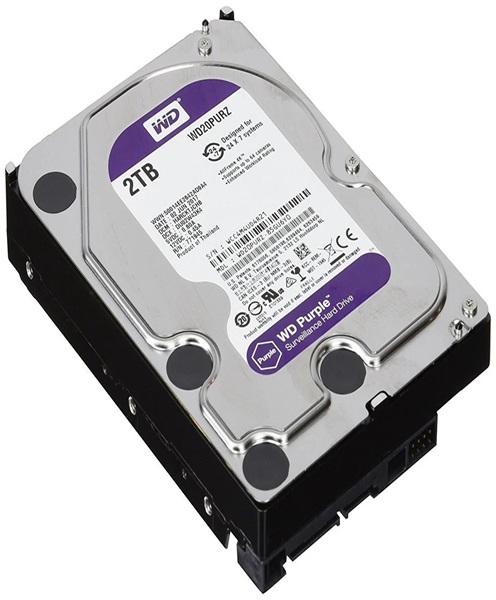
A recording hard drive is a storage device used to save digital information generated during recording or production activities.
It may be an internal or external hard disk drive (HDD), solid-state drive (SSD) or another compatible storage device. The choice depends on the recording equipment, data rate, capacity requirements and intended workflow.
Recording hard drives are used in many professional applications, including:
-
Video camera and production recording.
-
Multi-camera event recording.
-
Conference and seminar documentation.
-
Audio recording and music production.
-
Film and television production.
-
Livestream and broadcast workflows.
-
Photography and image storage.
-
Video editing and post-production.
-
Archiving and transferring event footage.
A recording hard drive is not the same as a complete recording system. A camera, audio recorder, video recorder or recording computer captures the content, while the hard drive provides storage when supported by the equipment.
Some recording devices write directly to internal or removable drives. Others require external storage connected through a compatible interface. It is important to confirm the supported storage type before arranging a rental.
Why Hire a Recording Hard Drive in Kenya?
Professional recording projects can require substantial storage capacity, especially when they involve high-resolution video, multiple cameras or long recording sessions.
Hiring a recording hard drive can help production teams manage these requirements without making unnecessary long-term purchases.
Access to Additional Storage Capacity
A production may generate more footage than the available internal storage can accommodate. This is particularly common during conferences, concerts, weddings and multi-camera recordings.
Recording hard drive rental provides an option for accessing additional storage for the duration of a project.
Support for Professional Recording Workflows
Some recording devices support external storage or removable drives. A compatible hard drive can provide a convenient destination for captured media, depending on the equipment’s specifications.
Before hiring, the recording team should confirm the supported interface, drive format, capacity limits and performance requirements.
Convenient Media Transfer
External recording drives can make it easier to transfer files between compatible production computers, editing workstations and other storage devices.
This is useful when footage must be handed over to an editor or production team after an event.
Reduced Equipment Ownership Costs
Buying several high-capacity drives for occasional events can increase production expenses. Hiring may be more economical when storage requirements are temporary or project-specific.
It also reduces the need to keep additional equipment in storage when it is not being used.
Support for Different Production Types
Recording hard drives can be used in video, audio, photography and broadcast workflows, provided the drive is compatible with the recording or transfer equipment.
This makes them useful for production companies handling different types of assignments.
Events and Productions That Require Recording Hard Drive Rental
Corporate Conferences and Seminars
Conferences may involve several sessions, keynote speeches, panel discussions, interviews and presentations. Recording teams may need to capture the entire programme for future reference, internal training or publication.
A recording hard drive can provide storage for the resulting media files. For multi-camera events, storage requirements should account for the fact that several cameras may generate files simultaneously.
Weddings and Private Events
Wedding videographers often capture extended footage from different cameras, including the ceremony, speeches, reception and entertainment.
A suitable recording hard drive can help store camera footage and audio recordings before editing. Additional storage may also be required for photographs, highlight videos and final project files.
Concerts and Live Performances
Concert recordings can involve multiple video cameras, separate audio feeds and long recording periods. High-resolution footage can consume significant storage space.
A recording hard drive may be used as part of the production’s storage workflow, subject to the data rates and recording formats involved.
Film and Video Production
Film crews frequently generate large media files from professional cameras. Recording storage may be required for original camera files, proxy media, audio recordings and editing projects.
The storage device must be appropriate for the camera or recording workflow. High-bitrate video may require an SSD or another storage solution with sufficient sustained write performance.
Livestreaming and Broadcast Production
Some livestreaming and broadcast systems support simultaneous streaming and local recording. Local recording provides a file that can be edited, reviewed or distributed after the production.
A compatible recording drive may support this workflow, but the recording system must be designed to handle the required data rate and connection.
Photography and Content Creation
Photographers and content creators may use external hard drives to store large collections of images, video clips and project files.
Recording hard drive hire can be useful for temporary projects, location-based production or assignments requiring additional storage.
Training and Educational Events
Schools, universities, training institutions and organisations may record workshops, lectures, seminars and educational sessions.
A recording hard drive can support the storage and transfer of recorded material for future learning resources.
Types of Recording Hard Drives
Different storage technologies offer different performance characteristics. The appropriate choice depends on the recording equipment and the intended use.
Hard Disk Drives (HDDs)
A traditional hard disk drive stores data on rotating magnetic platters. HDDs are commonly used for large-capacity storage and file archiving.
They can be useful for storing completed recordings, transferring media and maintaining large collections of production files.
However, mechanical drives have moving parts and are generally more vulnerable to physical shock than SSDs. They may also offer lower sustained performance than high-speed solid-state storage.
For recording applications, the drive’s actual sustained write speed must be considered rather than relying only on its advertised transfer speed.
Solid-State Drives (SSDs)
Solid-state drives store data using flash memory and have no moving mechanical platters.
They are commonly used where faster access, portability and improved resistance to vibration are important.
SSDs can be suitable for demanding recording and editing workflows, but performance varies by model, interface, controller and available capacity. Some drives may also reduce speed during long sustained transfers or when thermal limits are reached.
The drive must meet the recording equipment’s requirements.
External Hard Drives
External hard drives connect to computers and compatible recording devices through interfaces such as USB.
They are convenient for transferring, storing and organising media files. Their suitability for direct recording depends on the connection standard, drive performance and compatibility of the recording device.
Portable SSDs
Portable SSDs are compact storage devices designed for convenient transport and fast file access.
They may be suitable for location-based production, field recording and transferring large video files. However, the recording system must support the drive’s interface and sustained write performance.
Internal Recording Drives
Some recording computers and professional video equipment use internal storage drives. These may be installed within the recording device or computer.
Internal storage can provide a direct recording destination, but compatibility depends on the hardware, drive form factor, interface and supported capacity.
Recording Hard Drive vs Recording System
A recording hard drive and a recording system perform different functions.
A recording system is the equipment used to capture and save audio or video. It may include cameras, recorders, computers, interfaces and recording software.
A recording hard drive is a storage component that holds the resulting digital files when the recording system supports it.
For example, a multi-camera recording system may capture footage from several cameras while using compatible storage devices to save the recordings.
The hard drive does not independently capture video or audio. It must work with a suitable recording device or computer.
Recording Hard Drive vs Backup Hard Drive
Recording and backup storage are closely related, but they serve different purposes.
A recording hard drive is used as a storage destination during recording or production. A backup hard drive stores additional copies of important files to protect against data loss.
A production may use one drive for active recording and another for backup after the files have been transferred. For important projects, relying on one hard drive is risky because any storage device can fail, become corrupted or be lost.
A proper backup workflow should include separate copies and, where appropriate, an additional off-site or cloud backup.
How Much Storage Does an Event Recording Need?
The amount of storage required depends on the recording format, resolution, bitrate, frame rate, number of cameras and total recording duration.
For example, recording a short presentation from one camera will generally require less storage than recording a full-day conference using several cameras at high resolution.
The production team should estimate storage needs before the event.
Important considerations include:
-
Number of recording devices.
-
Resolution of each recording.
-
Recording bitrate and codec.
-
Frame rate and colour depth.
-
Number of audio tracks.
-
Total recording duration.
-
Expected file sizes.
-
Additional space for project files and exports.
-
Backup storage requirements.
For multi-camera productions, calculate the storage requirement for each camera stream and add the totals. Do not assume that one drive will automatically have enough capacity for every recording.
It is also advisable to leave free space rather than planning to use the entire advertised drive capacity.
Important Features to Consider When Hiring a Recording Hard Drive
Storage Capacity
The capacity should be appropriate for the amount of media expected during the project.
Small assignments may need less storage, while long-form recording, high-resolution footage and multi-camera productions can require significantly more.
The production team should estimate file sizes and recording duration before selecting a drive.
Read and Write Speed
Recording requires the storage device to write incoming data continuously.
A drive with insufficient sustained write performance may fail to keep up with demanding recording formats. This can result in dropped frames, interrupted recording or recording errors, depending on the equipment.
The required performance should be checked against the camera or recorder specifications.
Connection Interface
Common interfaces include USB-A, USB-C, Thunderbolt and other specialised connections.
The connector alone does not determine speed. The drive, cable, host port and recording device must all support the required interface standard.
File System Compatibility
Different recording devices and operating systems support different file systems.
A drive may need to be formatted in a particular file system before use. Formatting can erase existing data, so the contents must be checked and backed up before any format change.
Portability and Physical Protection
Location-based productions require equipment that can be transported and handled carefully.
Portable drives should be protected from drops, moisture, excessive heat and physical pressure. Mechanical HDDs need particular care because of their moving components.
Reliability and Data Management
No hard drive is completely immune to failure. Important recordings should be copied to separate storage as soon as practical.
The production team should also use clear file names, organised folders and appropriate verification procedures when transferring important files.
Recording Hard Drive for Multi-Camera Production
Multi-camera recording creates more complex storage requirements because several video sources may record at the same time.
For example, a conference may use one camera for the main speaker, another for audience reactions and a third for a wide stage shot. Each camera may generate its own files, depending on the recording arrangement.
The storage plan should consider whether cameras record internally, to external drives or to a central recording system.
Where several sources write to shared storage, the system must support the combined data rate. The connection, storage performance and recording software should be tested before production begins.
A drive that works for one camera may not necessarily be suitable for multiple simultaneous streams.
Recording Hard Drive for Audio Production
Recording hard drives are also useful in audio production.
Live sound engineers, musicians, podcast producers and recording teams may need to store multitrack recordings, voice recordings, sound effects and music projects.
Audio files are often smaller than high-resolution video files, but multitrack sessions can still require substantial storage, particularly when they contain many channels, high sample rates and long recording durations.
The recording computer or digital audio workstation must be configured to use the selected storage device correctly.
Best Practices for Protecting Recorded Files
Professional recordings can represent valuable business, creative or personal material. Proper handling helps reduce the risk of data loss.
-
Keep at least one additional copy of important recordings.
-
Avoid disconnecting a drive while files are being written.
-
Use the operating system’s safe-ejection procedure where applicable.
-
Protect drives from impact, moisture and excessive heat.
-
Keep cables and connectors secure during recording.
-
Confirm that files have transferred successfully before deleting originals.
-
Organise files into clearly labelled folders.
-
Avoid filling storage devices to their maximum capacity.
-
Do not use a drive for an unfamiliar recording system without checking compatibility.
-
Keep sensitive recordings protected with appropriate access controls.
For critical productions, a dedicated data-management person may be useful to oversee file transfers, backups and handover.
Why Choose Janeson Rentals for Recording Hard Drive Hire?
Janeson Rentals provides event and production equipment hire solutions for clients who need practical technical support for recording and AV workflows.
Clients choose Janeson Rentals because:
-
Flexible rental arrangements: Storage requirements can be discussed according to the duration and scale of the project.
-
Different production applications: Recording storage can be considered for conferences, weddings, concerts, corporate events, photography and video production.
-
Nairobi-based service: Janeson Rentals is based in Nairobi, with delivery arrangements across Kenya.
-
Production equipment coordination: Recording storage requirements can be considered alongside cameras, recording computers, audio recorders and video recording systems.
-
Practical compatibility planning: Clients can discuss storage capacity, connection interfaces and recording requirements before booking.
-
Event-focused solutions: Equipment planning can take into account the specific demands of live events and production assignments.
The aim is to help clients plan storage that suits the recording workflow rather than choosing a drive based on capacity alone.
Book Recording Hard Drive Hire and Rental in Kenya
If you need additional storage for video recording, audio production, conference documentation, live events or professional content creation, contact Janeson Rentals to discuss your requirements.
When requesting a quotation, provide the intended recording device, required storage capacity, connection type, recording format and expected duration. If you are recording multiple cameras or high-resolution video, share these details so that the storage requirements can be assessed appropriately.
Janeson Rentals offers Recording Hard Drive Hire and Rental in Kenya for production companies, videographers, photographers, corporate organisations, event planners and AV professionals.
Contact Janeson Rentals for recording hard drive hire in Nairobi and across Kenya, and plan your event recording storage with the right equipment for your production.