Recording Interface Hire & Rental in Kenya
Recording quality plays an important role in music production, podcasting, broadcasting, video production and other professional media projects. Whether you are recording vocals for a new song, producing a podcast series, capturing instruments or creating voiceovers, a recording interface helps connect audio sources to a digital recording environment.
A recording interface is an important component of a modern studio setup. It allows microphones, instruments and other audio equipment to communicate with a computer or compatible recording system. It also helps convert analogue audio signals into digital information that can be edited, processed, mixed and stored.
Janeson Rentals provides recording interface hire and rental in Kenya for musicians, recording engineers, media companies, content creators, podcast producers and organisations that need temporary recording equipment.
Whether you are working on a professional studio session, a corporate interview, a music production project or a multimedia assignment, renting a recording interface can help you access equipment suited to your production requirements.
What Is a Recording Interface?
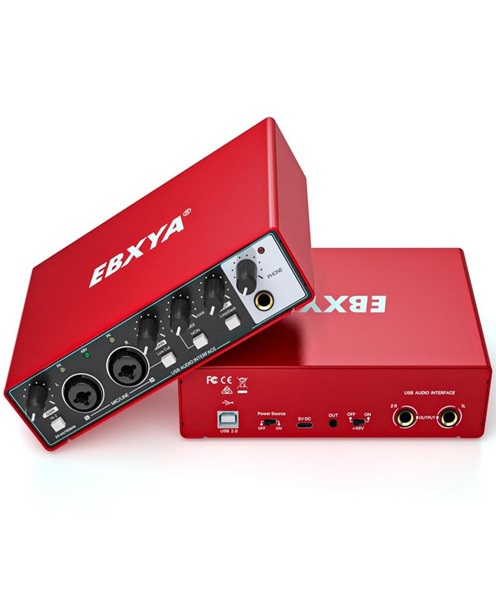
A recording interface is a hardware device that connects audio equipment to a digital recording system.
It receives audio from microphones, instruments, mixers and other compatible sources. The incoming analogue signals are converted into digital audio so that recording software can capture and process them.
Many recording interfaces also provide outputs for studio monitors and headphones, allowing musicians and engineers to listen to audio during recording and playback.
Depending on the model, a recording interface may feature:
-
Microphone preamplifiers.
-
XLR and line inputs.
-
Instrument inputs.
-
Headphone outputs.
-
Studio monitor outputs.
-
Phantom power.
-
Digital audio connections.
-
MIDI connectivity.
-
Multiple simultaneous recording channels.
-
Direct monitoring and internal routing features.
The specific functions vary, so the appropriate device should be selected according to the requirements of the recording session.
Why Hire a Recording Interface in Kenya?
Recording equipment can represent a considerable investment, particularly for independent creators and production companies working on occasional assignments.
Hiring provides access to recording equipment without requiring permanent ownership. It can also make it easier to arrange different equipment configurations for different projects.
Recording interface rental from Janeson Rentals may be suitable for:
-
Professional recording sessions.
-
Music production projects.
-
Podcast recording.
-
Film and television voiceovers.
-
Corporate interviews.
-
Audiobook narration.
-
Online broadcasting.
-
Educational recording projects.
-
Live audio recording.
-
Multimedia content production.
A rental arrangement can be planned around the project duration and the number of recording channels required.
Applications of Recording Interfaces
1. Professional music recording
Recording interfaces allow musicians and engineers to capture vocals and instruments through compatible recording software. Depending on the input capacity, they can support solo recordings, overdubbing and multichannel sessions.
2. Podcast production
Podcast producers use recording interfaces to connect microphones and record conversations. Multi-input models are particularly useful for interviews and group discussions.
3. Voiceover production
Voice artists, advertising agencies and video producers can use recording interfaces to capture clear narration for commercials, documentaries, presentations and promotional content.
4. Film and television production
Recording interfaces can be part of studio-based audio workflows involving dialogue recording, voice replacement, sound editing and post-production.
5. Audiobook recording
Authors, narrators and publishers can use recording interfaces to capture spoken content for audiobooks and digital publications.
6. Live performance recording
Music production teams can use suitable interfaces to capture audio from compatible mixers and stage equipment. The number of inputs and connection format must match the recording plan.
7. Educational and training projects
Schools, universities and training organisations can use recording interfaces for media production, music education, online lessons and digital learning content.
Key Features of a Recording Interface
A recording interface should be selected according to its technical capabilities and the type of audio work being undertaken.
Microphone preamps: Microphone preamps amplify low-level microphone signals before they are converted into digital audio.
Input capacity: The number of inputs determines how many audio sources can be recorded simultaneously.
Output capacity: Outputs are important when connecting studio monitors, headphones and external equipment.
Analogue-to-digital conversion: This process changes incoming analogue audio into digital data.
Digital-to-analogue conversion: This converts digital playback into analogue audio for listening through compatible equipment.
Phantom power: Some condenser microphones require 48V phantom power. Confirm microphone requirements before use.
Instrument connectivity: Instrument inputs can support direct recording of electric guitars, bass guitars and other compatible instruments.
Monitoring features: Direct monitoring and headphone controls can help performers listen to incoming signals while recording.
Digital connectivity: Depending on the model, an interface may support USB or other digital connection formats.
Choosing a Recording Interface for Different Projects
The number of recording channels is one of the most important factors.
For a solo recording session, a smaller interface may be suitable. A podcast involving several guests may require multiple microphone inputs. A band recording project may need more channels to accommodate drums, instruments and vocals.
You should also consider the connection format, computer compatibility, recording software, microphone requirements and monitoring arrangements.
For productions involving external mixers or additional recording equipment, check whether the interface supports the required line-level or digital connections.
Recording Interface for Music Studios
A recording interface can serve as the central connection point between studio equipment and the recording computer.
A typical music production environment may include microphones, studio headphones, monitor speakers, instruments, MIDI controllers and digital audio workstation software.
The interface receives the audio signals and sends them to the recording application. Once recorded, the audio can be edited, mixed and processed.
For multitrack sessions, it is important to establish whether the interface supports the required number of simultaneous inputs.
Recording Interface for Podcasts and Broadcasting
Podcasters and broadcasters need recording systems that can capture speech consistently.
A recording interface can connect microphones, headphones and other compatible audio equipment to a computer. Models with multiple inputs may allow several presenters to be recorded separately.
Separate tracks give the editor greater control over individual voices during post-production.
For live broadcasts, the production team should also consider monitoring, playback routing and the software being used.
Recording Interface for Video Production
Video production involves more than capturing images. Clear dialogue, narration and supporting audio are essential for professional content.
A recording interface can be used in voiceover booths, editing rooms and studio production environments. It can connect professional microphones to recording software for dialogue and narration capture.
When recording audio separately from video, the production team should maintain synchronisation using an appropriate workflow, such as a shared timecode system or synchronisation markers where supported.
Recording Interface Versus Audio Mixer
An audio mixer combines and controls multiple sound sources. A recording interface connects audio sources to a digital recording system.
Some interfaces include internal mixing and routing capabilities, while some mixers offer multichannel USB recording. However, their capabilities are not necessarily identical.
A production that needs live sound control may require a mixer, while a project focused on computer-based recording may prioritise a recording interface.
In some professional setups, both devices are used together.
Recording Interface Versus USB Audio Interface
A recording interface describes the device’s general purpose, while USB audio interface describes an interface that uses USB connectivity.
Many recording interfaces use USB, but others may use different connection formats or digital audio systems.
When arranging rental, specify whether your project requires a USB interface or another type of recording interface. This helps ensure that the equipment is compatible with your computer and production workflow.
Equipment That Works with Recording Interfaces
Depending on the recording project, a recording interface may be used with:
-
Studio condenser microphones
-
Dynamic microphones
-
Vocal microphones
-
Instrument microphones
-
DI boxes
-
XLR microphone cables
-
Instrument cables
-
Studio headphones
-
Studio monitor speakers
-
MIDI keyboards
-
Recording computers
-
Digital audio workstation software
-
Audio mixers
-
Microphone stands
-
Pop filters and shock mounts
The recording team should check the connection and power requirements of every device before beginning the session.
Recording Setup and Technical Considerations
Before using a recording interface, confirm that the correct drivers and software are installed where required. Check the operating system, input and output settings, sample rate, buffer settings and recording application.
Set appropriate input gain to avoid clipping. Monitor the incoming signal through headphones and test every channel before recording.
Keep cables organised and avoid placing equipment where it may be exposed to liquid, excessive dust or accidental impact.
For important recording projects, it is advisable to make a test recording and confirm that the recorded files are being saved correctly.
Why Choose Janeson Rentals?
Janeson Rentals provides event and production equipment hire and rental services in Kenya for clients with temporary technical requirements.
When enquiring about recording interface rental, clients can discuss:
-
Flexible rental arrangements: Equipment hire for short-term or scheduled recording projects.
-
Production equipment coordination: Enquiries for microphones, headphones, cables and related audio equipment.
-
Different recording applications: Solutions for music, podcasts, interviews, voiceovers and multimedia productions.
-
Nairobi-based support: Rental arrangements from Nairobi with delivery options across Kenya subject to confirmation.
-
Practical technical planning: Discuss input capacity, computer connectivity and recording requirements before booking.
Book Recording Interface Hire in Kenya
Are you preparing a music recording session, podcast, voiceover, audiobook or multimedia production? The right recording interface can help connect your audio equipment to your digital production environment.
Contact Janeson Rentals for recording interface hire and rental in Kenya. Provide your project date, location, recording software, computer connection requirements and the number of simultaneous audio inputs and outputs you need.
Arrange your recording equipment rental with Janeson Rentals and prepare your production with a suitable audio recording setup.