Recording Monitor Hire and Rental in Kenya
Reliable recording requires more than cameras, microphones and storage devices. Production teams also need a practical way to observe what is being captured and identify technical problems before they affect the final footage. A recording monitor provides a visual reference that allows operators to inspect video signals and monitor recording activity during a production.
Janeson Rentals offers Recording Monitor Hire and Rental in Kenya for videographers, camera operators, production companies, broadcast teams, conference organisers, event planners and AV professionals. Whether you are recording a corporate conference, a wedding, a concert, a documentary, an interview or a multi-camera production, a suitable monitoring display can support more controlled recording operations.
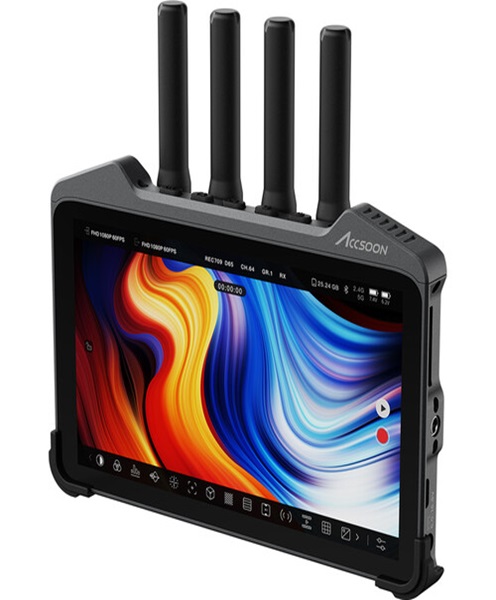
A recording monitor may be used to view a camera feed, inspect image composition, check focus and exposure, observe signal status or monitor the output of a recording device. Depending on the equipment, it may also provide tools such as waveform displays, focus peaking, false colour, audio meters, image guides and other monitoring features.
Hiring a recording monitor allows production teams to access suitable display equipment for a specific assignment without investing in equipment that may only be required occasionally.
What Is a Recording Monitor?
A recording monitor is a display used during recording to observe video signals, image quality, recording feeds or the status of a production workflow.
It may be connected to a camera, video recorder, recording computer, video switcher or another compatible source. The monitor displays the incoming signal so that an operator can check what is being captured or transmitted through the recording chain.
Unlike an ordinary television, a professional recording monitor may provide specialised monitoring tools that support camera operation and video production.
Depending on its design, a recording monitor may offer:
-
Live video signal display.
-
Image composition and framing assistance.
-
Focus checking tools.
-
Exposure monitoring.
-
Brightness and contrast adjustment.
-
Signal format information.
-
Waveform and histogram displays.
-
Audio level monitoring.
-
Recording status information, where supported.
-
Input selection and signal configuration.
Not every recording monitor includes all these features. Capabilities depend on the model, software and type of signal being monitored.
It is also important to understand that a recording monitor does not necessarily record or store footage. Its primary purpose is to display and monitor signals. Actual recording is performed by a compatible camera, recorder or computer.
Why Hire a Recording Monitor in Kenya?
Recording monitors are useful in productions where operators need to observe footage beyond the small screen built into a camera or recording device.
Improved Visibility During Recording
Camera operators sometimes work with cameras positioned on tripods, rigs, cranes or other equipment that makes the built-in display difficult to view.
An external recording monitor provides a larger viewing surface, helping operators inspect the image without constantly repositioning themselves.
Better Focus Checking
Focus is essential in professional video production. A recording monitor may offer focus-assistance features that help operators determine whether the subject is sharp.
Features such as focus peaking and image magnification can make it easier to check focus, depending on the monitor’s capabilities.
More Controlled Exposure Monitoring
Exposure monitoring helps camera operators avoid footage that is excessively bright or dark.
Professional monitors may provide tools such as waveform displays, histograms and false-colour overlays. These tools help operators evaluate image exposure more accurately than relying on screen brightness alone.
Improved Recording Oversight
A recording monitor can help production teams observe camera feeds and identify problems such as missing signals, incorrect framing or unexpected image changes.
When connected to a compatible recording device, the operator may also be able to view recording information or output status.
Convenient Multi-Camera Monitoring
A production involving several cameras may require monitors at different positions, such as the camera station, video control area and director’s position.
Depending on the signal-routing arrangement, recording monitors can help relevant team members view the feeds they need.
Reduced Equipment Ownership Costs
Professional recording monitors can be expensive, particularly when a production needs several displays with specialised monitoring features.
Recording monitor rental provides access to equipment for the duration of an event or project without requiring permanent ownership.
Events and Productions That Require Recording Monitor Rental
Corporate Video Production
Corporate video projects may include interviews, executive messages, product demonstrations, training videos and promotional content.
A recording monitor helps the camera operator and production team observe image quality during filming. This can be particularly useful when recording in offices, conference venues and other environments where the camera may be positioned away from the operator.
Conference and Seminar Recording
Conferences often involve long recording sessions, several speakers and multiple camera angles.
Recording monitors can help operators check camera framing, signal quality and recording feeds throughout the programme. In multi-camera productions, monitors may also support the director or technical team in observing selected sources.
Wedding Videography
Wedding productions involve important moments that cannot easily be repeated. Camera operators may need to monitor composition and image quality throughout the ceremony and reception.
An external recording monitor can be useful when cameras are mounted on tripods, gimbals or other rigs.
Concerts and Live Performances
Concert recording often involves cameras positioned at different distances from the stage. Recording monitors help operators observe the incoming image and make adjustments during performances.
They can also be used in a production control area to monitor selected camera feeds, depending on the video routing setup.
Film and Television Production
Film and television crews use professional monitors to evaluate camera images during filming.
Depending on the production, monitors may support focus checking, exposure evaluation, image framing and technical signal monitoring. Larger productions may use several monitors for camera operators, directors and video-assist teams.
Interviews and Documentary Production
Interview recordings require careful attention to framing, focus and lighting. A recording monitor can provide a clearer view of the subject and help the crew identify problems before recording continues.
Church and Religious Event Recording
Churches that record services, conferences and worship events may use recording monitors to observe camera feeds and monitor the quality of video being captured.
They can be integrated into a wider production setup involving cameras, switchers, recorders and display equipment.
Livestreaming and Broadcast Production
Livestreaming teams may use recording monitors to observe camera signals and check video sources before or during capture.
However, a recording monitor should not automatically be confused with a dedicated broadcast waveform monitor, multiview display or streaming control interface. The equipment should be selected according to the monitoring tasks required.
Types of Recording Monitors
Different production environments require different monitor sizes, features and connection options.
Camera-Mounted Recording Monitor
A camera-mounted monitor attaches to a compatible camera rig, cage or mounting system.
It provides a larger display than many built-in camera screens and can be useful for handheld, shoulder-mounted and tripod-based filming.
External Video Recording Monitor
An external video monitor receives a video signal from a compatible camera or recorder. It may be positioned on a desk, stand or production workstation.
This type of monitor is useful when the operator needs to view the recorded image separately from the camera.
Professional Production Recording Monitor
Professional production monitors are designed for more demanding video workflows. Depending on the model, they may provide advanced image-assessment tools, signal information and calibration features.
They are useful for camera departments, video-assist stations and production control rooms.
Field Recording Monitor
A field monitor is intended for use in location-based production. It may be compact and designed for mounting on camera equipment or a portable rig.
Its suitability depends on screen brightness, power options, input connections and physical durability.
Rack-Mounted Recording Monitor
Rack-mounted monitors can be installed in production racks or control-room equipment setups.
They are useful when operators need to monitor several recording or video sources in a central technical area.
Important Features to Consider When Hiring a Recording Monitor
Screen Size
The monitor should be large enough for the operator to inspect the image comfortably.
A compact camera-mounted monitor may be suitable for individual camera operation, while a larger display may be more appropriate for a production desk or control room.
Resolution
The monitor’s resolution should be appropriate for the camera or recording signal.
A high-resolution source displayed on a lower-resolution monitor may not provide the same level of image detail. The intended monitoring workflow should guide the selection.
Input and Output Connections
Recording monitors may support connections such as HDMI, SDI or other professional video interfaces.
The input must be compatible with the camera or recording device. Where different signal types are involved, an appropriate converter may be required.
The team should also check connector versions, supported resolutions and frame rates.
Brightness
For outdoor filming or brightly lit venues, monitor brightness is an important consideration.
A monitor intended for studio use may be difficult to view in direct sunlight. Field production may require a brighter display and appropriate shading accessories.
Focus Assistance
Features such as focus peaking and magnification can help camera operators evaluate focus.
These tools are especially useful for interviews, close-ups, product demonstrations and other situations where accurate focus is essential.
Exposure Tools
Waveform, histogram and false-colour tools can help operators evaluate exposure.
Their availability varies by model, and operators should understand how to interpret them correctly.
Power Options
Recording monitors may use internal batteries, external battery plates, mains power or other compatible power arrangements.
The required power source and expected operating duration should be established before the event.
Mounting and Positioning
A camera-mounted monitor may need a suitable mounting arm, cage or bracket. Larger monitors may require a stand or desk mounting arrangement.
The monitor should be positioned securely without obstructing camera movement or creating a safety hazard.
Recording Monitor vs Camera Monitor
A camera monitor is a display used to observe the image produced by a camera. A recording monitor focuses on observing the recording process or video signal within a recording workflow.
The terms may overlap because a camera monitor can also be used during recording. The difference is primarily the intended application and the features required.
For example, a camera-mounted display may help an operator frame a shot, while a recording monitor in a control room may be used to observe a feed coming from a recording device.
Recording Monitor vs Confidence Monitor
A confidence monitor is primarily used to provide presenters, performers or other participants with a view of relevant content.
A recording monitor is intended for technical monitoring of video signals or recording activity.
For example, a presenter may use a confidence monitor to view slides or programme information, while a camera operator uses a recording monitor to check image framing and focus.
Both may be used at the same event, but they serve different purposes.
How to Use a Recording Monitor in a Professional Production
A recording monitor should be integrated into the production setup before recording begins.
The process generally involves:
-
Identifying the camera or recording device that will supply the signal.
-
Confirming the monitor’s supported input connection.
-
Connecting the appropriate video cable.
-
Selecting the correct input on the monitor.
-
Checking resolution and frame-rate compatibility.
-
Adjusting brightness and display settings.
-
Testing focus and exposure tools where available.
-
Confirming stable power and secure mounting.
-
Checking the display during a recording test.
-
Positioning the monitor where the operator can use it comfortably.
For multi-camera productions, the team should also confirm whether the monitor is receiving a direct camera feed, a switched programme output or a routed signal from a video distribution system.
Why Choose Janeson Rentals for Recording Monitor Hire?
Janeson Rentals provides event and production equipment hire solutions for clients who need professional AV equipment for different types of projects.
Clients choose Janeson Rentals because:
-
Production-focused equipment planning: Recording monitor requirements can be considered alongside cameras, recorders and video signal equipment.
-
Flexible rental arrangements: Clients can discuss equipment requirements according to the duration and scale of their production.
-
Multiple applications: Recording monitors can be considered for conferences, weddings, concerts, interviews, film shoots and corporate video production.
-
Nairobi-based service: Janeson Rentals is based in Nairobi, with delivery arrangements across Kenya.
-
AV equipment coordination: Monitors can be planned alongside compatible cameras, cables, converters, recording systems and control-room equipment.
-
Practical technical guidance: Clients can discuss screen size, signal inputs, mounting and monitoring requirements before booking.
The aim is to help production teams choose a monitoring arrangement that supports their actual recording workflow.
Book Recording Monitor Hire and Rental in Kenya
If you need a recording monitor for a video shoot, corporate conference, wedding, concert, film production or multi-camera event, contact Janeson Rentals to discuss your requirements.
When requesting a quotation, provide the event date, venue, type of recording equipment, required screen size, signal connection and intended monitoring application. If you are using several cameras or recording devices, explain how the video signals will be routed.
Janeson Rentals offers Recording Monitor Hire and Rental in Kenya for videographers, production companies, event organisers, broadcasters and AV professionals.
Contact Janeson Rentals for recording monitor hire in Nairobi and across Kenya, and equip your production team with a suitable display for monitoring video signals and recording activity.