Introduction to Video Recording System Hire and Rental in Kenya
Video recording is an important part of modern event production, corporate communication, education, entertainment and digital content creation. Organisations and individuals regularly need to capture presentations, interviews, performances, demonstrations and other activities for future viewing, editing, distribution or archiving. Having the right recording equipment helps preserve these moments in a format that can be used long after the original activity has ended.
A video recording system brings together the equipment required to capture, process and store video footage. Depending on the production, it may include professional cameras, video recorders, capture cards, recording computers, storage devices, monitors, signal converters and supporting cables. The system can be configured for a simple single-camera recording or a more advanced production involving several video sources.
Janeson Rentals offers video recording system hire and rental in Kenya for event organisers, corporate clients, production companies, educational institutions, churches, agencies and other clients who need access to suitable recording equipment. Based in Nairobi, Janeson provides event and production equipment rental solutions, with delivery arrangements available across Kenya.
Hiring a video recording system is a practical option when professional equipment is needed for a particular event or project but permanent ownership is not necessary. Instead of investing in multiple devices that may only be used occasionally, clients can arrange a rental configuration based on their recording objectives, venue and production requirements.
Whether you are recording a business presentation, documenting a conference, capturing a performance or producing educational content, a properly planned video recording system helps create useful footage for editing, sharing and future reference.
What Is a Video Recording System?
A video recording system is a combination of compatible equipment used to capture and store moving images in a digital or other supported recording format.
The system receives video from one or more sources, processes the incoming signals where necessary and saves the footage using a recording device or computer-based platform.
The simplest configuration may consist of a camera and its internal recording storage. More advanced setups may use external recorders, video capture cards, switching equipment, monitoring screens and dedicated storage.
A video recording system can be used to capture:
-
Corporate presentations and business meetings.
-
Conferences, seminars and workshops.
-
Interviews and panel discussions.
-
Product demonstrations and launches.
-
Live performances and entertainment programmes.
-
Church services and religious gatherings.
-
Educational lectures and training sessions.
-
Exhibitions and trade show activities.
-
Promotional videos and marketing content.
-
Documentaries and other video productions.
The required equipment depends on the number of recording sources, video quality, recording duration, audio requirements and intended use of the final footage.
Why Hire a Video Recording System?
Access Professional Recording Equipment
Professional video recording equipment can be expensive to purchase, maintain and upgrade. Hiring gives clients access to suitable equipment for a specific production without requiring permanent ownership.
This is useful for organisations that record occasional conferences, presentations, training sessions or promotional events.
Capture Important Information
Video recording helps preserve presentations, demonstrations, speeches and other activities that may need to be reviewed later.
For businesses, this can support internal communication and documentation. For educational organisations, it can help preserve learning materials. For event organisers, it can provide a record of important programme activities.
Support Content Creation
Recorded footage can be edited into promotional videos, interviews, educational resources, social media content and event highlights.
A suitable recording setup helps capture footage that can be repurposed for different communication channels.
Improve Recording Quality
The right cameras, recording devices and signal connections can help produce footage that is more suitable for professional use than casual recordings from consumer devices.
The actual result depends on camera capability, lighting, framing, recording settings and the skill of the operators.
Accommodate Different Production Requirements
A video recording system can be configured for different types of work. A small interview may require a straightforward camera and recorder, while a conference or performance may need several cameras, external recording equipment and dedicated monitoring.
Hiring makes it possible to select equipment according to the requirements of each project.
Main Components of a Video Recording System
The components included in a video recording system depend on the recording workflow and the equipment being used.
Professional Video Cameras
Cameras provide the video source for the recording system. Different camera types are suitable for different production environments.
Professional camcorders may be appropriate for long-form event recording, while mirrorless and cinema cameras may be selected for productions requiring particular image characteristics or lens options.
PTZ cameras may also be used in installations where remote camera movement and framing are required.
Camera selection should consider resolution, frame rate, recording duration, lens requirements, lighting conditions and available output connections.
External Video Recorders
An external video recorder captures video signals from compatible cameras or other sources.
Depending on the model, it may support particular resolutions, frame rates, recording formats and storage media. Some external recorders also provide monitoring functions that allow operators to review the incoming image while recording.
Before hiring, the camera output and recorder input must be checked for compatibility.
Video Capture Cards
Video capture cards allow compatible video signals to enter a computer for recording or production.
They are useful in computer-based workflows where footage is captured using dedicated software. Capture cards vary in the number and type of supported inputs, so the correct model depends on the number of sources and required recording quality.
Recording Computers
A recording computer can capture video using compatible hardware and software.
The computer must have sufficient processing capability, memory, storage and suitable connections for the intended recording workload.
A computer used for several high-resolution video sources may require a more capable configuration than one recording a single camera.
Recording Software
Software controls the recording process in computer-based systems. Depending on the application, it may support source selection, recording settings, audio input management, file naming and monitoring.
The selected software should be compatible with the operating system, capture hardware and intended video format.
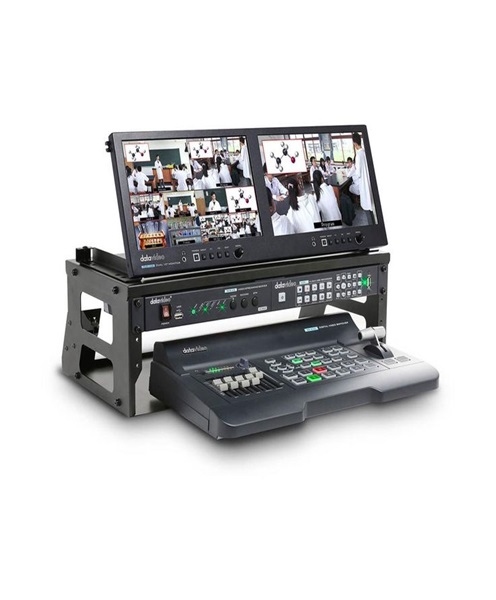
Video Monitors
Monitoring screens allow operators to check the camera image and recording signal.
A monitor can help identify problems with framing, focus, exposure, colour and signal connections before they affect the final recording.
Storage Devices
Video files can occupy substantial storage space, especially when recording at high resolutions or using less compressed formats.
Suitable storage may include internal drives, external hard drives, SSDs or other supported recording media.
Storage requirements should be calculated according to the number of sources, recording duration, resolution and file format.
Signal Converters and Distribution Equipment
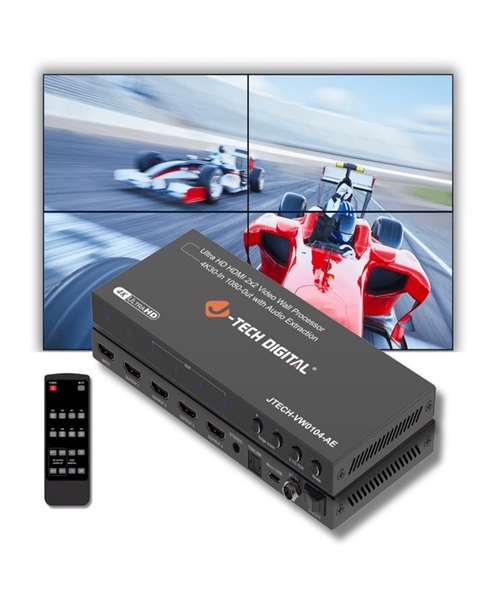
Some productions require converters to connect equipment using different supported video formats or connector types.
Distribution equipment may also be used where a video signal needs to reach more than one destination.
The selected equipment must support the required signal standard and should be tested before the event.
Cables and Accessories
Video recording systems may require HDMI, SDI, USB and power cables, as well as adapters, mounts and other accessories.
Cable length, connector type, signal quality and transmission requirements should be considered during setup.
Applications of Video Recording System Hire
Corporate Events and Business Presentations
Businesses use video recording to document conferences, presentations, annual meetings, product announcements and executive briefings.
A suitable system can capture the speaker, presentation area and other important activities. The footage can later be used for internal communication, training or promotional purposes.
Conferences and Seminars
Conferences often contain several sessions that organisations may want to preserve.
A video recording system can capture keynote presentations, panel discussions, interviews and demonstrations. The recording setup should be selected according to the number of stages, speakers and programme areas.
Training and Educational Programmes
Educational institutions and businesses can record lectures, workshops, demonstrations and training sessions.
Recordings may be used as reference materials or shared with authorised participants who need to revisit the information.
Church Services and Religious Events
Churches and religious organisations may require video recordings of services, worship sessions, sermons, conferences and special celebrations.
The equipment should be planned around the stage, congregation, lighting conditions and sound system.
Product Launches and Demonstrations
Product launches often involve presentations, demonstrations and audience interaction. Recording helps businesses preserve the launch and create material for later promotional campaigns.
A camera may be positioned to capture the presenter while another source focuses on the product or demonstration area.
Interviews and Panel Discussions
Video recording systems are useful for interviews, discussions and corporate communication projects.
The setup may include cameras, microphones, audio interfaces and recording devices. Camera framing and sound quality should be considered together to produce usable footage.
Performances and Entertainment
Concerts, stage performances, award ceremonies and cultural events can benefit from professional video recording.
The system may be configured to capture performers, stage activity and other important moments. Lighting conditions and camera positions are particularly important for these productions.
Exhibitions and Trade Shows
Exhibitors and event organisers may record product demonstrations, interviews, presentations and activities taking place across an exhibition venue.
A recording setup should be planned to cover the relevant areas without disrupting visitor movement.
Choosing the Right Video Recording System
Selecting suitable equipment requires an understanding of the recording objectives.
Identify the Video Sources
Determine whether the recording will use one camera, several cameras, a presentation computer or a combination of sources.
The number and type of sources affect the required recording inputs and supporting equipment.
Confirm the Required Resolution
The desired video resolution should be established before selecting cameras and recording devices.
The camera, capture equipment and recorder must support compatible settings. Higher-resolution recording may also require more storage and processing capacity.
Consider Recording Duration
A short interview has different requirements from a full-day conference.
Check the recording duration supported by the equipment, available storage capacity, power requirements and any file-management limitations.
For long recordings, the team should plan how files will be saved and checked during the programme.
Plan the Audio Setup
Although the primary function is video recording, audio is essential to the final result.
The recording system may need a direct audio feed from a mixing console, microphones or an external audio recorder. The production team should confirm how audio will be captured and synchronised with the video.
Consider Lighting and Camera Positioning
Camera performance is affected by lighting conditions and camera placement.
The production team should inspect the venue and identify suitable camera positions. Additional lighting may be required where the available illumination is insufficient.
Check Storage and File Formats
The intended recording format should be compatible with the editing workflow and the equipment being used.
Clients should also consider how the footage will be transferred, backed up and delivered after the recording.
Video Recording System Versus Event Recording System
A video recording system focuses on the equipment and process used to capture and store video.
An event recording system is generally organised around documenting a specific event and may combine video recording with audio recording, event microphones, camera coverage, monitoring and other production equipment.
The two solutions can overlap. A video recording system may be one of the main components of a complete event recording setup.
The best choice depends on whether the client needs video recording equipment alone or a broader event-focused recording arrangement.
Video Recording System Versus Live Camera Feed System
A video recording system is designed to save footage for later access, editing or distribution.
A live camera feed system delivers camera images in real time to one or more destinations, such as monitors, screens or a control room.
Some productions use both. A camera feed can be displayed live while the same source is also recorded, provided the signal path and equipment support both functions.
Technical Planning and Safety Considerations
Before recording begins, all equipment should be checked and tested.
Important considerations include:
-
Confirming camera and recorder compatibility.
-
Testing video inputs and outputs.
-
Checking the selected resolution and frame rate.
-
Verifying recording settings and storage capacity.
-
Testing audio connections and levels.
-
Confirming power availability and backup arrangements.
-
Securing cameras, tripods and other support equipment.
-
Routing cables safely and protecting them in walkways.
-
Testing the complete recording workflow before the programme.
-
Confirming how files will be named, stored and backed up.
For outdoor productions, equipment should be protected from weather and unsuitable environmental conditions.
Where footage includes identifiable people or confidential information, organisers should establish appropriate consent, access and storage arrangements.
Why Choose Janeson Rentals for Video Recording System Hire?
Janeson Rentals provides equipment hire and rental solutions for event organisers, businesses, institutions and production teams in Kenya.
Clients arranging video recording system rental can discuss their recording objectives and the type of equipment required for their production.
Reasons to consider Janeson Rentals include:
-
Flexible rental options: Access recording equipment for a specific project without purchasing an entire system.
-
Event and production applications: Arrange equipment for conferences, seminars, performances, corporate functions and other recording activities.
-
Related AV equipment: Coordinate video recording requirements with compatible cameras, monitors, capture devices, cables and supporting equipment.
-
Different production requirements: Discuss configurations for simple recordings and more involved video production workflows.
-
Nairobi-based service: Janeson Rentals is based in Nairobi and offers delivery arrangements across Kenya.
Equipment specifications, availability, compatibility and technical support arrangements should be confirmed before booking.
How to Hire a Video Recording System from Janeson Rentals
When enquiring about video recording system hire, provide the details needed to plan the recording configuration.
These include:
-
Event or production date.
-
Venue and location.
-
Type of recording project.
-
Expected recording duration.
-
Number of cameras or video sources.
-
Required video resolution and frame rate, if known.
-
Whether audio recording is also required.
-
Whether live monitoring or switching is needed.
-
Whether footage will be edited or distributed after recording.
-
Whether installation and technical operation are required.
This information helps identify suitable equipment and supporting accessories.
Book Video Recording System Rental in Kenya
Capture presentations, interviews, performances, conferences and other important activities using a suitable video recording setup from Janeson Rentals.
Whether you need equipment for a corporate event, educational programme, church service, product launch, exhibition or professional production, the right recording system can help preserve footage for editing, communication and future reference.
Contact Janeson Rentals to enquire about video recording system hire and rental in Nairobi and across Kenya. Share your project requirements to discuss an appropriate recording solution.