Wireless Presentation System Hire and Rental in Kenya
Wireless presentation systems make it possible to share content from compatible laptops, tablets, and other devices on a meeting-room display without relying on a direct video cable for every presenter. These systems can make meetings more flexible, especially when several people need to present from different locations in a room.
Janeson Rentals provides event equipment hire and rental solutions in Kenya for corporate meetings, conferences, seminars, training sessions, exhibitions, and business events. If you need a wireless presentation system for a temporary setup, you can enquire about available equipment and compatibility requirements.
A suitable system can help simplify presenter transitions, support collaborative sessions, and reduce visible cable clutter around conference tables.
What Is a Wireless Presentation System?
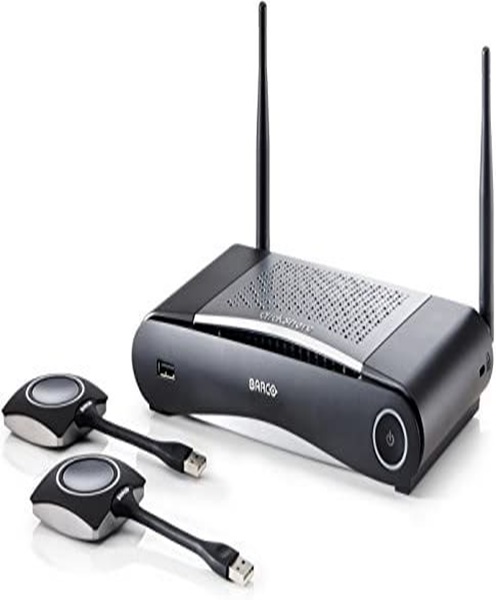
A wireless presentation system is a combination of hardware and software that allows a source device to transmit screen content to a compatible display over a wireless connection.
Depending on the product, users may connect through a dedicated transmitter, a computer application, a browser, a wireless network, or a supported screen-mirroring protocol.
The receiving unit connects to a projector, monitor, television, or other display. Once the source device and receiver are configured correctly, the presenter can share slides, documents, websites, images, and other supported content.
Features vary considerably between systems. Some support one presenter at a time, while others offer collaborative functions, multiple-user support, or advanced meeting-room integration.
Benefits of Wireless Presentation System Rental
Reduced Cable Clutter
Wireless screen sharing can reduce the number of cables needed for presenters moving between different seats or meeting positions.
Easier Presenter Transitions
During panel discussions, workshops, and meetings, presenters can switch devices without necessarily moving a shared video cable from one laptop to another.
Flexible Meeting Arrangements
A wireless system can support collaborative sessions in which several participants contribute information from their own devices.
Temporary Access to Presentation Technology
Hiring can be practical for conferences and corporate events that need wireless screen sharing for a limited period.
Integration with Display Equipment
A compatible system can work with a projector, television, or monitor, depending on its output interface and supported resolutions.
Support for Modern Workflows
Wireless presentation can be useful for sharing documents, slide decks, websites, dashboards, and other digital materials from compatible devices.
Applications of Wireless Presentation System Hire in Kenya
Corporate meetings: Allow participants to share reports, presentations, and business documents from compatible devices.
Conferences and seminars: Support presenters who need to share content without passing a cable between multiple laptops.
Training workshops: Help facilitators and participants share instructional materials and demonstrations.
Boardroom presentations: Reduce the need for presenters to move around the room to connect their devices directly to a display.
Exhibitions and product demonstrations: Display digital information from compatible laptops or tablets.
Educational institutions: Support collaborative lessons, workshops, and presentations using compatible equipment.
Business planning sessions: Allow teams to present project information, charts, and ideas during meetings.
Choosing the Right Wireless Presentation System
Start by identifying the devices that will be used. Confirm whether presenters will use Windows laptops, Mac computers, tablets, smartphones, or a combination of devices.
Check the system’s supported operating systems, screen-sharing methods, and connection requirements. Some products require a local Wi-Fi network, while others create their own connection or use a dedicated transmitter.
Determine how many presenters may need access and whether users must share content simultaneously or one at a time. If several participants will present, confirm that the system supports the intended workflow.
Review display output requirements. The receiving unit must connect to the projector, television, or monitor through a compatible interface, such as HDMI.
Security is also important. For confidential business meetings, check available access controls and whether the system can operate on an appropriate network. Avoid assuming that every wireless presentation device provides the same security features.
Finally, test the system at the venue. Network congestion, interference, device settings, and application permissions can affect performance.
Wireless Presentation Systems for Corporate Events
Wireless presentation systems can be useful when event programmes involve multiple speakers and frequent changes between source devices.
For example, a training workshop may begin with a facilitator’s slides, move to a participant demonstration, and then return to the facilitator’s materials. A suitable wireless presentation system can make these transitions easier to coordinate.
Before the session, test every presenter device and confirm the process for joining the system. Provide simple instructions so speakers know how to connect, share, and stop sharing.
Prepare a backup connection where appropriate. A wired HDMI connection may be useful if a wireless device, application, or network encounters an unexpected problem.
Wireless Presentation System Hire Across Kenya
Janeson Rentals provides event equipment rental solutions for organizers in Nairobi and other locations across Kenya. If you are planning a conference, business meeting, training session, seminar, or exhibition, enquire about wireless presentation system availability.
For an accurate quotation, provide your event date, venue, rental period, expected number of presenters, device types, display specifications, and any network restrictions.
If you also need a projector, television, monitor, HDMI cable, or display stand, include these requirements in your enquiry. Confirm the system’s features, availability, setup arrangements, and rental terms directly with Janeson Rentals.
Frequently Asked Questions
1. What does a wireless presentation system do?
It allows compatible devices to share their screens or content on a receiving display through a supported wireless connection.
2. Can I hire a wireless presentation system for a conference?
You can enquire about availability for conferences, meetings, workshops, and other events.
3. Does wireless presentation work without Wi-Fi?
Some systems require a Wi-Fi network, while others can establish a direct wireless connection or use dedicated hardware. Check the specific system’s requirements.
4. Can several people share their screens?
That depends on the model. Some systems support multiple users or collaborative features, while others allow only one active presenter at a time.
5. Should I have a backup cable?
For important presentations, a compatible wired connection can provide a useful alternative if wireless sharing encounters technical difficulties.
Book Wireless Presentation System Hire and Rental with Janeson Rentals
Make collaborative presentations easier to organize with suitable wireless display technology. Contact Janeson Rentals to enquire about wireless presentation system hire and rental in Kenya and request a quotation for your next event.